
Below are the review posts that I have written covering the YotaPhone 2.
And I have also created a Flickr album of all the photos taken on the Yotaphone 2- click here.

Below are all the review posts I have written covering the Nvidia Shield Tablet.
Today I am going to cover off my final thoughts on the Yotaphone 2.
The Yotaphone is without a shadow of a doubt one of the coolest piece of tech I have reviewed in ages. It is novel, different and caused huge debate with my friends whilst out at a restaurant. My friends were fascinated with the rear e-ink screen.
The rear e-ink display is not just about battery life. It is also about having an always on display for vital information. Perfect daylight visibility. And if your battery is about to die, you can take a screen shot of some information you will need later in the day, and it will be left on the rear e-ink display. And finally, the e-ink display is better for your eyesight.
The camera and audio aspects of the phone were reasonable. The competition includes phones with better sound and cameras. But in reality if photos are shared on social media, does it matter what the camera quality is like?
If you want something different and are the sort of person that needs the unique selling points of the Yotaphone 2 then its a match made in heaven. But the competition is fierce and there are many other options to consider too. Personally, this phone is staying in my collection. It is too cool not to have!!

Welcome back to part 3 of my review on the Yotaphone 2.
Today I am going to cover off the camera and audio aspects and any other titbits.
First up lets talk audio or sound. The loudspeaker is on the bottom edge, goes reasonably loud but is a little tinny. The sound through the wired headphones is not so hot. For some people it would be fine, but not for me. However, as soon as I connected my bluetooth headphones it was a different story. The music was so much better and a joy to listen to. But what about USB Audio. Using my USB Sabre DAC and USB Audio Player Pro app I was able to get USB Audio to work just fine.
The camera. 8mp on the rear, 2.1mp on the front. And being dual displayed comes with a few extra features. Firstly, the camera app is the default Google Camera app, so don’t expect any surprises. But don’t let the low resolution of the front camera put you off. Why? Well you can use the rear camera to take a selfie as the e-ink display will show your face to help take the shot. Also, when using the rear camera normally, 2 eyes appear on the e-ink display or a fake camera as shown above. Clearly Yotaphone have a sense of humour. There are other software novelties that appear when using a range of other apps. But what about the quality of the shots. Well on Sunday, I went out walking my 3 dogs. The lighting was poor and overcast so I did not expect brilliant shots. When I got home and examined them I was pleasantly surprised as they were better than expected. There are plenty of better cameras available but the f/2.0 clearly helped with my running dogs. I have created a Flickr album for the YotaPhone 2. Click here – https://www.flickr.com/photos/gavinfabl100/sets/72157650816294865/
In the meantime, below are some camera shots taken with the phone. Most are completely unedited.


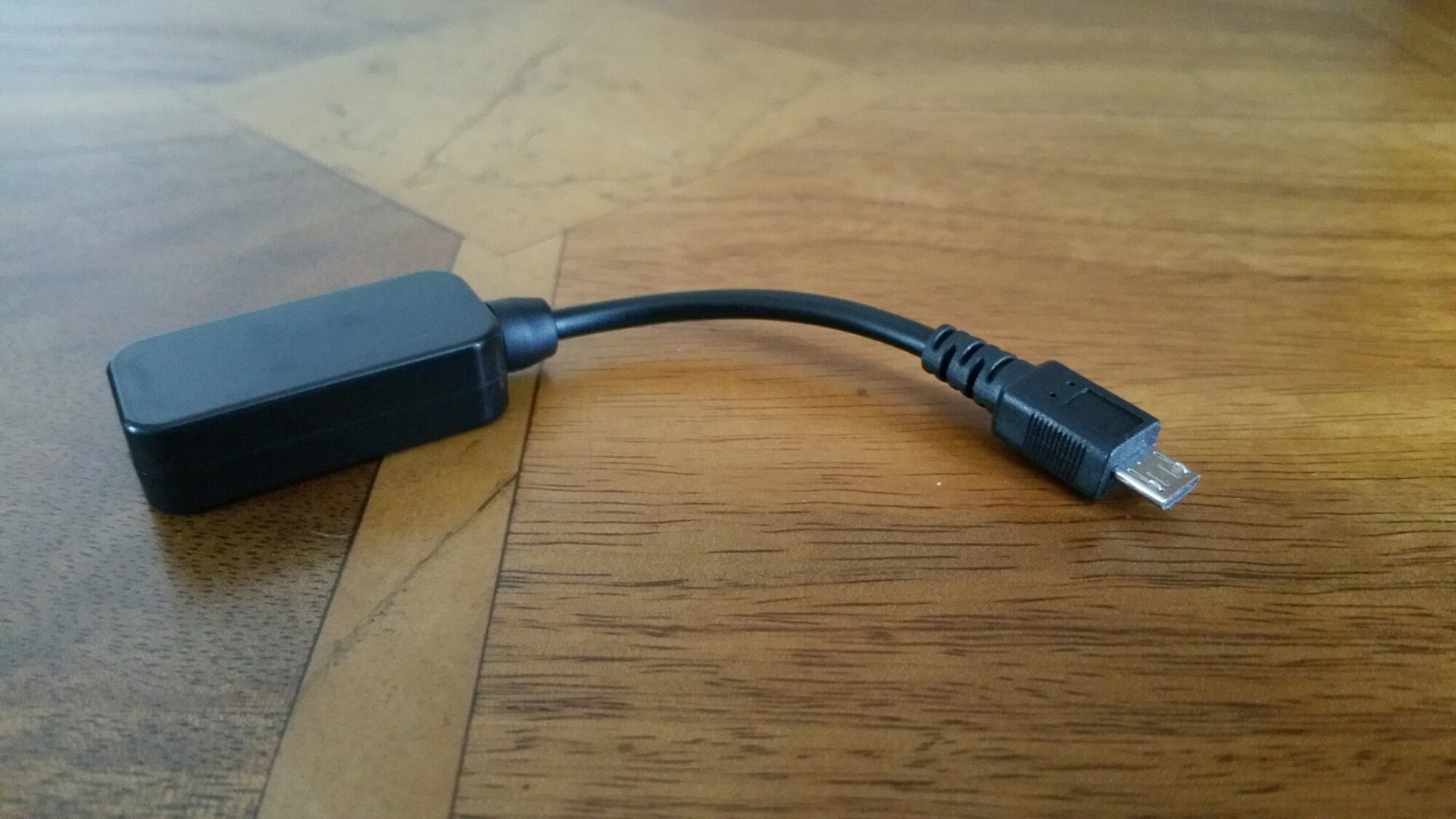
Today I am going to be reviewing the HiFiMEDIY Sabre Android USB DAC. This will form part of another 2 reviews, one covering the Cayin C5 portable headphone amp (live tomorrow) and another post blowing apart the myths on high end audio fidelity.
The HSAUD has DIY in its title for a reason. It has high end components inside, but housed in a cheap DIY plastic box thing to reduce the price down as low as possible. The Sabre ES9023 dac chip that is located inside this plastic box is found in more expensive DAC’s costing hundreds and even thousands of pounds.
Specifications –
-Sabre DAC Technology, Sabre ES9023 dac chip
– Connects directly to microUSB connector on Android phones
– Works with some phones only! USB OTG support required and Android 4.2+
– No external power needed. Dac draws minimal power (30mA)
– Output using a 3.5mm headphone jack
As android phone vary so much in terms of their internal specifications there is a warning about which android phones will work with this DAC. HiFiMe has tested it and confirmed it works with the following models include: Samsung Galaxy Note 2 running newest software update, Samsung Galaxy Mega running Android 4.2.2, Samsung galaxy S3 with newest software Samsung Galaxy S4 with Android 4.2.2 LG Optimus G Pro 4.1.2+ Possibly works with most Android phones running android 4.2.2 Does not seem to work with Cyanogenmod software. I have tested it with the Samsung Note 4, Honor 6 and Yotaphone. All work with this device using an app called USB Audio Player Pro.
So what is special about the DAC used. The Sabre ES9023 dac chip allows the sound to go straight out of the DAC chip and into your headphones or amplifier. It is not needed that the sound signal go through a capacitor to remove a DC voltage, there is no DC voltage to remove! This omits the need of a colouring cap which adds costs and reduces sound quality. – Jitter Eliminator! The ES9023 utilised patented HyperstreamTM architecture and Time Domain Jitter Eliminator. – 112db DNR USB (receiver) PCM2706: – Accepts up to 48Khz/16bit Output levels: Open 2.2Vrms 4.7Kohm 2.1Vrms 1.8Kohm 1.9Vrms 510ohm 1.5Vrms 330ohm 1.3Vrms 30ohm 1Vrms Note: Normally amplifier inputs are from 10K to 100K ohm. Normal headphones are from 32 ohm to 300ohm. Sound alien to you.
Don’t panic. This DAC is an upgrade to what your phone is using. It helps alot to have mp3 or similar at 320mp3 bitrate. The higher the bitrate the better and FLAC files help again. If you play mp3 or FLAC files straight from your android phone into the HiFiMeDIY DAC without using a proper app like USB Audio Player Pro, then there is no point even bothering to go down this route.
What is the difference using this method. You lose the convenience of just plugging your headphones into your phone and listening to anything via any app. You need the music stored on your phone and use a dedicated app. You gain huge improvements in everything to do with your music. It is like cobwebs are blown off the tracks. It really will make that much of a difference unless the actual recording is crap. Crap in and crap out.
The other beauty of this DAC is it can power many portable type headphones without the need of a portable headphone amplifier.
All in all I highly recommend this USB DAC.

Today, I am going to review the FitBit Charge HR with comparisons to all the other wearables I have used, including the FitBit Flex, see link https://gavinsgadgets.com/reviews-accessories/ to read up on all the other smartbands, watches and fitness devices already reviewed on Gavin’s Gadgets.

Charge HR builds on last year’s Flex fitness band with a bright blue OLED display, advanced sensors which include an altimeter for counting stairs climbed and optical heart rate monitor dubbed “PurePulse.” The FitBit Charge HR tracks steps, distance, calories burned, and floors climbed, It also takes into account motion and heartrate in its sleep analytics, meaning you don’t have to press or tap anything to tell it you’re about to go to sleep. It is water resistant—that is, sweat, rain, and splash-proof but not waterproof. Below are the home screen layouts for the Fitbit app on android. This looks the same whether on iOS or windows phone.
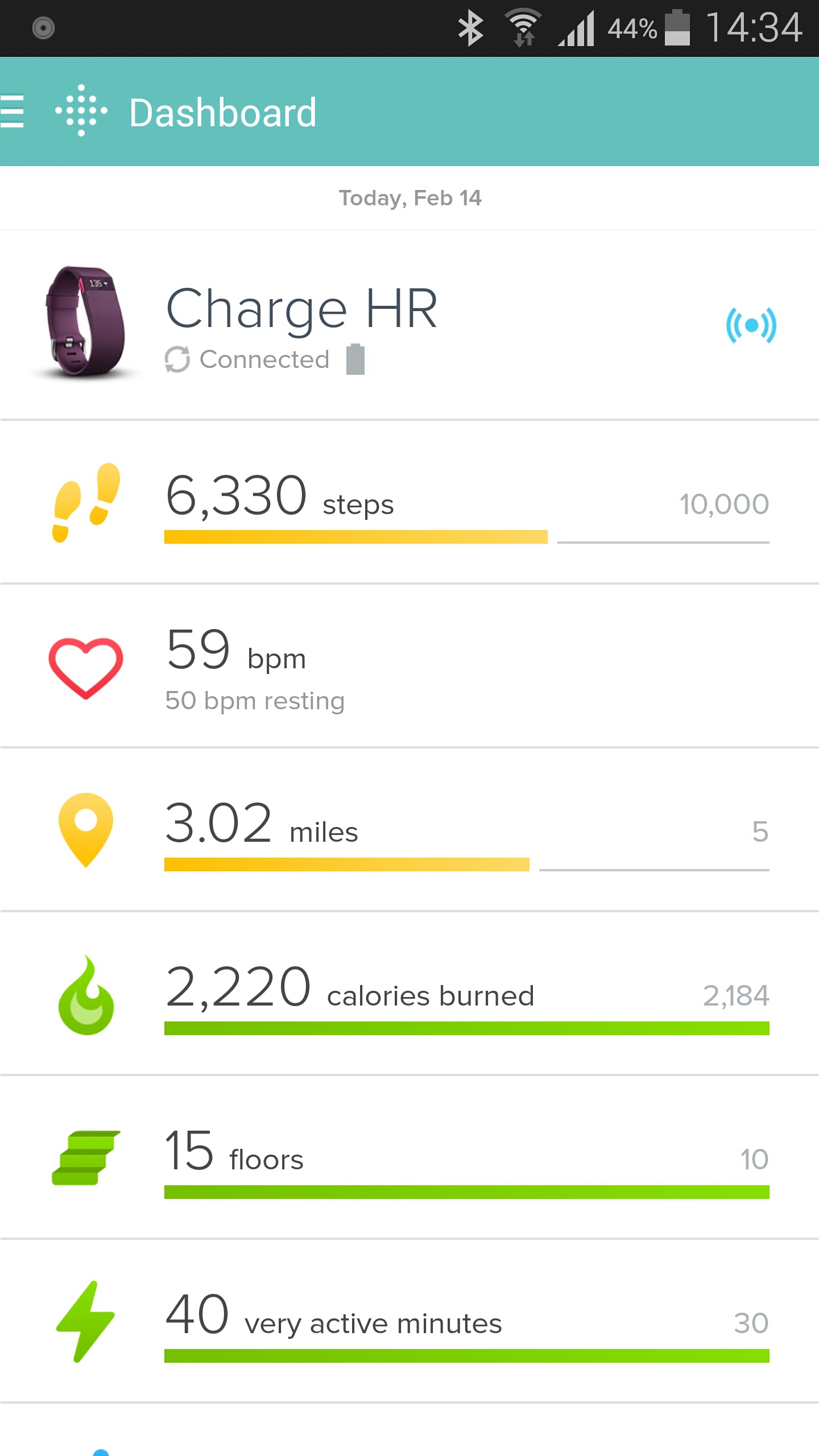

What makes the Charge HR special is its real-time heart monitoring capability. This means it knows if your in fat burn, cardio or peak zones when exercising. When you have told it you’re in exercise mode the heart rate measurements are taking every second. The FitBit has three special heart icons displayed next to the pulse rate readout which displays which mode your in – fat burn, cardio or peak zones.
When you have not activated exercise mode the Charge HR takes readings at five-second intervals throughout the day and this can be analysed later on a graph. There is also the ability using the app to adjust the heart rate banding in the different zones. This could be if you are a super athlete with significantly different bandings for your heart rate in the respective zones.
The Charge HR has an OLED screen. One press shows me the time and date (this is customisable), next press is steps, then current heart rate, distance travelled and calories burned. And that is all it does. It can vibrate for call notifications and sms, and for silent alarms. I do not use these features at all.
My wife has the previous generation of FitBit, the Flex. The Flex does not have a heart rate monitor or OLED display. The Flex has an different strap which is not as easy to remove or attach and could come off by accident. It also does not know when you are sleeping, or in a particular zone. You have to tap it to activate sleep mode. The sleep mode is not as accurate as the Charge HR. However, the Flex does have loads of replacement bands available from third party companies. My wife bought a pack of 10 different coloured straps for £12. With my wife using the Flex and myself on the Charge HR, there is no way in a million years that I would consider buying the Flex. The Charge HR is so much better.
The expression it does what it says on the tin is very true with the Charge HR. It makes walking, exercising and sleeping a breeze. It just happens in the background. It enables me to see how I can improve my fitness and more. But as this is a FitBit it also integrates into other third party apps. I am using MyFitnessPal to help me lose some pounds.

The Fitbit talks to MyFitnessPal and then MyFitnessPal converts the steps into additional calories that is added on to my total for the day. See above. However, if I was having a lazy day, MyFitnessPal deducts calories.
Using the Charge HR and MyFitnessPal in my current situation is a dream machine. It is also the best combination of any smart or fitness device I have used to date. Highly recommended.
Welcome back to part 2 of my Yotaphone 2 review. Today I am going to take a closer look at the special software and other aspects of the phone.
I was asked if I could provide the AnTuTu and Geekbench 3 scores for the Yotaphone 2. Personally, I don’t like these scores as they can mean nothing in real life. But as a few of you asked for the information, here is the highlights. AnTuTu scored a respectable 39,878. Geekbench 3 produced the following scores 895 for the Single Core and 2661 for the Multi Score. To give you a comparison the Samsung Galaxy S5 is similar to the single core and multi core scores of the Yotaphone 2.
Considering the Yotaphone 2 uses a Snapdragon 801 processor the above scoring is totally in the range I expected.
Anyway back to the Yotaphone 2 and its secondary display. When you first power up the phone for the very first time, you are guided through a tutorial which explains how to use the display. Useful. One feature I really liked was the Yota Mirror function that allowed you to send the display from the front to the rear. This is not simply switching displays but also converting the display to the lower e ink resolution. It is worth noting that the e-ink rear display is slower to use, has much longer refresh rates and ghosting does appear. However, it is totally usable and in many situations really superb to use.
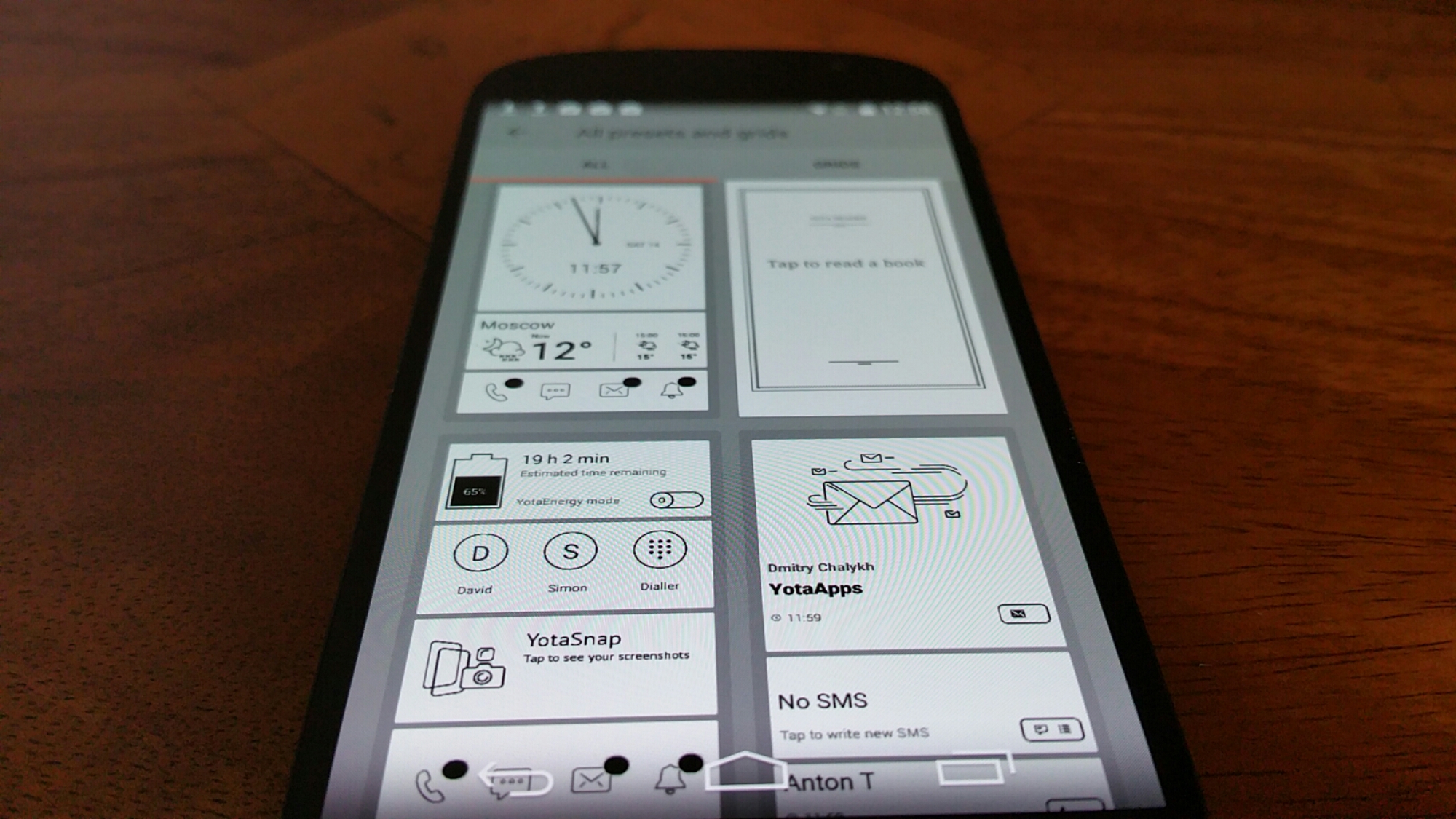
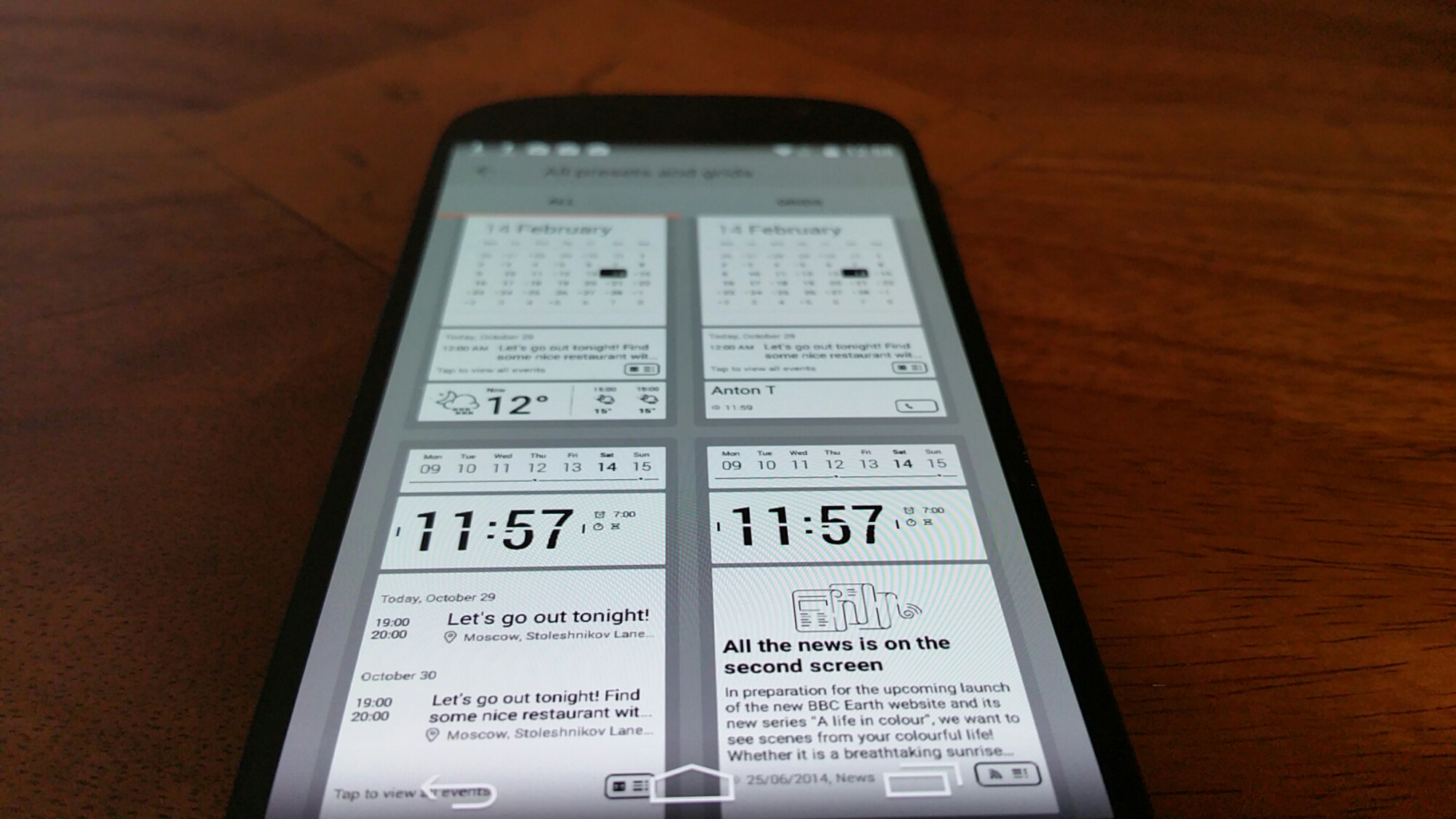
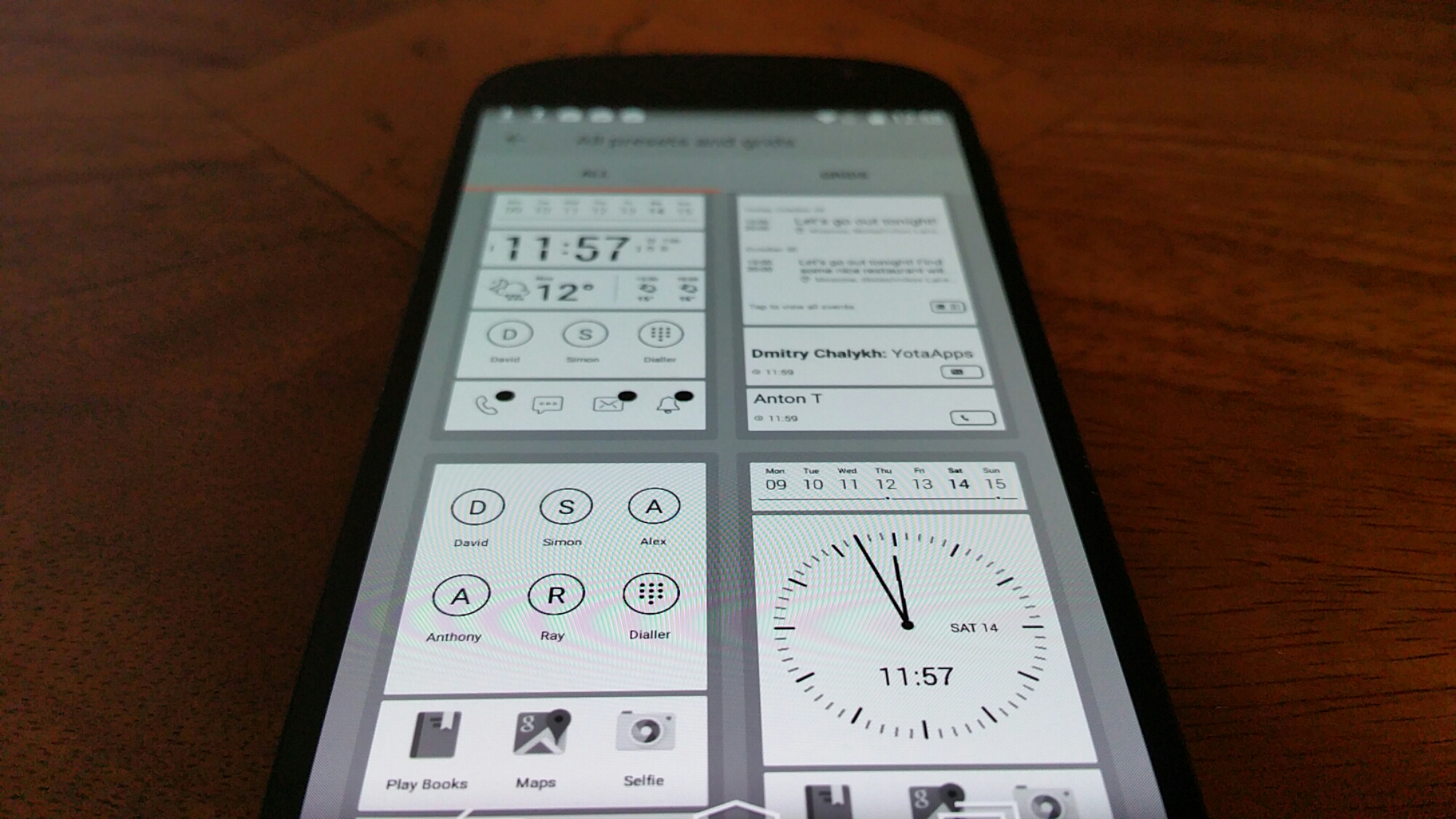
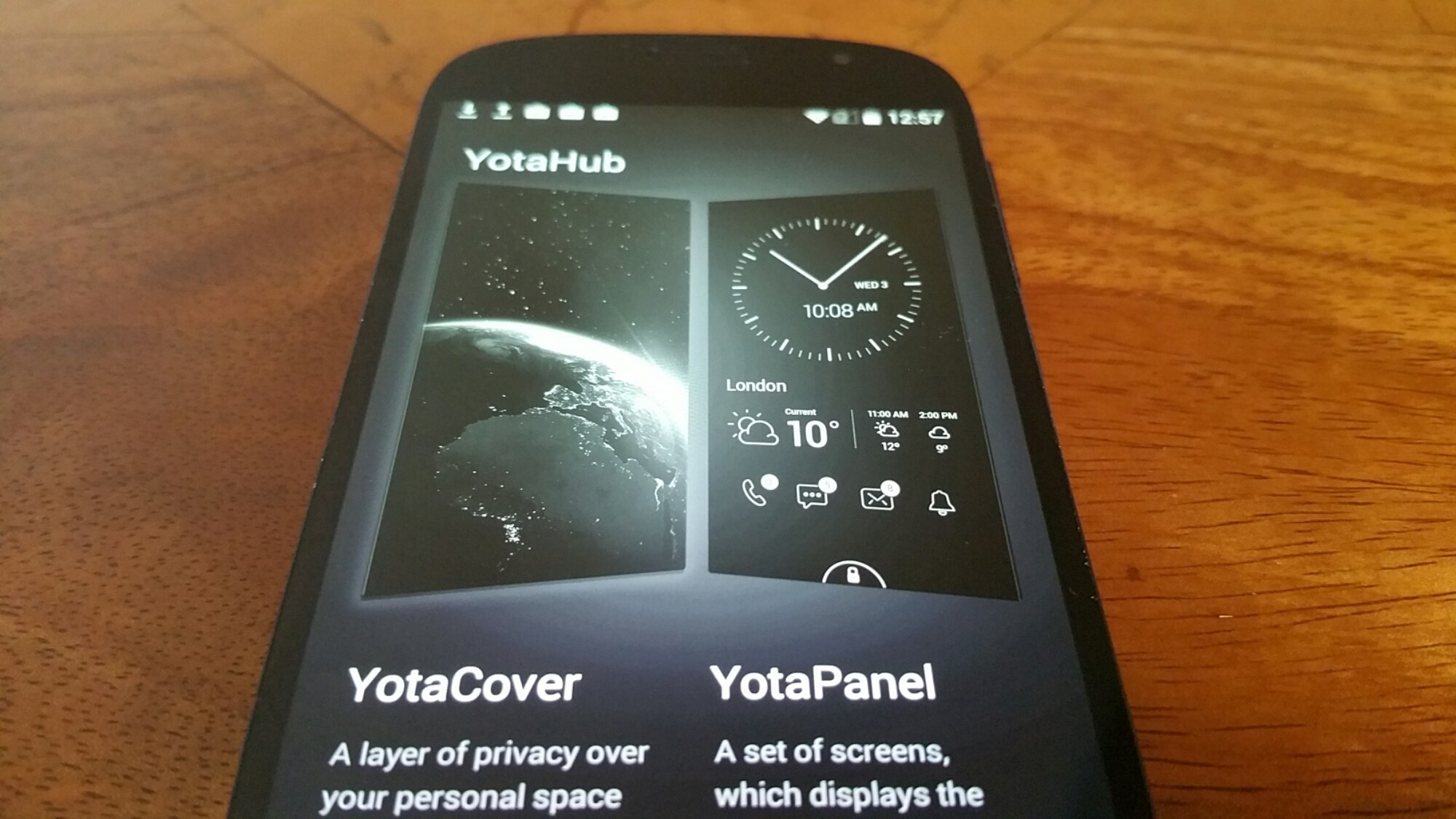
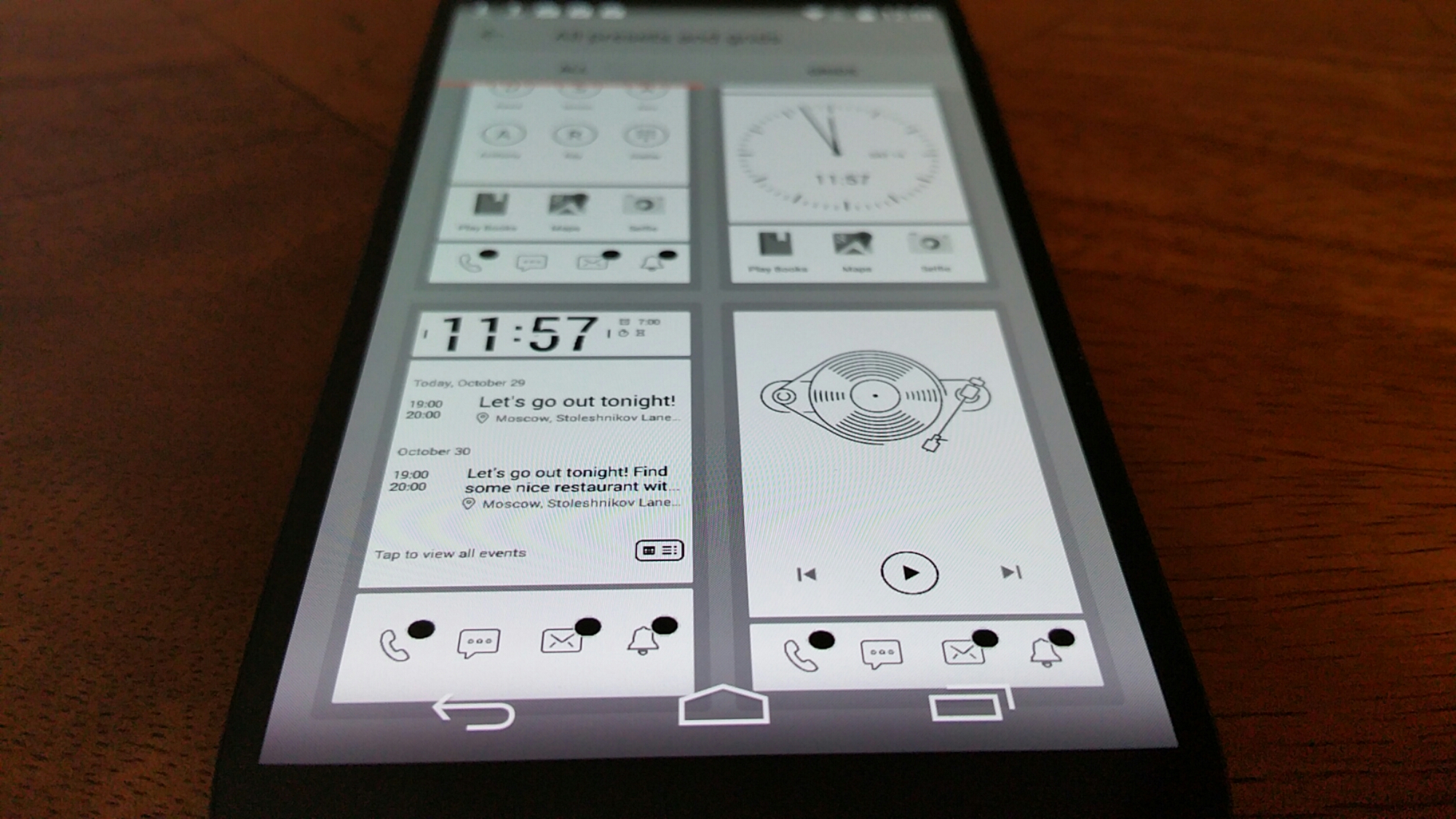
Yota provide 2 extra pieces of software on top of the Yota Mirror. These are YotaCover and YotaPanel which are managed by the YotaHub app. The YotaCover is the lockscreen for the e ink display. Yes a lockscreen to protect your private content if you so wish. It can also have notifications for email etc Here you can have a static or moving image. YotaPanels are up to 5 bespoke screens/panels of information that you can switch between. The recent firmware update increased the panels from 4 to 5 and also provided a white screen theme as shown in the photos. You can use the pre designed panel layouts or create your own. Some of the widgets which come in various sizes include a clock, battery, music player, calendar, appointments, app launcher and notifications. It is really customisable and clearly a lot of thought has gone into this section.
But what else is included. Well lets just step back a moment. The Yotaphone 2 has a near stock android experience which is a good thing as it makes for a snappy device. But Yotaphone did include some apps and games to improve matters. I mentioned yesterday YotaSnap but it also has a powerful battery saving mode called YotaEnergy. You can preselect at what battery percentage you would like this to be activated or turn on manually. This has a number of options to decide whether you want wifi, bluetooth or other options turned off. YotaReader allows you to import books, (you could of course mirror Amazon Kindle app), YotaRSS uses Feedly, games included are Chess, Checkers, Sudoku and 2048, all of which are ideal to be played on the e ink display.
Tomorrow, I will look at the camera and audio/loudspeaker. If you have any questions, please let me know.
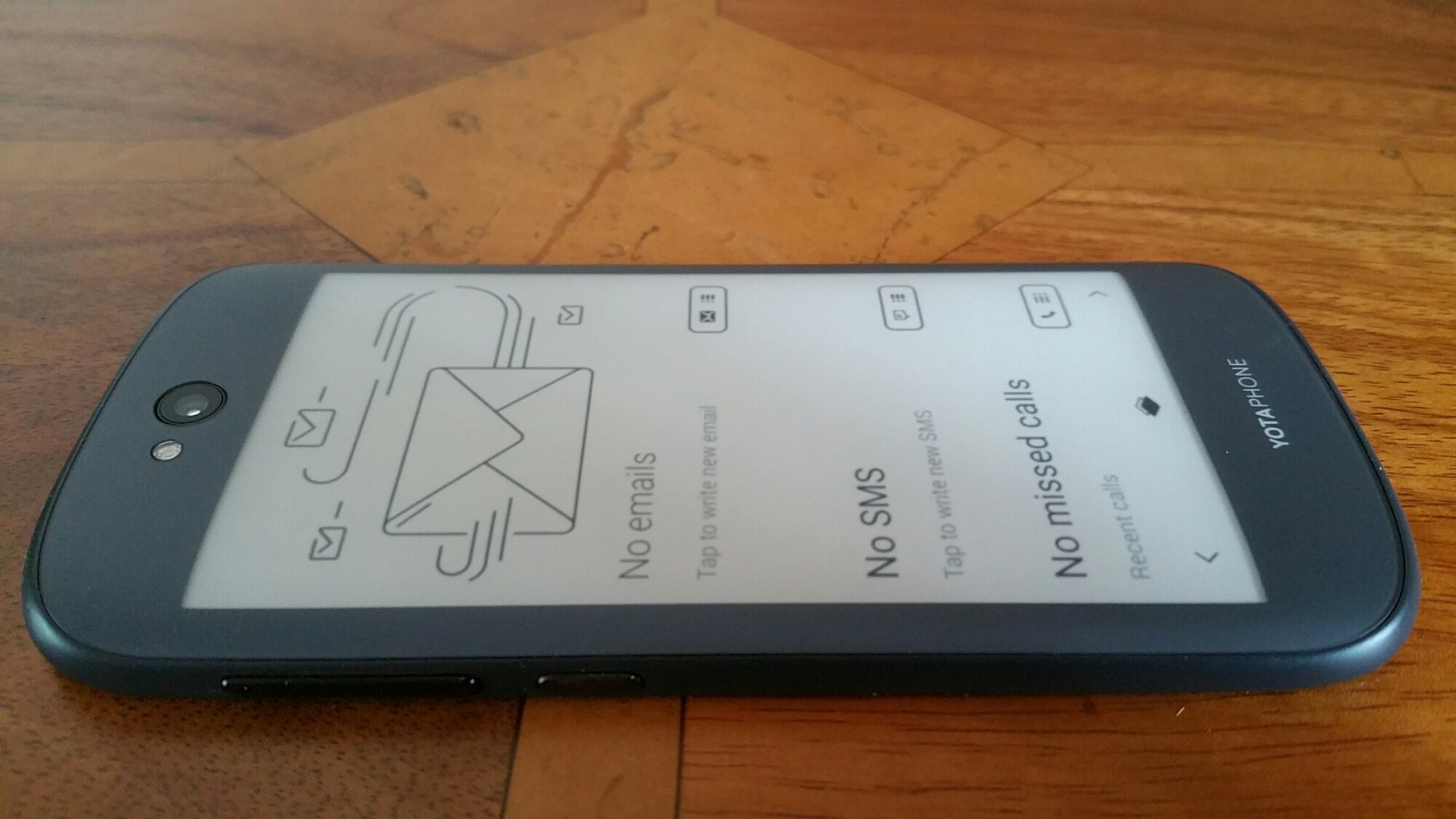
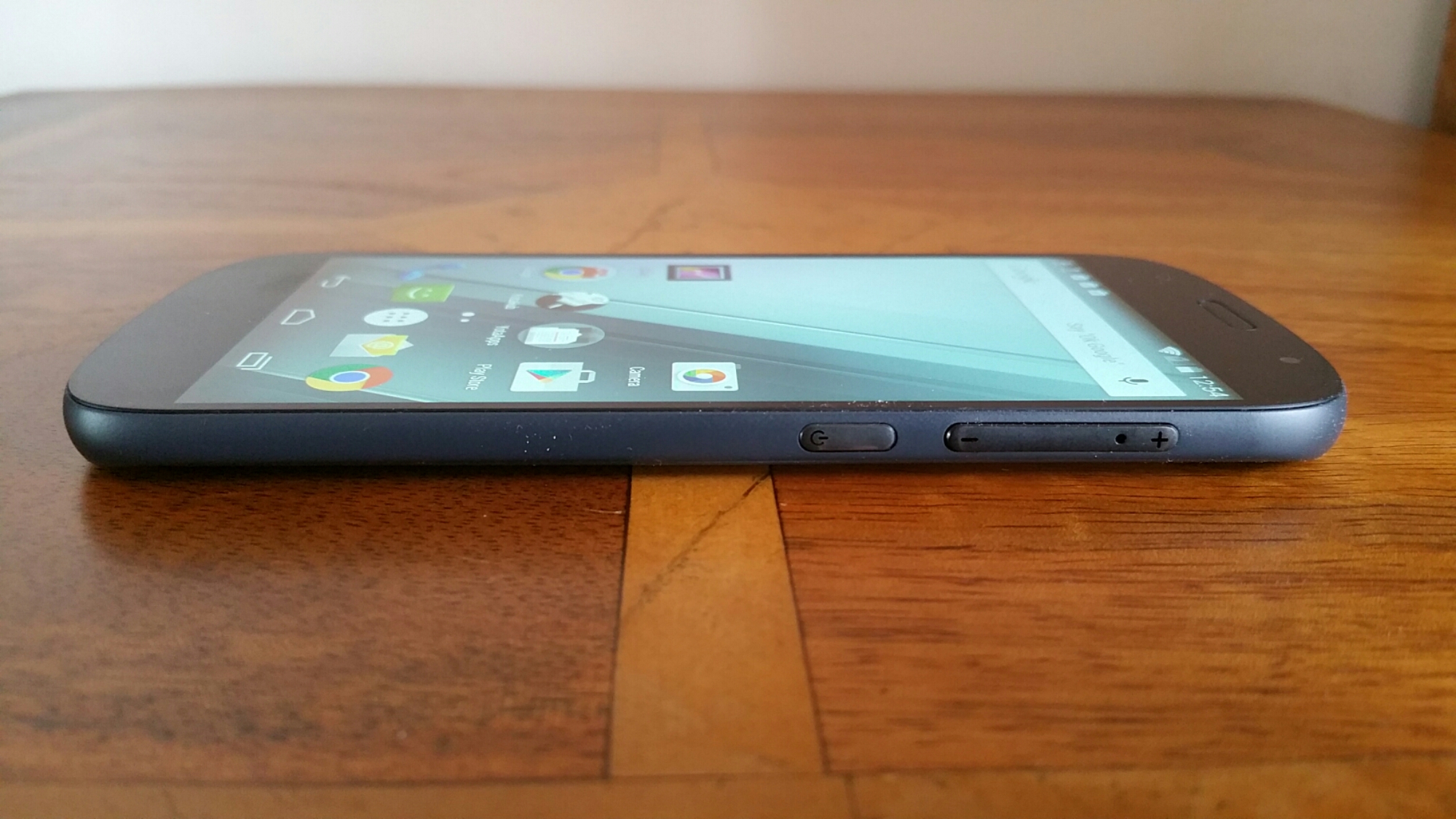

Good morning or evening or afternoon everyone, depending on which part of the world you are reading this from. This is my first part of the Yotaphone 2 Smartphone review. If you look at the photos of the Yotaphone 2 it is a decent sized phone, solid and comfortable to hold.
But before I delve deep in to the phone review, lets take a look at the specifications.
The technical specifications of the Yotaphone 2 (model YD-201) are –
-OS: Android™ 4.4.3
-CPU: Qualcomm® Snapdragon™ 801 2.2 GHz quad-core
-Form Factor: Monoblock with full touch capacitive screens on the front and back
-Dimensions: 144.9 x 69.4 x 8.95mm
-Weight: 145g
-Screen: 5”AMOLED Full HD 1920×1080,16M colours,full capacitive touch,442ppi,Corning® Gorilla® Glass 3
-Always-on Display: 4.7” Electronic Paper Display 960×540,16-level gray scale,full capacitive touch, 235ppi, Corning Gorilla Glass 3
-Network: GSM/EGPRS 850,900,1800,1900 MHz, WCDMA,DC HSDPA (rel. 8,cat.24), HSUPA(rel.7, cat7) bands 1 (diversity),2, 5 and 8, LTE (rel. 9,cat 4) bands 3, 7 and 20, VoLTE
-Memory/Storage: 2GB RAM,32GB eMMC
-CAMERA: Main: 8MP AF,LED Flash ,Front: 2.1MP
-Sensors: Accelerometer, compass, gyroscope, proximity sensor, amibient light sensor
-Connectivity: Wi-Fi 802.11 a/b/g/n/ac ,Wi-Fi Direct®, Wi-Fi CERTIFIED Miracast®
-MicroUSB 2.0 (SlimPort®)
-Bluetooth® 4.0 ,Bluetooth profiles: Advanced Audio Distribution Profile (A2DP), Audio/Video Remote
Control Profile (AVRCP), Device ID Profile (DID), File Transfer Profile (FTP), HID over GATT Profile (HOGP), Human InterfaceDevice Profile (HID), Headset Profile (HSP), Message Access Profile(MAP),Object Push Profile (OPP), Personal Area Networking Profile (PAN),Phone Book Access Profile (PBAP),Scan Parameters Profile (SCPP), Serial Port Profile (SPP)
-NFC
-GPS: A-GPS,A-GLONASS, BeiDou
-Nano-SIM
-VIDEO: Full HD 1080p 30fps
-Video formats/codecs: H.263,H.264 AVC,MPEG-4 SP,VP8. Supported file types/container formats: 3GPP (.3gp), MPEG-4(.mp4),MPEG-TS(.ts),WebM(.webm),Matroska(.mkv).
-Audio: 3.5mm AV connector,FM radio
-Audio formats/codecs: AAC LC, HE-AACv1 (AAC+),HE-AACv2(enhanced AAC+),AAC ELD,AMR-NB, AMR-WB, FLAC, MP3,MIDI,Vorbis,PCM/WAVE.Supported files types/container formats:3GPP(.3gp),MPEG-4(.mp4,.m4a), ADTS raw AAC (.aac), MPEG-TS (.ts), 3GPP(.3gp),FLAC (.flac),MP3(.mp3),MIDI Type 0 and 1 (.mid,.xmf,.mxmf), RTTTL/RTX(.rktl,.rtx), OTA(.ota),iMelody(.imy),Ogg(.ogg),Matroska(.mka),WAVE(.wav)
-Battery: 2500mAh built-in battery
-Qualcomm® Quick Charge™ 2.0
-Wireless charging
-Operating Times:
Stand-by 2G, mobile data off up to 16.5 days(397 hours)
Stand-by 3G, mobile data off up to 17 days (406 hours)
Talk Time 2G, up to 41.8 hours 3G up to 26.0 hours
Talk Time audio call over Skype or LTE) up to 13.7 hours, video call over Skype or LTE up to 1.8 hours
Reading with Yota Reader on 3G up to 109.3 hours
Video streaming playback on LTE up to 5.5 hours , via WiFi up to 5.8 hours
Audio playback via headset: up to 92.0 hours and via loudspeaker up to 62.4 hours
Web browsing LTE up to 4.5 hours or 4.4 hours via WiFi
I do suggest you have a look at all the specifications as I was surprised by some of them. First up this is a 5 inch Amoled 1080p 442 ppi screen on the front and a 4.7 inch E Ink screen on the rear. Wireless charging is included along with Qualcomm Quick Charge 2. It also has a Snapdragon 801 processor and 32gb storage of which about 24gb is available. The Yotaphone runs a near stock Android experience with the addition of the following apps and games: 2048, ABBYY Lingvo, Checkers, Chess, LitRes (for adding ebooks), Movie Studio, OfficeSuite 8, Sudoku, Tutorial, Twitter, Yota Reader, YotaHub, YotaRss and YotaEnergy. The rear 8mp camera is simple to use but in early testing seems fairly reasonable. I will cover the audio and camera with camera samples in a dedicated review section. Other aspects on the specifications worth noting are that it has LTE, WiFi Direct, Miracast and the USB 2 port is also a SlimPort.
So what is the phone like to hold. Comfortable. It is gently curved on the edges but also narrow. The power and volume controls are on the right edge making it for easy reach. The headphone socket is on the top and micro usb port on the bottom along with the loudspeaker grills. In fact everything is in the correct place for easy operation.
Part of the unique selling point of the Yotaphone 2 is the E-Ink display on the rear. Yotaphone have done a good job implementing the usage of this panel with some bespoke software and panels. One of the benefits of using the E-ink display is the battery consumption is significantly less or is supposed to be. In my usage, I am achieving 2 days real life from one charge. But in my mind improved battery life is not just what it is all about. I love the always on display with a full 4.7 inch screen displaying the time, notifications and other information as I have customised via the YotaHub. The YotaHub provides up to 5 different panels (screens) for the rear that are customisable. By having an always on screen I have reduced the amount of times I have picked up the phone and checked what was happening in my world. Then there is the reduced eye strain of using an E-Ink display!
Other uses of the screen are as an ebook reader. In theory you could go away on a weeks holiday, put phone in flight mode, and read your book for the entire week on one battery charge. But another function or bonus is readability in bright sunlight. It is incredible. So following maps, reading the screen and more is a breeze. However, at night, you will either need a light or have to switch to the amoled 5 inch screen. When your battery is about to end, you can take a snapshot of the screen and leave that as the display. The E-ink screen will keep that vital information always on its display irrespective if the battery has died. Ideal if you needed a flight pass to scan at the airport, as a flat battery with the Yotaphone would not be an issue. Obviously when using the E-ink display is not as nippy as using the front side. But that clearly is the compromise.
Another neat trick with this phone is the volume controls actually hide the nano sim tray. So neat. You actually eject the tray with the buttons attached. At first, I was wondering where on earth is the sim tray!
Anyway, tomorrow I will try and cover off more of the software tricks and other findings. So far the Yotaphone 2 is seriously cool and one of the most fascinating phones I have ever reviewed so far.

This is post provides a single page to link to my 2 part review of the Amazon Fire Phone.

The O2 XDA Exec was a cracking phone in its day, and I simply loved it. I wrote a huge editorial covering 16 days continuous usage of the phone without using a PC. It was written as a daily blog. This is a long post, probably the longest ever on Gavin’s Gadgets, so I hope you enjoy it. It does have some quirky bits and humour too. Apologies upfront for some of the language. And make a quick guess as to what I did after 16 days with this phone now before you read the article
Living with a PDA – My New Daily Blog – December 2005
By Gavin Fabiani-Laymond
Good day, evening or morning to you all. Some of you will be off to bed, others off to work and some unlucky souls at work.


24 hours ago I started the change of something major in my life. It was also very frustrating at the time, but now ,I am still smiling.
So what happened, my laptop was invaded by a string of viruses whilst visiting a site for my eldest son, Antony, about the legendary ship, The Mary Rose. Well the Mary Rose not only was very interesting from an educational point of view, it also activated Mcafee into alerting me of trojans. Anyway a few hours later my hard drive had failed, and at 4.00am in the morning I decided, f**k it, I am fed up with wasting so much time on my laptop, I am not going to fix it, I am going to abandon it in favour of my pda phone, the XDA Exec. So here I am 24 hours later, and my laptop looks like a distant memory. My laptop also had other problems.
So here I am, ranting or raving to you. Has anything changed? Well, yes. More time to myself. Instead of switching on my laptop, waiting for it to boot up, enter 101 passwords, waiting for Mcafee to kick and ask for more passwords, I pressed the power on button on my Exec. I entered my password, switched wifi on, and while eating breakfast checked my email, several forums where I check if anyone has posted any questions for me to answer on the XDA range, updated the weather and TV guide and retrieved all 90 news feeds. So 3 minutes later, I plug my Exec into the charger and got ready for work. Its a bit chilly in the UK, -3 degrees, so its a brisk walk down to the station, with headphones plugged into my Exec and listening to Madonna’s new album. Its a very good album.
So I am on the train, and decided to use my journey to first read the news feeds, reply to any new email , turn shuffle mode on with Wmp10 and start typing this.
Its really fascinating as I see curious onlookers trying to see what I am doing. The biggest shock, is the Exec rings, and I pull the headphones out, close the device and talk to a client. So now other passengers look a bit confused. So what happens next?
Well tune in tomorrow !
Part 2
So its been a long weekend. Still no laptop and purely using my Exec.
And flipping back to my first article, when I was on a train commuting to work, and my Exec rings, I take a calł and even more stares as I hold a brick to my ear. This phone is so big and heavy. So what happened next. The woman next to me started chatting away, asking tons of questions about my pda phone. Naturally, I obliged and nearly 20 minutes later the final question was ‘where can I buy one and would you help me set it up’? So I thought that would be the last I would ever hear from the lady on the train. 11.00am I received a phone call, and to my surprise the lady on the train had bought one and now wanted some guidance. The strangest part of this, was she was youngish and this now became the 5th lady that bought an XDA after I showed off its wares.
So what else happened on Friday? Xmas came early! When I got home there was a huge package from Brando Shopping. I was taken aback by the contents. Inside were 2 cases, a leather and an aluminium , 2 types of screen protectors, a travel mains kit and a sync/charge retractable usb cable. I had a huge smile on my face testing all the bits. Everything from Brando Shopping is fantastic and the range of Exec goodies was of even higher standard. The cases are so customised, I just love them. Anyway, a review will be finished soon on these items.
So as Friday had been and gone, I had managed to use the Exec for everything. However, I need to look into printing directly from the Exec, connecting directly to a projector for presentations and inserting images into a word document. I am not sure if Textmaker works on Windows Mobile 5. If anyone has any ideas then please leave in comments section.
Over the weekend, I was able to keep up to date with the help sections on the forums and use my email with ease. It seems TomTom Navigator 5 is the choice at the moment judging by all the recent questions. It is worth noting that TomTom have updated v5.0 , so I would recommend everyone to get the new updated application from TomTom.
I also had fun beta testing some stunning new games from Astraware. But mums the word on these!
The one part of the Exec keyboard that really annoyed me is the omission of the ctrl and alt keys. Well, now I have them thanks to any amazing developer. If anyone is interested, the link is http://www.nicque.com/PQz/ .
In my first blogs I had some really interesting feedback and some great insight in how to fix my laptop. Its still a super sized paperweight, but I will have ago this week in trying to fix it and not for me to use, but for my 4 kids. Educational reasons means a working pc at home is essential.
I was never a big text fan, but since having the Exec, I appear to be on a mission. So I wonder how many more Exec’s I will sell on the train this morning?
Living with a PDA – part 3
By Gavin Fabiani-Laymond
So it’s another day with my Exec.
I mentioned in part 2 of a wonderful application that allows ctrl and alt keys to work on the keyboard. This little application has proven a real winner. I gather it only works on windows mobile 5 devices, so if you have a K-Jam give it a go. You won’t be disappointed.
I have been road testing the new cases and accessories by Brando and so far its really grooving. Its quite amazing that such a range of cases exist for a device from various sources and every case is slightly different. For me this makes choosing one nearly impossible.
I noticed 2 updates to my current software, Resco File Explorer 2005 and Tweaks2k2. Resco File Explorer adds new meter skins and a recycle bin, although I am still trying to find the recycle bin option. Maybe it got left out in the trash! The XDA forums are proving more and more popular, with the XDA thread I started “Help form Expert User” now flying past 10,000 views and the XDA Exec Help and Questions rapidly catching up with over 3,000 hits. I must confess that when I started the thread XDA Help etc I never expected it to take off like it has. I find it really interesting when asked questions, because it shows more and more people are moving into converged devices and expect these devices to be more capable than their previous devices. Compromise was the order of the day a year ago when moving to a converged device, but now I believe its the opposite or nearly there. I reckon in 12 months converged devices will wipe the floor with standalone pda’s. Time will tell, but the future bright, the future is….
In case anyone was wondering, this blog has been completely typed on my Exec. I normally type it while commuting to work whilst listening to headphones, amidst a lot of staring from fellow passengers, especially the bloke to my left who is desperately trying to read what I am writing.
As part of my trials on living without my pc, I carried a clinical trial to establish my typing speeds on my Exec versus my work pc. To ensure the test was carried out in a professional manner, I asked one of the secretaries to provide a piece of text and time how much I could type on my work pc and my Exec. And the results were staggering. In one minute of copy typing after 3 attempts, I was each time only 2 words per minute slower on my Exec.
In my next part I will talk about some of the tweaks and applications I use, and why my Exec doesn’t fail to deliver day in day out.
Living with a PDA – Part 4
By Gavin Fabiani-Laymond
So what’s been happening in the last 24 hours?
Well judging by what’s on our TV screens not too much unless you’re hooked on ‘I’m a Celebritiy, Get me out of here’ . The only highlight was seeing Carol Thatcher, the ex Prime Ministers daughter, drop her knickers and pee next to her bed in the jungle. Thank goodness the night cameras weren’t clearer! Or maybe some quick editing occurred. Either way, there are 101 better things to do than watch TV. Where’s my Exec?
Yesterday, I mentioned Resco File Explorer 2005 had been updated, and the Recycle Bin was nowhere to be seen. Well after some investigation I found it. Rather disappointingly it is simple virtual folder, which has an allocated amount of space allocated which can be adjusted. I hadn’t installed the today plugin, so within the options of the application there is an option to download it. After jumping from one resco.net web page to another, I was still unable to download this. I cannot understand why Resco.net has a specially formatted mobile site, but has the inability to allow downloads direct to the device! So I will have to use a pc to download and extract file. Ahhhh!
If you recall, my laptop was seriously f**ked. Luckily, after the help of a very good friend and wonderful customer service at Micro Anvika in Tottenham Court Road, London, I was able to establish that my laptop’s hard drive had failed. It was only 18 months old, but in a space of 15 minutes the old 40gb drive was out and a new whopping 500gb drive inserted. This is a prototype hard drive by Seagate, but no problems so far. I have since reinstalled all my old software 90% of my docs and discovered some rather interesting photos on my backup cd.
So back to Resco Photo Explorer 2005. After installing the latest update I received a message stating that the registration process had changed. After visiting the site it appears that updates are only free for one year, thereafter you get 50% if you re-purchase. Is that fair? Problem is, its one of the best file explorer , with FTP support, today plugin, encryption , zipping, send to options from pc and quick and easy file editing. And whilst there are good freeware alternatives like Totalcommander nothing really comes near to Resco File Explorer. If only I didn’t keep upgrading to the newest devices, I wouldn’t need to upgrade my software. But then, I would not have any fun exploring the latest and newest software.
Just think, next year, I will be watching the latest ‘i’m a celebrity, get me out of here’ – on my XDA Exec Extreme Mk 2 🙂
Living with a PDA – Part 5
By Gavin Fabiani-Laymond
Today has been a really long day. I have travelled from the far corners of outer London starting with a meeting at 9.00am at Heathrow Airport. Later, I travelled all the way to Excel Exhibition Centre, in Docklands, London. And finally attended a posh dinner.
Despite this my journey was made easier by the marvellous freeware, Metro. Even back in July following the London bombs, there was an update to the London database to allow for the changes/alterations that occurred. Today, it has proven awesome. For those that haven’t come across Metro, it is a free transport route planner, covering over 360 locations in the world. The beauty of this program is for London it includes not only the Underground, but trains, trams , river buses, places of interest and more. So simply, all I had to do was tap London Heathrow Terminals 1-3 and Excel Exhibition Centre. In under a second, it displayed the route (text only). From the airport, I had to take the Heathrow Express Train, which took 15 minutes into London Paddington. Connect onto the Metropolitan Line, 2 stops to Baker street. Change Jubilee Line to Canning Town. Change Docklands Light Railway to Customs House, and then a 5 minute walk into the exhibition centre. Even as an experienced traveller I would not have thought of using that route which took 74 minutes. According to Tube 2 London by visualit.co.uk, which is for route planning on the Underground only but does include map and moving visuals, the journey time would have been 83 minutes.
Anyway, I was just off to bed, when I decided to update my rss news feeds. I took a big gasp, Pocketgear and Handango had listings for updates on all Pdamill.com games. This was really exciting, as whilst no comment had been entered as to what the update was, I knew it could be only one thing. Windows mobile 5 support. And I was right. The only draw back was I had to use my now fixed laptop to install several of their games. Before you shriek in horror, I got my son Antony to install them for me. (he was supposed to be in bed asleep, but I heard him playing on his gameboy) I was really happy. I am amazed at how fast software is being updated to WM5. And Pdamill didn’t charge for any of updates! Plus I now have some of my top games like Flux Challenge, Gamebox Classics and Solitaire and Arvale all rocking on my Exec.
So could my day get any better. Well yes, Textmaker had just been updated to work properly on wm5. When microsoft updated wm200se to wm5 they moved the sip keyboard icon and hid 3 icons on the menus within Textmaker. Textmaker is written by http://www.softmaker.de And is the only true comprehensive word processor. Word Mobile is basic and will suit most people, but if you require the full range of editing, then this is the only option. Softmaker also have an Excel alternative called Planmaker. Once I install both these on my Exec I will only have to resolve the printing part. Sadly, you still need a pc to install Textmaker and Planmaker.
I believe that direct over the air downloads needs to be the standard norm, that way removing the need for a pc. What do you think about this?
Living with a PDA – Part 6
By Gavin Fabiani-Laymond
Major panic has set in!
My 2 gb Sandisk card is showing zero free space. It makes no difference whether I go to the memory applet and check or resco file explorer. All read zero free space. This is impossible. I have just deleted 2 music albums. But still no free space. Then I deleted 300 pics. Still zero free space. I started to panic, I surely wasn’t going to have to reformat my sd card. That would be a nightmare. So I did the obvious soft reset. No change. I removed/inserted card and still no change. I then removed the sd card and did a soft reset without the card, and then re-inserted. Still no change. So maybe time to reformat? That would be heartbreaking to have to reformat the card. I wondered if there were any hidden directories, but resco was set to show hidden files. As a last resort, I connected my Exec to my laptop, set the windows explorer to show all files and voila, I saw sight of a very hidden folder, called, guess now, ‘recycle bin’. I could have cried – resco explorer’s new recycle bin option caused me all this grief. Well at least my sd card is still ok.
Yesterday, I installed both textmaker and planmaker. I had a problem installing planmaker whereby the installation process aborted by saying I was installing to a handheld pc, please refer to http://www.softmaker.de For correct version. After checking softmaker’s forums I discovered that it is necessary to have the Exec in portrait mode when installing planmaker. Update – softmaker has just updated this app to provide windows mobile 5 support.
I met up tonight with an old friend , Colin, who was ready to do gadget battle. Colin knew (so he thought) that I had an XDA IIs, so after organising the pints of beer, Colin quickly removed the latest Nokia Communicator. I had to laugh. I said to you can’t be serious, that’s not hi-tech. I removed my Exec from my re-enforced coat pocket. Opened it up, lifted the keyboard, swivelled the screen, did a quick 30 sec demo. Colin next remark – you bast**d, that’s much better than my Nokia. Colin did confess the Nokia was really slow. However, based on my knowledge of new devices from all major platforms, the future is really rosy.
So 8-9 pints of beer later, what better use of my new Exec than to play ‘google fight’. This is where you type in 2 names and the name which has the highest number of hits wins. So we had great fun, using people like Pamela Anderson and so on. And then in our last tipsy state, tried our own names. All I can say is that the vga screen of the Exec in full screen mode really is wonderful!!
Remember, this is a daily blog, so more tomorrow. I intend to talk more about some of the really useful applications and how to get more out of your pda/Exec using the included programs.
So from whichever part of the world you’re from its goodbye from me, until tomorrow.
Living with a PDA – part 7
by Gavin Fabiani-Laymond
This is my second attempt at writing todays blog.
I had just finished all bar the last paragraph and I by accident hit a key, lost all the text by two letters and stupidly I exited the document.
This was a real disaster since I had created a word document which contained all the daily blogs. Anyway, I opened resco file explorer to see whether a duplicate file had been created and alas, none. But I did see a file with the same name, but with a bak extension. Suddenly, I knew I was in partial luck. I had recently installed Textmaker by http://www.softmaker.de and this WONDERFUL program creates backups automatically. What had happened was that I had decided to use Word Mobile as it did a few things a lot simpler than Textmaker, like capitalise the first letter of each new sentence. That makes typing on my Exec faster. However, after my scare, I am now typing in Textmaker with auto backup every 2 minutes. Textmaker has tons of extra extras which I am now using. So if you want full word editing abilities, use Textmaker. It’s amazing!
So back to what I had written, that now I have to re-write. I guess that in an ideal world, my wife would love technology but alas she hates it. So we often have debates (that’s the polite word) with me often been told to put my Exec away. To be honest, I hardly use it to the extent it takes over my life, but she never see’s it like that.
Anyway, I had thought that I could have some time with my Exec to play around with the registry and alter some of my program configurations. Sadly no such chance as I am re-decorating the house inside and out and ie replastering where needed etc..So far since mid September I have installed and fully decorated a new kitchen (extended as well), added a downstairs toilet with shower, decorated the hall up and downstairs with ceramic tiles which run from the kitchen right through to the front door, and are also laid on the 2 halls floor upstairs. The stairs themselves have carpet. 2 of the 4 bedrooms have been completely re-done. I need a holiday to recover. So today after 5 hours of working in the dining room, I was only able to use my Exec for streaming internet radio.
Its the end of the day, and now I am off to the gym to pump the muscles up and then relax in the steam room and jacuzzi.
Living with a PDA – Part 8
By Gavin Fabiani-Laymond
Back on track, or am I?
I had one of those days where everything on my today screen looked ugly.
So what could I do? Well, I could start by jazzing up the i-launcher settings or maybe change the today plugins. I have previously experimented with Wisbar Advance 2 by http://www.lakeridgesoftware.com. This piece of software really changes the look and feel of your PDA, but alas with my Exec it seems to eat too much system resource. Wa2 also has a plugin called Wisbar Desktop which allows total customisation of the today page. For me, when tweaking the today screen it is vital that I don’t slow down the phone aspect of the device. A lot of the fancy plugins do tend to alter speed. And too many plugins as well. On my Exec I had to decide between Spb Pocket Plus or I-Launcher.
I chose I-Launcher at it seemed to use less system resource and didn’t cause any crashes. But I wondered if I could achieve a similar effect using the plugin that came with Resco Explorer 2005 Often when you own or demo as much software as I do, you end up having several pieces of software that can do the same things. It is important that you don’t operate these at the same time otherwise disaster might strike. So whilst Resco’s plugin is basic and doesn’t allow tabs or many other nifty extras like shortcut icons in the shell tray (bottom part of today screen) or a battery meter in the top bar, I can achieve some of these using other software already installed. For example, it is possible to place an icon on the top bar using Gprs Monitor, and customise the icon to display battery level and 2 other items. So slowly but surely I added additional icons into Resco’s plugin until I got to the point whereby I had achieved a similar look to i-launcher. For some unknown reason, I got a frozen white screen when I powered the Exec on. Was this resco or just a lock up? Strange as I never normally get any freezes.
So what else could I easily change. I checked out Unithemes by Spbsoftwarehouse. These are wonderful looking skins for a full suite of software packages. And they are free. Each theme includes a number of programs by Spbsoftwarehouse and other standard apps. I was able to add funky skins for Windows Media player some of which displayed the album art and others that didn’t. I also changed the skin for Gprs Monitor but I forgot to save the original skin.gif file, and the vga skin didnt work on my Exec. I would be grateful if someone could email me the original skin on the Exec for this program to gavin @ pda247 dot com. Must be from the Exec. Sadly, some of the great looking today themes didn’t work on the Exec. This is due to the way wm5 handles themes.
I have also bought Pocketbreeze 5 by http://www.sbsh.net. This is a stunning piece of software but it seems to swallow tons of memory until I have none left and then freezes the device. The developers at sbsh.net are working on a fix, and no doubt once this has been done, I will be able to re-install and alter the look and functionality of my device.
So after several hours of changing things on my today screen, it looks different, but does exactly the same as before. What an achievement! Or was it a huge waste of time.
And no doubt it will change again. I-launcher is about to be updated with new features , so I can see another change in the pipeline.
Living with a PDA – Part 9
by Gavin Fabiani-Laymond
Good morning to everyone.
Once again, I am on the train tapping away on my Exec keyboard. I really love typing on this device and viewing the magnificent screen.
I am really excited, as I read that an update to Pocketbreeze 5 is only a week away. I am hoping it will fix the memory problems and allow me to use fully.
Over the weekend I had discussed Textmaker and Unithemes amongst other items, so if you missed these, do look back over the archives.
I was debating how I manage memory usage on my sd card. Why? Well, with all the various software packages installed, there are normally bundles of skinning options. I have now set up a folder called skins, with sub folders for the various programs. The difference is I am keeping the skins either as zip or rar files. If I need to change a skin, I simply copy the skin out of the compressed file and place it in the correct place. For those that use rar files, a freeware program to uncompress and compress these files is pocketrar, available at http://www.rarlab.com. On the subject of skins, I really hope microsoft release the skinning guide/program for wm5 devices.
Shaun McGill mentioned using mydigiguide in conjunction with Avantgo. Sadly Avantgo is not wm5 compatible. I even tried installing Avantgo but had major problems with the font sizes and the latest version for wm5 is only in alpha stages, not beta. If you have isilo, I believe you can retrieve listings with this program. As another alternative, I have been using Radio Times guide for Pocket PC. It is a standalone application, which also needs updating to work properly on wm5 devices. Goto http://www.radiotimes.com/pda. The work around is to run desktop installer which once installed isnt able to retrieve settings or update the program. This is a similar issue to Avantgo. So I had to copy the cab file across onto my device, and then install directly. After installation, I had to open file explorer and located the directory where the program had been installed. With the Radio Times folder there is another exe file called Radio Times Sync.exe. Tap on this, set up account settings and sync from this bit to update the program. Now you can open up the main Radio Times application and use the sync option from within the main program. The infra red remote control bit doesn’t work and some of the settings freeze when amending them on the device. These can be altered from by logging onto the internet and adjusting your settings. Despite this not being a VGA application, it does work and provide very useful information. Also, the layout is great with a choice of list view or grid view. Plus you can view by Radio Times choices, your favourites and films.
How many of you like the weather displayed on the today screen? Well, I seem to be fascinated by it. I own Weatherpanel (www.marsware.net) and Pocketweather (www.sbsh.net) , so I decided to give SPB Weather (www.spbsoftwarehouse.com) a whirl. I hadn’t realized that the weather was not updating, so after a quick email to SPB Softwarehouse, and a reply within a couple of hours, I was furnished to a link to a beta version of this program which now updates correctly. Now that’s what I call good customer service!! ☺
Living with a PDA – Part 10
by Gavin Fabiani-Laymond
So I have lasted nearly two weeks using my Exec as the sole device, and despite a few wobbly moments it’s going much better than anticipated.
I have been travelling all day on the London Underground, off on foot to a meeting and then on to my next meeting. I had 5 meetings today, starting at 8.00am and finishing by 10.00pm. Thankfully, I have Tube 2 London Streets by http://www.visualit.co.uk. This has an interactive London Underground tube map. I was able to plot the start and end points and watch the map move along the train lines until the destination was reached. In addition it calculates the journey time. With the London streets version you get a rail map and an A-Z Street Map. This integrates into the tube map with amazing ease. Simply tap on the destination station and info regarding that station appears along with a green arrow. Tapping on this brings up the A-Z exactly at your destination station. I was then able to search for the road. This is a very nifty program.
One of my destination was near Trafalgar square. I thought it would be interesting to try the panaromic option on the camera. Using this option allows you to join up to 6 photos together to create one huge one, and in my case I created a wonderful span of Trafalgar Square.
Does your XDA ring long enough for you to pick up the call? Well based on my experience so far with my Exec, I wished it would ring longer. There is a simple workaround (thanks to Neil). Call O2 Support and ask for technical support. Ask them to increase th duration of rings before the call transfers to voicemail etc. What a difference this makes.
The other interesting thing I have noticed is the 3g speed. Believe it or not I discovered that O2 operate 3g at either 128 or 384. 384 is the speed we all should have but most I have found that a large percentage will be running at the lower option. Once again a call to technical support solved this problem.
Tomorrow, I will promise to start discussing about vital business applications eg. Space Invaders and the similar 🙂
Living with a PDA – Part 11
by Gavin Fabiani-Laymond
So apart from emails, internet surfing reading rss news feeds and checking the weather, whatever are the other vital applications?
3 guesses. Games of course. I previously had a XDA IIs which I sold to Shaun who by return sold it to Neil. We tend to keep things in the family at Windowsmobile247!!!! :-). This had a qvga screen. Prior to this I had a HP 4700, which is vga. So I already have had experience of games on a ppc phone and a vga device. The problem arises having vga and a ppc phone, and then wm5, so enter the Exec.
The number of games that work well on the Exec are no where as many that I could play on my XDA IIs. But it’s definitely not all doom and gloom. In fact get it right and the vga experience is stunning. Move over psp.
Damm it. Textmaker froze and again I have lost half my blog.
Anyway, some of my vga games include Ancient Evil , Super Slyder, Ultimate Bowling Fighter and Gamehouse Solitaire. (links are, http://www.ppcstudios.com, http://www.astraware.com x2 and http://www.pdamill.com).
Ancient Evil is a role playing game and requires some skill to install as it has not been updated to wm5. To install it I doubled clicked on the exe file and accepted the license agreement etc and then the installation started. Suddenly, I was faced with an error message saying active sync failed to install. Ignore this. Then, the add/remove programs start and you must change location from main memory to sd card. Next it appears as if the game is being installed on the card. Then myExec said installation was unsuccessful. In fact, what has happened is the cab file has simply been copied to the sd card. Now tap on the av.cab file using file explorer and the installation will start. After installation go to file explorer again and delete the cab file. It is important to noted that you will need 105mb free to install since the cab file is just over 50mb and the game is a similar size.
Now I off to do battle in the dungeons.
Living with a PDA – Part 12
Warning. Don’t drop the Exec stylus. The end tip always breaks off. I have broken 3 since I have had the device. Well actually, 1 fell out and 2 broke. The included stylus simply gets too lose and then it just simply falls out. This is most bizarre as I have not had these kind of problems with earlier devices. Why can’t we have the palm push in/push out stylus? The only solution to stop my stylus from falling out, was using a 3-1 stylus by Brando Shopping. It was a bit tighter fit and never fell out or worked its way lose.
The XDA foums are very active, so please keep asking questions, no matter if the seem trivial or complex.
And I get to type more on the Exec’s keyboard:-)
I had a really long session playing Ancient Evil vga. I had the qvga version on my old device, but its no comparison to the graphics etc on a vga device. I found the game so engrossing that I put my phone in flight mode. No more annoying calls!
I had some good news regarding a replacement battery for the Exec. Lion Battery (www.lionbattery.com) sell Mugen Battieries and I have capacity one should be available around xmas. I am finding that in daily use I running my battery really low, and I could do with a second. The other problem is how do I charge my device and 2nd battery at the same time. Even if I bought a replacement battery, in would have to charge each battery in the Exec.
It’s going to be a quiet weekend in terms of computer use, due to various commitments.
Living with a PDA – Part 13
By Gavin Fabiani-Laymond
Its been a busy weekend, with my mum’s surprise 60th and DIY.
I was lucky enough to have Saturday night to myself and my wife was on a xmas party, so I had quality time with my Exec.
I spent most of this beta testing a few new games from Astraware whilst watching X-Factor. Then I tried Ancient Evil which seemed a little sluggish. So I switched to Arvale and I was in Grand Prix mode moving very spritely across the screen. I ended up playing this for several hours – too addictive in my opinion.
Talking of games, I had the pleasure of playing the X-BOX 360 and all I can say is ‘holy s**t’ it really smokes like a demon. Awesome piece of kit.
So for the remainder of Saturday, I played a few more games, but I did leave my Exec at home when out at lunch. I really felt naked without it, and if it had been any more than 3 hours I would have needed to see a doctor.
Sunday was more mundane with tons of decorating. Luckily for me , I ended up listening to internet radio via the Exec. This works really well and even better with the phone in flight mode. I have been also trying a new weather program called fizztraveller. I know Shaun McGill had written a review, but in my opinion this is clearly one of the best weather programs and the only program that doesn’t like the stylus. It really uses the soft keys properly in wm5.
So onto the sound quality of the Exec versus and iPod. Well I had finished my workout and one of the guys asked what my device was ; I happily obliged. When it came to the sound quality, I was asked if I had any Iron Maiden, which I did. I cranked the volume up in wmp10, passed across my sennheiser headphones, and I was told it played and sounded better than an iPod. It also didn’t skip tunes when playing and multitasking.
Living with a PDA – Part 14
By Gavin Fabiani-Laymond
Hi again. Its been a long weekend and I have been very busy. Naturally, the Exec has been part of my routine.
On yesterday’s news, Sunnysoft Backup Manager was mentioned as the only Windows Mobile 5 compatible backup solution. Whilst, from reading other peoples views on this software, it is definitely not 100% perfect. This has made me nervous, since Activesync 4 onwards has removed the option to backup to pc. I am still waiting on Sprite Software to update their products. I am hoping it is as good as previous offerings, since Sprite Backup Premium Edition performed perfectly. I know because I used it at least 20 times. So I am using my Exec without any backup. So if something happens, I have to wait until I get home any resync my pim information. Well, here’s a great bit of news, it is possible to backup pim information on a WM5 device without any third party software, to SD card or wherever.
How? Using the built in file explorer, look for pim.vol or just pim in the root folder. If you can’t see it, go to the options in File Explorer and select show all/or unhide hidden files. Now copy pim.vol to SD card. You know have a backup of your pim information on you SD card. After a hard reset. Rename pim.vol. Copy using file explorer again, the pim.vol on SD card to root directory. Using a third party software, eg psshutXP, soft reset device. Now delete renamed pim file. Old pim data back on device. Time to sleep again.
My favourite plugin has been updated. Pocketbreeze nows works really well on my Exec. And with the custom tabs makes a superb addition to my today screen. I actually have Egress (rss newsreader) built into Pocketbreeze as a custom tab.
I was thinking about selling my Exec. Not that I am unhappy with it, simply I have done everything possible and need a new challenge. Sadly, there are no contenders out there, so I will just have to see what goodies the new rom will provide; hopefully high quality Bluetooth stereo and push email.
Living with a PDA – Part 15
By Gavin Fabiani-Laymond
Good day, evening or morning.
A new store has opened up next to where I work, and all the sell is iPods and accessories. It is amazing to see what you can add to your device.
My key consideration was sound quality versus my Exec. I was allowed to test a Nano using my sennheiser headphones. It was a very close call. I would say that the Nano was marginally better with some music , but the Exec excelled with others. However, as soon did the comparison with Pocketmusic Pro, the Exec in my opinion was superior. I know your views may differ. The test was carried out using Joss Stone, G4, and Madonna.
In my previous blogs I had raved about the today plugins by http://www.sbsh.net . These include Pocketbreeze 5, i-Launcher, Pocketweather and Contactbreeze. These are all stunning applications and offer brilliant support. I cannot live without these applications on my Exec. More amazing was their key developer Amit Regev, (based in Israel) had followed a link on my signature to my sister’s website ( http://www.justinelaymond.com) and left a lovely message of support. Just shows that a great person creates a great company!
Tweaks2k2 got updated yesterday and added a tweak to improve the cache on Windows Mobile 5 devices. The net result is a machine that works 20% faster. And it really does make a difference. Ever switch or close of an application is quicker.
Living with a PDA – part 16
By Gavin Fabiani-Laymond
The End. Now this may seem like a strange beginning, but more will be revealed later.
Confused, try not to be. My XDA Exec has been loyal but with some failings which were really highlighted when I got a chance to play with a Palm Tungsten TX.
Now I know you are all thinking, the Exec is far more powerful, has 101 better specs, its a phone, its 3g, vga and the list is just endless. Even the keyboard which I am using to type this review is rock solid. So what happened.
As I have been providing daily blogs of my Exec usage , this has really focused my mind on how long things took, the inherent problems which I worked around where possible. My friend Shaun moved from his Pocket PC phone a Treo 650. That got me thinking. And then the final straw. I was in Micro Anvika in Tottenham Court Road and asked to play with the Tungsten TX.
As a brief potted history my last palm was a Tungsten T3. I hated the slider. Then I moved to a hp4700, xda Iis and then an xda exec.
So I spent nearly an hour with the TX. What was wrong. The TX was so fast it was scary fast. None of the previous or current devices were able to react as quick. The music quality was brilliant through my sennheiser headphones. In fact I just had to have it. Technically it not on par with the Exec but it just is superior in use. The best way I can describe the difference. The Exec can multi task. The TX has completed the tasks without the need for multitasking.
Also, I loaded Agendus by http://www.iambic.com For my pim controls and it simply works far more effectively and with amazing simplicity than any other third party offering from pocket pc. (pocketbreeze 5 got close). Also, I have started to load other palm software and everything seems so much more fun. Tons of graphic customization . And no soft resets!!
So I have upgraded my XDA Exec for a Tungsten TX and a Sony Ericsson K750i. So now its time to remember all my palm os tricks. Its a fun road ahead.
Well a few more days with the TX has proven I was very right in my move. This paragraph has been written using graffitti 2. Its taken about 10 minutes to master. Its not as sluggish as pocket pc. In fact its a dream to use. Also with the TX I dont have to soft reset 3 times a day. In fact I dont reset at all. No PDA is perfect but the TX is nearly there. TCPMP also seems to work better on palm os. Now any useful tips would be handy as its been a long time since I have used a palm. Mind you I have installed over 63 apps.
Ps. I was thinking about providing a heat and height test on the XDA Exec. And interested parties? Eg blow torch , drop from a roof top.
And there you have it. 16 days documented on how I used the XDA Exec exclusively back in 2005. And in true Gavin style, upgraded it
 Gavin's Gadgets & Photography