Watch the all new HTC One in this video leak below.
Samsung GALAXY S5 comes with loads of extra software and services – details
Samsung has listed all the extra software, services and apps that will be offered with the S5. And it’s a long list including Wall Street Journal subscription, Cut the Rope, Run Keeper Premium service and much much more.
Be sure to hit the link for full details.
Fight – the Samsung Galaxy S5 or Sony Xperia Z2? Share your thoughts
Clove Technology has the Samsung Galaxy S5 and Sony Xperia Z2 advertised for approximately £458 plus VAT.
So which one would you choose? Below are some key comparisons.
Sony Xperia Z2 – if you order now you get speaker and headphones worth £120. There are currently no offers for the S5.
Screens – The Z2 has a 5.2 inch IPS vs the S5 with a 5.1 inch super amoled. Winner Z2 as IPS is bigger and easier to read in sunlight.
Ruggedness – Z2 is IP55/58 . The S5 is only IP67. The Sony Z2 can last longer in water and with dust but as it’s a glass front and back with a steel frame likely to suffer more damage if dropped than Samsung’s polycarbonate plastic affair. The Z2 looks more premium.
Cameras – Z2 has a 20.7mp rear, front 2.2mp. The S5 is 16mp rear and 2mp front. Despite the Sony Z2 have the larger lens the actual results will decide the winner. Just look at the iPhone 5S with just 8mp which often outperforms every smartphone. This could be an interesting battle between these two phones, but the S5 might be the likely winner.
Dimensions – Z2 146.8 x 73.3 x 8.22mm thick, 169 grams. The S5 is slimmer and lighter at 142 x 72.5 x 8.1mm , 145g.
Processor – Z2 has a Snapdragon 801 at 2.3Ghz. The S5 has the same processor but running at a faster clock speed of 2.5Ghz.
RAM – Sony Z2 has 3gb ram, Samsung S5 only 2gb.
Memory – both phones have 16gb with a memory card slot. The S5 is supposed to also have a 32gb version but don’t hold your breadth to ever see one of these in the UK.
Extras – FM Radio – Sony Z2 has a FM Radio. The S5 doesn’t. The S5 has a finger printer scanner, heart rate monitor and download booster over the Z2. Note that you can add a heart rate monitor to most phones via an app.
Call Time / Standby Time – Sony Z2 on 3G 19 hours/740 hours. Mainly as it has a bigger battery than the S5 at 3200maH. The S5 battery is 2,800maH.
Other factors – both phones will have a slew of accessories. Samsung has a larger choice of wearables than Sony. Both include their own software customizations.
As to which one to pick, it is not as easy a choice really. On paper the Sony Xperia Z2 inches ahead of the Samsung Galaxy S5. Real life usage in reality will determine the winner. But which phone would you choose?
Do you really need to upgrade your smartphone?
The new shiny smartphones for 2014 are being launched now, from the Sony Xperia Z2, HTC One (All New) and the Samsung Galaxy S5 plus new phones from everybody.
The new handsets all have small improvements over last years and sometimes go 3 steps forwards and one step backwards when a feature is removed that you really liked.
For the first time in many years none of the new phone announcements are making me want to upgrade my current Samsung Note 3. The camera is excellent in the area of photography that I focus on which is landscapes and macro. For example the shot below taken on the Note3 is just under 13mb in file size providing tons of detail. The link to the original is on my Flickr.

Then I look at all the other features of the camera from 4K video recording and so on. It is not perfect. It struggles in low light but then so do most smartphone cameras.
But obviously the Note 3 has another 200 features and that is being pessimistic! I have added a heart rate monitor via an app and via apps I’ve added so much more.
What I’m saying is that my current phone is extremely reliable and superb at carrying out all the things I want it to do and therefore I’ve reached a plateau whereby anything new does not add any value. In fact, the time it takes to recreate my personalised setup on a phone is not worth the hassle of changing to a new shiny piece of hardware.
How do you feel about your current phone ?
I have a hobby – I only made $1bn in 2013
Tim Cook at its shareholders meeting states-
“It’s a little more difficult to call it a hobby these days,” Cook told shareholders at the company’s headquarters in Cupertino.”
That little black Apple TV Box made Apple $1bn in 2013.
Don’t we all wish we had a hobby like that?
[THROWAWAY] Who wants a 15 inch Macbook Pro?
Palmaddict is a favourite site of mine are giving away a Macbook Pro.
So head over for full details. Looks very simple to enter as well.
Episode 9 Gav & Dave’s Tech Podcast is live Please RT
A reminder.
As you know, I co-host a weekly podcast with David from UKMobileTech called Gav & Dave’s Tech Podcast. It is a light hearted tech podcast broadcast bi-weekly. To subscribe click here for iTunes or copy and paste this link into your favourite podcast app.
Episode 9 is now live.
If you get a moment and have enjoyed the podcast, please leave some feedback in iTunes. Thanks.
The Official New Glam Samsung Note 3 Covers – Lime Green aka Bright Yellow
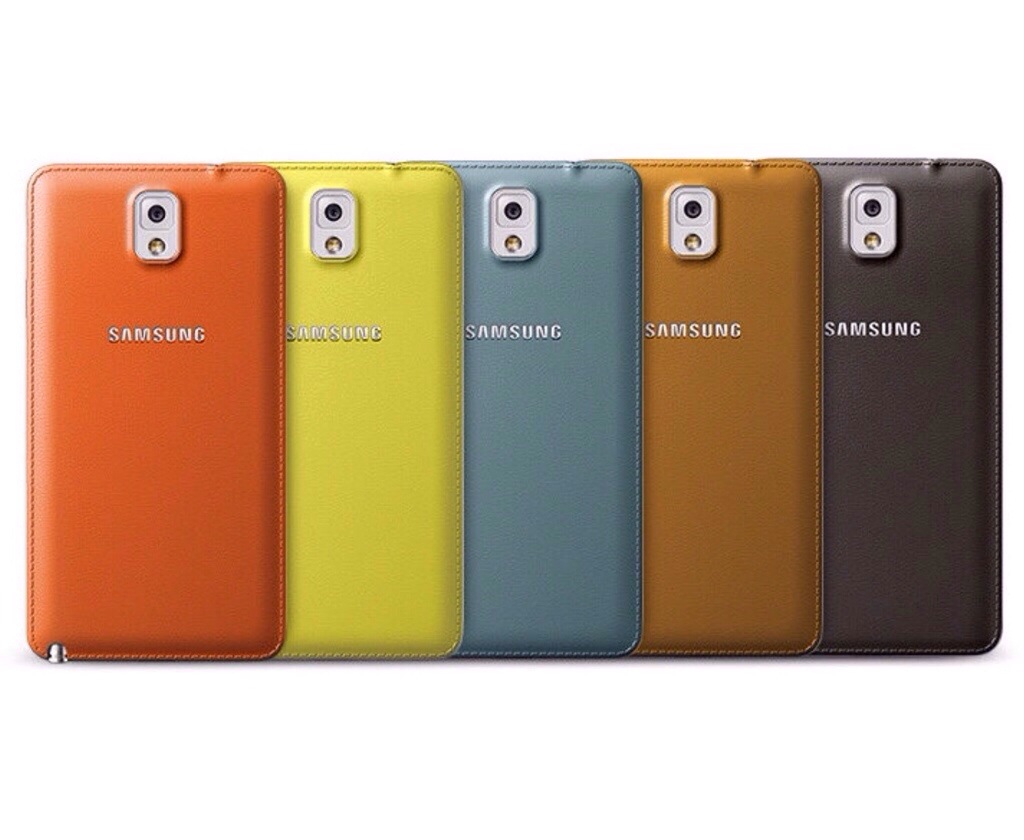
Samsung has released official high glam back replacement covers to give your Note 3 a bit of style. The cover is smooth so a little bit more slippery than the standard black colour.

All boxed up. So after a few seconds it’s fitted on to my Note 3.
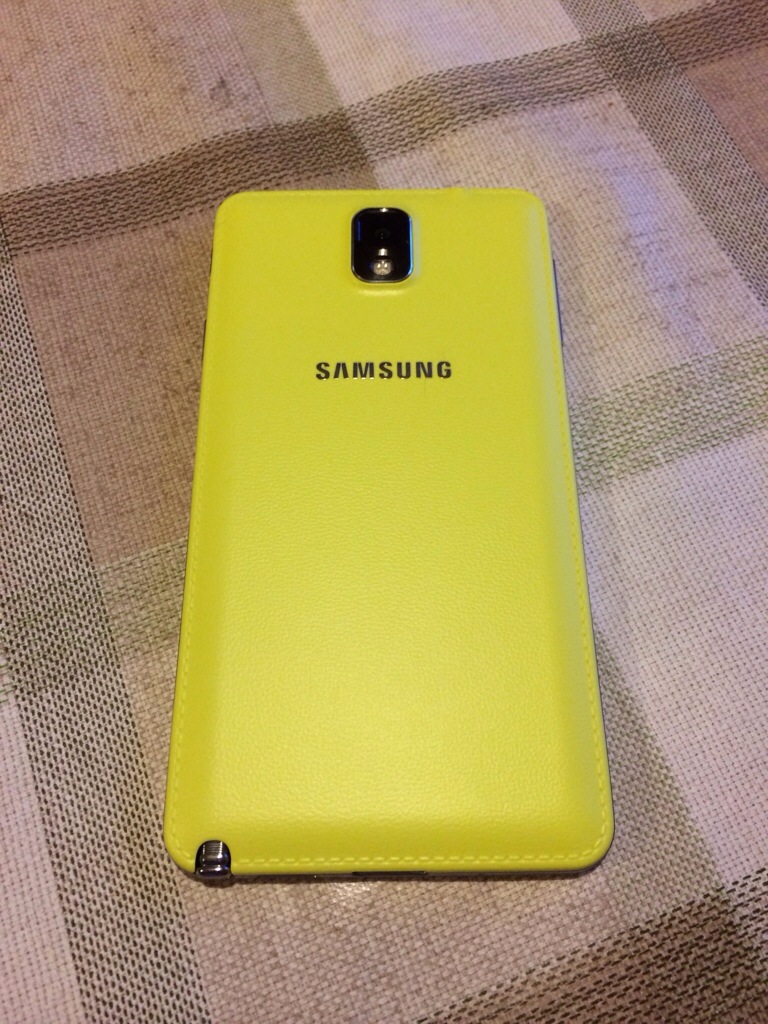
So I love it. But what do you think?
If you want one of these colours I got mine from eBay.
Oppo, Nokia and HTC take aim at the Samsung Galaxy S5 – but it’s a dangerous idea
Ever since Samsung announced the Samsung Galaxy S5, HTC, Nokia and now Oppo seem to be bashing it with claims from Oppo and HTC that in March they will announce something even better.
And they may have a better made and specced phone and it may be an opportunity to steal some thunder from Samsung but rumour has it Samsung has another phone in the works for a May release that could one up everyone else.
Time will tell but with Samsung launching the S5 in 115 countries on 11th April, I’m sure they are not going to have any issues with not achieving high sales.
Google+ new juicy update
Google has updated Google+ with some decent new features. It looks like Snapseed is being totally integrated into Google+ and I wonder how long before the app gets pulled completely.
The change log –
-Non-destructive photo editing across devices — Starting today you can start your edits on one device, and continue on another. This means you can backup full-resolution photos from your desktop, edit them in seconds on your phone, then add some finishing touches from your tablet.
-Brand new filters like Drama, HDR Scape and creative editing tools
-The new ‘All’ view displays your entire photo library — whether it’s on your current device, or backed up in the cloud.
-An easy way to browse your photos by date — In addition to search, there’s now another way to find your photos fast. Just swipe through your photos in the ‘All’ view, and look for the scroll bar on the right. Dragging the scroll bar up or down will quickly move you forwards or backwards in time.
 Gavin's Gadgets & Photography