Website redesign – details as to the location of everything now

Over the last few months, several changes have been implemented on Gavin’s Gadgets.

1) There is now a search option. Top right just under the main banner is a magnifying glass. Tap on this and type what it is you are trying to find on here.

2) Reviews – All reviews are now neatly collated together under the one heading. Access this by tapping on the Menu. Sometimes on mobile devices the main menu loads before you can hit the 7 sub pages which breakdown the reviews into categories eg. Smartphones and Headphones. The review links now take you directly to the articles. Some links had got corrupted previously. The last historical review was published today.

3) The new sub review pages are Smartphones/Tablets/Laptops, HTC One M7 and M8 Mega review, Historical reviews pre 2010, Wearables/Fitness Trackers/Smartwatches, Headphone/Amp/DACs, The Internet of Things and the last sub page covers reviews for Cases/Power/Camera Lenses/Gloves and more.

4) There is a new page called “Editorial Specials”. This page includes links to pieces I wrote sharing a view or two and date back from when Gavin’s Gadgets was born.

5) The other pages cover Help Me/About, Gav & Dave’s Tech Podcast, Princetown Weather Station and Shopping Links.

You can help me by buying off Amazon using my special link (see Help me page) and by telling as many people who might be interested in tech to visit Gavin’s Gadgets.

In the meantime, enjoy the rest of the day.

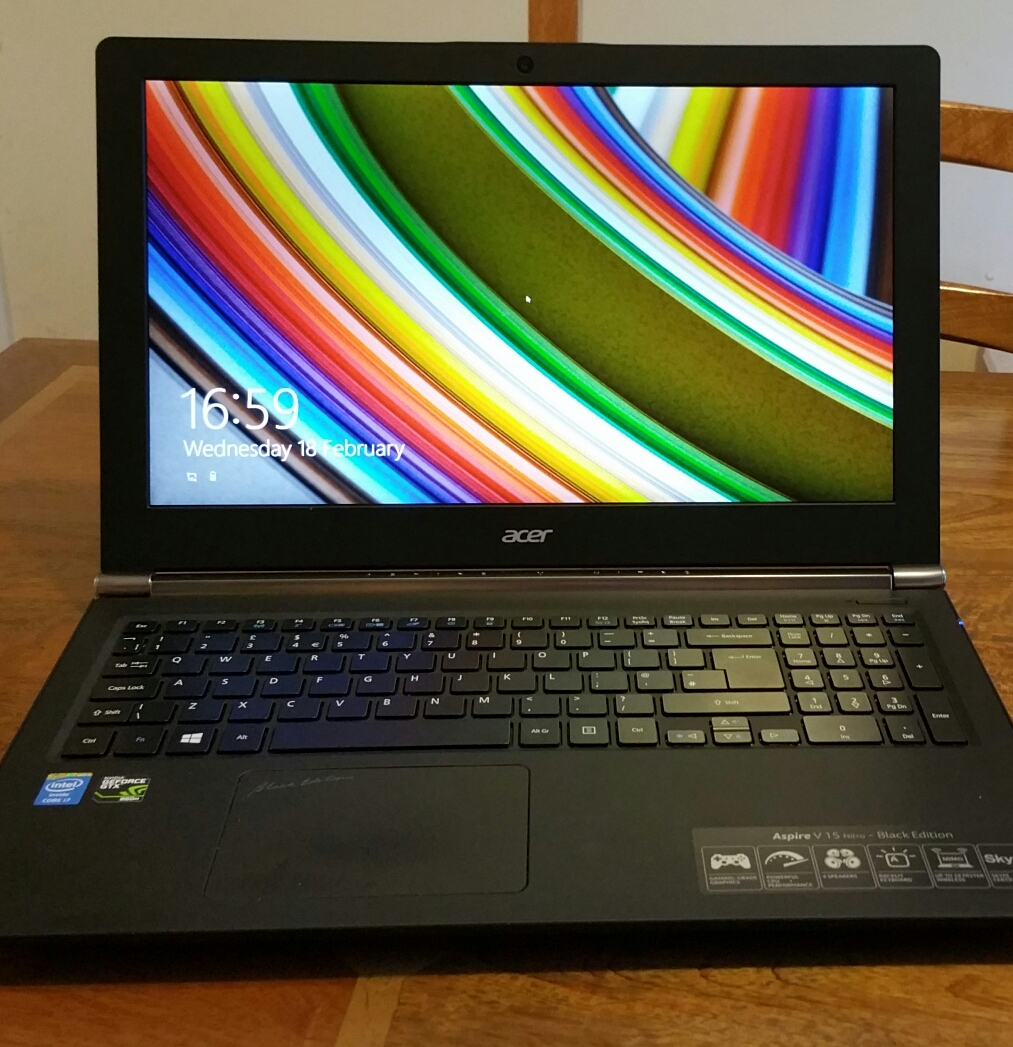
Acer V15 Nitro Black Edition – Windows 8.1 – Laptop review

image

Welcome to my thoughts on the Acer V15 Nitro Black Edition Windows 8.1 laptop. This is one powerhouse of a laptop. You could call it the “powerful one”.

The core specs are –

– Windows 8.1 Intel Core i7-4710HQ Quad-core 2.50 GHz
– 39.6 cm (15.6″) HD (1366 x 768) 16:9
– NVIDIA GeForce GTX 860M with 2 GB Dedicated Memory
– 16 GB, DDR3L SDRAM , 1 TB HDD + 128 GB SSD

image

As part of the Nitro black themed laptop, the keyboard back lighting is red. This looks cool IMO.

image

The display is fabulous. Just look at the colours of the sunflower. That’s the beauty of its IPS 1080p screen resolution. If you want 4K resolution this is available too as an option.

image

The Acer V15 runs Windows 8.1 so has the world of Microsoft at your finger tips.

To keep the slim profile, there is no DVD/CD drive. The opposite edge only houses the kensington lock point. On the side shown above you have the USB ports(3), headphone socket, HDMI, ethernet, and power connector. On the front edge is a memory card slot.

image

So what makes this “Nitro” edition so special. Simply, this is a pure gaming grade laptop, with huge graphics, powerful CPU, 4 decent built in speakers, MIMO wifi and Skype certified out of the box. The 4 speakers provide a decent loud sound. The volume was near full volume when I first used the machine, which made me stand back at just how loud it could go.

The storage configuration is a 128 Solid State Drive with a 1 TB hard drive. Plenty of storage space! And the SSD for speed. If you look back at the specs above, you will note the Intel Core i7 and respective graphics chip. So am I blinding you with specs? Slightly, but in real life this means you will have power on tap.

From a cold boot to a ready on state. Less than 7 seconds and fully ready. Impressive. Just as quick to fully shut down too. Editing video was notably faster on the Nitro too. My 4 year old MacBook Pro can barely cope with video editing and takes nearly 2 mins to boot up from cold. Gaming. I played several games, again with no issue whatsoever.

In my other article covering the Acer Chromebook, I commented how much I enjoyed this. However, I have been surprised at just how quick all my photo and video editing can be accomplished with this machine. It really is night and day faster than my 4 year old MacBook Pro. Plus with a Windows 8.1 base, my gaming options are vast.

I now face a dilemma. Since using this, I just can’t accept anything inferior! Thanks go out to Acer for the review unit.

Acer C720 ChromeBook review

image

For the last 2 weeks I have been using 3 different laptop type devices. My ageing MacBook Pro, an Acer C720 ChromeBook and an Acer V15 Nitro Windows 8.1 laptop to see which one I will opt for once my MacBook dies completely, which won’t be long.

image

But what I am going to do today, is write my thoughts down on the Acer C720 ChromeBook,the Acer V15 Nitro in a different post, and then on a mini comparison between all 3 devices.

image

image

image

First lets have a look at the specifications of the Acer C720 Chromebook.

– 11.6″ 1366×768 TN display
– 1.4GHz dual-core Intel Celeron 2955U processor
– Intel HD graphics
– 16GB SSD
– 2GB DDR3 RAM
– 1x USB 2.0, 1x USB 3.0
– HDMI output
– SD card reader (up to 32GB)
– 720p webcam
– Bluetooth 4.0
– 3.5mm headphone minijack
– Dimensions: 288x202x19mm
– Weight: 1.25 kg

Nothing spectacular in the specifications except for the choice of processor which helps provide long battery life of 8.5 hours. Other aspects of the specifications include a 7 second boot up time, Solid State Drive memory and free 100 GB of Google Drive cloud storage for 2 years. The C720 is also available in 32 GB SSD and another version which has a touch screen. The 16gb memory can be expanded by the of an SD card.

Those are the specs but what do I think of the Acer Chromebook. Well, this is my first ever chromebook that I have used and it has been a revelation. My MacBook Pro is toast. Why? Well, the Acer chromebook only takes 7 seconds to boot up, and in reality it takes longer for you to enter your password than it does boot up! The battery life lasts far longer than my MacBook Pro. I recall one day of usage from 9am to 5pm on a Sunday. I had been using it constantly and looked at the battery life to find it was only at 29%. It is also lightweight enough to be great to lug around as well.

But let me step back to the very first powering on. The Acer C720 just required my Google email and password and that was it. All my music, photos, files and documents were at my finger tips. The chromebook also has a guest mode, or if I decided to upgrade or sell the device on, all you have to do is go into settings, select “powerwash” and in a few minutes the device is cleaned and ready for its next owner. You can also speed up the entering of your password, by enabling smart unlock in the settings using your android phone. If it detects your phone is nearby it unlocks the chromebook.

The Acer C720 has built in loudspeakers which were clear and concise. I plugged in my headphones and was very happy with the sound quality. In usage the machine is fast, really fast. Everything is smooth and I really have not enjoyed using a device so much in ages. I have not touched my Samsung Tab S since using the chromebook, and the Acer C720 has been most impressive in its endurance, speed and reliability. Printing. Fortunately I have a HP wireless printer that comes with cloud printing out of the box so there was no issues getting documents printed from the Acer Chromebook. Cloud Printing uses your printers unique email address to send files for printing. I wanted to transfer photos from my smartphone to Chromebook. I found that the easier wireless method was using an app on my android phone called Photosync (the app has versions for ios too) and opening a special http page on Chrome was able to see my directories with photos and copy them across. This was the only item that required a bit of a workaround. Other than that I have had no issues with productivity using the Chromebook.

Based on my few weeks use I highly recommend this device is you are using Google services. It just works so effortlessly and has been a competent machine too. My thanks to Acer for the review unit too.

Nvidia Shield Tablet – 7 Part Review

Below are all the review posts I have written covering the Nvidia Shield Tablet.

Nvidia Shield LTE 32gb Tablet – First Impressions

Nvida Shield Tablet – more impressions

Nvidia Shield Tablet – hardware and cover review

Nvidia Shield Tablet – Battery and Games Testing

Nvidia Shield Tablet – console mode and game recording

Nvidia Shield Tablet – the negatives and bugs

Nvidia Shield tablet – cracking post tomorrow

Yotaphone 2 – Review – Conclusion

YOTAPHONE2 Image 5
Today I am going to cover off my final thoughts on the Yotaphone 2.

The Yotaphone is without a shadow of a doubt one of the coolest piece of tech I have reviewed in ages. It is novel, different and caused huge debate with my friends whilst out at a restaurant. My friends were fascinated with the rear e-ink screen.

The rear e-ink display is not just about battery life. It is also about having an always on display for vital information. Perfect daylight visibility. And if your battery is about to die, you can take a screen shot of some information you will need later in the day, and it will be left on the rear e-ink display. And finally, the e-ink display is better for your eyesight.

The camera and audio aspects of the phone were reasonable. The competition includes phones with better sound and cameras. But in reality if photos are shared on social media, does it matter what the camera quality is like?

If you want something different and are the sort of person that needs the unique selling points of the Yotaphone 2 then its a match made in heaven. But the competition is fierce and there are many other options to consider too. Personally, this phone is staying in my collection. It is too cool not to have!!

Cayin C5 -Portable Headphone Amplifier – Review

image

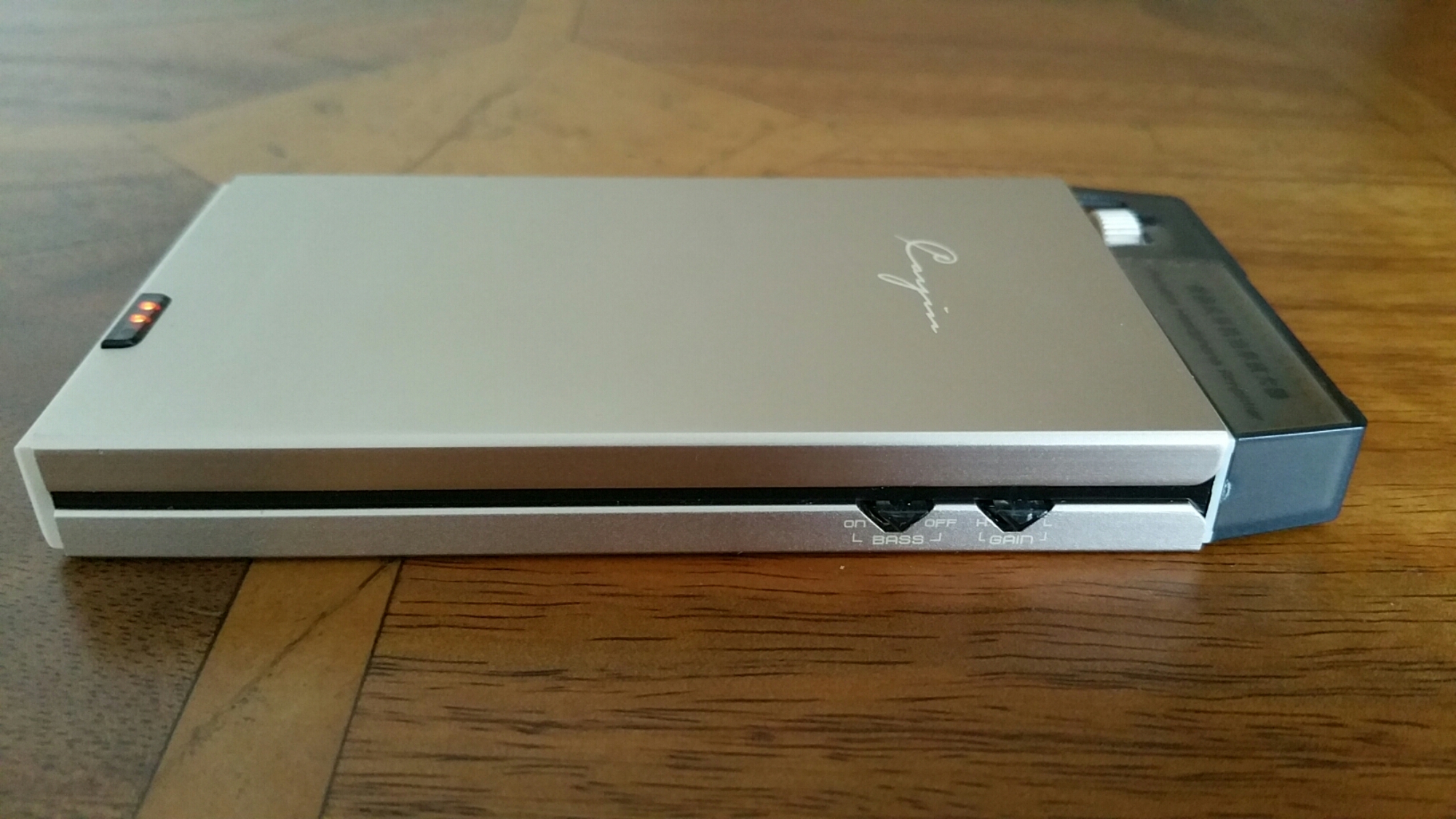
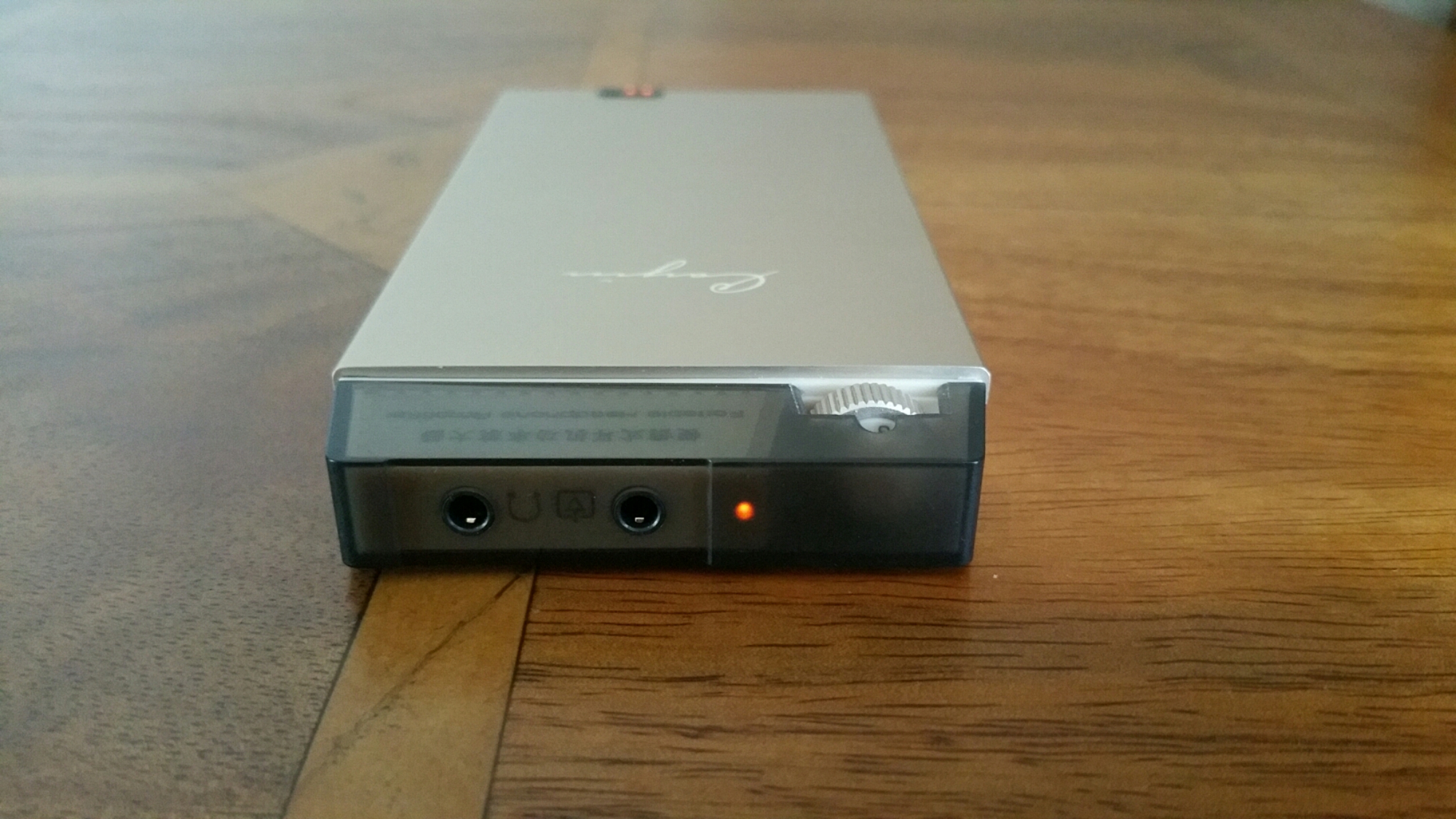
The Cayin C5 is a portable headphone amplifier that has a lovely sound signature and is capable powering many headphones. It is made from a brushed aluminium alloy. It has a battery level indicator. But what provides it sound is the use of dedicated high performance audio op amp OPA134 and LME49600. In addition Japanese original ALPS volume potentiometer is used too. The Cayin C5 is handy as it can be used as a mobile power source to charge other mobile devices. If you like more bass in your music it has a high and low end bass switch. It also has shielding to prevent interference affecting the music.

image

image

Technical Parameters:

– Rated output power: 800mW + 800mW (32 ohm load) SNR: ≥101dB (A-weighted)
– Life time: about 12 hours (32ohm load)
– Frequency response: 20Hz-100kHz (+- 1dB)
– Sensitivity: ≤500mV (gain H) Charge limit voltage: 12.6V
– Charging time: about 4 hours (off state, the use of DC5V / 2A charger)
– Total Harmonic Distortion: ≤0.02% (1kHz)
– Lithium battery capacity: 1000mAh / 11.1V
– Size: 136x63x15mm Weight: about 185g

So in English what does all the above mean. This amplifier has nearly 1 Watt of power at 32 ohms driving your headphones. With that much power the volume can obviously go very high but it more about the control of musicality that this amp brings to your music. The amp creates a huge 3D sound stage, which lets the mids shine out. Bass is controlled with excellence depth and dynamics. The treble is fantastic too, never too bright but very concise. The Cayin C5 is also capable of driving IEMs through to full size headphones.

This is one musical beast of an amp and seriously good value for money at it price. It is available from Amazon via EA Audio. This is where I bought mine from and using EA Audio too.

Link to Cayin C5 at Amazon via EA Audio

Samsung releases more information/photos/videos on the Samsung Galaxy S6

Samsung has started to release more information on its Samsung Galaxy S6.

Below are a selection –

Samsung Note 4 – Qialino Luxury Leather case

They say pictures can say a thousand words. Below are photos showing the Qialino leather case for the Samsung Note 4.

image

image

image

image

Now without cheating, how expensive do you think this case is? Now you have made a guess, click on the ebay link – http://www.ebay.co.uk/itm/Original-Qialino-Real-Leather-Rivet-Back-Cover-Case-for-Samsung-Galaxy-Note-4-/261754207755?pt=LH_DefaultDomain_3&hash=item3cf1c43e0b