Category Archives: Windows

Updated – All the latest phones, wearables & accessories reviewed plus 23 camera phone comparison

There has been a lot of content published on Gavin’s Gadgets recently.

Below are all the direct links to all the goodness.

1) 23 Smartphone Camera comparison including Note 4, LG G3, iPhone 6 Plus and more. Click here.

2) Massive 10 to 31 part reviews of all the latest smartphones including Note 4, LG G3, BlackBerry Passport, Apple iPhone 6 Plus, HTC One M8 and 18 more covering all platforms. Click here.

3) Detailed reviews of all the hottest wearables including Samsung Gear S, Gear Fit, Gear 2 Neo, LG G Watch R and the original G Watch and not forgetting the Pebble. Click here.

4) 50 Reviews covering wireless and clip on cameras, app enabled accessories,  headphones, amps, DACS, cables and tech gloves. Click here.

5) My podcast “Gav & Dave’s Tech Podcast” Click here.

WOW 23 SMARTPHONE CAMERA SHOOTOUT – NOTE 4, LG G3, IPHONE 6 PLUS, BLACKBERRY PASSPORT, SONY, NOKIA, HTC ONE M8, S5, HUAWEI, NEXUS & MORE

Not sure about which phone or brand takes the best photos, then have a look at this super sized collection of photos from all the best and latest smartphones and some budget phones as a comparison.

Samsung Note 4 – https://www.flickr.com/photos/gavinfabl100/sets/72157648796796660/

Apple iPhone 6 Plus – https://www.flickr.com/photos/gavinfabl100/sets/72157647679181549/

BlackBerry Passport – https://www.flickr.com/photos/gavinfabl100/sets/72157648520943848/

LG G3 – https://www.flickr.com/photos/gavinfabl100/sets/72157645618979801/

Samsung Galaxy K Zoom – https://www.flickr.com/photos/gavinfabl100/sets/72157644532639249/

HTC One M8 – https://www.flickr.com/photos/gavinfabl100/sets/72157643265004874/

HTC One M7 – https://www.flickr.com/photos/gavinfabl100/sets/72157644039700054/

Samsung S5 – https://www.flickr.com/photos/gavinfabl100/sets/72157643875623354/

Samsung Note 3 – https://www.flickr.com/photos/gavinfabl100/sets/72157644034132513/

LG G Flex – https://www.flickr.com/photos/gavinfabl100/sets/72157644114354349/

Samsung S4 Zoom – https://www.flickr.com/photos/gavinfabl100/sets/72157644039495565/

Apple iPhone 5S – https://www.flickr.com/photos/gavinfabl100/sets/72157644035336913/

LG Nexus 4 – https://www.flickr.com/photos/gavinfabl100/sets/72157644039660933/

Sony Z1 Compact Z1 – https://www.flickr.com/photos/gavinfabl100/sets/72157644028694521/

Sony Xperia Z1 – https://www.flickr.com/photos/gavinfabl100/sets/72157644039246935/

Sony Z Ultra – https://www.flickr.com/photos/gavinfabl100/sets/72157644083052095/

Sony QX100 – https://www.flickr.com/photos/gavinfabl100/sets/72157644035811453/

Sony QX10 – https://www.flickr.com/photos/gavinfabl100/sets/72157644035335185/

Huawei Ascend P6 – https://www.flickr.com/photos/gavinfabl100/sets/72157644028833151/

Nokia Lumia 1520 – https://www.flickr.com/photos/gavinfabl100/sets/72157644035105534/

Nokia Lumia 1020 – https://www.flickr.com/photos/gavinfabl100/sets/72157644035516523/

Nokia Lumia 925 – https://www.flickr.com/photos/gavinfabl100/sets/72157634991010769/

Nokia Lumia 620 – https://www.flickr.com/photos/gavinfabl100/sets/72157644083348093/

To see the sets in one indexed page click here – https://www.flickr.com/photos/gavinfabl100/sets/

So which phone is your winner?

Wearables – Reviews covering Samsung Gear S, Gear 2 Neo, Gear Fit, LG G Watch R, LG G Watch, Pebble and more

Samsung Gear S, LG G Watch R, LG G Watch, Samsung Gear 2 Neo, Samsung Gear Fit, Samsung Galaxy Gear and Pebble Smart Watches. I owned and reviewed them all.

Wearables

LG G Watch R – review

Samsung Gear S – 9 Part Review

LG G Watch – review – android wear

Samsung Gear Neo Impressions

Samsung Gear Fit review

Samsung Gear review

Pebble Smartwatch review

It’s live – Gav & Dave’s Tech Podcast – Crispy Screens – Please RT

As you know, I co-host a twice monthly podcast with David from UKMobileTech called Gav & Dave’s Tech Podcast. It is a light hearted tech podcast broadcast every two weeks. To subscribe click here for iTunes or copy and paste this link into your favourite podcast app.

Episode 28 is now live for your listening pleasure. Today we discuss all the latest reviews and news. 

If you have enjoyed the podcast, please leave a 5 star review in iTunes. It helps others find our podcast. Go now and leave a review !

If you have any comments, questions or feedback, please drop a line at feedback@gdtpodcast.com .

Netatmo Urban Weather Station – Cross Platform Connected Weather Station – 6 Part Review – Updated with Wind Sensor

nat

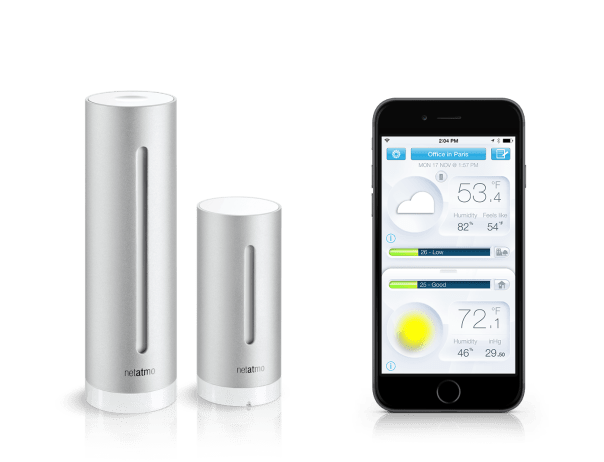
The Netatmo Urban Weather Station is a cross platform connected weather station. I use it to provide daily weather information at Princetown on Dartmoor.

Below are all the review posts.

Netatmo Urban Weather Station review

Part 1 – https://gavinsgadgets.wordpress.com/2013/10/14/netatmo-urban-weather-station-for-ios-and-android/

Part 2 – https://gavinsgadgets.wordpress.com/2013/10/17/netatmo-urban-weather-station/

Part 3 – https://gavinsgadgets.wordpress.com/2013/10/23/netatmo-urban-weather-station-for-ios-android-and-windows-phone/

Part 4 – https://gavinsgadgets.wordpress.com/2013/12/30/netatmo-urban-weather-station-and-princetown-yearly-weather-stats/

And finally – long terms weather stats from the Netatmo Weather Station – https://gavinsgadgets.wordpress.com/2013/12/30/netatmo-urban-weather-station-and-princetown-yearly-weather-stats/

Part 6 – One Year Later Review including new Wind Sensor

Link to deal on Netatmo Weather Station at Amazon

Episode 27 – Gav & Dave’s Tech Podcast is live – Please RT – All the latest tech discussed

As you know, I co-host a bi-weekly podcast with David from UKMobileTech called Gav & Dave’s Tech Podcast. It is a light hearted tech podcast broadcast bi-weekly. To subscribe click here for iTunes or copy and paste this link into your favourite podcast app.

Episode 27 is now live for your listening pleasure. Today we discuss the new Samsung Gear S, the Note 4, Note Pro and much much more.

If you have enjoyed the podcast, please leave a 5 star review in iTunes. It helps others find our podcast. Go now and leave a review !

If you have any comments, questions or feedback, please drop a line at feedback@gdtpodcast.com .

Microsoft and Dropbox announce strategies partnership – full info

Microsoft and Dropbox announced a new partnership, that was somewhat surprising to say the least. This means the following –

Dropbox and Microsoft users can now do the following:

Access Dropbox from Office apps to get to their files and folders faster.

Edit Office files directly from Dropbox and sync them across devices.

Share new or edited files from the Office apps using simple Dropbox sharing functionality.

The functionality will first be included in the next updates to the Office apps for iOS and Android, coming in the next few weeks. The Web integrations between the Dropbox website and Office Online will be available in the first half of 2015. Dropbox will also make its application available on the Windows Phone and Windows tablet platforms in the coming months.

These capabilities will be available to all Office users with a Dropbox account. Dropbox for Business customers will need an Office 365 subscription. More information can be found by visiting the Dropbox blog at https://blog.dropbox.com/2014/11/dropbox-microsoft-office-partnership and the Office blog at http://blogs.office.com.

Via – http://news.microsoft.com/2014/11/04/microsoft-and-dropbox-announce-strategic-partnership-to-give-people-more-freedom-in-how-they-work-2/

From last week – Gav & Dave’s Tech Podcast is now live – Please RT

From last week.

As you know, I co-host a weekly podcast with David from UKMobileTech called Gav & Dave’s Tech Podcast. It is a light hearted tech podcast broadcast bi-weekly. To subscribe click here for iTunes or copy and paste this link into your favourite podcast app.

Episode 26 is now live for your listening pleasure.

If you have enjoyed the podcast, please leave a 5 star review in iTunes. It helps others find our podcast.

If you have any comments, questions or feedback, please drop a line at feedback@gdtpodcast.com .

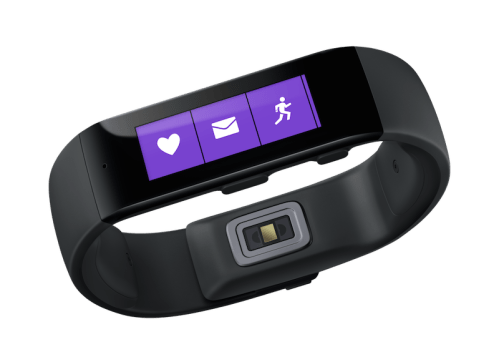
Microsoft launches the Microsoft Band – cross platform fitness band – details

microsoft-band_hero_2

Microsoft has launched the Microsoft Band. It lasts 48 hours on a single charge and tracks all activity including your sleep. There are 10 sensors that track standard health statistics like heart rate, a UV sensor to measure sun exposure and galvanic skin response, which can identify stress. Like smart watches, the Band can also receive notifications from a user’s smartphone.

Full details of what it can do are –

– Activity tracking and goal setting : Heart rate monitor 24-hour heart rate monitor: Gives you a better understanding of your calorie burn, sleep patterns, and peak and resting heart rate so you can perform at your best.

– Run Run: Whether you’re on the treadmill at the gym or outdoors in the rain or sun, you can view your run summary on your band with personalized metrics in the phone app including pace splits and heart rate.

– Steps tracker Steps: Set a goal and track your progress. Microsoft Band calculates the calories you’ve burned and the distance you’ve traveled each day.

– Built in GPS Built-in GPS: Measures the distance you’ve run and tracks your pace and route. Save your favorites to retrace your steps and challenge yourself later.

– Calorie tracking Calorie tracking: Count the calories you burn each day. View daily or weekly stats, set goals, and receive a virtual “high-five” when you reach them.

– Sleep tracking Sleep tracking: When activated, Microsoft Band tracks the length and quality of your sleep. Analyze the sleep charts in your app to gain insights about your slumber.

– Guided workouts Guided Workouts: Fun and challenging workouts from fitness partners like Gold’s Gym, Shape, and Men’s Fitness with exercise prompts on the band and much more in the app.

-Goal setting Goal setting: Challenge yourself by setting daily step and calorie goals. Microsoft Band notifies you when you meet them so that you can stay motivated.

The Microsoft Band goes on sale for $199. Looks promising.

Source – http://www.microsoft.com/Microsoft-Band/en-us
Microsoft want to rule the Cloud – OneDrive just became a great offering

Microsoft has announced that all Office 365 subscribers are now eligible to receive unlimited storage on OneDrive for no additional cost. The rollout for Office 365 Home, Personal and University customers has begun and will continue over the coming months.

This represents great value and will now put pressure on Dropbox and Google on their respective storage platforms. Sadly I do not see Apple making it cloud offering as competitive for a while.