Category Archives: Tech News

Apple Keynote Speech Global Times

Later today in 11.5 hours, Apple will announce the new iPhone, iOS 7 and other new stuff. If you go to Apple a live link to the keynote speech is available.

In case you don’t know the start time in your country, below is a list of times.

07:00 AM – Hawaii​
10:00 AM – Pacific​
11:00 AM – Mountain​
12:00 PM – Central​
01:00 PM – Eastern​
06:00 PM – London​
07:00 PM – Paris​
09:00 PM – Moscow​
02:00 AM – Hong Kong (September 11th)
02:00 AM – Tokyo (September 11th)

A full summary will be provided afterwards. ​

Confirmed key features of the iPhone 5S ahead of the launch

The Wall Street Journal has confirmed that the iPhone 5S will have a finger print scanner built in to the home button.

In addition the new iPhone will have an improved camera flash and low light operation.

It will run the latest version of iOS , iOS 7.

And in another miracle will apparently look identical to the outgoing iPhone 5.

The iPhone 5C, the new colour range plastic iPhone,  will not feature the fingerprint scanner.

With all these leaks and confirmations, why bother having a keynote speech?

iOS Traumatic Stress Disorder

Shortly Apple will release iOS 7 to the masses. Most people when they hit accept update to iOS 7 won’t realise how dramatically different the new iOS version is compared to the previous.

So it should come as no surprise that Apple is training its staff to deal with iOS Traumatic Stress Disorder. That is customers calling about their new look.

Just how the whole world will view the new look is unknown but I am sure Apple’s marketing team will create a campaign to make everybody desire the new look and functionality.

Wireless charging and why I won’t buy any device unless it has this feature

I had read an article by Steve Litchfield from All About Windows, and listened to him rave about how amazing wireless charging along with the benefits. Well, I did think this was a load of nonsense. I mean, how difficult can it be to plug a micro USB lead into your phone and tablet!

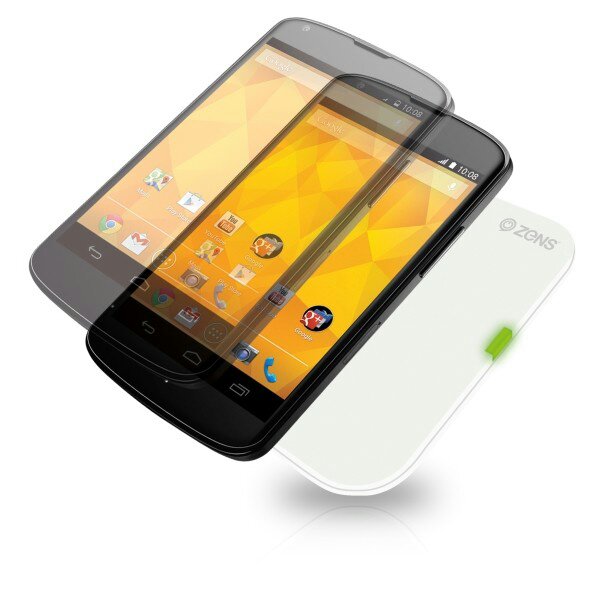
Well that was a week ago. My views today are this. Unless a phone has this capability or means I won’t consider buying it. So what has happened in a week. I received the Nexus 4 and new Nexus 7 and then discovered they both had the circuits built in to allow wireless charging. Curiosity got the better of me and I ordered a Zens charging pad. Well being able to just place the phone or tablet on this pad and it charges is a revelation. It is just so cool. In addition the pad turns charging off at 100% and recommences when battery drops to 95%.

So I decided to get a double charging pad for another room. I might get one more for downstairs too. But the double pad is not as slim and sleek as the single pad. So I returned the double pad and got another white Zens single charging pad. Happy days.

The other neat aspect of the Zens charging pad is that it is not placement sensitive.
image

image

My top photography apps on android

Those that follow my twitter account @gavinfabiani know that I like posting photos of my pets and Dartmoor. Consequently, I also have tried a number of photography apps. Below are my favourite-

1. The default camera app that came with your phone. Always start here and see what it can and can’t do.

2. The phone’s default editing options. Explore what your phone can and can’t do. Examine file sizes after editing too as some photo editors shrink the photo.

3. Camera Zoom FX – simple easy to use and tons of editing options. Works on tablets too. Complete control of photo capture. Voice activation.

4. Color Splash Effect – takes an image and makes it black and white. Then add back colour to the areas you want. Plus add text, effects, overlays, frames, and textures too.

5. Picsay Pro – similar to Camera Zoom FX but only for editing photos. Has some snazzy effects too.

6. ProCapture – camera + panorama – high quality panoramic photos up to 12 linked together, wide shot, loads of camera options. Good on tablets too. No post editing just great at taking photos.

7. Pro HDR Camera – full control over taking HDR photos. Plus after editing adjustments before saving.

8. Photoshop Touch – enables layers and other pro editing options. If you know what you are doing this is a very good app.

9. Lapse it – Time Lapse – Pro – create some stunning time lapse effects. A tripod might be handy.

10. Snapspeed – another post editing app. Drama is a great affect to use. Makes boring photos exciting.

A lot of the apps have some overlap, but each offer something special. With all the above and the default camera app you will be surprised by what you can achieve.