Category Archives: Tech News

Nokia Lumia 930 – Key Information

Nokia announced the Lumia 930, and boy what a piece of stunning hardware specification.
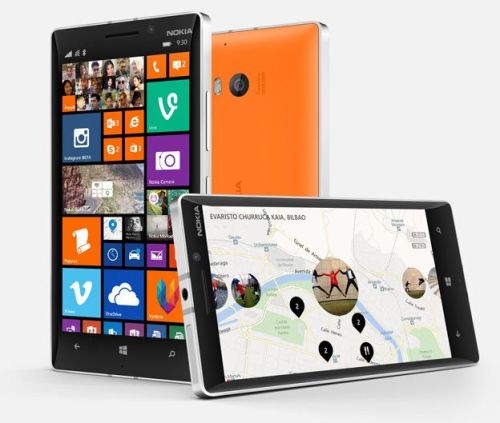
930

The key specs are –

– Size/weight: 137 x 71 x 9.8 mm, 167g

– Connectivity: LTE network bands: 1, 3, 7, 8, 20, WCDMA network: 900 MHz, 1900 MHz, 2100 MHz, 850 MHz, GSM network: 850 MHz, 900 MHz, 1800 MHz, 1900 MHz, WLAN IEEE 802.11 a/b/g/n/ac (2.4Ghz + 5GHz); Bluetooth 4.0 (including Bluetooth LE); microUSB (USB 2.0), NFC

– Memory: 32GB mass memory, 7GB of SkyDrive cloud storage

– Processor: Quad-core 2.2GHz (Qualcomm Snapdragon 800), with 2GB RAM

– Screen: 5.0″ AMOLED ClearBlack; 1080 x 1920 (full HD) pixels resolution; protected by Gorilla Glass 3

– Camera: 20 megapixel, f/2.4 auto-focus camera, with OIS, 1/2.5″ sensor and dual-LED flash; front facing HD camera; four HAAC for Rich Recording in intelligent stereo at 1080p and with lossless digital zoom

– Sensors: GPS, accelerometer, compass, gyroscope, proximity and ambient light sensors

– Audio: 3.5mm audio out (AHJ + WP controls); HD Audio support; Dolby Headphone support

– Battery: 2420mAh integrated battery, with integrated Qi wireless charging

– Software: Nokia apps pre-installed include Nokia MixRadio, Nokia Camera, Creative Studio, Cinemagraph, Panorama, Nokia Storyteller, HERE Maps, HERE Drive+, and HERE Transit, Windows 8.1

– Colours: White, Black, Green, Orange

This looks like a cracking piece of hardware, which will come with the updated Windows software 8.1. The included software services add to the value. All Nokia/Microsoft need to do now is plug the app/games differentials to Android and iOS.


Amazon Fire TV and Gaming – Your Living Room is Required

b-slate-01-lg-hover2

Amazon Fire TV is a tiny box you connect to your HDTV. It’s the easiest way to enjoy Netflix, Prime Instant Video, Hulu Plus, low-cost movie rentals, and much more. Massive selection—Over 200,000 TV episodes and movies, millions of songs, and over a hundred games. Perfect with Prime—Unlimited access to thousands of popular movies and TV shows including exclusive titles like Downton Abbey and Under the Dome. Get a free 30-day trial. Voice search that actually works—Simply say the name of what you want to watch and start enjoying in seconds. Tiny box, huge specs—Fast quad-core processor, 2 GB of memory, dedicated GPU, plus 1080p HD video and Dolby Digital Plus surround sound. Easy to set up and use—Pre-registered to your Amazon account so you can enjoy favorite titles and personalized recommendations. Instant streaming—Exclusive new feature ASAP predicts what movies and TV episodes you’ll want to watch and buffers them for playback before you hit play. Perfect for parents—Amazon FreeTime lets you easily limit screen time and create personalized profiles just for kids (coming soon). Great for gaming, too—Play blockbuster titles like Minecraft-Pocket Edition, The Walking Dead, and Monsters University, plus free games and Amazon exclusives. Paid games start from just 99 cents.

feature-gaming-thumb._V340471328_

Above, gaming controllers for the Amazon Fire TV.

Well, I knew this was coming as I am sure many of you did too. It is everything as expected, and it appears a very polished first attempt. Voice control via the remote, gaming, preset up with your account and more. What is does not have is Apple’s Airplay, HBO and availability outside of the USA at the moment. Once Amazon launches its own smartphone, we will have a serious 4 way fight between Apple, Google, Microsoft and Amazon.

For more information head over to http://www.amazon.com.

HTC One M8 – Daily Blog – review – day 9

Today I am going to share my brief thoughts after just one week of ownership. On Sunday I will share my further views on my podcast I co-host with Dave Rich, Gav & Dave’s Tech Podcast . Dave also has the HTC One M8 so it will be an interesting discussion.

Camera – excellent. Best lower sharpening to minus 0.5. HTC over sharpen normally. More shots of pets and people obtained due to speed of camera launch and time to first shot taken. If a very bright day, switch to HDR, focus on sky, press and hold to lock AE/AF. Then take shot.

Sense – it makes sense. Designed properly. Feels stock but with some extras that feel smooth.

Sound – Boomsound – the best quality and loudest. Headphone amp so strong. I am finding I can use phone as standalone music player.

Hardware – drool worthy. Say no more.

Extras – free silicone case a decent freebie

Screen – find me a better one. Colours look natural and dont seem to strain eyes.

Speed – move over Ferrari

Upgradable – with ease as HTC apps in Play Store. I like the idea of not having to wait for firmware updates. Also, HTC have an app for new apps they introduce for your phone, thereby adding new features on the fly.

I was a bit worried about the low 4mp rear camera but based on the results I am pleasantly surprised. The wide angle lens is great too both on for the rear and front selfie camera.

Tune in for Sundays podcast where I will provide detailed examples of each of the above.

HTC One M8 – Daily Blog – Review – Day 8 – Ultrapixels

Following on from yesterday’s explanation of the camera modes, and the day before that explaining some of the effects, today I am going to explain my thoughts behind the Ultrapixel arrangement on this phone. I previously had the original HTC One, which based on my experiences of that phone and the new M8, helped me create this article.

The M8 has a Ultrapixel lens and a depth sensor lens. At 4.1mp it is definitely not the best camera on the market. Make no illusion about this point. The depth enabled shots that create a bokeh effect either work well, not so well or simply fail. But I am hoping with software updates and developers on board the potential is huge.

However, the Ultrapixel optics is good at picking up subtle differences within a range of lighting but it is poor at dealing with situations where there is a very wide range of lighting in a photo. Sky shots are a nightmare where there is bright sunlight and grey clouds.In my experience. HTC took the decision that this would be more of a social camera and therefore calibrated it to pick up subtle detail when lighting situations have a low level of variance. Eg inside a room for a constant light reading and subtle variances in the shot. Look at my table shot of the mugs yesterday. Great shot.

So what does this mean for outdoor bright shot. Tap on the screen and use a point where the lighting is slightly darker than it needs to be, unless you can find a perfect spot. It is easier to lighten a photo as the information already exists, but impossible to adjust an over brightened shot in the same way.

The HDR mode of the HTC One is far too bright. I am trying third party apps that have an HDR mode and so far the results have been better than the inbuilt camera app. In fact the best app so far is “A Better Camera”. But it is a close call sometimes between using the stock app.

So I mentioned HTC made this a social camera with lots of funky effects to show off to your friends on social media, video highlights of the events all created for you, so in reality the photos where this camera shines are quick snaps to capture that moment that other phones will have missed and in slightly lower but not total darkness lighting eg in a bar, at home early evening. Pets, people and relatively close up shots, macro and such like all work really well.

So is everything else is just average? I don’t think so. In fact, the photos I have captured look wonderful. There is even in manual mode shutter control, so you can set a longer shutter time if required.

See for yourself at a selection of 16 shots and decide for yourself. Click here for Flickr set.

https://www.flickr.com/photos/gavinfabl100/sets/72157643265004874/
image

Google Keyboard v3.0 – a few neat changes

Google has updated its android keyboard to version .

The update brings a few minor bug fixes and tweaks, such as a dedicated “ABC” button to switch from emoji. There is a new personalized suggestions feature which uses data from other Google Apps and Services to improve suggestions and corrections.

The personalized suggestions feature is disabled by default but is easily turned on in the settings.

HTC Mini+ Review – a phone for your phone

20140402-053911.jpg

The HTC Mini+ icon and settings options appeared in the HTC One M8 so I was curious about it enough to see what all the fuss was about.

The official specs are –

– Size – 118.7 x 39.8 x 7.15mm
– Display – 1.5” white color 4 gray OLED, 128X128 resolution
– Features – Stay connected with calls, SMS, Notification,
– TV remote
– Facilitate presentation with remote control and laser pointer
Applications
– CIR/Sense TV
– PowerPoint controls
– Connectivity – Bluetooth® 2.1 + EDR and NFC Pairing
– Battery – 320 mAh
– Talk time: 9 hours
– Standby time: 95 hours

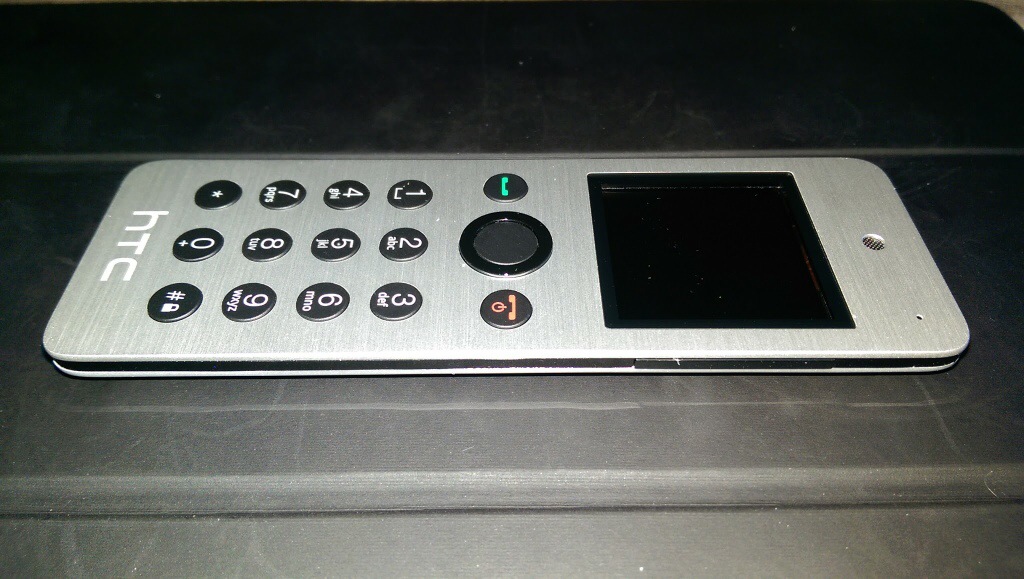
So, it arrives as it is slightly bigger than I thought it would be and not as slim. It has a slightly curved back which has a plastic feel to it, thus ruining the metallic front finish look.

In the box is the instruction, device and micro USB cable. First up you have to give it a full charge. Turn on and pair either via Bluetooth or NFC.

Functions. If a call arrives on your HTC One M8 it displays caller and vibrates but the Mini+ rings with the name in the display. You answer and talk away. Call quality was fine but even at full volume the ring volume isn’t that loud. You can do conference calls on this. This device is very light so if you do lots of calls you won’t end up with hand ache. You can make a call from the Mini+ either by scrolling through frequents or tapping the name out on the keyboard until the name appears on screen. This is actually very intuitive and uses a T9 logic so is very quick with few taps needed for most names.

The Mini+ can act as a remote for the camera shutter, even worked on third party camera apps eg a Better Camera, gallery app ( so if connected to the HTC Media Hub you can use it to remotely show your photos on the TV ), PowerPoint slide remote with laser pointer and TV remote control. You can also use it as a controller for your windows PC. It also acts as a remote for media playing on the HTC One and works for most media apps.

The TV remote option is cumbersome as you have to use text based options displayed on the screen and takes the info from the M8 TV app. It also only has limited options. Better than nothing I suppose.

Find My Phone. Press this and boomsound blasts your ringtone at full volume. You won’t take long to find your phone.

Notifications – shows details of missed calls, readable text messages and replying using the text templates from the HTC One M8 and a number of received emails. However, this is from the HTC Email app only and it’s just says emails with the number received. You cannot scroll to see who they are from. Rather pointless. And that is it for notifications. It does sync notifications so if you read a text it’s marked as read on the HTC One M8. Same for calls. Diary. You can view next events for the day.

But the screen goes black in standby so unless you heard you had missed a text etc.. you wouldn’t know to check the screen.

The HTC Mini+ came with software version 4.0 and according to HTC’s website there is a firmware update but you need a windows PC. Mac is not available.

My closing opinion is it’s cool to look at, a conversation piece, but debatable as to its usefulness.

Available from Clove Technology.

HTC One M8 – Daily Blog – Review – Day 6 – Kid and Camera options

Another day with the HTC One M8.

Screenshot_2014-03-30-14-40-36

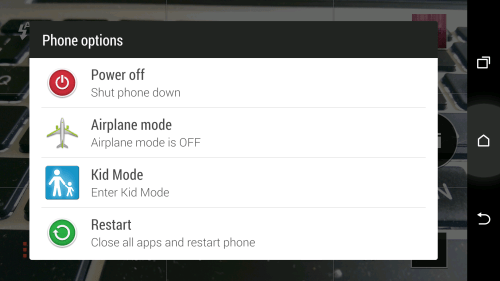
The top power button. If you press and hold this you have 4 options. Power Off, Airplane Mode, Kid Mode and Restart. All self explanatory.

I have had a good play with the camera. There several key ways of using it. One is use it in full auto so you can use the post focus editing effects as detailed yesterday.
Screenshot_2014-03-30-14-39-01

If you want to change from the rear and front camera you can swipe across the width to switch.

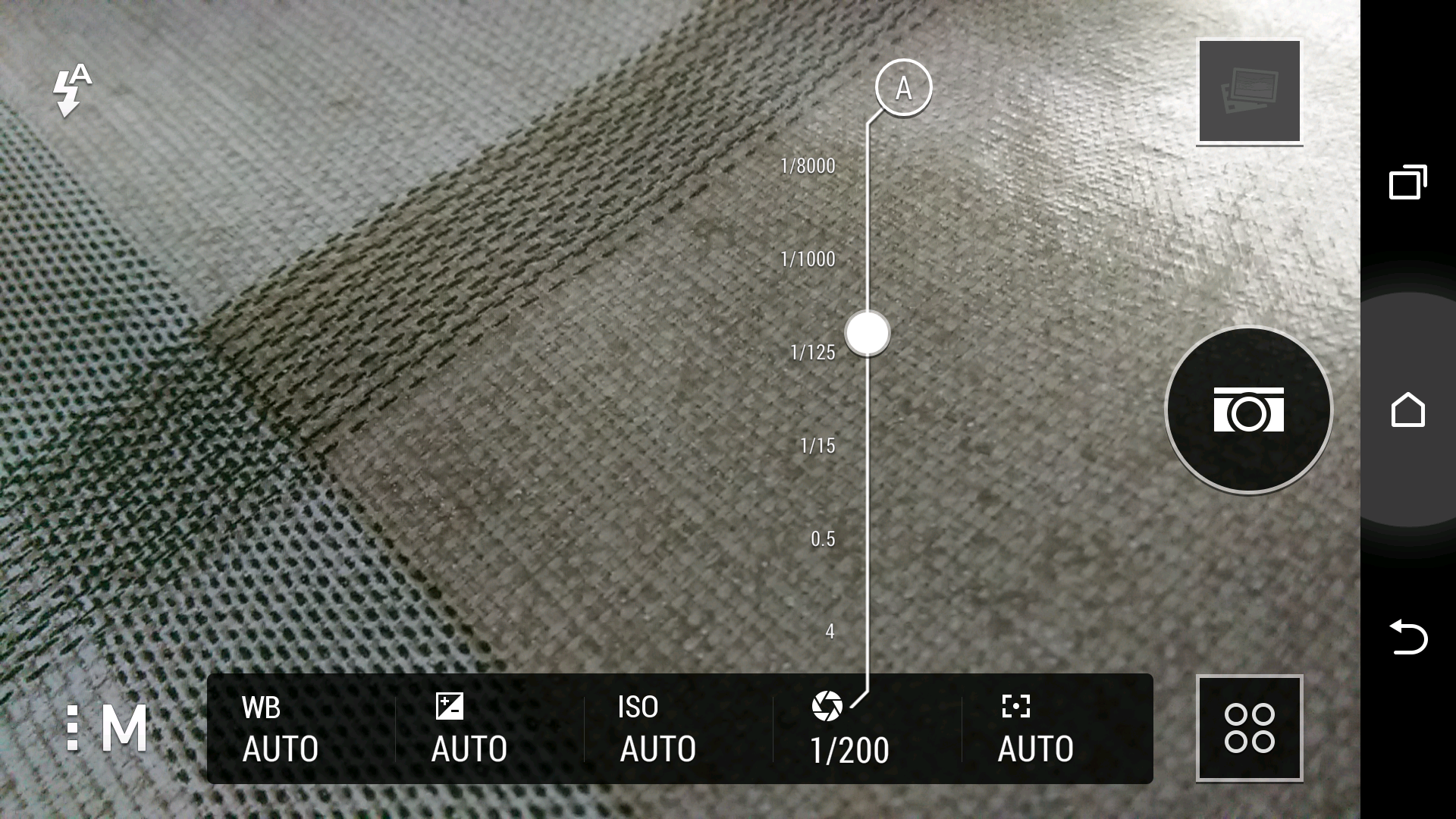
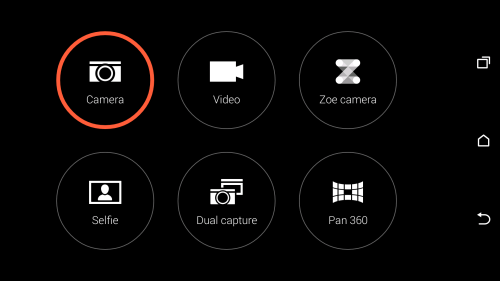
So Camera mode is the simple way to take a photo in full auto. Or you can within that mode adjust the flash mode, ISO, EV, AWB, Camera effects, Camera settings and camera mode. Camera modes are auto, night, HDR, sweep panorama, anti-shake, manual, portrait, landscape, backlight, text and macro. In manual you can also adjust the metering point, shutter duration as well. The camera settings include make up level, image adjustments, crop, grid, geo tag, review duration, self timer, storage, continuous shooting, auto smile capture, touch to capture, shutter sounds, volume button to either be used a volume, capture or zoom, tips and tricks and reset option. The camera effects include normal, distortion, vignette, depth of field, dots, mono, country, vintage, vintage warm, vintage cold, grayscale, sepia, negative, solarize, posterize and aqua. With distortion, vignette, depth of field and dots you can adjust the effect level.

In video mode you have settings from full HD at 1920 x 1080, HD, QVGA and MMS. After recording a video you can trim its down in the editing options.

Selfie mode. Uses the front camera to record photos or even a video. Also has a 3 second countdown.

Dual Capture – a bit pointless but takes a picture uses the front and rear cameras. You can move the front image to wherever you want on the screen.

Manual mode – if you use certain settings on a regular basis you can save your own camera mode that will appear as a new mode in the mode screen.

Zoe – this is slightly improved from the original HTC One. It still takes 1 sec before and you press the shutter, 20 photos but if you press and hold the shutter button for more than 4 secs “locked” appears. You can continue shooting now in video. After recording a Zoe you have additional editing options. These include GIF creator, Sequence Shot, Always Smile and Object Removal.

I will post samples from some of the modes detailed above, but if you have any requests please let me know. Tomorrow I will post my theories on the Ultrapixel.

Twitterific 5.7 goes freemium – will all apps go this way?

The Iconfactory has changed their business model for Twitterrific making it a freemium app rather than a paid app at £1.99.

This means anyone can download the app for free as an ad-supported application. There is also a selection of unlockable features available as in-app purchases.

Features such as the today view, translation and removal of ads are now offered as paid upgrades. Most notably, enabling push notifications now requires a paid upgrade.

I just wonder if this is the future of all apps. What do you think?

Typo Keyboard hits stumbling block

Via Reuters.

“A U.S. district court judge on Friday granted BlackBerry a preliminary injunction against the Typo iPhone keyboard case for infringing on certain patents, effectively banning sales of the Ryan Seacrest-backed device.

In a ruling handed down by U.S. District Judge William Orrick, BlackBerry was able to establish a “likelihood” of proving that the Typo Bluetooth keyboard infringes on its patents, reports Reuters.

That knowledge, combined with Typo’s inability to challenge BlackBerry’s patents, is enough to slap the company with a preliminary injunction banning sales.

“BlackBerry is pleased that its motion for a preliminary injunction against Typo Products LLC was granted,” BlackBerry said in a statement. “This ruling will help prevent further injury to BlackBerry from Typo’s blatant theft of our patented keyboard technology.”

I must admit when I first saw this accessory I knew BlackBerry would be left with no choice but to sue the company.