Category Archives: Reviews

LG G Flex – First Impressions

So currently I have the Samsung Galaxy S5 which I like a lot. However over the weekend, whilst browsing I noticed the LG G Flex had been reduced considerably at Asda Direct to £379, so I decided it was worth seeing what all the fuss was about and whether it was a novelty or useful piece of tech.

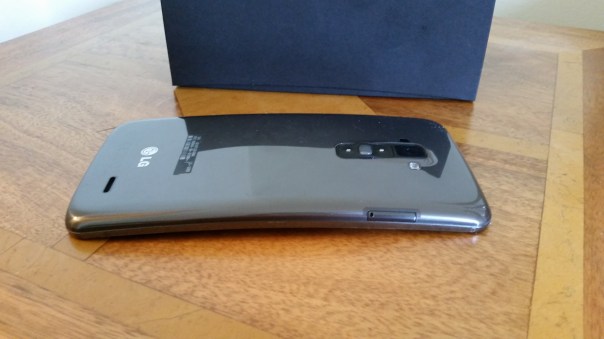
So, after ordering it arrived the next day in the post. The box is curved inwards at the topside which is a neat touch highlighting the fact that you are about to hold your first curved phone, that is able to bend and has a self healing back. And before anyone asks, it does go flat. Freaky or what.
2014-05-05 14.28.08

The next oddity is the physical buttons. They are on the back. Sounds weird and for the first hour they are oddly placed, but I grew to find them really handy and easy to use. It meant that despite the large screen size I didn’t have to fumble to a button on the top.
2014-05-05 14.28.32

These buttons on the back have the volume up and down keys, power and notification light built into the power key. Screen shots are really simple too as you hold down the power and volume down key together. If you are taking a selfie using the rear camera, the notification light changes colour when your face is lined up properly.

The G Flex does not have android kitkat yet, although it is due to roll up in about 3-4 weeks time. The differences are minor but it will still be worth updating.

The screen is only 720p for a 225ppi resolution. If you have the Samsung S5 next to you, then the difference is obvious. But like anything you soon get used to the screen. LG have a custom skin and launcher which can be themed to your hearts content by accessing a number of free themes in the LG Smart World. You can also get themes to change the look of the LG Keyboard. At the bottom you have soft menu keys. Again, you can change the positioning and have either 3 or 4 on screen menu keys. Then there are the quick apps, small apps that you can have floating on the screen. You can also have up to 3 apps just swiped off to the side using 3 fingers, ready to bring back as and when needed.

The LG G Flex also has double tap to unlock and lock. Kit kat update adds code unlock.

The LG built in keyboard was very good, with optional swipe too and a permanent row for the numbers. Symbol shortcuts were also possible on a number of the keys.

That curve. My wife said it looks like you have had an accident and bent your phone. And if you did not know any better then you would think that. But it weirdly does makes media more engaging. Even games felt great on that large screen.

The 32gb G Flex has 24gb user storage available. Despite such a large amount taken for all the LG skinning, the Flex is super nippy. I could not slow it down so far, despite installing loads of apps and games. The G Flex has a snapdragon 800 processor and 2gb ram, and a standby battery that seems to last me nearly 2 days. Crazy good.

The infra red blaster in on the back next to the camera module. So just hold your phone upright and use the remote software on screen to control your TV etc… And the Quickremote app works very well and it feels far more logical and easier to lift phone upright slightly to operate your devices.

So far so good and all I can think is at £379 this is a great value 6 inch smartphone, that happens to have a flexible screen and body and a self healing back. Also, with this phone there is no reason to opt for a tablet as well. But when it cost £800 it was not worth that amount of money.

Episode 14 – Gav & Dave’s Tech Podcast is alive – Please RT

As you know, I co-host a weekly podcast with David from UKMobileTech called Gav & Dave’s Tech Podcast. It is a light hearted tech podcast broadcast bi-weekly. To subscribe click here for iTunes or copy and paste this link into your favourite podcast app.

Episode 14 is now live for your listening pleasure.

First Impressions of the Sony Xperia Z2

Firstly, I would like to thank my neighbour who lent me their new Xperia Z2, for a temporary swap for my Samsung Galaxy S5. I had a day with the Z2, at the end of which my neighbour was so relived to get back his phone and return my S5. And in one day, I can fully understand why.

So, for me the differences between the S5 and Z2 are huge. The Z2 is speedy to use, no lag like the S5. Great camera that does need software optimisations still, but its starting base is so much better than the Z1 and Z1 Compact. I used the Z2 is auto mode and also switched to manual to see what more I could tweak out of the camera shots. The photos were generally all very impressive and if you were to ask which phone had the best camera the S5 or Z2, it really is a close call. But my winner is the S5 for more natural looking shots, a great HDR mode and 16mp shots as standard versus the 8mp Sony Z2. But it really is a close call, and at times the Z2 took the better shot.

The industrial design of the Z2 is superb, much nicer than the S5. But a fingerprint magnet. The screen was gorgeous, but weirdly I preferred the S5 screen. The Z2 has a much better loudspeaker, in fact it has stereo front facing speakers. Also whilst the S5 is water and dust resistant, the Z2 is water and dust “proof”.

Sony’s software skin is gorgeous on the Z2 and there is a lot to like when using this phone. It makes me feel engaged and happy to use it. The S5 inflicts no emotion whatsoever although it is technically superior and ultimately that wins the day for me.

I really enjoyed using the Z2, and I just cannot get over how much faster it is to use the the lag fest Samsung S5. In reality, if you did not have another phone to compare the S5 to, it is fine but at times it seems to lag too much. Maybe that’s why Sony fitted 3gb of ram, whereas Samsung only has 2gb in the S5!

Samsung launches the Galaxy S5 in 16gb & 32gb – is 16gb enough?

Samsung announced the S5 would be available in 16gb and 32gb.  In some countries the 32gb has surfaced.  But not the UK and in fact it’s not available in most places.

This is due to Samsung and the networks choosing the cheaper 16gb model as there is a memory card slot.  And the less storage you have the more you need to stream and the more expensive your contact will need to be. Now if Samsung only made a 32gb with micro sd card support that would be ideal.

But can you manage with 16gb? Yes if you use a memory card and don’t play many large games.  And your phone is a Samsung and the developer builds in some support for memory cards.

Let’s have a look at my two week old S5.

image

Out of 16gb, 4gb was already used up by Samsung. By the time I installed all Samsung’s apps, extras and my apps and games I had a total of 118 apps of which 40 were games. I have a 64gb memory card installed.

image

Plenty of space left on the card but remember video recording will swallow that fast.

Now the S5 has a limited support for moving part of an app to the memory card if supported by the developer. 

image

Above you can see that NFS Most Wanted installed 2gb on the memory card leaving about 15mb for the app in main memory.  But not all games support this.  Ah but not so fast. Look again. The apps that have the right box ticked do have part installed on the micro sd card. Those that don’t have been still installed into the internal memory but under a section called sd card. Confusing.

image

AVP and Shadowgun only installed to main memory even when using the option shown below where you can force the app to use the memory card. 

image

Prince of Persia allowed me to move most of the app to the memory card but not all of it. New blockbuster games are busting above the 2gb mark and it’s time for phones to have 32gb as standard especially as most phones don’t support this move to memory card and Google doesn’t like it either.

In new versions of android the memory card is only meant for music and photos mainly,  not for installing apps and games.

However,  so far I have managed with some careful management.

Samsung Wireless Charging Pad review

2014-04-23 17.32.16

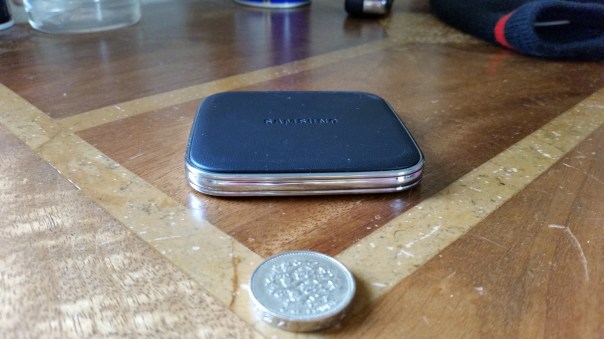
The new Samsung QI wireless charging pad arrived a few days ago. Unlike other QI pads I have owned this one is small in size, insanely small and very unobtrusive. It is half the size of the Samsung S5. In fact it has the same depth too. In the small box you get the pad and a manual. Nothing else. Not even the Samsung 2 Amp Mains charger that you will need to use this product. If you use a lower than 2 amp charger it will flash its light. So that means having to use the 2 amp charger that came with the S5. So if you want another pad you will need to buy the official Samsung 2 Amp mains charger as well. At £34.99 I was not impressed it did not come with a charger.

It has a indicator light. When you connect a power source it goes from red to green to orange. The light flashes orange when not charging properly. It flashes green when using a charger under 2 amps.

The advantage of this method of charging is the intelligent electronics that stop the phone being charged once fully charged. It is also simpler just to place phone on top and you therefore won’t need to use the USB port on the phone and in turn open the flap that covers this port. But you will need the Samsung Wireless back cover for this to work. I am still waiting for mine to arrive in the post.

If you want one of these Clove Technology have them in stock. http://www.clove.co.uk/samsung-s-charger-pad

Samsung Galaxy S5 – Battery Life feedback

I thought I would provide some feedback on the battery life of the Samsung Galaxy S5. First test was normal usage, no power saving tricks used whatsoever, screen nice and bright too. I did plenty of podcast listening via wired headphones and or bluetooth music streaming.

Below are the results.
2014-04-21 20.46.34

2014-04-21 20.46.40

Not too shabby. 15 hours usage and 4.5 hours screen on time. Also note that my S5 is a power user setup so has everything running in the background and tons of notifications. I was not at home when I hit 1%, so I switched to “ultra power saving mode”. Several hours later, I got home and still was at 1% battery.

So my next test was to use the normal “power saving mode”.
2014-04-22 06.25.11

image

image

As you can see the usage obtained was considerably longer. I gave up in the end at 5%. It would have gone about another hour. Whilst the screen on time seems lower there was a lot of streaming and tons of background tasks on the go.

So the next option is “ultimate power mode”. This turns the S5 into a near dumb phone and can last a huge amount of hours even on just one percent.
image

So if you have the S5 you shouldn’t run out of battery until you get home with all the different power saving modes .

Samsung Gear Fit review

2014-04-18 13.10.48

I was out shopping with my wife and noticed my local O2 stores in Plymouth, Devon had the Gear Fit and Gear 2 Neo on display, and both in stock. I really do surprise myself sometimes with such “Superman” eyesight.

I choose the Gear Fit as it looked a lot better than the bland Gear 2 watch. Ironically, the Gear 2 Neo and Fit were priced the same at £179, or £50 off if you bought them with a Samsung S5. Anyway, in the box you got the mains charger, clip on plastic cradle to charge the Fit and some leaflets.
2014-04-20 08.01.55

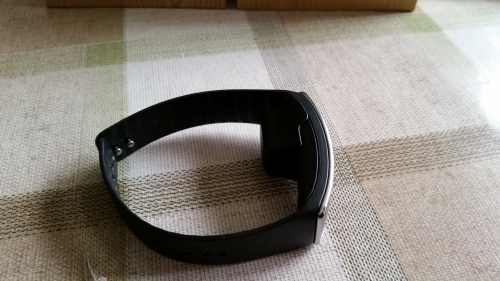
And this is the oddity. The Fit whilst it has a curved amoled screen, looks damn odd to have to clip on this piece of plastic, which no doubt people will mislay. The cradle has a micro usb slot on the side. I was not too impressed with the overall thickness of the device.

The Fit is meant to last 4-5 days light use, 3 days heavy use, has an IP67 waterproof and dustproof rating, runs Tizen, and has a built in heart rate monitor. That battery life is overstated. More on that later. To set up the Fit you need to download the Gear Fit Managaer from Samsung App store, a relatively simple process.

2014-04-19 06.50.08

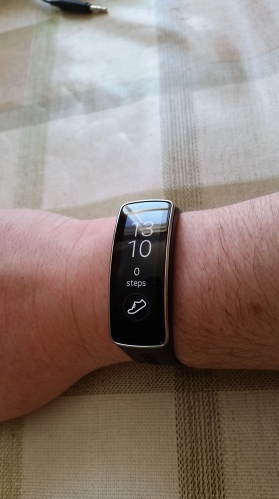
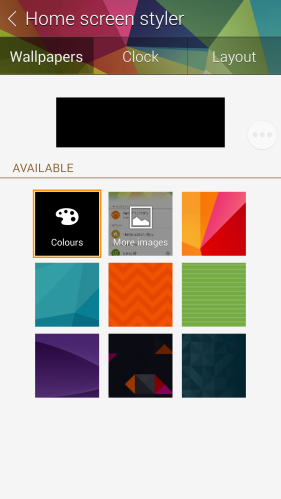
You then have access to a number of customisations. I personally as you can see from the shot of the Fit on my wrist choose a black background.

2014-04-19 06.50.20

2014-04-19 06.50.33

Below is a list showing all the functions available on the Fit.

2014-04-19 06.50.41

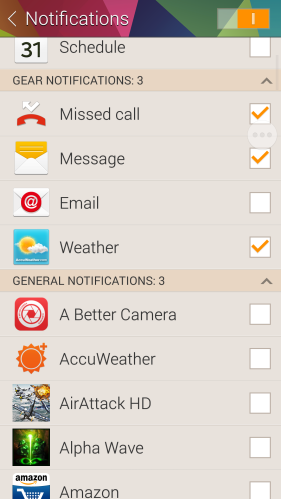
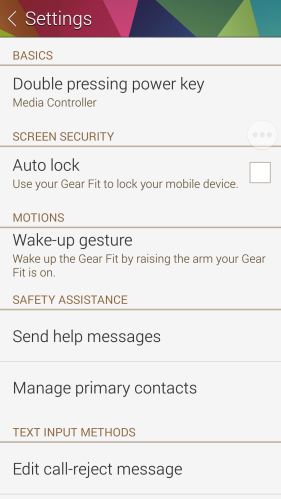
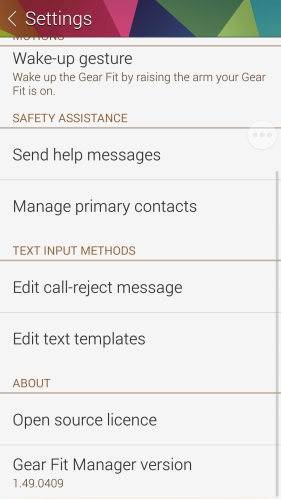
You then have a host of other options as shown in the screen shots below.

2014-04-19 06.50.55

2014-04-19 06.51.17

With regards to notifications, apart from Phone Call Rejections and Text Messages templates there is no other interactivity available. You can merely browse through the notifications, delete individually or delete all. The delete all is great as it covers all notifications from all the apps in one go.

2014-04-19 06.52.04

Also, deleting notifications on the Fit does not delete them on the Samsung device. It is worth noting that the Fit works with 17 different Samsung devices.

2014-04-19 06.52.15

So the setup is really simple. Next open S health and make sure you can sync the devices. This should be fine, but I changed the sync to the shortest delay of 3 hours. The delay between syncs is all the way up to 24 hours. Also, in the Fit settings you have a few more options from allowing motions to turn display on, what to display by default, which wrist the Fit is fitted too, select what double tapping the home button activates, changing the display to vertical (this is a must in my book) and the display brightness. The brightness scale is 1-5 and 6 is outdoor mode but rather uselessly only stays active for 4 minutes. In bright sun you will need 5, as if you set to 6, it then defaults back to level 4.

So what is it like in use. Actually not too bad. I tried the Samsung S Sleep app which was meant to provide information from the Fit about your sleeping. It did nothing apart from blind my wife every time I moved the Fit flashed the time in front of her eyes. So using the Fit with the S5 and the S Health app was a much better experience. The user interface of the Fit works really simply and is hassle free. Basically it does what it says on the tin!

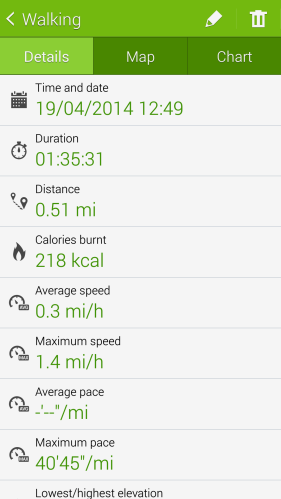
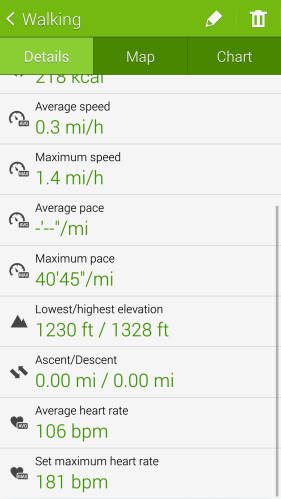
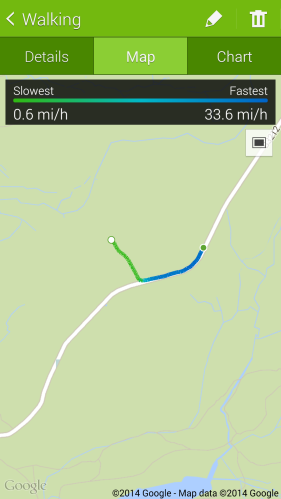
If you want to use the heart rate you can measure this manually by selecting the option, but when you choose exercise on the Fit and select the type of exercise, it monitors everything in real time. Below is the information provided by the S Health app after I walked for 90 minutes over some demanding gradients.
2014-04-19 13.41.45

The Gold award icon also appeared in the Fit display so I knew I had achieved my daily 10,000 steps already.

2014-04-19 13.49.40

Plenty of data for those that like this sort of thing.

2014-04-19 13.49.47

You can always check progress during the activity as well from duration and heart rate etc..

2014-04-19 13.50.16

The GPS data is taken from the Samsung S5.

So do you think it looks impressive? The Samsung S Health app is very detailed and well thought out, but I just cannot get over the thickness of the Fit. From a distance even a small distance it looks good, but it is bulky and then needs the additional piece of cradle plastic to charge it. But the killer reason why I won’t be keeping it is the battery life.

When I got home, I was busy with household tasks, so left the Fit to charge for ages. After just 24 hours and using it for a 90 minute walk, the battery was at 44%. So, after a few charges the battery life improved, but with only 2 days battery life. Now if I used it to monitor say a cycle commute to work and back and my work out in the gym, I doubt it would last the day.

So in summary, it is reasonable, just not good enough yet.

Episode 13 – Gav & Dave’s Tech Podcast is now live – Please RT

As you know, I co-host a weekly podcast with David from UKMobileTech called Gav & Dave’s Tech Podcast. It is a light hearted tech podcast broadcast bi-weekly. To subscribe click here for iTunes or copy and paste this link into your favourite podcast app.

Episode 13 is now live on Easter Sunday.

If you get a moment and have enjoyed the podcast, please leave some feedback in iTunes. Thanks.

Review Highlights from the Latest Phones – HTC One M8, S5, Z1 Compact

Below are the quick links to reviews I have written from the latest phones available at present. If you click the menu bar above, and select reviews phones, there are another 20 plus phone reviews to read.

Samsung Galaxy S5 review

HTC One M8 review

Sony Xperia Z1 Compact review

Samsung Note 3 review

Sony Z Ultra views and Camera Samples

Motorola Moto G review

Sony Xperia Z1 Review

Nokia Lumia 1520 review

Nokia Lumia 1020 review

Nokia Lumia 925 review