When Apple launched the iPhone 7 Plus, Portrait Mode was not available publicly. Then it arrived as a beta but as time has moved on a few more software updates have improved its results.
Below is an example of a shot I took of a wonky road sign on Dartmoor. I imagine the bending of the sign was done by a free roaming cow that wanted to scratch its back and in the process bent the edges.
What I like about this photo, is how crisp the edges are including where the metal of the sign has bent at the corners.
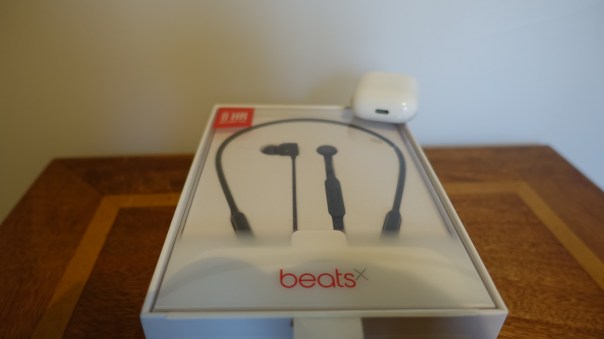
BeatsX Wireless headphones went on sale on Friday 10th February 2017 on Apple’s website. They are available in grey, white, blue and black and cost £129.95.
The Key Features / Specs
– Experience authentic, clear sound
– Up to 8 hours of battery life
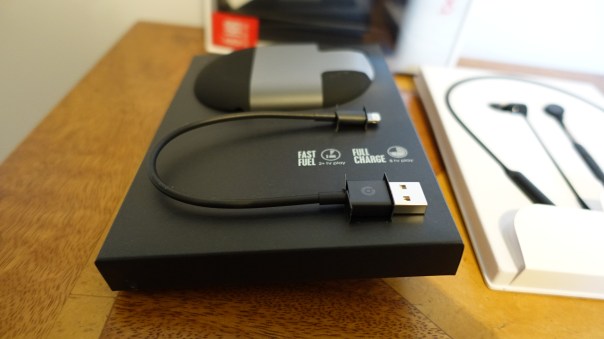
– Fast Fuel, a 5-minute charge gives you 2 hours of playback
– Lightning to USB-A charging cable (short length cable in box)
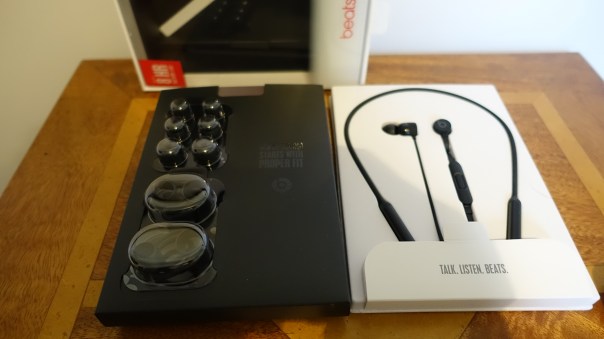
– Pocket-sized carrying case
– Unique Flex-Form cable provides all-day comfort and easy pocket portability
– Eartip options provide a personalised fit and secure-fit wingtips available in box offer added stability
– Class 1 Bluetooth
– Apple W1 Chip
– RemoteTalk allows you to take calls with a built-in mic, play music, adjust volume and activate Siri
– Charges from a lightning port, short cable provide in box
– Noise isolating
How To Setup
They instantly set up using the new Apple W1 Chip and iOS 10. Just power on and hold near your iPhone, a notification box appears, tap connect and after that you have simultaneously connected to your Apple Watch, iPad and Mac. This means no more pairing with your other Apple devices as the pairing is synced across using iCloud. The only exception is the Apple TV for some reason which will need manual pairing as will any non Apple device.
The Sound Quality
Apple describe the BeatsX sound as “authentic, clear sound with optimised noise isolation for an immersive listening experience. An innovative acoustic design delivers a clean treble response and distortion-free bass for the most natural tonality across a broad range of genres.”
Seriously, are the BeatsX possessing a natural tonality across a broad range of genres? Well, blow my socks off, because these are the first Beats headphones that have a more natural tonal response. That means there is soundstage separation (medium), there is treble and decent midrange, something that is missing off many older Beats products. And these do deliver a decent punch too.
In fact, I tried these with every genres including pop, rock, classical, dance, jazz, blues, new age and many more. The BeatsX did a stellar job with all of these plus provided a good amount of noise cancellation.
Also as these have the Apple W1 chip, the bluetooth connection range is crazy long and without any signal dropouts.
UnBoxing, Video Review and Comparison versus AirPods and other Bluetooth Headphones
Now its time to watch the next part of my review. This includes a quick unboxing, sound test, comparison with AirPods and other headphones.
Conclusion
The BeatsX are somewhat of a surprise sonically as the midrange and treble are not lost to the bass line. In fact they sound really good. With the iOS benefits of instant pairing across all Apple devices, music controls and more, these are highly recommended and for many will be preferred over the superb AirPods.
Finally, I just want to say a quick thank you to the excellent customer service at the Apple Store in Plymouth.
For those who listen to the Tech Addicts Podcast, you will have known I have not been able to record the last 2 weeks due to being poorly.
I picked up some sort of virus that took me out for a few days, but also left my voice rather croaky 🙂
Anyway, I now have several hot gadgets that I have been testing in the background, ready for publishing the reviews and videos.
So coming up for review will be the –
– Huawei Mate 9 – don’t forget to scroll back several weeks to see all the photos taken from this phone.
– Plantronics Backbeat Pro 2 Bluetooth Headphones, the update to the incredible original version. These are the new flagship Bluetooth headphones from Plantronics.
– Austell & Kern XB10 APT-X High Resolution Music Bluetooth Adapter with optional balanced output. This is a dream gadget for going wireless with high quality wired headphones.
– Zecti 70 inch tripod. After reviewing the 50 inch version, Zecti has a new 70 inch model which I bought yesterday. Can’t wait to see this and put it through its paces.
– Vodafone Smart Ultra 7 – great value phone from Vodafone. I reviewed the Smart Ultra 6 a while back, so I am looking forward to this.
– BeatsX Wireless headphones. Just released today. I will see how these compare to the AirPods and other bluetooth headphones.
These will all appear over the next few days to a week or so.
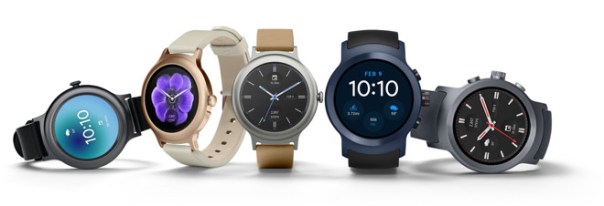
Last night Google announced the new Android Wear 2.0 update and LG announced some new watches that run the new update.
So how does Android Wear 2.0 compare to the Apple Watch?
– Complications are now included in Android Wear. Finally!
– Android Wear now allows switching between the different watch faces like the Apple Watch.
– GPS enabled android wear watches now work standalone, something Apple introduced months ago.
– Android Pay is now included if the watch has NFC
– Now its possible to select which apps are installed on the android wear watch.
– Google Assistant vs Siri – You decide which is better 🙂
– Android Wear now has its own version of the Google Play store
– LTE – Mobile connection on android wear are possible without a phone. The Apple Watch does not offer this.
– Google Fit has been revamped and now has auto workout detection.
Whilst it is clear Google has copied or has been inspired by Apple, it is great to see such big and worthy improvements to the android wear platform.
I sincerely hope android wear is now successful as Apple needs some competition for its Apple Watch.
Imagine being able to control your home automation systems and connected objects from a single and highly customizable interface as I have done above with several of my home devices. An app called Imperihome for android and iOS allows you to do this.
You could for example wall mount a tablet or use your smartphone to control your smart home the way you want and without any required modification on your current installation.
Systems that are linkable include –
– Logitech Harmony hub-based remotes (universal remotes)
– Musaic HiFi speakers (audio HiFi system)
– Fitbit (fitness and health devices)
– XeeConnect (connected car module)
– Sonos (audio HiFi system)
– Kodi (home theater software, formerly known as XBMC)
– LIFX connected bulbs (lighting system)
– Parrot Flower Power (plant sensor)
– Legrand EcoCompteur (energy consumption sensor)
– Myfox Home Control 2 (security and home control system)
– Philips Hue (lighting system)
– Vera, VeraLite (ZWave controller by Micasaverde / Vera Control) UI5, UI6 and UI7
– ZiBase (Multi-protocol controller by Zodianet)
– eedomus (ZWave controller by Connected Object)
– Fibaro Home Center 2 (home control system by Fibaro)
– IPX800 v3 / v4 (Relay controller by GCE Electronics)
– Eco-Devices (Teleinfo energy counter by GCE Electronics)
– Netatmo Weather Station and Thermostat and Welcome Camera
– Zipabox (Multi-protocol controller by Zipato) / Cameras and security features not yet supported
– Systems implementing the ISS API (ImperiHome Standard System)
– MJPEG, MPEG4, h264 IP cameras
– Withings – activity trackers, scales, blood pressure monitors
– Jawbone UP
And more systems are being added constantly.
Options include –
List View – Smartphone optimized portrait layout, ability to hide devices and groups, notion of favorite devices, grouped actions (all on/off)…
Dashboard View – Tablet optimized landscape layout that matches the wall-mounted tablet use case, different layouts fully customizable, place holders for smart widgets, automatic wake-up using camera move detection. The screenshot shown at the start is one of my dashboard views.
Highly Configurable – Devices icons animated and changeable with built-in or personal images, possible customization of sensors units, customizable refresh rates, ability to define a custom name for each device, export/import of your configuration…
Use Power of Your Device – Fast and responsive user interface, voice recognition, NFC Tags (android), shortcuts on Android launcher, Android Wear & Sony Smartwatch 2 integration… Works great on my Huawei Mate 9 for example.
Charts Module – Built-in, generic, compliant with several systems, configurable timeframes, integrated in the different views…
Third Party Integration – ImperiHome Control API (android), integration with Tasker, ImperiHome Standard System for home-made installations
Ultimately, you are only limited by your lack of imagination in many cases. I have used Imperihome for over 2 years and it has been vastly improved in that time. In the screenshot shown at the top I have linked in 4 different connected systems on to one dashboard. From the one dashboard I can see all my security camera footage, adjust all my Philips Hue lights from fading, on/off and colour changes, check all the data from my weather station and much more. Have a view of the video below too, to give you a better idea of what is possible.
Apple iPhone, Services, Mac and Apple Watch Set All-Time Records.
“CUPERTINO, California — January 31, 2017 — Apple today announced financial results for its fiscal 2017 first quarter ended December 31, 2016. The Company posted all-time record quarterly revenue of $78.4 billion and all-time record quarterly earnings per diluted share of $3.36. These results compare to revenue of $75.9 billion and earnings per diluted share of $3.28 in the year-ago quarter. International sales accounted for 64 percent of the quarter’s revenue.
“We’re thrilled to report that our holiday quarter results generated Apple’s highest quarterly revenue ever, and broke multiple records along the way. We sold more iPhones than ever before and set all-time revenue records for iPhone, Services, Mac and Apple Watch,” said Tim Cook, Apple’s CEO. “Revenue from Services grew strongly over last year, led by record customer activity on the App Store, and we are very excited about the products in our pipeline.”
Our outstanding business performance resulted in a new all-time record for earnings per share, and over $27 billion in operating cash flow,” said Luca Maestri, Apple’s CFO. “We returned nearly $15 billion to investors through share repurchases and dividends during the quarter, bringing cumulative payments through our capital return program to over $200 billion.”
WOW – APPLE IS SURELY DOOMED (NOT).
Note the additional points below which are mind blowing TBH –
– 78.3 million iPhones sold with average price per iPhone up by $4 dollars. This was driven by the higher priced Plus models/higher storage options. This is also a new record for number of iPhones sold.
– China – sales decreased by 12% from this time last year
– 13 million iPads (19% drop) and 5 million MACs were sold (MACs returned to growth too)
– $7 billion made in services – huge number and this is only going to get bigger
– $4 billion in other services which includes Apple TV, Apple Watch, Beats products, iPod and Apple-branded and third-party accessories (8% decline)
– Apple Watch – best quarter for units and revenue – demand was so high they couldn’t keep up!
– AirPods – Apple still trying to catch up with demand!
– Enterprise – major partners with IBM, Cisco, SAP and many more
– HomeKit – best level of security – loads more products announced this month. Also Apple is unmatched when it comes to securing your home with HomeKit-enabled door locks, garage doors, and alarm systems
– Apple Pay transactional volume up 500%
Apple Watch, staying fit, being more active and New Year resolutions. Sound familiar.
My New Year resolution in 2017 was to continue my weight loss and improve my fitness. As you can see from the screen shot above, I have cleared all 3 activity rings on my Apple Watch every day this January, with just today to complete for the perfect month.
To recap, to clear the 3 rings, you need to first do enough calories to hit the calorie goal, exercise for 30 mins per day whereby your heart rate registers higher than just walking and stand for 1 min minimum in at least 12 hours per day. Apple’s method is slightly different from a few other fitness devices eg Fitbit which set a target of 10,000 steps per day. Apple’s approach is to ensure you stay more active during the course of the whole day and raise your heart rate to complete 30 mins exercise.
This year I decided to set a lower calorie target of just 400 calories per day. This meant if I was having a long day at work in meetings or driving or something else I had a higher chance of hitting this target. I don’t know about you, but if I had failed to hit the target one day during January, I could have easily given up. With a lower target, I am feeling more and more motivated and pleased that I am smashing my target. In reality, the lowest amount of calories burnt per day is 700. Every day I complete, makes me more motivated to complete the next day. I also like receiving the various achievements awarded in the activity app. After a successful day today, I will get my successful month award.
The next difficult part is completing 30 minutes exercise per day. The simplest solution I have found is to listen to some upbeat energetic music, and walk/jog on the spot at home. Sometimes, exercise minutes are registered when I walk my dogs but normally walking my dogs doesn’t translate into enough exercise minutes. Of course I could go to the gym, but with such a busy life and living on rural Dartmoor, going to a gym is not practical.
The final aspect of hitting the daily goals, is making sure you are sharing your progress with a suitable friend or two. This really helps maintain focus and adds a friendly competitive nature to the challenge.
Now if you don’t have an Apple Watch, all of the above still applies. Don’t set an unrealistic tough goal for each day. Set one that you know you will hit to keep you motivated and compete with friend or two.
I recently reviewed the new AirPods from Apple. To read the review, Click HERE to find out why I was blown away by these and still am.
Tim Cook went on record to say AirPods were a runaway success and based on my views and others, it does not surprise me that these are so successful.
“Now according to a report by Slice, the AirPods made up 75% of all sales in the USA in December 2016. Before the launch on December 13, Beats occupied 24.1 percent of online revenue for wireless headphone sales, according to the report, with Bose following behind with 10.5 percent, then Plantronics and Jaybird with 7.8 percent and 7.45 percent respectively.
For the period after the launch, Apple suddenly became the dominant wireless headphones brand, moving from having no share at all to occupying 26 percent of the market. Revenue derived from Beats wireless headphones dropped down to a 15.4 percent market share during the same time, and though Jaybird and Plantronics dropped down to below 3 percent each, Bose managed to improve its standing to 16.1 percent.”
So it seems and comes as no surprise that out of nowhere, Apple is likely to soon be, if it isn’t already the number one headphone manufacturer in the world!
Over Christmas I had time to experiment with different Apple Watch straps. I wanted to make my plain Series 2 watch more like the Apple Nike Watch. So I bought 2 different brand Apple Watch straps that claimed to look identical to the official versions.
So what I did was go for a black/yellow finish and the same Nike looking style strap, but in a colour not offered by Apple officially. I picked the red/black finish.
My observations are the plastic used in the third party straps are not of the same quality as Apple original straps, but they do costs over £30 less. As the straps have holes, they are slightly lighter, and they allow your skin breathe more.
To give you a better perspective, I have filmed a short video capturing more of the differences, comparisons with official Apple straps and showing the straps against some cases, for that perfect colour coordinated look.
Video Review
In my video review, I am hoping you get a better perspective of the different straps, the quality versus and Apple original strap and some colour coordination with some official Apple iPhone cases.
Conclusion
My little experiment in discovering Nike style Apple Watch straps was a huge success. I personally prefer the black/yellow mix although I at times I like switching back to the red/black strap. The Nike looking straps looks gorgeous!
Useful Links
iMiWell Black/Green Nike Style Apple Watch – Click HERE.
Elobeth Nike Red Style Apple Watch Strap – Click HERE.
Other colours and mixes of straps are shown on using above links.
Apple created a new achievement award for 2017. It’s goal was to help people kick start and get back on track with their health and fitness activity. To achieve this new achievement award, you have to clear all 3 activity rings on the Apple Watch from a Monday to Sunday. In addition to receiving the reward, you also received new stickers in the messages app.
So I wondered whether I could focus and hit this new award. In the first week I hit the target. In fact on most days I exceeded the required elements for each activity ring. This also meant I lost 3 lbs. On some days to make sure I hit the minimum 30 mins exercise I did do a fast paced walk on the spot.
So my goal for 2017 is to undo the damage done over Christmas and New Year and continue my quest to get slimmer and healthier.
Remember, you don’t need an Apple Watch to stay fit, in fact you don’t need any fitness device, but if you do have a tracking device of any kind, I have found it has helped to share my progress with a friend. In my case, I am sharing my data with my wife. When either one of us clears a ring, the other is notified. The end result is it keeps both of us on track in a friendly competitive way.
So whatever your plans for 2017, good luck, stay fit and healthy. At the end of this month, I will update you on my progress. Hopefully, it continues the way it started.



 Gavin's Gadgets & Photography