Category Archives: Apple

Netatmo Welcome Camera for iOS & Android – Review – Updated 4 months later

Welcome to my review of the Netatmo Welcome Indoor Camera.

  
The Netatmo Welcome Indoor camera unique selling point is its ability to recognise faces and then send you notifications to your phone.

See video from Netatmo below showing this in action.

The Key Specifications

– Dimensions – 45x45x155mm
– In the Box – 1 x Welcome camera, 1 x USB cable, 1 x power adapter, 1 x 8GB micro SD card
– Build – Single piece of durable aluminium shell, Matte black plastic piece infrared transparent.
– Hardware Requirements – High-speed Internet connection needed, Public hotspots not supported.
– Connectivity Specifications – Ethernet RJ-45 port: 10/100 Mbits, Wireless: Wi-Fi 802.11 b/g/n (2.4G)
– Camera – Video sensor: 4MP, Resolution: Up to 1920×1080
– Minimum iOS 8 for iPhone / iPad, Android 4.3 minimum
– Browser Support – Webapp available for the two latest versions of: Chrome, Safari, Firefox, Internet Explorer
– Monthly Costs – Nil, Free to Use, App available on the App Store / Google Play.Free access to your camera online.
– Data Storage – MicroSD card up to 32GB (8GB class 10 MicroSD card included)
– Faces – Max 16 faces

The Hardware


The Netatmo Welcome camera is a lovely piece of hardware and doesn’t look like a typical camera. This means it gets blended into your environment without people gets paranoid they are being “watched”. In fact, you forget its actually there. On the rear there is an ethernet port, micro SD card slot and micro USB port. The front is minimalistic.

Background Notes for Review

Notes – I originally reviewed this after 3 weeks. Further down is my update after 4 months following a significant firmware update that added lots of new features which are documented along with a tip if you have dogs.

I have been using the Netatmo Welcome for 3 weeks now and overall have been pleased with its operation and results and intend to keep this indefinitely as my home connected security indoor camera. I also have several IP Cameras which were a total nightmare to setup and configure as remote access involved changing my home router configuration. I have now retired these. In terms of other connected devices, I have a Netatmo Urban Weather station which is coming up to 2 years old and a range of lights that are controlled from my iPhone and or Apple Watch. Due to protecting my own privacy, screen shots of the app in operation have been edited to remove views of my home.

The Initial Setup

Netatmo have made the first setup as simply as possible. I setup my Netatmo Welcome camera using my iPhone 6S Plus. I downloaded the Netatmo Welcome app from the Apple App Store and then followed the on screen setup instructions provided by the app. The app asks permissions to share Wi-Fi setup from your iPhone to the Welcome camera and literally within 5 minutes the camera is connected. Points to note. The Welcome camera only operates at 2.4G . Over the next 24 hours a new firmware arrived and got installed on the camera and the app showed me faces and asked me to identify who the respective people were. For each member of your house, a face profile gets created.

The Operation

The concept of the Netatmo Welcome camera is simple. It learns all the faces of people who live in your home/flat and then notifies you when somebody comes home and tells you who they are and also if somebody arrives who is not recognised. When movement is detected, it records a clip onto the micro SD card which can be streamed back on to your phone and or downloaded remotely to your phone as well. When at home you can also play back the recorded video clips.


Other options include a range of privacy and advanced security options. For example if your Netatmo password gets changed, or someone logs into your account you can receive an email. Netatmo will also block your account if there are too many failed attempts occur. In terms of learning faces, you can go into the app settings and speed up the learning process. You can also tell the system when the house is empty and adjust other settings as shown below.

  
Using the app on your phone is really easy. It shows a live view snapshot when you open the app. You can then hit the play icon to stream live video. Turning your phone landscape provides full screen playback and streaming. Scrolling the screen reveals details of who is at home and or when they were last seen. Scrolling the screen the other way reveals a list of when movement was detected. Tap on one notifications and you can watch or download the recorded movement. Now if your home is broken into and someone steals your camera, you will get a notification that Welcome was switched off. The person cannot access your data and videos without your Netatmo account details. However, this also means if the camera is never recovered, you cannot view the videos stored on the camera either. However, if you sign into My Netatmo on the web you will be able to see a screen shot of each video before it started the recording of the motion.

The video quality is excellent and the camera switches to night mode which provides clear images and video as well.

As I have mentioned I have had the Netatmo Welcome indoor camera for 3 weeks now. In that time, the camera has come offline about 4 times for no apparent reasons and then reconnected a few hours later. I don’t know if its my broadband dropping although that wouldn’t surprise me as the connection does vanish occasionally. I have only had to pull the power cord out and replug back in to restart the camera just once when it became unresponsive. In terms of recognising faces this is now 90% accurate. I have relocated the camera several times to get a better position. To be honest, positioning is crucial. If the camera is recording motion to the micro SD card, it is not possible to see a live view until this has finished.

UPDATE – 4 months later, Netatmo released a major firmware update. This improved its performance and reliability but also added Dropbox support and tags. With Dropbox you can now upload video clips to the cloud instead of using the micro SD card.

wp-1467698483257.jpg

Tags are waterproof sensors for doors and windows. Photo above is one of my tags. The Netatmo tags are superb as they detect the motion before the intrusion occurs. That is because they detect vibrations. The Tags’ have an integrated open/closed state sensor, so you can choose to be alerted if you have accidentally left a window or the garage door open. And then you can check directly on your smartphone if all windows are closed.

Tips – I have 3 labradors and the Welcome camera was recognising my dogs faces. So instead of telling the Welcome camera they were not faces, I did the opposite. So now it recognises my 3 labradors and that means I don’t get any false notifications about an unknown face.

The Special Stuff

The Netatmo Welcome camera supports third apps and that extends to IFTTT. This opens up a whole world of different sequences that can be achieved. See screen shot below.

  
You can also add Welcome tags to the system, sensors for doors and windows. The other aspect I like about the Netatmo Welcome Indoor camera is once bought, there are no other costs. Its free and it has no monthly charges either.

As I mentioned already, Netatmo allow you to sign into to your camera via a web browser which uses their web app. Using a web browser, if you have other Netatmo products, you can access all the different connected devices in one go.

Conclusion

The Netatmo Welcome Indoor camera recommended retail price is £199, although if you click the link below it is available for a lot less. It provides piece of mind with its face recognition and notifications with zero ongoing costs once purchased. Add to the fact it supports third party app integration and it becomes a decent investment. It also doesn’t look like a typical camera so blends into the home environment.

And now after using it for over 4 months the added new features of tags and Dropbox integration really add to its value.

Highly Recommended.

Info and Deals on the Netatmo Welcome Home Camera with Face Recognition

Apple’s first emoji sticker packs for Messages in iOS 10

“Apple’s first emoji sticker packs for Messages in iOS 10.

Apple has rolled out its first emoji sticker packs for iMessages in iOS 10. Available only to those testing its first beta release, the packs include the Smileys, Hearts, and Hands stickers found on Apple Watch — plus a Classic Mac collection.”

If you are running iOS 10 beta, you can now enjoy a sticker pack for iMessage. Sticker packs on one of the new features for iMessage in iOS 10. The stickers will certainly add a bit of fun to your messages, but really for Apple to kill the competition like Whatsapp they need to at least make iMessage available on android!

More at CultofMac

Apple iPhone 7 – Hot of the Press – New Lightning Headphones / DACs / Apple’s new MFI Audio Specifications

The next iPhone, the iPhone 7 will remove the 3.5mm headphone jack. Instead it will rely on either bluetooth audio or routing the sound out via the lightning connector. Any headphone utilising the lightning connector will need a DAC (Digital to Analogue Convertor) to convert the digital sound outputted via the lightning connection.

So what is Apple asking manufacturers behind the scenes? What ground rules are Apple requesting or expecting? And what are the pros and cons?

In a thread on Head-Fi, the founder of Fiio audio products created a thread to let everyone know that the company finally after many years of applying for Apple’s MFI Certification got approved. This then revealed some interesting extra bits of information:-

– Each and every potential product has to have the manufacturing and technical information sent across to Apple, thereby revealing any company secrets as to how they made a product sound so good. Chord Audio decided not to get their awarding winning DAC, the Chord Mojo MFI approved for this reason.

– Apple have not even decided what type of product Fiio can manufacture yet.

– Apple are courting headphone manufacturers to make headphones with a lightning connector. Apple are not asking these manufacturers to make an external DAC to connect traditional headphones with a 3.5mm jack.

– Whilst DACS sold by Fiio are at the budget pricing end of the market. Fiio have confirmed that going forward their pricing will increase as they will be forced to purchase lightning connectors and related chips from Apple.

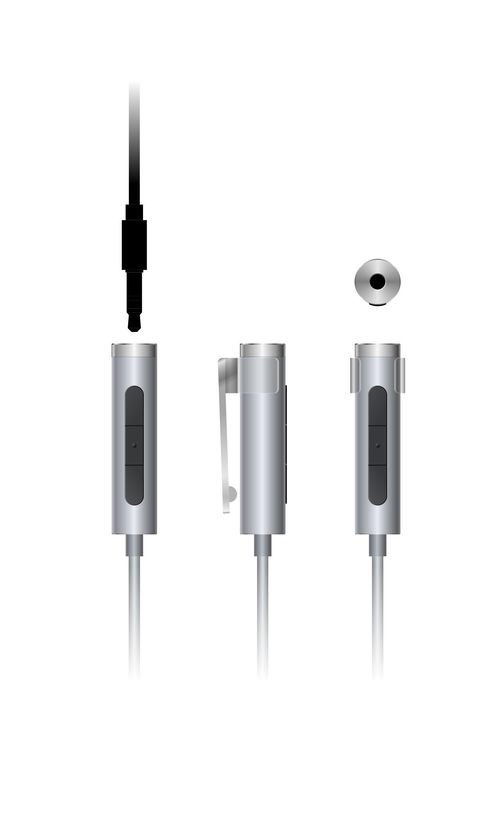
– Fiio are hoping the can work with Apple creating a Lightning DAC as per photo above. This is a slimline DAC with a 3.5mm headphone jack.

– Apple are stipulating the type of product they would like to see. Apple have now asked that all MFi products must includes a LAM ( lightning audio module ) , remote control keys and microphone if the product has headphone out jack. This means that there will not be similar products like the SONY PHA-1/2/3 in the future. This is sad news.

What is frustrating here is Apple have only approved Fiio once they needed them due to the removal of the headphone jack in the next iPhone. Then there are stipulation the type of DAC that is allowed to be manufactured. Next is the higher costs created due to Apple’s MFI program.

So whilst the sound quality should sound better via the lightning port, I am not sure people will be too impressed if the costs of a lightning audio adapter or module becomes at a too higher a price point.

But as they say, better to be in the team than relegated to the side lines.

More at Head-Fi

Apple CEO Tim Cook named lead independent director at Nike

Apple CEO Tim Cook named lead independent director at Nike

Nike on Thursday appointed Apple CEO and longtime board member Tim Cook as its “lead independent director,” while announcing company founder Phil Knight’s retirement from the board.

Tim Cook was already on Nike’s Board and now he moves up the ranks. Great news for Tim and Nike.

More at 9 to 5 Mac

Apple might buy Tidal Music Streaming Service – Viewpoint

“The talks are ongoing and may not result in a deal,” reports the Wall Street Journal, which says Apple is considering buying the company as a way to bolster its strategy to spend tons of cash on artist exclusives.

Despite scoring exclusives from everyone from Rhianna to Madonna, Tidal has struggled to keep up with the pace of paying subscribers Apple Music and Spotify are adding. Apple Music boasts more than 15 million paying listeners. Spotify has 30 million. But Tidal only has 4.2 million.”

Currently I am subscribing to Tidal at £19.99 a month to listen to Hi Resolution music. I am not subscribing because of any music exclusives, I am subscribing so that I can listen to hi resolution music. Does this deal makes sense for Apple. Yes it does to remove the competition and gain access to any deals Jay Z can muster together. But I hope if Apple does purchase Tidal, that we don’t lose the Hi Resolution music, but instead Apple raises the game with hi resolution music streaming!”

More at CultofMac

Spotify claims Apple won’t approve a new version of its app

“Spotify says Apple is making it harder for the streaming music company to compete, by blocking a new version of its iPhone app. In a letter sent this week to Apple’s top lawyer, Spotify says Apple is “causing grave harm to Spotify and its customers,” by rejecting an update to Spotify’s iOS app. The letter says Apple turned down a new version of the app while citing “business model rules”

Clearly Apple and Spotify are starting to clash on each other’s toes. Probably Apple playing hard ball but ultimately that’s the price of having an app store under single ownership. Could be interesting to see what happens next. 

More at The Verge

Apple sued by man who claims he invented iPhone in 1992 – Is this Crazy or What?

Apple sued by man who claims he invented iPhone in 1992

The iPhone went on sale nine years ago today, and to mark the momentous occasion a Florida man is suing Apple for a whopping $10 billion and 1.5 percent of all future Apple earnings — because he claims to have come up with the idea for Apple’s breakthrough mobile device all way back in 1992. 

Seriously crazy patent lawsuit. Someone needs to overhaul patents to stop the costly and pointless money grabbing law suits. More at Cult of Mac.

Source – Cult of Mac

Cirrus Logic releases development kit for Lightning headphones

“Cirrus Logic releases development kit for Lightning headphones.

With Apple rumored to be doing away with the headphone jack on its new iPhone, Cirrus Logic is offering a development kit to aid headphone makers looking to simplify the switch to Lightning connectors. The company’s MFi Headset Development Kit includes reference designs for creating Lightning port connected headphones and a development board to be used in programming, debugging and testing audio performance. The design is compatible with earbuds.

I can see a world of iPhone only headphones all working via the lightning connector or more than likely improved Bluetooth headphones . Once Apple removes the headphone jack everyone else will too. If you can’t sell more phones just wait, manufacturers will be queuing up to sell you compatible headphones! 

More at iLounge

Tech Addicts Podcast – Next Episode is Live

wp-1460657590183.jpg

Tech Addicts Podcast is back again with new episode starring Gareth Myles, Jay Garrett, Sam Pullen and I. Tech Addicts is released every 2 weeks.

To listen to the latest episode subscribe by searching “Tech Addicts” within your favourite podcast app, iTunes or use the URL “mobiletechaddicts.libsyn.com/rss” to add directly. ALternatively, you can also add it to Google Play Music, Click HERE.

Have fun listening!

WWDC 2016 – Ian’s Thoughts of the Keynote Speech

Ian has jotted down a few thoughts following Apple’s WWDC Keynote speech –

Thoughts on WWDC

So as an Apple Watch, iPhone 6s Plus and iPad Pro owner have been waited for this for a while, and just invested in S7 edge and 360 Cam so wanted Apple to step up.

WatchOS -Good badly needed update, as apps pretty much unusable. Happy with new Swiping through apps, speed increases.watch faces

TVOS – Poor hmmm sold mine and moved to the shield, nothing impressed here, need to really improve gaming aspect,

MacOS – Good, watch unlocking, ApplePay, sync between macs, not totally convinced on Siri but solid update

IOS- Great, much needed Apple Music, and blatant copy of Google photos , maps and messaging – finally HomeKit !!! …guess no support for Nest or Smart Things

So great Keynote All in all

What was missing, PadOS ??? Hmm much needed on the pro, mouse support, file system, I can dream