Category Archives: Android

Honor Holly – Review – Part 2

Welcome back to the Honor Holly review part 2. Today I am going to cover the audio and camera.

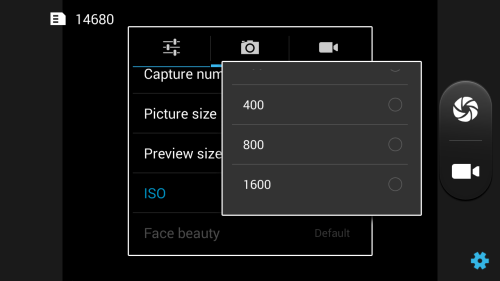
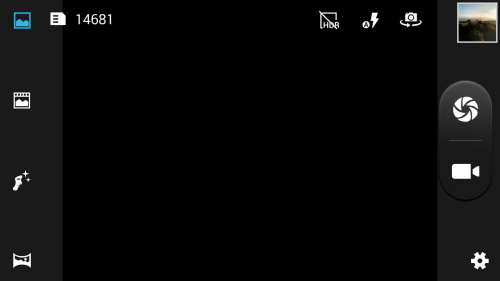
The Honor Holly camera app has a number of options available including ISO controls all the way up to ISO 1,600. The burst mode captures up to 40 shots or you can amend the setting to allow up to 99 shots in a burst. The burst mode works fairly well. The separate post today covers off some of the camera shots taken on this phone.
Screenshot_2015-02-15-11-02-05

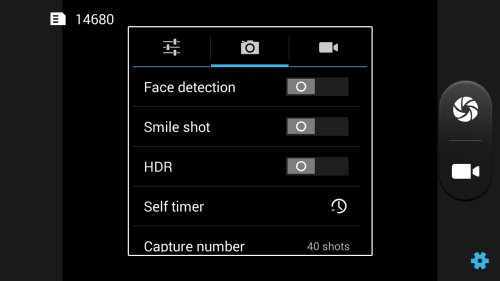
It also features a number of other options from HDR, Face detection and timer can be set for 2 or 10 seconds.
Screenshot_2015-02-15-11-01-12

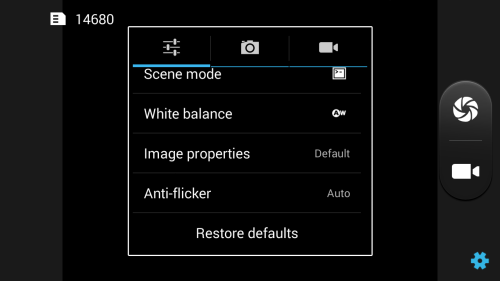
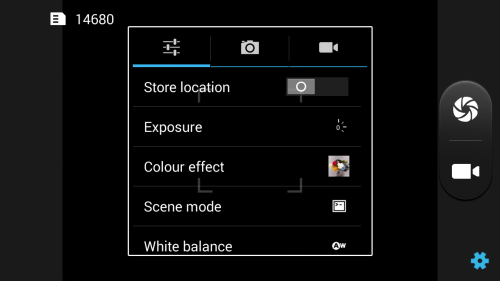
Scene mode has options for night, sunset, party, portrait, panorama, night portrait, theatre, beach, snow, steady photo, fireworks, sports, candle light or auto. There is a number of colour filters available from whiteboard, blackboard, aqua, negative, sepia and mono.
Screenshot_2015-02-15-11-01-05

The main interface on the left side includes modes for panorama, face beauty, live photo mode (combines a photo and video) and the standard camera shooting mode. On the top right you can toggle HDR and the flash and switch between front and rear camera.
Screenshot_2015-02-15-11-00-49

All in all a competent set of options and in my testing a good camera too that punches above it weight at its price point.
Screenshot_2015-02-15-11-00-27

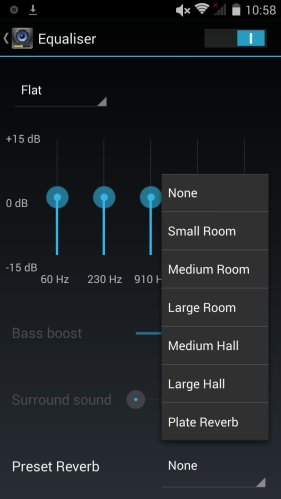
The Honor Holly has its own music player app, similar to Honor 6 which I reviewed recently.It also includes a number of options in the graphic equaliser department as shown below.

Screenshot_2015-02-15-10-59-04

Screenshot_2015-02-15-10-58-53

The loudspeaker sounded a bit tinny and the sound via the headphone socket was satisfactory. However, with the help of all the EQ options you could tweak it to your liking. I tried connecting via USB Audio but the Honor Holly does not support this.

Tomorrow I will provide my final thoughts on the Honor Holly.

Honor Holly – Review – Part 1

20150215_092033

Welcome to my review of the Honor Holly.
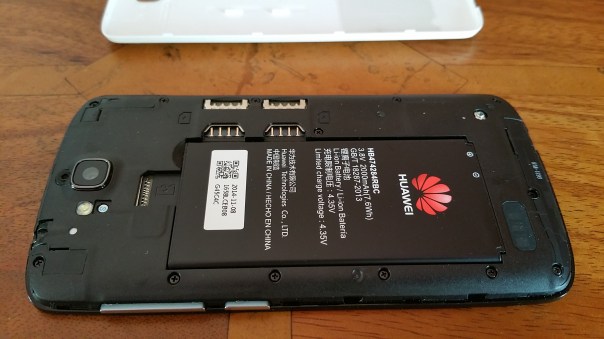
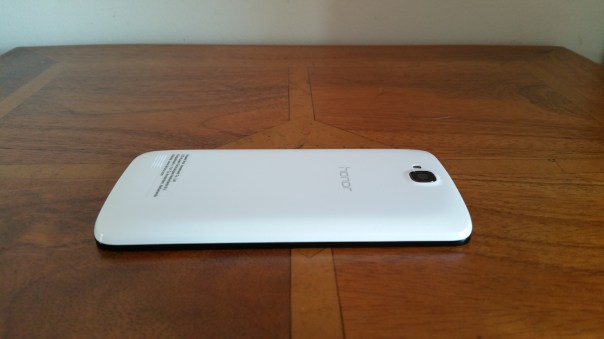
The Honor Holly is budget priced phone but as you will see, it comes with some midrange features. So lets have a look at the hardware. The back of the phone is white, and lifting the battery cover off reveals it is a dual sim phone with a micro SD slot too for cards up to 32gb. The battery is removable and therefore also user replaceable too.

20150215_092113

20150215_091957

The official specifications of the Honor Holly are –

– 5 inch IPS 720p screen
– Quad Core CPU MT6582 1.3GHz
– 16gb Storage
– 1gb ram
– Android 4.4.2 with Emotion UI
– 8MP rear & 2MP front cameras, both BSI and with F/2.0, panoramic mode, beauty mode, HDR mode, continuous shot, scene mode and video stabilizer
– Battery 2,000maH
– Dimensions – 142.2 x 72.3 x 9.4
– Removable battery
– Dual sim, plus micro sd up to 32gb
– 48 hours battery life

The Emotion UI skin provides a clean look as without the app drawer.
Screenshot_2015-02-14-18-47-49

Screenshot_2015-02-14-18-47-41

As you can see there are a few extra apps included in the Honor Holly to add to the experience. Also included is WPS Office by Kingsoft Office Software, Facebook and Twitter. In the pull down settings, cast screen is included automatically as is the sound profiles (4 options). The phone comes with 16gb storage of which just over 12gb is available.

Whilst the phone is 720p in resolution, this did not impact my enjoyment as the device had good viewing angles and had a high brightness level. Battery life is stated at 48 hours and in my usage I managed close to that figure. In terms of benchmarking AnTuTu scored 18,995 and Geekbench 3, 352 for Single Core and 1156 for Multi Core. I have said I don’t personally care for these types of scoring as they often don’t translate in to real life usage. I have found the Honor Holly to be snappy to use and quick opening applications.

So far it has been a positive experience.

Tomorrow I will cover off the audio and camera and in the meantime, if you have any questions, please let me know.

Tidal Hi-Fi Music Streaming service – pros and cons

Tidal Hi-Fi Music Streaming service costs £19.95 per month so it better be worth paying twice as much as other streaming services. For those not sure or haven’t heard of Tidal it streams music at 3 different bit rates. See below.

– Normal quality: 96 kbps (AAC +)

– High quality: 320 kbps (AAC)

– HiFi: Flac 1411 kbps – Lossless (16 bit/44.1 khz)

Google All Access streams at 320mp3 at its highest and Apple at 256 AAC. As you can see Tidal streams at an even higher bitrate called Flac.  This digital file is higher than that of CDs.  It normally is an uncompressed recording of the actual performance.  Tidal also offers HQ video but this is only available via a PC and not using their mobile apps.

So I downloaded their app on to my Note 4.  Signed up for free 7 day trial.  You do need to give them your credit card details. And started streaming.  My setup was Tidal app playing the music,  in to my HiFiMeDIY Sabre Android USB DAC and then into my Cayin C5 Portable Headphone amplifier.  This sounded amazing.  You could plug your headphones straight into the Note 4 itself which still offers a remarkable improvement.  The change in dynamics, clarity, instruments and nuances of each song was so much better.  After 4 hours of streaming music I thought to myself it really cannot be that much better than that of say Google All Access music.  So I selected a jazz album on Tidal played one track,  switch to Google Music and played the same track.  Nightmare scenario. Google Music now sounded distorted and muddy and lacking everything.  The difference was stark and greater than expected.

But here’s the thing.  Flac music files are huge in size.  A typical album will be in gb’s not mb’s. Fortunately,  Tidal offers offline mode and the option to store tracks to the micro SD card if you have one.  Due to Flac’s storage requirements I never bothered using them as the extra storage required was crazy.  I have a vast music collection and if it was all flac files my house would be full of hard drives.  But this is why I like Tidal.  As it streams the space issue is overcome. 

So after 2 days in to my 7 day trial I am nearly convinced to pay the monthly payment.  But not everything is rosy.  The app is not the best for finding music.  It’s buggy too.  In my offline downloads it shows I’ve downloaded 3 albums but in the queue are 5 tracks showing still to be downloaded, which they have been already.  Mid way through listening to music it sometimes just stops.  Some of the offline downloaded tracks when playing them back skip in places.  This might be down to the track not downloading properly with my wifi speed maybe being the cause. Whatever the reason it’s annoying.  And offline mode means you still need large storage if you want to hold several albums on your device.

The other aspect of Tidal is the music catalogue is not as large as say iTunes but it is broader than I imagined.  I’m listening to Imagine Dragons as I type this. One other point is Tidal only allows 3 authorised devices which should be enough. 

If there is one reason why I don’t subscribe it is due to the tracks skipping mid song.  Totally ruins the enjoyment of otherwise a special music streaming service. 


Fight – Acer C720 Chromebook vs Acer V15 Nitro Windows 8.1 laptop vs MacBook Pro

This post is to summarise my experiences of reviewing to different types of laptops that I would not have normally have chosen. The reason for this task, is that my 2010 MacBook Pro is too damn slow at anything and constantly runs out of steam. I am sure this is ploy by Apple with each update.

So I asked several of you for recommendations. The Acer C720 Chromebook was the number one choice. So I spoke to Acer and they agreed to send the C720 for review, but also said would I like to try their gaming performance laptop, the V15 Nitro. Whilst, the V15 Nitro is gaming ready, it is also a super powerful machine in every way with loads of storage too.

Following my time with the Acer devices, my MacBook is toast. It just cannot compete in any shape or form. Period. Some might say that a 5 year old laptop is a decent duration.

I have decided that I don’t want another MacBook. They are lovely machines, but I do not have any Apple devices, other than a work iPad. So consequently, I would not gain the full benefit of its functionality. Second, whilst the Acer V15 Nitro Windows 8.1 laptop would require a new learning curve for me, I realised that the sheer power of the processor, SSD, and graphics mean this is the machine for all my photo and video editing.

But for general day to day stuff, the Acer Chromebook would be my only choice. It has crazy good battery life and again is fast in everything it does. So maybe I need both Acer machines?? Or maybe a Chromebook/Android Tablet combined device. Wait, didn’t Google say these were coming this year…

But what would you choose if you were in my predicament?

The Internet of Things reviews

As the Internet of Things takes off,  so will my reviews of these devices.  So far I have reviewed those listed below.

Belkin WeMo Smart light Bulb starter kit review

Mipow Playbulb Rainbow review
Mipow Playbulb review

Imperihome Pro review
Netatmo Urban Weather station – 5 Part review

Following my reviews of the above I still use every day the Belkin WeMo Smart light Bulb starter kit.  I have both bulbs in my lounge.  The Mipow Playbulb Rainbow is used instead of the original and this again is in my lounge in an uplight.  Sometimes changing the room colour is great for mood changing.

Both the Netatmo and Imperihone are used everyday too and have been for a year and a half. 

WOW – 30 Smartphone Cameras Shootout – Samsung, Apple, BlackBerry, Lumia, LG, Honor and More

Not sure about which phone or brand takes the best photos, then have a look at this super sized collection of photos from all the best and latest smartphones and some budget phones as a comparison.

Samsung Note 4 – https://www.flickr.com/photos/gavinfabl100/sets/72157648796796660/
Samsung Note Edge – https://www.flickr.com/photos/gavinfabl100/sets/72157647404207644/
Samsung S5 – https://www.flickr.com/photos/gavinfabl100/sets/72157643875623354/
Samsung Note 3 – https://www.flickr.com/photos/gavinfabl100/sets/72157644034132513/
Samsung Galaxy K Zoom – https://www.flickr.com/photos/gavinfabl100/sets/72157644532639249/
Samsung S4 Zoom – https://www.flickr.com/photos/gavinfabl100/sets/72157644039495565/

Apple iPhone 6 Plus – https://www.flickr.com/photos/gavinfabl100/sets/72157647679181549/
Apple iPhone 5S – https://www.flickr.com/photos/gavinfabl100/sets/72157644035336913/

BlackBerry Passport – https://www.flickr.com/photos/gavinfabl100/sets/72157648520943848/

LG G3 – https://www.flickr.com/photos/gavinfabl100/sets/72157645618979801/
LG G Flex – https://www.flickr.com/photos/gavinfabl100/sets/72157644114354349/

Honor 6 – https://www.flickr.com/photos/gavinfabl100/sets/72157650041826847/
Honor Holly – https://www.flickr.com/photos/gavinfabl100/sets/72157650823415601/
Huawei Ascend P6 – https://www.flickr.com/photos/gavinfabl100/sets/72157644028833151/

HTC Desire Eye – https://www.flickr.com/photos/gavinfabl100/sets/72157650368916456/
HTC One M8 – https://www.flickr.com/photos/gavinfabl100/sets/72157643265004874/
HTC One M7 – https://www.flickr.com/photos/gavinfabl100/sets/72157644039700054/

Yotaphone 2 – https://www.flickr.com/photos/gavinfabl100/sets/72157650816294865/

Acer Jade S55 – https://www.flickr.com/photos/gavinfabl100/sets/72157648344100003/

LG Nexus 4 – https://www.flickr.com/photos/gavinfabl100/sets/72157644039660933/

Amazon Fire Phone – https://www.flickr.com/photos/gavinfabl100/sets/72157648220945873/

Sony Z1 Compact Z1 – https://www.flickr.com/photos/gavinfabl100/sets/72157644028694521/
Sony Xperia Z1 – https://www.flickr.com/photos/gavinfabl100/sets/72157644039246935/
Sony Z Ultra – https://www.flickr.com/photos/gavinfabl100/sets/72157644083052095/

Sony QX100 – https://www.flickr.com/photos/gavinfabl100/sets/72157644035811453/
Sony QX10 – https://www.flickr.com/photos/gavinfabl100/sets/72157644035335185/

Nokia Lumia 1520 – https://www.flickr.com/photos/gavinfabl100/sets/72157644035105534/
Nokia Lumia 1020 – https://www.flickr.com/photos/gavinfabl100/sets/72157644035516523/
Nokia Lumia 925 – https://www.flickr.com/photos/gavinfabl100/sets/72157634991010769/
Nokia Lumia 620 – https://www.flickr.com/photos/gavinfabl100/sets/72157644083348093/

To see the sets in one indexed page click here – https://www.flickr.com/photos/gavinfabl100/sets/

So which phone is your winner?