Category Archives: Android

Samsung Galaxy S6 – It’s arrived

Just a quick heads up that I now have a Samsung Galaxy S6 in black. I have not had a chance to do much with it other than charge it to 100%. It is now downloading a 249mb software update.

Later on in the week I will provide some more feedback, but in the meantime do let me know what questions you would like answered.

However, I did sneak in a quick low light shot and then take the same shot with my Note 4. All I will say based on this single shot I took, the S6 took a much better shot than the Note 4.

Samsung Note 4 – Camera shots

Below are similar shots taken in the same place as the Nokia Lumia 830. It is not fair to totally compare them as the sunlight was vastly brighter and the sky bluer when I took the shots on the Note 4. With the Lumia 830 the sunlight was a little hazy. Again the Note 4 shots are unedited apart from framing them.

Anyway, below are the photos. Let me know what you think.

Flowering Gorse on Dartmoor #Note4 #unedited

Bank Holiday Monday on Dartmoor near South Hessary Tor with some Dartmoor Ponies #Note4 #unedited

Bank Holiday Monday on Dartmoor on route to Burrator Reservoir #Note4 #unedited

Bank Holiday Monday on Dartmoor with stunning views of Burrator Reservoir #Note4 #unedited

Bank Holiday Monday on Dartmoor on route to Burrator Reservoir #Note4 #unedited

Bank Holiday Monday on Dartmoor by "The Cross"  on route to Burrator Reservoir #Note4 #unedited

The "Hounds of Dartmoor" by "The Cross" on route to Burrator Reservoir #Note4 #unedited

Bank Holiday Monday on Dartmoor.  View of South Hessary Tor #Note4 #unedited

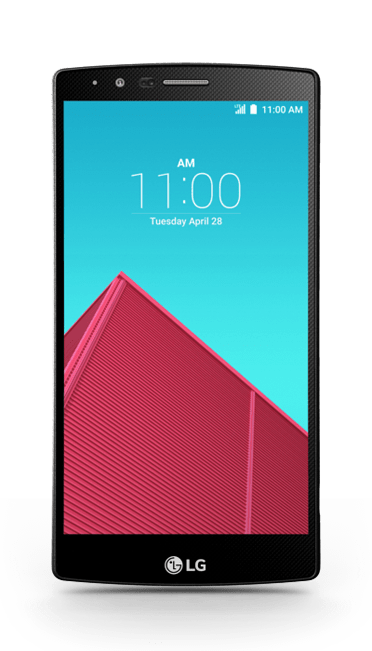
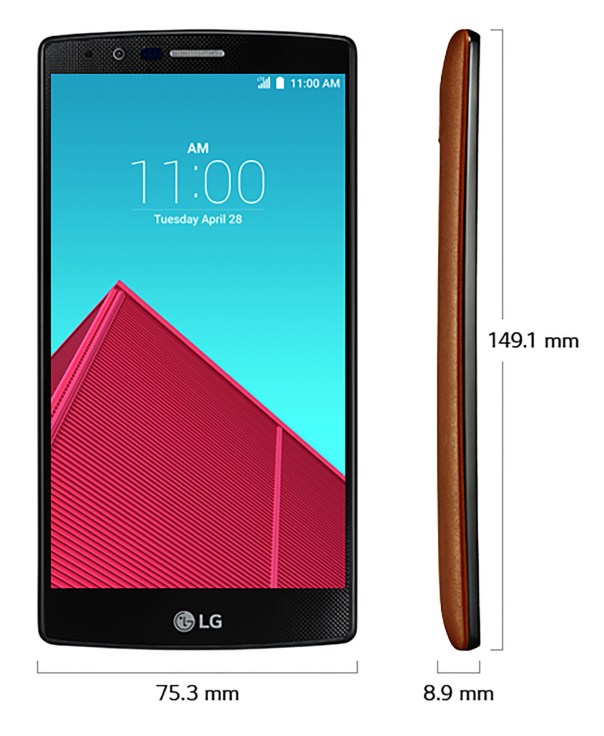
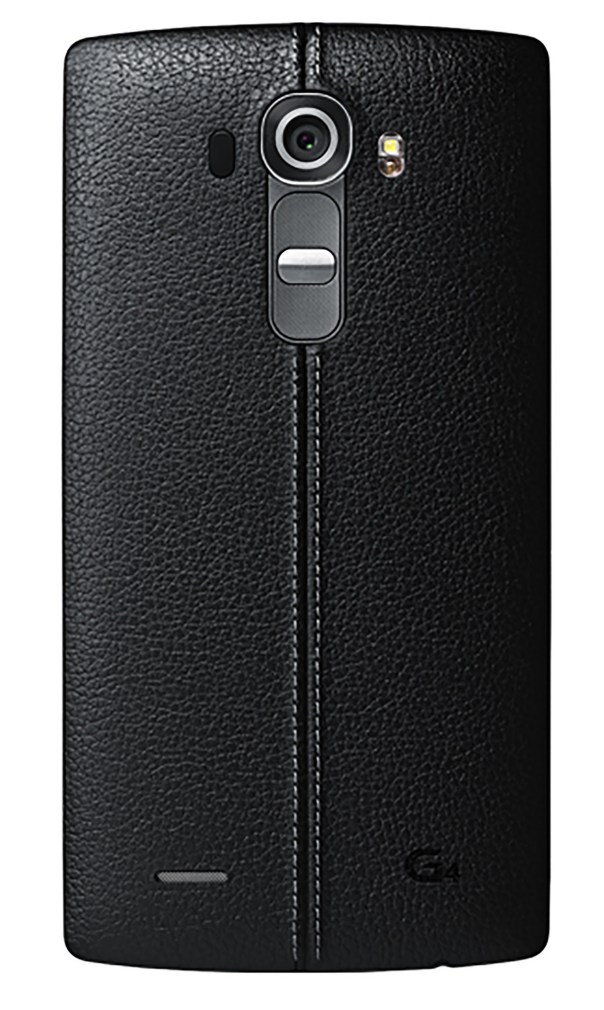
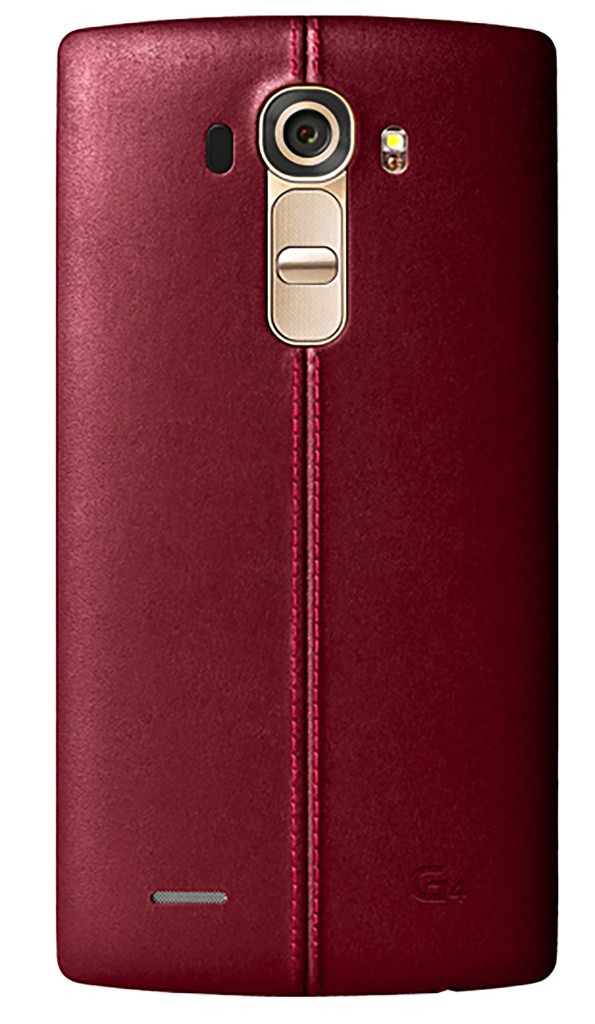
LG G4 – massive details get revealed of LG’s next flagship by LG Korea – photos galore

LG-G4

lg-g4-leak39

LG Korea, a short while ago revealed a fair amount of information about the LG G4, before being taken down.

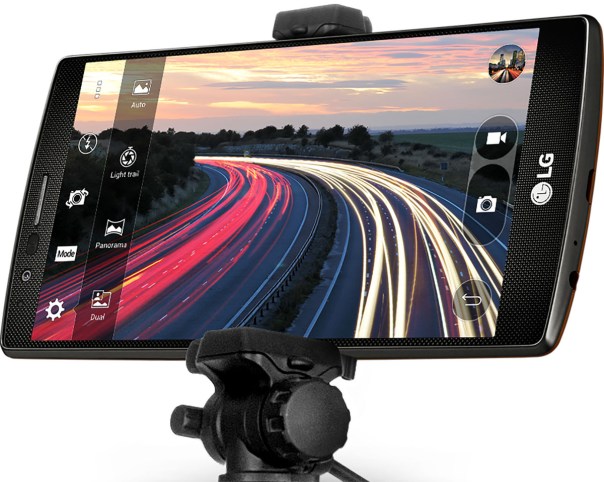
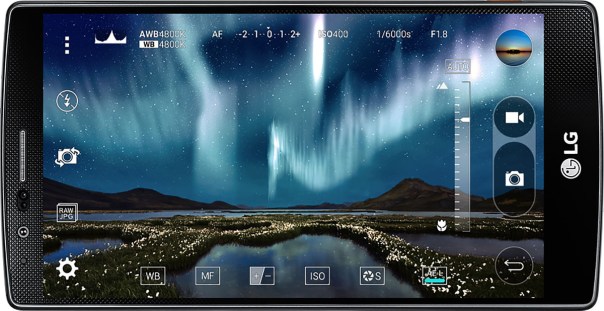
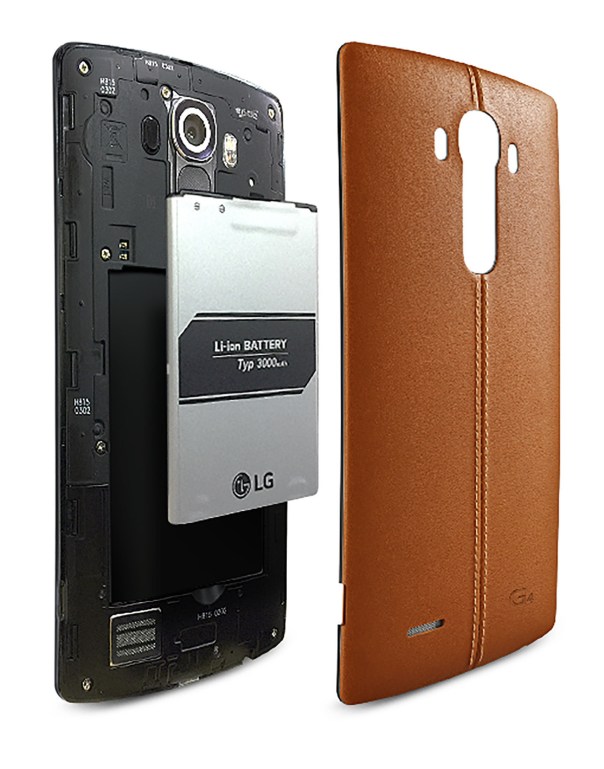
It revealed that the LG G4 will have leather backed options, similar to the Moto X. Other hardware specs got revealed too, from a 5.5-inch QHD screen, f/1.8 aperture lens with a 16 megapixel count, confirmation of a removable battery and SD card slot. LG is doubling down on camera software, as the site listed tons of camera features including a manual mode and OIS v2.0. This could be the flagship phone to buy for the camera alone!

lg-g4-leak22

lg-g4-leak23

lg-g4-leak26

lg-g4-leak38

lg-g4-leak41

lg-g4-leak42

lg-g4-leak43

Of course, this supposed mistake by LG Korea was unlikely to have been a mistake, more a ploy to stop and make people wait before ordering the new Samsung Galaxy S6/S6 Edge.

Source – @evleaks / http://www.androidcentral.com / LG Korea

Samsung Note 4 – 4K Video Capture – The Results

I’m not really into videoing events,  but this morning I used 4K Video mode on the Note 4 and captured the following video. In fact, I normally would not even use the 4K video mode as it uses so much space, and my ancient MacBook struggles to process it without crashing.

Using the inbuilt Video app from Samsung to playback, whilst playing back, goto settings and turn on capture and playback speed. You can now tap screen and hit capture button to snap a 8mp photo from a frame. If you hit pause,  you can skip back or forward one frame at a time using the on screen icons. Using this mode, I was able to get superb stills of my 3 labradors jumping and playing over and around the leat by Windy Post on Dartmoor.

Below is the 4K Video, weighing at around 230mb in file size for just a few minutes recording, and below are a selection of the captures. Head over to http://www.flickr.com/photos/gavinfabl100 if you want to see all 16 captures from this one video. I could have extracted so many more shots of the dogs at different intervals too. It is also possible to crop in on the photos too.

And now here are the frame captures, a very small selection too of possible frames, from the 4K video.

George, Fury and Tiggy jumping over the leat by Windy Post on Dartmoor #Note4 #unedited #4KVideoCapture

George, Fury and Tiggy jumping over the leat by Windy Post on Dartmoor #Note4 #unedited #4KVideoCapture

George, Fury and Tiggy jumping over the leat by Windy Post on Dartmoor #Note4 #unedited #4KVideoCapture

George, Fury and Tiggy jumping over the leat by Windy Post on Dartmoor #Note4 #unedited #4KVideoCapture

George, Fury and Tiggy jumping over the leat by Windy Post on Dartmoor #Note4 #unedited #4KVideoCapture

George, Fury and Tiggy jumping over the leat by Windy Post on Dartmoor #Note4 #unedited #4KVideoCapture

George, Fury and Tiggy jumping over the leat by Windy Post on Dartmoor #Note4 #unedited #4KVideoCapture

Going forward, I am always going to use 4K Video for capturing the action!

Samsung Galaxy S6 – review update

I have already posted my hands on impressions with my video on the S6 and S6 Edge here – https://gavinsgadgets.com/2015/03/19/my-hands-on-experience-with-the-samsung-galaxy-s6-and-s6-edge-plus-camera-shots/

Unfortunately, Amazon Germany have totally ruined my shopping experience. I had pre ordered a S6 Edge in 128gb , which at the time of pre ordering showed a delivery between 11th-13th April. Well, it turns out Amazon had zero stock and any of the new phones regardless of storage option too. The larger capacity is available directly from Samsung Germany but they won’t ship to the UK.

Anyway, cut a long story short, I have a S6 32gb arriving hopefully by Monday. This will enable me to see how the phone performs and even decide if it’s worth keeping my pre order for the Edge. For the record, the S6 Edge is way more stylish than the standard S6. 

As some of you will know, I prefer my phones in white. My Note 4 is white. But for some reason, the gold S6 whilst it looks amazing, reflects too much light with the screen on, and therefore I chose black. White looked dull this time, and the black has a shimmer of blue in it, making it much nicer. 

By Amazon/Samsung delaying the delivery of the larger storage option, it will mean other flagships will be available too and there is a possibility of leaving the Samsung brand.  

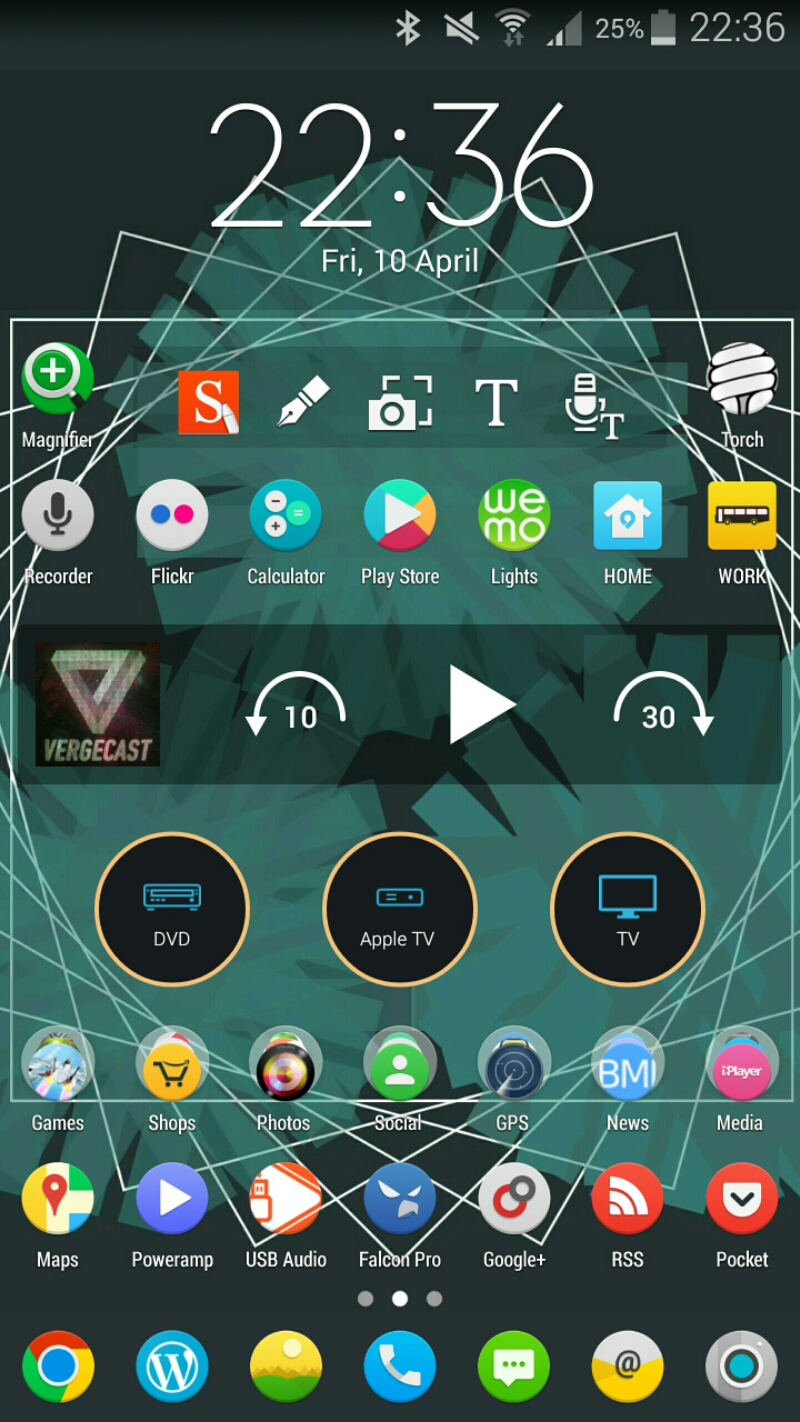
Samsung Note 4 – Current Home Screen

image

Using Nova Launcher Beta, Audax icons, Pocketcasts widget, S Note widget, Galaxy Universal Remote Widgets, swipe down to pull down notifications, swipe up for app drawer.

Background photo is a wallpaper from Tersus icon set.

Home screen on left is Google Calendar agenda view on whole screen. On the other side of the above home screen is Google Now widget, MyFitnessPal widget and Fitbit widget.

HTC One M9 – Master Review

Welcome to my review of the HTC One M9.

image

image

First let’s look at the hardware. Whether you like the two tone silver and gold finish is a personal decision but I do adore the two tone finish. Naturally other finish options are available too. In terms of grip, the One M9 is easier to hold on to than last years One M8. The One M8 was the first phone to slide out of my hand and fall to the ground.

image

image

In terms of button layout, the power button is now in the side instead of being on the top as was the case with the One M8. This is a much better position but I do occasionally catch the power button when picking up the M9 off the table.

Overall, I really like the new small changes HTC made to the M8 to create the M9. Before we delve deeper into the phone, let’s take a look at the specifications.

The official specifications are –

– Size 144.6 x 69.7 x 9.61 mm
– CPU Speed Qualcomm® Snapdragon™ 810, octa core 64-bit, 4 x 2.0GHz + 4 x 1.5GHz
– Memory ROM: 32GB / RAM: 3GB, Extended memory: microSD™ up to 2 TB
– Sensors Ambient light, Proximity, Accelerometer,Compass, Gyro, Magnetic, Sensor Hub
– Camera Main camera: 20MP with sapphire cover lens, auto-focus, BSI sensor, f/2.2, 27.8mm lens, 4K video recording, Front camera: HTC UltraPixel™, BSI sensor, f/2.0, 26.8mm lens, 1080p video recording
– Dual-tone metal unibody – other finishes available
– Extras – Themes ,HTC Sense™ Home,One Gallery ,Photo Editor
– Weight 157g
– Platform Android Lollipop HTC Sense™
– Network 2G/2.5G – GSM/GPRS/EDGE:850/900/1800/1900 MHz, 3G UMTS: 850/900/1900/2100 MHz,4G LTE:FDD: Bands 1,3,5,7,8,20,28
– Connectivity NFC, Bluetooth® 4.1 Wi-Fi®: 802.11 a/b/g/n/ac (2.4 & 5 GHz),DLNA® HDMI MHL 3.0,CIR
– 3.5 mm stereo audio jack, micro-USB 2.0 (5-pin) port, FM Radio with RDS
– Multimedia Audio supported formats:Playback: .aac, .amr, .ogg, .m4a, .mid, .mp3, .wav, .wma, .flac, .ac3, .ec3, .eac3,Recording: .aac Video supported formats:Playback: .3gp, .3g2, .mp4, .wmv, .avi, .mkv
Recording: .mp4
– Display 5.0 inch, Full HD 1080p
– SIM Card Type nano SIM
– GPS Internal GPS antenna + GLONASS
– Sound HTC BoomSound™ with Dolby Audio™
-Battery Capacity: 2840 mAh Talk time: Up to 25.4 hours for 2G/ 21.7 hours for 3G Standby time: Up to 391 hours for 2G/ 402hours for 3G
image

image

image

In terms of Sense UI, see the screen shots of what is included. HTC’s Sense UI is one of the best android experiences and a joy to use. The skin is consistent throughout the phone and that also makes it easier to flow from one activity to another.
image

image

This year HTC have added location aware services in Blinkfeed eg. a recommending a restaurant near your current location and there is a widget that is supposed to provide the apps you need at the time of day you require them. In addition, there is a folder of app suggestions. These new options are somewhat hit and miss and maybe over time they will improve. Blinkfeed is one of my favourite home screen widgets providing news I want to read on the topics I have selected, updates on my social media, location based information and local device information. Just going back to the skin, theming is now included. You can point the camera at anything eg a shirt or an object, and the One M9 will use the colours from the shirt or object to create a new theme. I had a lot of fun with this mode.
image

image

Audio is HTC’s claim to fame and the One M9 does not disappoint. Amazing quality sound from the front facing stereo speakers and awesome headphone output both in terms of quality and volume level too. Better than my Samsung Note 4 I might add. USB Audio is supported too. A FM Radio is included with RDS. The M9 speakers now feature Dolby Surround Sound but let’s get realistic. The speakers are tiny so don’t expect miracles. However, I would repeat that it is by far one of the best quality loudspeaker experiences on a phone and if you watch movies, YouTube or anything with sound the experience provided by better speakers is second to none. Add to the fact there is a FM Radio with RDS too, something not found on any Samsung or iPhone, and this completes a rather good audio experience.

Other hardware inclusions are a decent infra red blaster with good software provided to control your TV and more. You might think having an IR Blaster on your phone is pointless, but I won’t keep a phone unless it has this feature. With the IR Blaster you can control your TV, DVD, Apple TV box and so much more.

image

Camera/photo editing/Zoe and Video Highlights. Below are screen shots of the various apps and options.  Plenty of editing and sharing options for your photos and social media.  The camera app is one of my favourite camera apps. I find the options, settings and controls ideally positioned for taking photos and making any small adjustments on the fly. Another factor, and one which is very important to note, is speed of response when tapping the screen. The M9 is zippy fast, holding shutter for burst shots is instant practically so you won’t miss the moment.

image

image

image

image

image

HTC are due to release an update to the camera app to allow RAW photos. This is a good move allowing Photoshop users to extract and create the best possible final product. With the One M9, HTC changed the 4mp UltraPixel found on the One M8 to a 20mp lens. The good news is the 4mp Ultrapixel lens from the One M8 got moved to the front for high quality selfies and in my testing this arrangement works just fine. So over to the rear, how does this fair in use. Let’s look at some camera shots.

HTC One M9 Camera shots - a selection of photos from the M9.

And then cropping in on the above photo, you get this.

HTC One M9 Camera shots - a selection of photos from the M9.

HTC One M9 Camera shots - a selection of photos from the M9.

And a crop of the above to highlight the detail.

HTC One M9 Camera shots - a selection of photos from the M9.

HTC One M9 Camera shots - a selection of photos from the M9.

HTC One M9 Camera shots - a selection of photos from the M9.

HTC One M9 Camera shots - a selection of photos from the M9.

HTC One M9 Camera shots - a selection of photos from the M9.

And a crop of the shot above.

HTC One M9 Camera shots - a selection of photos from the M9.

HTC One M9 Camera shots - a selection of photos from the M9.

Really accurate representation of the colours captured by the M9.

HTC One M9 Camera shots - a selection of photos from the M9.

And this is my all time favourite shot I have taken of Dartmoor Prison. I prefer this over all the other phones that I have used to snap this shot.

HTC One M9 Camera shots - a selection of photos from the M9.

HTC One M9 Camera shots - a selection of photos from the M9.

HTC One M9 Camera shots - a selection of photos from the M9.

The shot below is an edit using the Gallery app and one of its effects. Love what it did to the original shot.

HTC One M9 Camera shots - a selection of photos from the M9.

In my opinion the photos are good in good daylight, macro control was much better than expected, and really excelled at times. A few shots suffered from over exposure issues along with some poor dynamic range at times and some of the colours on a few shots were inaccurate. However, just by using some of the manual controls and saving them as a new camera mode, and using this new mode along with some of the included options and it is not too difficult to take a decent shot. With all the updates and RAW coming, it could be quite ironic if HTC had the last laugh on camera quality! As there is no optical image stabilisation camera shake and consequently blurring of photos is more likely to happen, and more often especially as the level of lighting drops. And that moves me on to low light shots which were poor until you take it out of auto mode, switch to manual and change the ISO yourself. Low lights shots were the One M9’s weakness. These can be further improved by the use of a tripod and using manual controls but when the competition doesn’t need to do this why should you need to on the One M9. And who carries a tripod with them! To be honest it not all doom and gloom. You can use the front 4mp Ultrapixel lens for low light shots! However, I do feel that the camera is an improvement over last years One M8. I was comparing my One M8 photos to the One M9 and could see overall I was getting better shots. See end of article for links to my Flickr One M8 and One M9 photo albums. Further software updates are scheduled and this should continue to improve the camera. At the end of the day, after you use HTC’s photo editing app which has loads of options, see below, and then upload to Twitter or Facebook, I don’t think anyone is going to be any the wiser as to which phone took that shot. I also think using third party photo editing apps like Camera360, Adobe Photoshop Express, Snapseed and VSCO Cam will make any photo looks fabulous and in turn hide any flaws. Plus, the controls that HTC’s camera app provides really allows for some creative photography. HTC’s Gallery app also produces video highlights of an event automatically from your photos and video snapped, which you can tweak too with one of several included effects/music.

image

image

image

image

image

As this is created automatically, it makes magical memories to share and look back on afterwards. Last Christmas, at a large family gathering, I ended up showing a number of video highlights from the One M8 and One M7 that I had created and saved, and it was the highlight of the evening. Memories are precious!

Battery and heat. The new Snapdragon 810 is meant to be a faster processor with better battery life. It’s definitely faster at times. But better battery life. Not so sure on that but I did manage a days usage out of the phone. Fortunately, there are 2 different power saving modes, one of which is an aggressive ultra power saving option. I did notice a correlation between the phone getting warm and the battery level dropping faster. Thermal throttling is being used here which only becomes more noticeable during intensive gaming. The One M9 does support Quick Charging 2 but HTC did not include a quick charger in the box which is disappointing. Using a quick charger and the phone at the same time, produced more heat on the rear of the phone than expected, too much for my liking.

So what’s my overall verdict. If you are after a taste of the HTC experience which includes one of the best audio experiences, Sense UI skin and theming, extensive photo editing/video highlights on the fly, a comprehensive camera app which produces good camera shots from the rear and front cameras, all packaged in a lovely two toned body, then its a match made in heaven.

However, one cannot ignore the competition and their offerings. This year HTC really has a battle on their hands with new phones from Samsung, Honor, Sony, LG, Apple and others. And last but not least, HTC’s own One M8 is a decent challenger to the One M9.

Links –

My HTC One M9 Flickr Album – https://www.flickr.com/photos/gavinfabl100/sets/72157651403658570/

My HTC One M8 Flickr Album – https://www.flickr.com/photos/gavinfabl100/sets/72157643265004874/

My HTC One M7 Flickr album – https://www.flickr.com/photos/gavinfabl100/sets/72157644039700054/

HTC One M9 – Camera samples

Okay, these are some sample shots that I had already taken with the HTC One M9. These are not my best photos from the One M9, but I thought I would share these before my full review. These photos are not edited in any shape or form.

HTC One M9 Camera shots - a selection of photos from the M9.

And then cropping in on the above photo, you get this.

HTC One M9 Camera shots - a selection of photos from the M9.

HTC One M9 Camera shots - a selection of photos from the M9.

And a crop of the above to highlight the detail.

HTC One M9 Camera shots - a selection of photos from the M9.

HTC One M9 Camera shots - a selection of photos from the M9.

HTC One M9 Camera shots - a selection of photos from the M9.

HTC One M9 Camera shots - a selection of photos from the M9.

HTC One M9 Camera shots - a selection of photos from the M9.

And a crop of the shot above.

HTC One M9 Camera shots - a selection of photos from the M9.

HTC One M9 Camera shots - a selection of photos from the M9.

Really accurate representation of the colours captured by the M9.

HTC One M9 Camera shots - a selection of photos from the M9.

And this is my all time favourite shot I have taken of Dartmoor Prison. I prefer this over all the other phones that I have used to snap this shot.

HTC One M9 Camera shots - a selection of photos from the M9.

HTC One M9 Camera shots - a selection of photos from the M9.

HTC One M9 Camera shots - a selection of photos from the M9.

The shot below is an edit using the Gallery app and one of its effects. Love what it did to the original shot.

HTC One M9 Camera shots - a selection of photos from the M9.

Recap of the 8 Reviews published this week

This week has been busy with a number of reviews. But before I get to the reviews, the latest episode of “Gav & Dave’s Tech Podcast” got released.

https://gavinsgadgets.com/2015/04/03/episode-34-fight-club-gav-daves-tech-podcast-is-now-live-please-rt/

Reviews included –

Oppo PM-2 Headphoneshttps://gavinsgadgets.com/2015/03/31/oppo-pm-2-headphones-review-be-prepared-to-be-blown-away-with-incredible-sound/

AKG K702 Headphoneshttps://gavinsgadgets.com/2015/04/03/akg-k702-headphone-review/

HTC Desire 820 Smartphonehttps://gavinsgadgets.com/2015/04/03/htc-desire-820-review/

Google Nexus 9 Tablethttps://gavinsgadgets.com/2015/04/01/nexus-9-tablet-review/

Samsung Note 4 Official Wireless Charging Kithttps://gavinsgadgets.com/2015/03/30/samsung-galaxy-note-4-official-s-charger-qi-wireless-kit-review/

And then 3 posts on the Nokia Lumia 830, and the camera vs Samsung Note 4 –

https://gavinsgadgets.com/2015/03/30/what-app-shortage-my-nokia-lumia-830/

https://gavinsgadgets.com/2015/04/01/nokia-lumia-830-vs-samsung-note-4-camera/

https://gavinsgadgets.com/2015/04/02/nokia-lumia-830-vs-samsung-note-4-camera-samples-part-2/