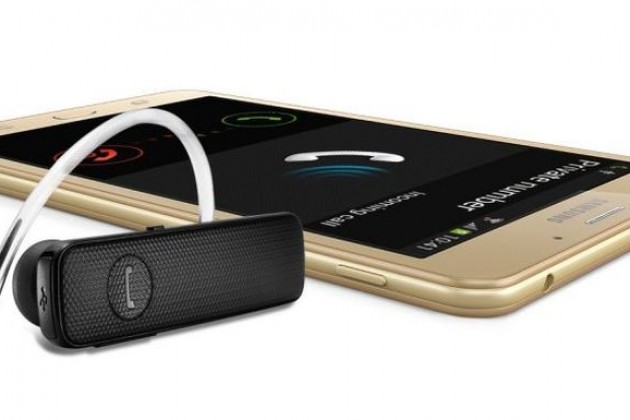
“It’s a phone! It’s a tablet! It’s the newly unveiled 7-inch Samsung Galaxy J Max.
“Designed for those who are looking for a complete entertainment experience on a mobile device.” The Samsung Galaxy J Max has a 7-inch screen, with in-box Bluetooth headset.”
The future is big. Big phone / tablets. Or is it ? Come summer where do you stash your huge phone!
Tech Addicts Podcast is back again with new episode starring Gareth Myles, Jay Garrett, Sam Pullen and I. Tech Addicts is released every 2 weeks.
To listen to the latest episode subscribe by searching “Tech Addicts” within your favourite podcast app, iTunes or use the URL “mobiletechaddicts.libsyn.com/rss” to add directly.
“Xiaomi’s MIUI is one of the most popular and liked ROMs outside of stock android. A new version, MIUI 8, was announced in May, with a stable version pushing out to devices in August.
The major complaint with respect to the OS is the presence of ads baked into the system. Testers of MIUI 8 have complained that the new version still has ads in most of the default system applications such as the file explorer. While the advertising isn’t bad, it’s annoying when an advert pops up when doing serious work. Although, you can just manually close the ads, there is no place within the system where you can turn off ads completely.”
This now explains all the Chinese notifications I was getting with the Xiaomi Mi Max. Totally unacceptable to have ads appearing everyday and probably explains why Xiaomi can sell it for a lower price, as the cost is subsidised with adverts!
Welcome to my review of the Netatmo Welcome Indoor Camera.
The Netatmo Welcome Indoor camera unique selling point is its ability to recognise faces and then send you notifications to your phone.
See video from Netatmo below showing this in action.
The Key Specifications
– Dimensions – 45x45x155mm
– In the Box – 1 x Welcome camera, 1 x USB cable, 1 x power adapter, 1 x 8GB micro SD card
– Build – Single piece of durable aluminium shell, Matte black plastic piece infrared transparent.
– Hardware Requirements – High-speed Internet connection needed, Public hotspots not supported.
– Connectivity Specifications – Ethernet RJ-45 port: 10/100 Mbits, Wireless: Wi-Fi 802.11 b/g/n (2.4G)
– Camera – Video sensor: 4MP, Resolution: Up to 1920×1080
– Minimum iOS 8 for iPhone / iPad, Android 4.3 minimum
– Browser Support – Webapp available for the two latest versions of: Chrome, Safari, Firefox, Internet Explorer
– Monthly Costs – Nil, Free to Use, App available on the App Store / Google Play.Free access to your camera online.
– Data Storage – MicroSD card up to 32GB (8GB class 10 MicroSD card included)
– Faces – Max 16 faces
The Hardware
The Netatmo Welcome camera is a lovely piece of hardware and doesn’t look like a typical camera. This means it gets blended into your environment without people gets paranoid they are being “watched”. In fact, you forget its actually there. On the rear there is an ethernet port, micro SD card slot and micro USB port. The front is minimalistic.
Background Notes for Review
Notes – I originally reviewed this after 3 weeks. Further down is my update after 4 months following a significant firmware update that added lots of new features which are documented along with a tip if you have dogs.
I have been using the Netatmo Welcome for 3 weeks now and overall have been pleased with its operation and results and intend to keep this indefinitely as my home connected security indoor camera. I also have several IP Cameras which were a total nightmare to setup and configure as remote access involved changing my home router configuration. I have now retired these. In terms of other connected devices, I have a Netatmo Urban Weather station which is coming up to 2 years old and a range of lights that are controlled from my iPhone and or Apple Watch. Due to protecting my own privacy, screen shots of the app in operation have been edited to remove views of my home.
The Initial Setup
Netatmo have made the first setup as simply as possible. I setup my Netatmo Welcome camera using my iPhone 6S Plus. I downloaded the Netatmo Welcome app from the Apple App Store and then followed the on screen setup instructions provided by the app. The app asks permissions to share Wi-Fi setup from your iPhone to the Welcome camera and literally within 5 minutes the camera is connected. Points to note. The Welcome camera only operates at 2.4G . Over the next 24 hours a new firmware arrived and got installed on the camera and the app showed me faces and asked me to identify who the respective people were. For each member of your house, a face profile gets created.
The Operation
The concept of the Netatmo Welcome camera is simple. It learns all the faces of people who live in your home/flat and then notifies you when somebody comes home and tells you who they are and also if somebody arrives who is not recognised. When movement is detected, it records a clip onto the micro SD card which can be streamed back on to your phone and or downloaded remotely to your phone as well. When at home you can also play back the recorded video clips.
Other options include a range of privacy and advanced security options. For example if your Netatmo password gets changed, or someone logs into your account you can receive an email. Netatmo will also block your account if there are too many failed attempts occur. In terms of learning faces, you can go into the app settings and speed up the learning process. You can also tell the system when the house is empty and adjust other settings as shown below.
Using the app on your phone is really easy. It shows a live view snapshot when you open the app. You can then hit the play icon to stream live video. Turning your phone landscape provides full screen playback and streaming. Scrolling the screen reveals details of who is at home and or when they were last seen. Scrolling the screen the other way reveals a list of when movement was detected. Tap on one notifications and you can watch or download the recorded movement. Now if your home is broken into and someone steals your camera, you will get a notification that Welcome was switched off. The person cannot access your data and videos without your Netatmo account details. However, this also means if the camera is never recovered, you cannot view the videos stored on the camera either. However, if you sign into My Netatmo on the web you will be able to see a screen shot of each video before it started the recording of the motion.
The video quality is excellent and the camera switches to night mode which provides clear images and video as well.
As I have mentioned I have had the Netatmo Welcome indoor camera for 3 weeks now. In that time, the camera has come offline about 4 times for no apparent reasons and then reconnected a few hours later. I don’t know if its my broadband dropping although that wouldn’t surprise me as the connection does vanish occasionally. I have only had to pull the power cord out and replug back in to restart the camera just once when it became unresponsive. In terms of recognising faces this is now 90% accurate. I have relocated the camera several times to get a better position. To be honest, positioning is crucial. If the camera is recording motion to the micro SD card, it is not possible to see a live view until this has finished.
UPDATE – 4 months later, Netatmo released a major firmware update. This improved its performance and reliability but also added Dropbox support and tags. With Dropbox you can now upload video clips to the cloud instead of using the micro SD card.
Tags are waterproof sensors for doors and windows. Photo above is one of my tags. The Netatmo tags are superb as they detect the motion before the intrusion occurs. That is because they detect vibrations. The Tags’ have an integrated open/closed state sensor, so you can choose to be alerted if you have accidentally left a window or the garage door open. And then you can check directly on your smartphone if all windows are closed.
Tips – I have 3 labradors and the Welcome camera was recognising my dogs faces. So instead of telling the Welcome camera they were not faces, I did the opposite. So now it recognises my 3 labradors and that means I don’t get any false notifications about an unknown face.
The Special Stuff
The Netatmo Welcome camera supports third apps and that extends to IFTTT. This opens up a whole world of different sequences that can be achieved. See screen shot below.
You can also add Welcome tags to the system, sensors for doors and windows. The other aspect I like about the Netatmo Welcome Indoor camera is once bought, there are no other costs. Its free and it has no monthly charges either.
As I mentioned already, Netatmo allow you to sign into to your camera via a web browser which uses their web app. Using a web browser, if you have other Netatmo products, you can access all the different connected devices in one go.
Conclusion
The Netatmo Welcome Indoor camera recommended retail price is £199, although if you click the link below it is available for a lot less. It provides piece of mind with its face recognition and notifications with zero ongoing costs once purchased. Add to the fact it supports third party app integration and it becomes a decent investment. It also doesn’t look like a typical camera so blends into the home environment.
And now after using it for over 4 months the added new features of tags and Dropbox integration really add to its value.
“BlackBerry’s next phones may be its last gasp with Android.
While the handsets have yet to be formally announced, VentureBeat reports three codenames for the projects – Neon, Argon, and Mercury.Two Noble Gases, a Transistion Metal and a Pizza Place. Due out this summer, the BlackBerry Neon is said to sport 3GB of RAM, 16GB of storage, a 5.2 inch display, touchscreen keyboard, and a more consumer-friendly price.Next, the BlackBerry Argon is set to launch this October with a 5.5 inch display, 32GB of storage, 4GB or RAM, and a fingerprint scanner – a welcome feature for BlackBerry’s key demographic of government workers and industry executives handling sensitive information.Finally, due out in Q1 of 2017, the BlackBerry Mercury will be the only one of the three Android models equipped with a classic, clickety physical keyboard. The Mercury is also expected to house 3GB of RAM, 32GB of storage, and a juicy 3400mAh battery”
What would worry me the most buying any new BlackBerry phone is what would happen with software and security updates if BlackBerry threw in the towel.
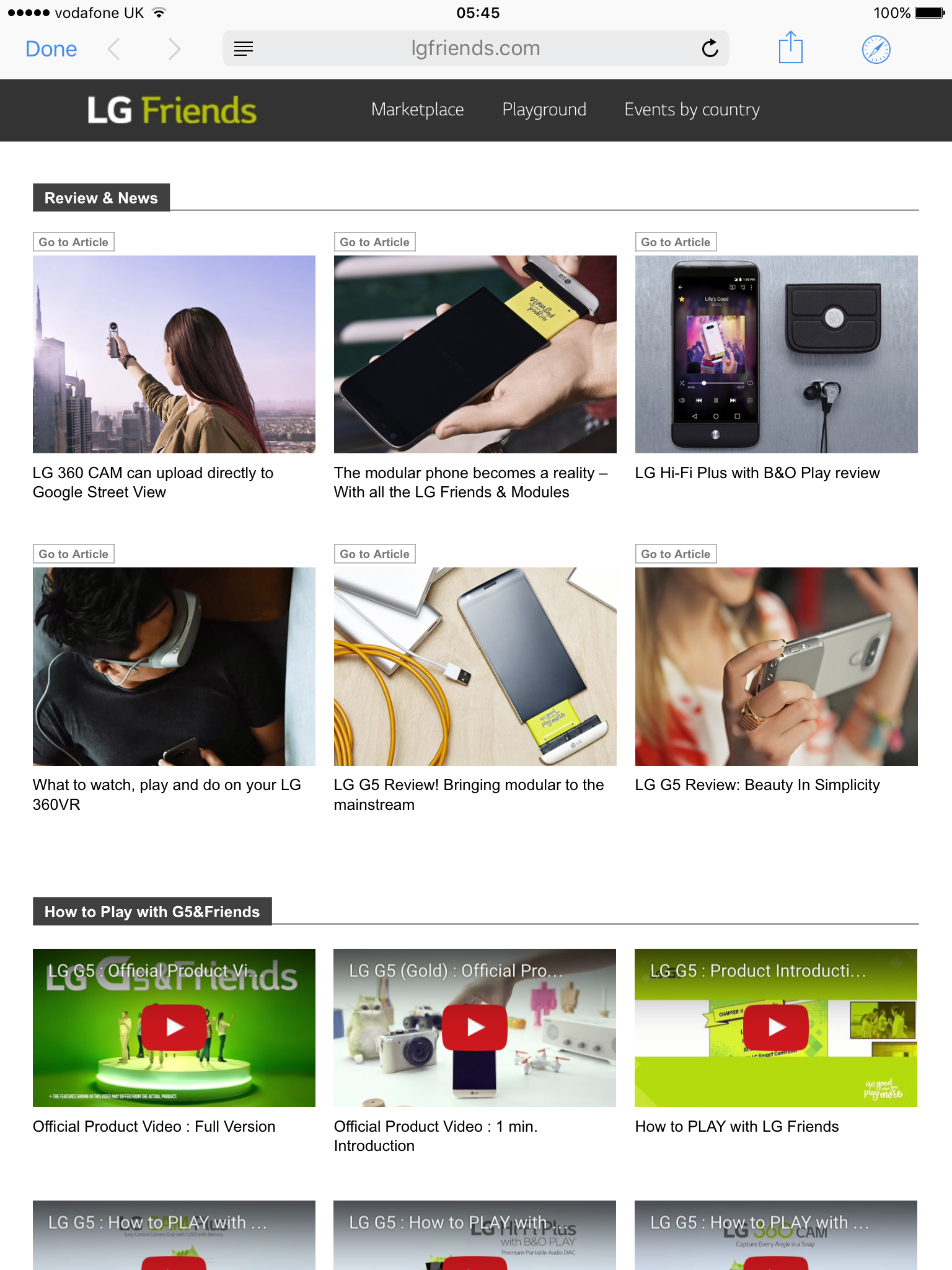
LG has created a special page with its LG G5 and Friends. Click HERE.
The first section is all about news and reviews. So go click on the link above and then click on the middle top item “modular phone becomes a reality ” and you will find yourself directed to Gavin’s Gadgets LG G5 & Friends 26 Part review.
I was not expecting this to happen, so am rather chuffed.
“MIUI 8 public beta kicks off July 11, stable build hitting August 16.
At the Mi Max launch event in New Delhi, Xiaomi announced that the public beta of MIUI 8 will commence on July 11, with the stable build becoming available starting August 16.”
Upgrading my Mi Max from MIUI 7 to the alpha China build of MIUI 8 was a huge improvement. To have a global version with Google Play Services incorporated will be a massive plus.





 Gavin's Gadgets & Photography