Category Archives: Android

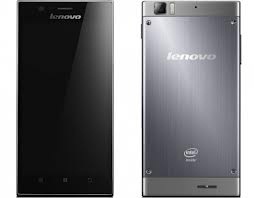
Lenovo K900 phone – full info

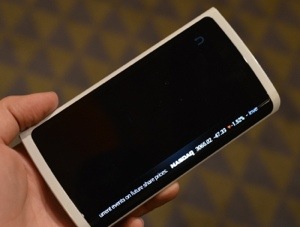
The Lenovo K900 is a 5.5-inch, 1080P IPS display, 6.9mm body weighing in at 162 grams. The K900 is powered by Intel’s brand new Clover Trail+ 2GHz Atom processor along with 2GB of RAM and Android 4.1.2 Jelly Bean out of the box. This is one seriously powerful phone.

The K900’s 13 MP camera has a Sony Exmor BSI sensor with a F1.8 lens for low-light performance. The front camera has a super-wide angle lens.

The K900 is a very industrial design with sharp corners and exposed screws. It has a 400 dpi resolution screen. It’s narrow like the Samsung Note 2 but very dramatic. Compared to an iPhone this thing is huge.

I would be interested in seeing the benchmarks and battery life for this device. I just wonder what we need such a powerful chip for in a phone. Well apart from gaming.

20130109-083611.jpg

Samsung & Dropbox get Cosy

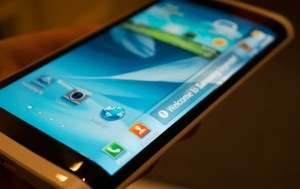
Samsung and Dropbox have announced plans to build and integrate further the cloud storage service into more of Samsung’s phones.

The Samsung Galaxy Note 2 became the first device to integrate Dropbox directly into the photo and video gallery for automatic uploading of new images or movies. This was a superb service and idea. Samsung also plans to add document storage and additional sharing options to upcoming devices.

Safe backup of one’s media and documents is really important. If anything happened to your phone you can relax knowing a copy of your media and created documents sits in the cloud.

So What was Eric Schmidt doing in North Korea

Recently Executive Chairman of Google, Eric Schmidt was seen touring North Korea. But why?

Whilst many might start conjuring up conspiracy stories, I just reckon it was simply a PR exercise to improve relations between Google and North Korea.

Of course, business would be on the table too. Perhaps Google trying to offer more of its services without restrictions. Hopefully we will find out soon.

Do you have any thoughts?

20130109-080117.jpg

Nike+ Running App on Android platform now

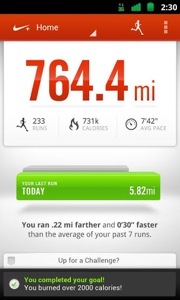
Nike+ Running App has now been made available on the Google Play store. It still doesn’t compete with the iPhone offering, since with the iPhone you get the Nike+ iPod app which is activated from the settings app. This is then paired with a Nike shoe sensor for more accurate measurements. The features of the android versions are –

Map your runs, track your progress and get the motivation you need to reach your goals. No sensor or additional products needed, just grab your phone and go.
– From the trail to the treadmill, your phone’s GPS and accelerometer accurately record your distance, pace, and time. In-run audio feedback lets you know these metrics at every mile, so you can stay focused on your run.
– Get in-ear cheers from your friends on Facebook when you broadcast that you’ve started a run. Tag the friends you ran with and share a map of your route with friends and family.
– Have a song that gets you pumped? Set up PowerSongs to give yourself a boost with the tap of a button.
– Our Run Summary makes it easy to view your route and track how you felt, the terrain you tackled, and the weather you endured.
– Rotate your phone while viewing the Run Summary to see the breakdown of your run into mile splits.
– See how your last run stacks up against your previous seven, and get fresh insights based on your latest activity every time you come back to the app.
– Swipe upwards on the Home Screen to view your next moves. From picking your PowerSongs to challenging one of your personal bests, there’s always something to make your running experience better than before.
– Visualize all your runs side-by-side and see your progress in a bar graph history view.
– Syncing your run to the Nikeplus.com website allows you to view your maps on a larger screen, set a new goal, and find Nike+ Top Routes in your area. Check it out.
– There’s even shoe tagging. Type in the name of your running shoes to track the distance they’re logging and see when it’s time to lace up a new pair. You’re never done running, but your shoes might be.
– Need extra motivation? Add a widget to your phone’s home screen to show when you ran last, display your total mileage, and for even quicker access into a run.
– Some features such as Share Run and Cheer Me On require users to be connected to a wireless network for full functionality. Please note that continued use of GPS running in the background could dramatically decrease battery life.

* Motorola Droid2 Global
* HTC ThunderBolt
* HTC Incredible2
* Samsung Fascinate
* HTC My Touch 4G Slide
* Samsung Galaxy Nexus
* Samsung Galaxy S III

Nike+ Running Devices NOT Supported
* All Sony Ericsson Xperia devices
* Motorola Atrix devices
20130114-074045.jpg

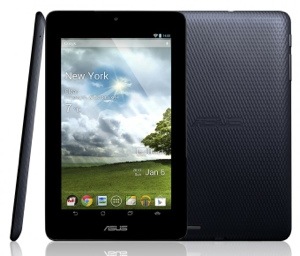
Asus Nexus 7 undercut by Asus Mebo $149 tablet

Asus has announced the MeBo tablet to take on itself, with its own Nexus 7.

The MeMO Pad is running Android 4.1 Jelly Bean with a low 1024×600 resolution. It’s powered by a VIA WM8950 processor running at 1 GHz, paired with a Mali-400 GPU. It’s got 1GB of RAM, and either 8GB or 16GB or on-board storage, with a microSD slot for good measure. Plus you get 5GB of free online storage from ASUS.

So it’s an even more compromised device than the Nexus 7. I just don’t get these cheaper tablets. They provide a poorer user experience too. It won’t be long before we will see either a $50 tablet or Amazon giving them away totally free. Do these cheaper tablets get people on board with the tablet revolution or do they destroy the high spec offerings? All it seems it all about the price on this one.

20130114-073418.jpg