Category Archives: Android

Sony Xperia Z Tablet review – conclusion

To recap the previous parts of the review click here.

The Z tablet has been a learning experience and a joy of discovery. It’s strengths are its exception audio quality through headphones, it’s media abilities, the FM Radio. I must stress the radio. Until you listen to the Z I doubt you would have ever heard anything so mind blowingly good. The same applies to the Walkman app.

It’s profile. It’s very slim, light (extended periods of use don’t matter due to being so slight) , waterproof too. This adds to its durability. For the first time if I want to take a photo outside and it’s raining I have nothing to worry about. Also the camera is very good with loads of options too.

Access to PlayStation One games which work with the PS3 controller out of the box. Also I have been using the Moga Pro Controller which makes gaming a joy. The 10.1 inch screen is like having a tv with you. The iPad Mini looks so squashed and blurry. It’s not blurry but it just doesn’t compete with the Z.

Battery life is all day. The infra red remote control.

The memory is expandable for media up to 64gb. NFC.

Seriously this Z is one serious bit of kit. I love it. If I didn’t have so many games on ios, about 600, I would have sold the iPad by now.

And Sony have really worked hard to make the user experience perfect and with other devices you can create a superb eco system.

So do I recommend it. One word. Yes.

LG Optimus G2 details leak

image

LG is about to release their next flagship phone. Photos of the device leaked, courtesty of @evleaks. The photos reveal something odd and new on the phone— the volume buttons will be moved to the back of the device, slightly below the 13MP rear camera. It’s an odd feature and it’s sure to catch the many consumers out when it is released. Otherwise, the phone has a 2.3GHz quad-core Snapdragon 800 processor, 2GB RAM, and Android 4.2.2, 13mp camera and a 5.5-inch full HD display.

I will reserve judgement until I see the phone, but volume controls on the back? What do you think?

Zenus Neo Classic case for the Sony Xperia Z Tablet review

I received the Zenus Neo Classic case from Gearzap in wine red. The black/grey version had sold out so I took a chance with the wine red. The photos make it look more red than it is, since it does have shades of brown too. In fact the finish is stunning.

image

Above is the front view and below the rear of the case when closed.

image

Opening the case up reveals 3 flaps on the right and the base for the Z tablet to slide into too from the top downwards.

image

Due to the profile of the Z tablet it is able to slide into the Zenus case as it it was on rails. See below.

image

The case is beautifully designed with the camera hole perfectly cut on the rear, and a space cutoff for the infra red blaster and microphone. The usb flap is not accessible when the case is closed, nor is the case dockable with the official Sony dock. But with the case folded back you have clear access to the usb flap. Also, it is a simple affair to glide the Z out of the case and into the dock.

The case has 3 flaps inside, held back with using magnets. One provides a carry strap, which is pointless, and then the other two are for typing mode or viewing position. 

image

image

You have the option of clicking the fastener to the case or leaving it loose as shown above.

The stand out impression of this case is one of quality. It does add to the weight and overall bulk, but it will protect you Z Tablet in style. The tablet weighs 495g and the case 322g. One omission is not having a magnet to turn on or off the screen. That’s a shame as its otherwise its a great case . Then again at £45 it should be of top quality.

Sony Xperia Z Tablet SGP-DS5 Official Dock review

Yesterday the postman was all about the Z Tablet, and along with the Zenus case came the official Sony Dock .

image

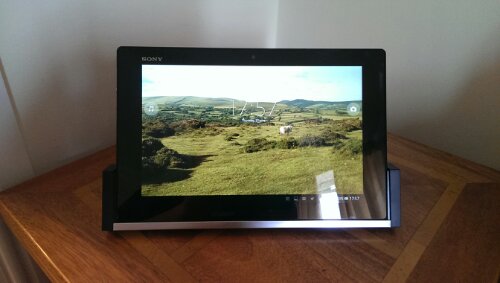
The dock is a very simple affair, a plastic base with a micro usb slot and a pivoting rear plate. The dock costs nearly £40 and doesn’t come with a micro usb lead or mains plug. You are meant to use the plug and cable that came with the tablet. Connecting the lead is very simple as shown below.

image

You then take the Z tablet and it beautifully glides down into the dock. Effortless.

image

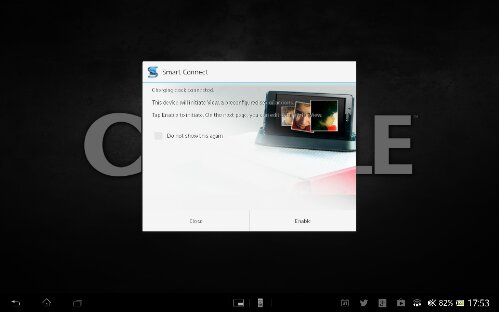
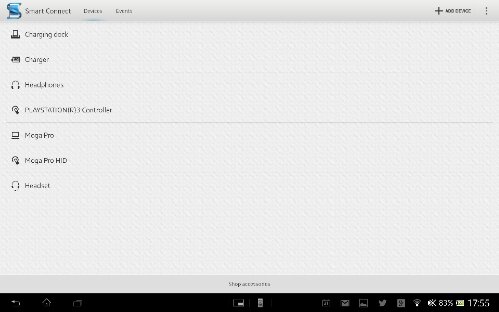
You can then adjust the angle too. However, as soon as the tablet is docked the smart connect app launched. Screen shots below.

image

image

With this app you can create actions that occur when the tablet is cradled. In fact you can do this for any accessory, and as you can see I have a number already working with the Z tablet.

Once docked you can adjust the viewing angle. I must admit when I first took the dock out of the packaging I was a underwhelmed. But in use it is rather neat. Is it worth £40. That’s debatable. Would I recommend it. Yes but only if you’re rich.

Sony Xperia Z Tablet – review part 8

For the earlier review posts click here.

In this part I am going to look at some of the software included by Sony.

Socialite – this is a social and news gathering service and if you use it before the end of June you can import Google reader feeds. Looks good but lacks the full sharing options for some bizarre reasons.

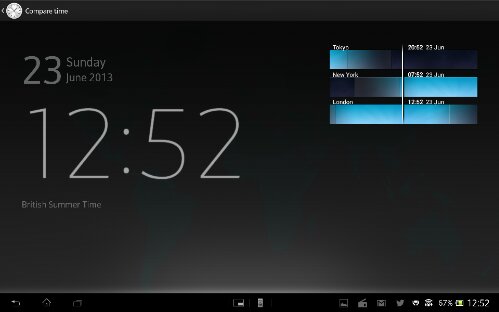
Alarm Clock – an app to manage your alarms, with a world clock, stopwatch and timer. In the world clock screen you can press the time zone icon and it displays the countries setup as a light to dark shade giving you a pictorial representation if it is night or day.

Backup – this app allows you to back your device to the SD card or USB storage. You can select whatever data you require from the system Apps data, media , and the downloaded apps and it’s data. I haven’t tested this yet but it does look really good.

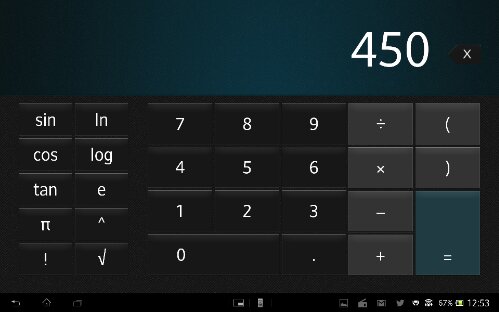
Calculator – its a calculator

Calendar – Sony’s calendar app is very good. Views are month, week, day and agenda. The month view also displays in the right an agenda view of the days events. Each day of the month has the text of the event. The week view has the days of the week laid out with the text and on the right a small calendar of the month. The day view is the same as the month but just that day and a small view of the calendar on the right. The agenda view is a list, but with the page split in two. List of events in left and detail of highlighted event on right.

Camera – modes for resolution, self timer ,smile shutter, quick launch, geotagging, auto upload, touch capture, shutter sound, data storage, superior auto, normal, video capture, burst (3 speed options), picture effect (9 to choose from), sweep panorama, scene selection (soft snap, landscape, night ,beach, snow, sports, party), front video, HDR, iso, white balance, entering, image stabiliser, exposure value, focus mode. All in all a very comprehensive list of options and being waterproof you can photograph in the rain.

Email – if you don’t use gmail, Sony has its own email app.

Downloads – displays what you have downloaded.

File Transfer – allows you to move the fire from internal to micro SD card. Or USB storage. Hidden files can be shown too. Plenty of options too.

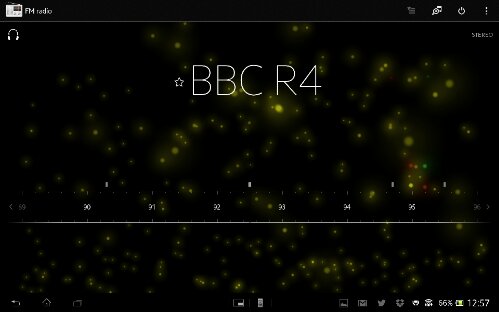
FM Radio – the coolest FM radio app I’ve seen with great sound. Displays station name and have cool visualisations in the background. Also has track ID built in. You can play in the speaker and force mono. You can also change region between default, Japan, Italy and Thailand. Ideal for travellers. I must emphasise the fm radio quality is exception with great separation and more. Stunning!

PlayStation Mobile – play PlayStation 1 games bought from Sony’s store. Most of the games work very well with the PS3 dual shock controller.

Movie Studio – for editing your movies.

Music & Video Unlimited – access to Sony’s stores for music and video.

Notes – a note app that syncs with Evernote .

Mobisystems Office suite viewers. You can upgrade for £15 for full editing.

Play Memories online – Sony’s photo storage offering

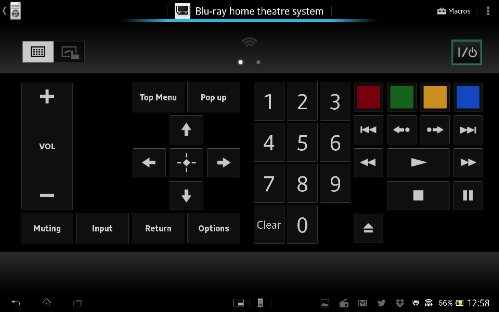
Remote – universal remote control app that uses the Sony infra red blaster. Also has macro modes. Great app.

Sony Select – Sony’s app and game recommendation. Worth looking at as some good free apps exclusive for Xperia devices.

TV Sideview – WiFi remote plus programme guide and details

Update Centre – a single app to handle every type of updates from the firmware to apps. Also shown in the settings.

WiFi Checker – does exactly what is says. Ideal if you are having problems .

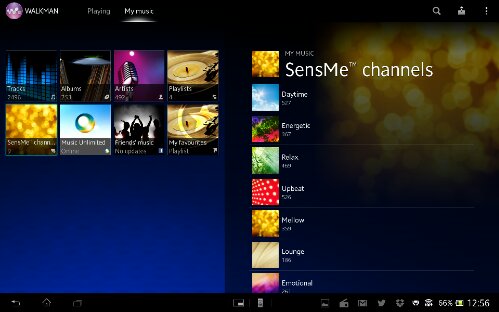
Walkman – the Sony music app. And its great. Select by tracks, albums, artists, playlists (create your own or use the smart ones) , mood selection, music unlimited, friends Facebook music and a favourites playlist. Music info can be pulled in from Gracenote. Superb sound and equaliser options. But I’ll stress and the stunning sound.

There are many other apps plus the Google standard apps. The only browser installed is Chrome.

Below are a selection of screen shots.
image

Above is a screen shot from the Socialife app. Below is from the remote app.
image

image
Above is the PlayStation Mobile app and below the FM Radio app.
image
Next up is Track ID and Office suite.
image
image
Below screen shots from the Walkman app.
image
image
Next up the Backup app and Calculator app.
image

image
And now the Alarm Clock app.
image

Tomorrow I will summarise my final thoughts on this tablet.

The new Sony Smartwatch

Below is the official info from Sony, and afterwards my view.

A multi-functional message notification device, Android app interface and music remote, all in a sleek and water-resistant design. Combines Sony’s technology and design expertise with one-touch connectivity and premium build quality Next-generation Sony SmartWatch offers improved performance, intuitive interface and standalone capability. Reaffirms Sony’s leadership in smartwatch and wearable technology segment**
25th June 2013, Mobile Asia Expo, Shanghai –

Sony Mobile Communications (“Sony Mobile”) today introduces Sony SmartWatch 2 SW2, the most advanced smartwatch available*.
Sony SmartWatch 2 is a second screen for your Android smartphone that, as well as enhancing existing phone functionality, offers unique new benefits. Combining form and function in a sleek design, it serves as a multi-functional watch, notifier, Android app interface and phone remote control, all-in-one.

-Handle your calls by a simple touch of your wrist
-Take a photo remotely from your SmartWatch, using a smart camera app
-Control your presentations remotely using Presentation Pal
-Taking a run or on the bike? Select a mapping app on SmartWatch to check your route with a quick glance at your wrist
-Read previously downloaded e-mails when not connected to your phone
-Use lifestyle apps like Runtastic to map and instantly track your fitness activities on the go
-Quickly and easily adjust the tracks and volume on your music player, without ever taking your phone from your pocket

image

The watch strap is a standard 24mm design so user replaceable with something different. My only concern is that it just looks ugly. It certainly packs more options than the last model and looks better than the Pebble Smartwatch but until these watches look stylish it will remain niche. Probably it will take Apple to change the market.

Sony Xperia Z Ultra – 6.44 inch phone – full specs

Sony announced the Xperia Z Ultra a 6.44 inch smartphone with monster specs to go with its size.

– Colors: Black, white, purple

– Processor: Qualcomm Snapdragon 800 2.2GHz quad-core CPU
– RAM: 2GB

– Dimensions: 179.4 x 92.2 x 6.5 mm

– Weight: 212 grams

– OS: Android 4.2.2 Jelly Bean

– Cameras: 8MP rear, 2MP front

– Display: 6.44-inch 1920×1080 TRILUMINOS display for mobile, touch panel cover glass with Super Hard Coat ASF

– Storage: 16 GB (up to 11 GB user-accessible memory), microSD expandability up to 64GB SDXC

– Networks: UMTS HSPA+ 900 (Band

image

VIII), 2100 (Band I) MHz, 850 (Band V), 1900 (Band II), 1700 (Band IV), GSM GPRS/EDGE 850, 900, 1800, 1900 MHz, 4G LTE

– Battery: 3,000mAh embedded

– Waterproofing and dust resistance: IP55/IP58-rated

Sony state this is the world’s slimmest full HD smartphone, the world’s largest full HD smartphone display, the world’s sharpest large-screen smartphone display, and the world’s fastest smartphone processor.

Even more bizarre is the Xperia Z Ultra can be used with any pencil and selected stylus or pen (capacitive stylus or metal pen with tip diameter over 1mm). That’s right. You can use a pencil on the screen.

My initial thoughts are huge device, top specs, waterproof, and no need for a special pen like the Samsung Galaxy Note range. I do wonder though if 3,000 mah battery is big enough to power this device for a whole day.

So would you buy this as your only device?

The Humble Bundle – a great idea

image

The Humble Bundle is back, and with version six you’re able to get up to seven great games for your Android device at one low price. It’s a pay-what-you-like affair, and any amount will get you these five great games:

Aquaria
Fractal
Organ Trail: Director’s Cut
Stealth Bastard Deluxe
Pulse (Android-only)

If you opt to pay more than the average payment, you also will unlock Frozen Synapse and Broken Sword: Director’s Cut. Right now, the average payment is just $4.90, but that changes as more people pay (it’s the average).

I have bought the bundle and I am really impressed with the game variety and quality. If you get in quick, there may be more games added which you would get too.

Update -the bundle just got increased by another 3 games. So now you also get Waking Mars, McPixel and Night Sky.

Sony Xperia Z Tablet – review part 7

To read the previous parts of the review click here.

I took a break from reviewing the tablet at the weekend, not because I wanted a break but because I had to exchange my Z tablet for a new one due to damage to one of the flaps. I must comment the Plymouth Sony Centre for their excellent handling of this problem. The experience was equal to the Apple store and that is saying something.

Anyway, over the weekend I had to reinstall all my apps and start to setup all my services and logins. Bizarrely, this was actually a really good tthing as I discovered a couple of things I previously missed.

First up, I am now using the default keyboard, which is in my opinion the best keyboard I have ever used. To get it into this position I went into the keyboard settings and asked it to auto correct my spelling mistakes, to add symbols to the keys and allow swiping. I also opted to include Google Voice symbol and a smiley key.

image

Previously, auto correct only adjusted capitalisation and the keys didn’t have symbols on them, no smiley and Google key either. The difference for me with these adjustments is superb. I am super quick across the keyboard. Apple iPad users I feel for you 😉

The other nifty feature I discovered was with the default Sony launcher. The launcher allows for 5 home screens, all of which can be completely different, including the dock icons. So one page could be a business setup, with the respective widgets, apps and sshortcuts. Another for music and entertainment etc.

The other aspect of this tablet I like is its waterproof nature. In the UK it rains a lot. How many of you would feel comfortable using your phone in the rain or tablet? Well now if it is raining I can use my Z tablet and continue taking great photos with its 8mp camera. It is the little things like this that make a big difference.

I am also loving the lightweight feel and glorious 10.1″ screen.

One last setting I found was in the music sound settings. It has an option to level out the volume between different songs. So, right now as I type this, I am using the tablet to llisten to my music, in shuffle mode. With the option switched on, listening to piano or heavy metal makes no difference to volume level. All songs play at the same volume level. Neat!

Tomorrow I will look at more aspects of this Z tablet. All I can say so far is that Sony have created a real gem.