Category Archives: Android

HTC One M8 – Daily Blog – Review – Another Day

Another day has passed and its been a roller coaster of a weekend. Why? Well, I got to play with the Samsung Galaxy S5 and that got me drooling after one. Luckily, this spell didn’t last long.

So back to happy days with the M8 and thinking about the little things on a phone that can make it really a big news item.

And the little thing is a button created on the HTC Watch Infra Red app called “Eject DVD”. You see, not only does the HTC IR blaster have a terrific range that also means it is not necessary to aim directly at the TV, it is also programmable, something that is missing from its competitors. My DVD player eject button stopped working several months ago and the DVD remote did not have an eject button on it. Luckily, I was able to buy an universal remote control that did have this option. But now by using the learning function, I have this option on my HTC One M8. Genius.

Another reason why I love the HTC One M8.
image

Episode 12 – Gav & Dave’s Tech Podcast is now live Please RT

As you know, I co-host a weekly podcast with David from UKMobileTech called Gav & Dave’s Tech Podcast. It is a light hearted tech podcast broadcast bi-weekly. To subscribe click here for iTunes or copy and paste this link into your favourite podcast app.

Episode 12 is now live.

If you get a moment and have enjoyed the podcast, please leave some feedback in iTunes. Thanks.

Its alive – Gav & Dave’s Tech Podcast – Episode 12 – Please Share & RT

As you know, I co-host a weekly podcast with David from UKMobileTech called Gav & Dave’s Tech Podcast. It is a light hearted tech podcast broadcast bi-weekly. To subscribe click here for iTunes or copy and paste this link into your favourite podcast app.

Episode 12 is now live.

If you get a moment and have enjoyed the podcast, please leave some feedback in iTunes. Thanks.

20 minutes with the Samsung Galaxy S5

I was shopping this morning and to my surprise the Samsung Galaxy S5 was out on display heavily clamped down. Fortunately, when I asked they had another S5 to hold freely.

I was looking at the black finish, which is like a grey black dimpled back and metallic looking rims. Being honest the S5 doesn’t look at special or even stand up particularly. From first glance you wouldn’t even know what it was.
The HTC One M8 really puts the S5 to shame with its aluminium unibody design.

But holding the S5 was fantastic. Really felt lightweight, very comfy, secure and well balanced in the hand. The screen was vivid, bright and touchwiz was superb. The new flatter design really appealed to me. Only one issue third party app icons looked out of place. This is a problem Apple had initially with iOS 7. However, I cannot see developers making new app icons just for Samsung. The touchwiz folders looked better too, and I proffered the settings icons and menu system.

Speed. Despite being a show floor demo, there was no lag present. It wasn’t as fast as the HTC One M8 switching between apps but if you didn’t have the 2 phones to compare you would be none the wiser.

I couldn’t test the loudspeaker or headphone output but the sales assistant did say it was not as loud as the HTC One M8.

Camera. I took several shots inside the store. The store was brightly lit but it was still artificial light. The first camera samples were out of focus. The next few were in focus but nothing special. The M8 had no trouble focusing or capturing a decent photo. With some other shots the S5 was really accurate and you could really notice the fast auto focus time.

So what do I think after a short play? It’s not going to set the world alight for looks, but then again it does have water and dust resistance built in. It did feel more durable and better balanced in the hand and overall I quite liked it. It’s inoffensive but will appeal to many.

HTC One M8 – 7 Part Review plus Podcast

Over the last week I have written a daily blog of my thoughts on the HTC One M8. Below is links to all the articles with the finale tomorrow on Gav & Dave’s Tech Podcast.

Camera Theories of the 4mp<

Hello HTC One M8 – Day 1

HTC One M8 – part 2

HTC One M8 – part 3

HTC One M8 – part 4

HTC One M8 – part 5

HTC One M8 – part 6

HTC One M8 – part 7

HTC One M8 – part 8

Amazon Fire TV and Gaming – Your Living Room is Required

b-slate-01-lg-hover2

Amazon Fire TV is a tiny box you connect to your HDTV. It’s the easiest way to enjoy Netflix, Prime Instant Video, Hulu Plus, low-cost movie rentals, and much more. Massive selection—Over 200,000 TV episodes and movies, millions of songs, and over a hundred games. Perfect with Prime—Unlimited access to thousands of popular movies and TV shows including exclusive titles like Downton Abbey and Under the Dome. Get a free 30-day trial. Voice search that actually works—Simply say the name of what you want to watch and start enjoying in seconds. Tiny box, huge specs—Fast quad-core processor, 2 GB of memory, dedicated GPU, plus 1080p HD video and Dolby Digital Plus surround sound. Easy to set up and use—Pre-registered to your Amazon account so you can enjoy favorite titles and personalized recommendations. Instant streaming—Exclusive new feature ASAP predicts what movies and TV episodes you’ll want to watch and buffers them for playback before you hit play. Perfect for parents—Amazon FreeTime lets you easily limit screen time and create personalized profiles just for kids (coming soon). Great for gaming, too—Play blockbuster titles like Minecraft-Pocket Edition, The Walking Dead, and Monsters University, plus free games and Amazon exclusives. Paid games start from just 99 cents.

feature-gaming-thumb._V340471328_

Above, gaming controllers for the Amazon Fire TV.

Well, I knew this was coming as I am sure many of you did too. It is everything as expected, and it appears a very polished first attempt. Voice control via the remote, gaming, preset up with your account and more. What is does not have is Apple’s Airplay, HBO and availability outside of the USA at the moment. Once Amazon launches its own smartphone, we will have a serious 4 way fight between Apple, Google, Microsoft and Amazon.

For more information head over to http://www.amazon.com.

HTC One M8 – Daily Blog – review – day 9

Today I am going to share my brief thoughts after just one week of ownership. On Sunday I will share my further views on my podcast I co-host with Dave Rich, Gav & Dave’s Tech Podcast . Dave also has the HTC One M8 so it will be an interesting discussion.

Camera – excellent. Best lower sharpening to minus 0.5. HTC over sharpen normally. More shots of pets and people obtained due to speed of camera launch and time to first shot taken. If a very bright day, switch to HDR, focus on sky, press and hold to lock AE/AF. Then take shot.

Sense – it makes sense. Designed properly. Feels stock but with some extras that feel smooth.

Sound – Boomsound – the best quality and loudest. Headphone amp so strong. I am finding I can use phone as standalone music player.

Hardware – drool worthy. Say no more.

Extras – free silicone case a decent freebie

Screen – find me a better one. Colours look natural and dont seem to strain eyes.

Speed – move over Ferrari

Upgradable – with ease as HTC apps in Play Store. I like the idea of not having to wait for firmware updates. Also, HTC have an app for new apps they introduce for your phone, thereby adding new features on the fly.

I was a bit worried about the low 4mp rear camera but based on the results I am pleasantly surprised. The wide angle lens is great too both on for the rear and front selfie camera.

Tune in for Sundays podcast where I will provide detailed examples of each of the above.

HTC One M8 – Daily Blog – Review – Day 8 – Ultrapixels

Following on from yesterday’s explanation of the camera modes, and the day before that explaining some of the effects, today I am going to explain my thoughts behind the Ultrapixel arrangement on this phone. I previously had the original HTC One, which based on my experiences of that phone and the new M8, helped me create this article.

The M8 has a Ultrapixel lens and a depth sensor lens. At 4.1mp it is definitely not the best camera on the market. Make no illusion about this point. The depth enabled shots that create a bokeh effect either work well, not so well or simply fail. But I am hoping with software updates and developers on board the potential is huge.

However, the Ultrapixel optics is good at picking up subtle differences within a range of lighting but it is poor at dealing with situations where there is a very wide range of lighting in a photo. Sky shots are a nightmare where there is bright sunlight and grey clouds.In my experience. HTC took the decision that this would be more of a social camera and therefore calibrated it to pick up subtle detail when lighting situations have a low level of variance. Eg inside a room for a constant light reading and subtle variances in the shot. Look at my table shot of the mugs yesterday. Great shot.

So what does this mean for outdoor bright shot. Tap on the screen and use a point where the lighting is slightly darker than it needs to be, unless you can find a perfect spot. It is easier to lighten a photo as the information already exists, but impossible to adjust an over brightened shot in the same way.

The HDR mode of the HTC One is far too bright. I am trying third party apps that have an HDR mode and so far the results have been better than the inbuilt camera app. In fact the best app so far is “A Better Camera”. But it is a close call sometimes between using the stock app.

So I mentioned HTC made this a social camera with lots of funky effects to show off to your friends on social media, video highlights of the events all created for you, so in reality the photos where this camera shines are quick snaps to capture that moment that other phones will have missed and in slightly lower but not total darkness lighting eg in a bar, at home early evening. Pets, people and relatively close up shots, macro and such like all work really well.

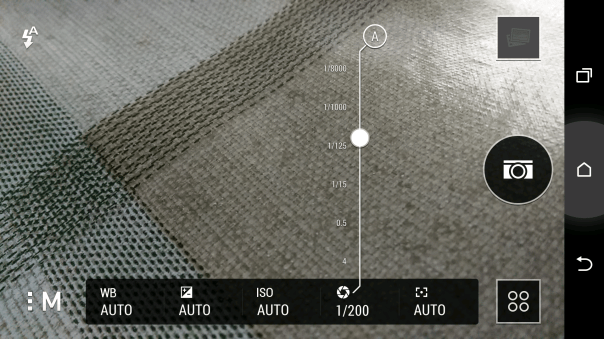
So is everything else is just average? I don’t think so. In fact, the photos I have captured look wonderful. There is even in manual mode shutter control, so you can set a longer shutter time if required.

See for yourself at a selection of 16 shots and decide for yourself. Click here for Flickr set.

https://www.flickr.com/photos/gavinfabl100/sets/72157643265004874/
image

Google Keyboard v3.0 – a few neat changes

Google has updated its android keyboard to version .

The update brings a few minor bug fixes and tweaks, such as a dedicated “ABC” button to switch from emoji. There is a new personalized suggestions feature which uses data from other Google Apps and Services to improve suggestions and corrections.

The personalized suggestions feature is disabled by default but is easily turned on in the settings.