Category Archives: Android

Samsung Galaxy NotePro 12.2 Tablet – first impressions

image

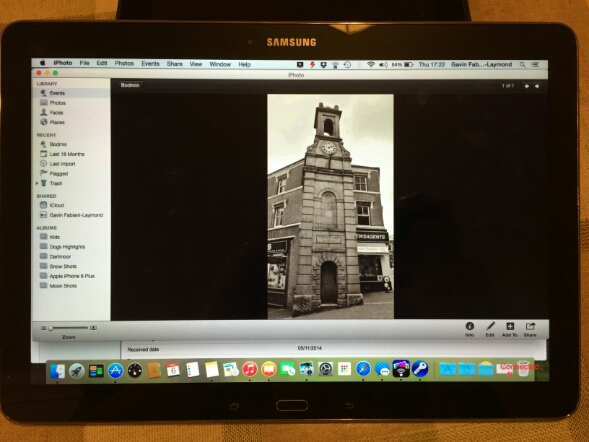
Don’t be confused, it is Yosemite running on the Samsung NotePro 12.2 tablet but it’s using the free software Remotepc that Samsung provide. It’s seems really good too and it has a file explorer allowing the transfer of files from your computer to tablet  The above photo demonstrates just how big the tablets screen is.

Anyway, last night after allowing the tablet to charge, then spending the next hour or so downloading all the app updates from Google Play store and the Samsung App store plus the installation of 2 OTA firmwares the tablet was ready to rock 

First impressions are that it is huge. It is heavier than any tablet I have held in years. But it is also the biggest tablet screen size I have used too. In fact the screen is fabulous,  as is the default on screen touch keyboard. I have typed this post on it.

Several apps look like stretched phone apps, but on the whole the rest looked fine. The S-Pen is included and is more suitable for such a large screen for note taking and such like. Handwriting recognition appears to be really good so far. Samsung include many business type apps which I will cover off in more detail. Multitasking with 4 windows open is slick, but it is better to have 2 as the size of the windows is 6 inches a piece. This is the first Samsung product that includes a brilliant infra red software app. Very pleased about this as the dvd software includes the eject button. My dvd player eject button doesn’t work anymore and the official remote does not have an eject button either. 

If Apple release a 12 or 13 inch ipad,  the experience will be fantastic. I hope they include allowing more than one app to be displayed on the screen. Photos just shine on this tablet. In fact, they look better than on my ancient macbook. If my macbook dies I could just use this tablet.

Lag. It’s Samsung. It lags. Slows down at times. But in reality it doesn’t matter that much. There is also the magazine UI powered by Flipboard which also adds some HTC Blinkfeed options too.

I still have a lot to setup and discover. I will also be using this tablet with the Samsung Note 4 and Gear S. First impressions will be on Sunday hopefully on my podcast .


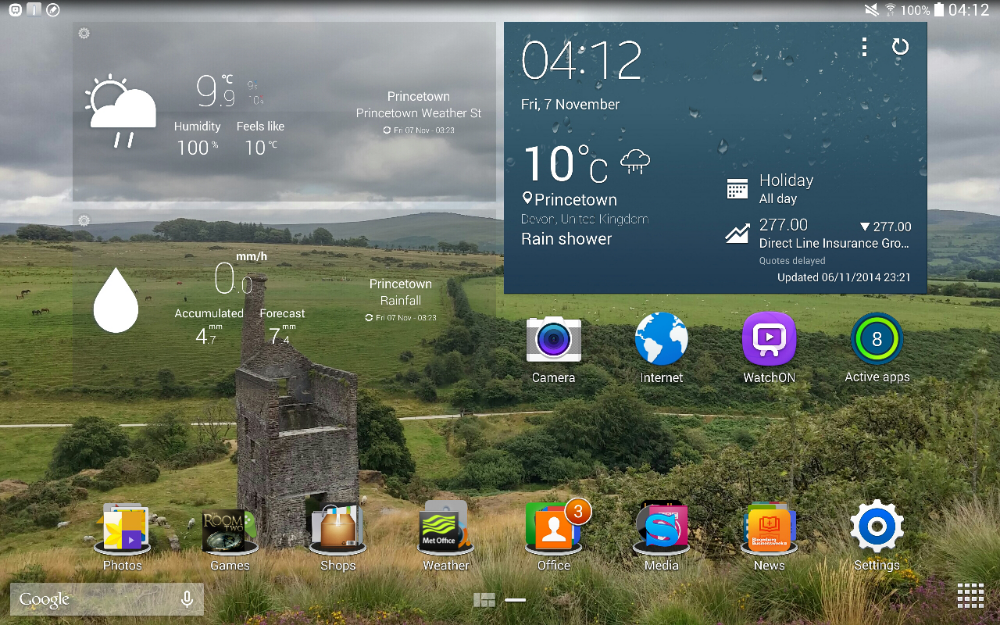
In the meantime below are a few screen shots. First my current home screen. The time is correct.
image

Next up is a screen shot with the Magazine UI.

image

You can make the tiles smaller in the above shot, so if you wanted you could have 6 items per page. Next this is Multitasking done properly.

image

The above screen shot shows 3 screens open. 4 is the maximum in multi window. As I mentioned above, having 2 windows open side by side is really useful and manageable.

More soon…. questions please ask.

Samsung partners with West Yorkshire Police using the Note 3

London UK – 3rd November, 2014 – Samsung Electronics today announced that it has partnered with West Yorkshire Police to help the force lead the way in one of the biggest technological advancements in modern policing.

4,000 Samsung Galaxy Note 3 devices are being issued to front line officers and staff, replacing traditional pocket note books. The mobile devices contain online ‘apps’ which allow officers to record a crime without having to return to a station, reducing admin and spending more time on the front line.

West Yorkshire Police, Assistant Chief Constable, Andy Battle said it means more time spent in communities:

“This initiative will exploit technology to maximise the capability and effectiveness of policing at the front-line. It will potentially lead to 7,000 front line officers and staff using the devices. As a result of this project, there will be an increase in the amount of time they are able to spend on the streets, dealing with crime and public safety. The device includes an e-notebook which will enable us to record information and make intelligence submissions via secure mobile police apps.

Officers will be able to enter electronic witness statements and complete missing person forms without having to put pen to paper back at base. Similarly, the device will allow users to view and update incidents whilst on the beat, increasing our visibility, responsiveness and presence on the streets.

According to a national audit conducted in 2012 which looked at mobile working in policing across the UK, an average of 18 minutes of additional time on the streets was generated. From a West Yorkshire perspective, one minute of extra time on the street per officer, per day equates to a million pounds worth of additional policing annually.”

This is a good use of technology and providing the Note 3 phones don’t break too often this could be a success

LG and Google have entered into a 10 year cross licensing agreement- details

Via LG

SEOUL and MOUNTAIN VIEW, Calif., Nov. 5, 2014 — LG Electronics Inc. (LG) and Google Inc. have entered into a long-term patent cross-licensing agreement covering a broad range of products and technologies. The agreement covers the two companies’ existing patents as well as those filed over the next 10 years.

“We’re pleased to enter into this agreement with a leading global technology company like LG,” said Allen Lo, deputy general counsel for patents at Google. “By working together on cross-licenses like this, companies can focus on bringing great products and services to consumers around the world.”

This agreement builds on the long-standing strong alliance between Google and LG Electronics, the companies said.

“LG values its relationship with Google, and this agreement underscores both companies’ commitment to developing new products and technologies that enhance consumers’ lives,” said J.H. Lee, executive vice president and head of the LG Electronics Intellectual Property Center.”

This is great news for consumers. I wonder what implication this will have with Samsung

Microsoft and Dropbox announce strategies partnership – full info

Microsoft and Dropbox announced a new partnership, that was somewhat surprising to say the least. This means the following –

Dropbox and Microsoft users can now do the following:

Access Dropbox from Office apps to get to their files and folders faster.

Edit Office files directly from Dropbox and sync them across devices.

Share new or edited files from the Office apps using simple Dropbox sharing functionality.

The functionality will first be included in the next updates to the Office apps for iOS and Android, coming in the next few weeks. The Web integrations between the Dropbox website and Office Online will be available in the first half of 2015. Dropbox will also make its application available on the Windows Phone and Windows tablet platforms in the coming months.

These capabilities will be available to all Office users with a Dropbox account. Dropbox for Business customers will need an Office 365 subscription. More information can be found by visiting the Dropbox blog at https://blog.dropbox.com/2014/11/dropbox-microsoft-office-partnership and the Office blog at http://blogs.office.com.

Via – http://news.microsoft.com/2014/11/04/microsoft-and-dropbox-announce-strategic-partnership-to-give-people-more-freedom-in-how-they-work-2/

THE Most Important Story of The Year – Buy a Burger with your Phone

If you prefer MacDonalds over Burger King, I can forgive you. I love Burger King so this news is BIG news for me at least 🙂 Well it will be when it comes to the UK.

Paypal have confirmed the following –

“BURGER KING® restaurant customers in the U.S. will soon be able to pay for their meals using PayPal, through our collaboration with Tillster Inc. Tillster worked with Burger King Corporation to develop the BURGER KING app® (available for iOS and Android), which offers customers increased convenience and savings. With the BURGER KING® App, guests can receive exclusive offers and discounts at BK® restaurants, find their closest BK® restaurant, and browse the menu and nutritional information. We will be rolling out later this quarter across the United States to all locations, BK® restaurant guests will be able to securely pay with PayPal by simply launching the app and when they select to pay with PayPal they will be prompted with a four digit pin to pay.”

Source – https://www.paypal-community.com/t5/PayPal-Forward/Money2020-PayPal-for-Burger-King-the-Post-Delivery-Pay-Movement/ba-p/898497

The Nexus 9 Tablet – review

The Nexus 9 review embargoes have been lifted and a number of tech sites have published their reviews.

Below is a summary of the main reviews from across the web –

Via – http://www.engadget.com/2014/11/03/google-nexus-9-review/?ncid=rss_truncated

PROS -Android 5.0 Lollipop runs like a dream,Material Design face-lift is warm, welcoming,K1 chipset is plenty powerful, despite benchmark oddities

CONS -Screen is solid, not jaw-dropping, BoomSound speakers not as good as M8’s, No expandable memory

Via – http://www.androidpolice.com/2014/11/03/nexus-9-review-a-little-better-on-paper-than-in-practice/

The Good –

Display: I love the 4:3 form factor, and the display itself is very nice. Great colors, what looks to be solid white balance, good brightness, and excellent viewing angles. I can find no real important faults with it.
Android L: Is pretty, adds tons of new features (many of which are quite useful), and beautiful animations throughout the OS. Easily the most mature and thoroughly styled Android has ever looked. It looks great on the Nexus 9.
Fast: The Nexus 9 is, in most situations where linear performance is the primary concern, very quick. Its single-thread benchmark results put it even ahead of Apple’s new iPad Air 2, so that K1 isn’t a slouch.
Front-facing speakers: I don’t really need to extol the virtues of front-facing speakers. They’re obvious.
Software support: OTA updates from Google mean you’ll be the first to get the latest version of Android, of course, with all the good and bad things that entails.

The Not So Good

Battery life: 9.5 hours of Wi-Fi browsing is, as far as my review unit is concerned, a fantasy. Like, there’s just no way. I’m getting half that.
Performance: It’s unpredictable. The Nexus 9 is fast, but it’s twitchy. Apps will randomly take longer to load than normal, longer than I would expect – it doesn’t feel fully optimized. That, or only having two cores is causing issues.
Build quality: It does not feel like a $400 tablet should feel. Not only is it fairly heavy for its size, the plastic back seems to have the same issues the Nexus 5’s did – it deforms under pressure, snaps, and creaks. It is not nice. Also, it’s a finger oil magnet.
Design: I’m sorry, but in my subjective opinion, the Nexus 9 is not a pretty tablet. It is decidedly generic, and not in a cool, stealthy way. It’s boring and drab. The press shots do it too much justice.
Price: All things considered, I find $400 ($480 for 32GB) hard to stomach for a 16GB tablet of this caliber. That’s generation one iPad Air money.

AndroidCentral.com – went on record to say they only got their device on Wednesday and they will spend more time with it so they can write a proper review. That makes sense to me!

Reading a number of reviews last night echoed the findings of the views printed above. Some loved it, some questioned its strengths and others were not blown away. Either way it is a direct take on Apple’s iPad space with a 4:3 aspect ratio but it does not beat the iPad Air at all.

Nvidia Shield Tablet – the negatives and bugs

So far I have covered off all the wonderful aspects of the Shield tablet. But I have also discovered a number of bugs and issues as below.

Nvidia Shield Tablet issues

1. Wifi Connectivity – I have noticed the range is not as powerful as my other devices. A recent OTA software update has improved matters.

2. Remote Streaming – Doesn’t work unless using an Ethernet Adapter. Wifi signal too week to stream. I have not experienced this myself, but some users have. Unfortunately, my PC is too old and does not have the minimum specs for streaming.

3. Cracks Edges on Case – Hairline cracks in all 4 corners of device. Case creaking and splitting. There are pages and pages on many forums about this. Again, I have not had this issue. But it Is worth highlighting it. Apparently Nvidia changed the manufacturing plastic bonding process with the newer LTE 32gb. However, users with this newer model have also experienced the shell suffering hair line cracks. More than likely caused by excessive heat whilst gaming at full throttle for hours at a time. The only good news is Nvidia does seem to be exchanging people’s devices. I should point out that if you get a crack, it doesn’t affect anything. Just cosmetic.

4. Poor Battery Life – 2 to 3 hours max when gaming. 5 hours otherwise. No quick charging. I have done battery tests and the gaming battery life is poor.

5. Bluetooth Controller Connectivity – Interference with 2.4GHz signal and inability to connect to certain devices.

6. OTG USB Charging and Ethernet Adapter – Not able to use a USB splitter for both the Ethernet Adapter and Charging at the same time. Not a feature advertised by Nvidia but would have been useful due to short battery life.

7. Mushy Power Button and Volume Rocker. I find these difficult to operate. Fortunately the Smart Cover turns the device on and off , and the wireless controller has volume controls.

8. Brightness Fluctuations with Screen. Auto brightness control is too aggressive and changes brightness too often.

9. Folders. I have created folders on the home screen. But apps keep vanishing out of them. Maybe I have too many apps in the folders? But then it allows me to place them inside to start off with.

Every device I have owned has issues including the Nvidia Shield tablet. However, despite all the above I am keeping this over my iPad. The Shield has flaws but it also has charm and lots of functionality that makes it a keeper.

Google Chromecast – List of devices that support cast screen

Own a Google Chromecast and want to be able to cast your screen. Then you need the following devices –

Nexus 4
Nexus 5
Nexus 7 (2013)
Nexus 10
Samsung Galaxy S4
Samsung Galaxy S4 (Google Play Edition)
Samsung Galaxy S5
Samsung Galaxy Note 3
Samsung Galaxy Note 10
HTC One M7
HTC One M7 (Google Play Edition)
LG G3
LG G2
LG G Pro 2
Sony Xperia Z3
Sony Xperia Z3v
Sony Xperia Z3 Compact
Sony Xperia Z3 Tablet Compact
Sony Xperia Z2
Sony Xperia Z2 Tablet
Support for additional devices coming soon

In addition Android OS 4.4.2 or higher required. Casting your mobile screen is currently in Beta. Casting your mobile screen is currently not supported on iOS devices.

Via Google

From last week – Gav & Dave’s Tech Podcast is now live – Please RT

From last week.

As you know, I co-host a weekly podcast with David from UKMobileTech called Gav & Dave’s Tech Podcast. It is a light hearted tech podcast broadcast bi-weekly. To subscribe click here for iTunes or copy and paste this link into your favourite podcast app.

Episode 26 is now live for your listening pleasure.

If you have enjoyed the podcast, please leave a 5 star review in iTunes. It helps others find our podcast.

If you have any comments, questions or feedback, please drop a line at feedback@gdtpodcast.com .