Tag Archives: HTC One

HTC One – Daily Blog

Today I have been streaming a movie to the HTC Media Hub. I was then able to carry on and use the HTC One as normal but in landscape mode.

In fact as I am typing this I have my TV screen displaying the post as well.

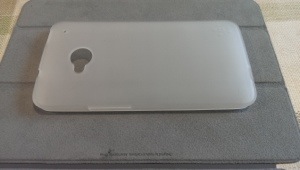
I got a clear silicone Belkin case today. It’s ok but doesn’t set my world alight. The One just looks so damn good naked.

I tried connecting a wifi wireless mouse via a USB otg cable but it doesn’t work. Shame.

After many days using the phone I wish it had a quick profile change in the power button and an automated do not disturb option.

Photo of Belkin case below. My main gripe is that it’s not contoured around the phone properly. So I’ve been looking at other options and have a short list of 31 cases.

20130413-171401.jpg

HTC One – Daily Blog

Yesterday I was lucky enough to win a free film code of HTC on twitter, so I’ve got a film downloaded for today. Actually, I decided to try another 2. I am going to see if it works with the HTC Media Hub as well and let me stream the film on my TV. I believe it should.

The HTC Watch app is a fairly reasonable way to get movies instead of Google Play and if it let you play the movies on a TV screen via the media hub then that is better than Google Play tat doesn’t allow this.

I’ve really settled in to the swing of things with the HTC , just wish a few of my apps got updated for the HTC screen resolution. These are Zite, Nationwide and Need for Speed Most Wanted.

Also of a surprise is the fact that I have over a 100 apps installed, tons of photos, several personal video clips and 3 feature films. And I still have over 13gb free.

Anyway, not much today as I am watching the F1 qualifying on my HTC One via the BBC iPlayer app. It’s so loud with the HTC One speakers. A dream to listen and hear!

HTC One – Daily Blog

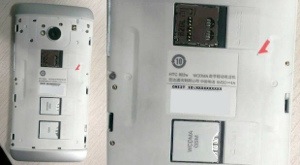
The other day I came cross the HTC One variant for China, featuring dual sim slots and micro sd expansion. See below.

20130409-073946.jpg

However, I still prefer the unibody design of the UK version. Far more dramatic and better looking. And I’ve been surprised how I’ve managed with 32gb of memory so far. My storage shows I have 15gb free despite taking hundreds and hundreds of photos at the weekend, along with Zoe’s too.

In my review of the HTC One review (links under header) I mentioned the Car Mode. Well I have had time to use this properly and will have a really detailed review of this live on Monday.

HTC’s included keyboard is very good. It has the options for swipe and many other niceties. However, it doesn’t work properly in some apps, whereby the word suggestion fails. This problem occurs in many well known apps like Plume. Oddly, the word suggestion does work when using the swipe mode. Well despite holding out there was only one solution, and that was installing swiftkey. This is the best android keyboard. It does swipe brilliantly, learns your styles and so much more. Text entry is super quick with this keyboard. Also handy is landscape mode, whereby you have the option to split the keyboard making it much easier to type in this rotation. The only weirdness is the unlock. If you have a 4 digit code, swiftkey not only brings up the numbers but other punctuation. The HTC keyboard only brings up the numbers so looks a lot better.

Update. I’m back with the HTC default keyboard. I went into HTC keyboard options and calibrated the keyboard. It is now super accurate and quick, and also using swipe/trace method a lot more as its very quick.

HTC One – Highlight video and freezing motion – HTC One Camera

The above is a highlight video lasting 32 seconds that is automatically produced from the photos and videos of an event. You have a choice of background music and you can change the random order of the compilation.

Some of the stills from this video are shown below. The photos below show how good the HTC One is at freezing motion. My dogs were running really fast.

20130409-104459.jpg

20130409-104521.jpg

HTC One – Daily Blog – Continuous Shooting

One of the things often forgotten about the HTC One, is its ability to capture motion perfectly. The camera can take 8 photos a second. That’s right 8 photos a second. All you do is press and hold the shutter button.

Now if you do this you get presented with a best shot option. Choose the best shot and the other photos are deleted. However, hit the back key and the batch is saved. Go to the photo editor, tap edit, tap retouch and tap action shot. Select a few photos and tap save and you can get the below affects.

Another way is turning Zoe mode on. And edit as above. Anyway have a look at the two photos below. Look at the old lady and the escalator. Rather cool.

20130407-060852.jpg

20130407-060901.jpg

It features like this that make the HTC One amazing. Also if you are taking photos, power off, when you power on , you are straight back in to camera mode.

HTC One – Daily Blog

In my review I mentioned the HTC Music player and how once playing a song it can display all sorts of fancy visualisations and obtain the lyrics for the song playing, but I never attached a screen shot. Well this is the song playing with lyrics.

20130406-101105.jpg

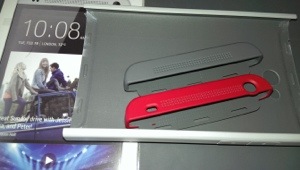
I have been looking at cases and screen protectors. At present the options are limited but I did get the HTC Double Dip hard case and HTC Official screen protector. Whilst the HTC case is fine, I have grown to dislike it. It takes away the beauty of the phone. And the HTC screen protector is crap. It doesn’t fit properly. On both edges the protector is not without air underneath. It just won’t stick down properly. Poor fit. Otherwise its ok. So I’m in two minds now whether to forget using a case and screen protector. I have got a slim silicone case on route so I will decide then.

20130406-104411.jpg

The other thing I noticed after fitting the screen protector is that it affects the capacitive buttons. Sometimes the don’t work first time and it is the screen protector that causes this. So I removed it.

HTC One – Daily Blog

Welcome back. As before click here for my reviews and more on HTC One .

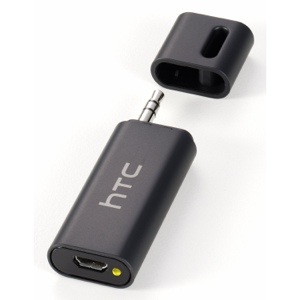
I had ordered via Amazon the HTC A100 Car Bridge adapter.

20130406-093209.jpg

This is a great little piece of tech. Basically if you don’t have a Bluetooth enabled car stereo but you do have an audio input jack, plug this in, then stream your music via Bluetooth from your HTC One to this device and it then plays through your car stereo. Also worth mentioning is the A100 has the apt-x codec for high quality Bluetooth stereo sound, which is handy as the HTC One has this as well. Makes a huge difference to the sound quality. As a point of reference the iPhone 5 doesn’t possess this codec.

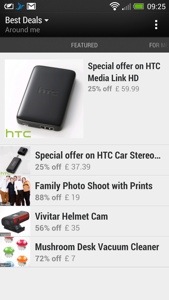
I was quite pleased to buy it from Amazon, as it was £5 cheaper than anywhere else at £45. To my annoyance, I had the Best Deals app (installed as standard on the HTC One) pop up on Blinkfeed with daily deals, and the HTC A100 was £37.99. £7 cheaper than Amazon. So I cancelled my Amazon order and ordered it through the Best Deals app.

20130406-094113.jpg

When I get this, I will let you know how it works.

I used Google Navigation on the One today, and apart from the clarity of the screen, the front speakers are so clear it makes it seem the person is there talking to you.

Seriously you cannot underestimate what a difference the front speakers make to the HTC One experience.

HTC One – Daily Blog

Since I now have reviewed the HTC One in every way possible, I’m just going to do a short post now, noting on new findings and experiences.

First up, here’s the links to all the previous HTC One reviews and more.

I discovered a setting in the default web browser. Go to the web browser settings, accessibility and tick “dim screen while web pages loading”. A nifty battery saving tip.

I have changed the auto brightness off. It’s too bright. I have a manual setting which works just fine.

The HTC One also has USB on the go. So far I have tried connecting a USB memory stick and a small USB hub all of which worked fine. Unlike my Samsung Note 2 you do have to go into settings, storage and tap unmount USB before detaching from the phone.

I also tried connected a Fiio E17 headphone/dac via USB. This worked really well, and I am pleased that the HTC One has USB audio out as a standard feature. As a comparison you can get USB audio out from the iPad Mini, iPhone 5 and older Apple devices, but as Apple control the authentication aspect, any USB DAC subsequently costs a premium due to the royalties Apple charges and their bespoke connectors. At least with the HTC One it is using a worldwide standard micro USB connection.

Connecting the Fiio E17 via USB to the HTC One, and using the DAC on the Fiio you begin to realise just how capable the One is in the audio department. Truly astonishing. And for the full affect you can use the Fiio E17 as a USB DAC only and feed the signal to the Fiio E12 Mont Blanc Portable Headphone amplifier, as shown below.

20130405-224648.jpg

20130405-224722.jpg

Just to clarify for those not as technically minded, plugging the USB on the go cable (thats the small black cable coming out of the One) into the HTC One, then enables you to connect the digital analogue converter, and then that sends the analogue sound to the portable power amp. Your headphones plug into the portable power amp. Using this method bypasses the built headphone amp, DAC & Beats on the HTC One, but does provide a much cleaner and even better audio. No sound comes out of the speakers or headphone jack with this connection setup either.

And the USB on the go cable also allows you to connect USB mouse, keyboard and more. I’ve only tested the USB audio and memory sticks but I’m fairly sure the others will work too.

HTC One – Links to everything written, reviews, first impressions, camera and more

HTC One Review Parts 1-9

HTC One – Camera Sample and also more here.

Comparison review between HTC One vs Samsung S3/S4 Note 2 vs iPhone 5 vs Nokia Lumia 620

HTC One – First Impressions

HTC One – Full Specifications

My guest appearance on Techtalkuk’s podcast discussing the HTC One

Reviews of Note 2 & Nokia Lumia 620 plus other reviews.

HTC One – Review Part 9

Over the last week I have written daily reviews of the HTC One, with camera examples, was a guest in a podcast and more. To read everything on the HTC One click here.

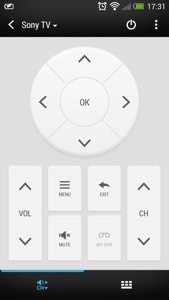
In today’s post I am going to cover compatibility with HTC Media Link HD but first I discovered an extra function with the TV app. When I was first using the app, I couldn’t find a button to change the external inputs. Below is a screen shot of the TV app.
20130404-174607.jpg

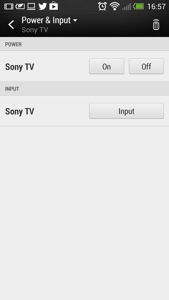
Notice the standby/power icon, top right. You would think this would turn off your TV. It does,but not straight away, as pressing it reveals the following screen.
20130404-180840.jpg

As you can now see the input and power options are available.

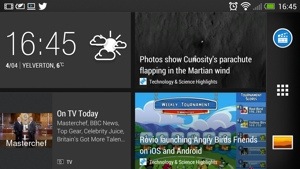
Now on to the HTC Media Link HD. Does this work with the HTC One and do you need it. First up, it does work, but I had a faulty HDMI cable which caused me some grief until I realised I needed a new cable. After a quick pairing, the TV screen is showing you to swipe up on the HTC One with 3 fingers. This connects the two devices. The HTC One screen rotates to landscape and looks as below.
20130404-175544.jpg

The odd part is how Blinkfeed works connected to the HTC Media Link HD. Tapping on a news item just reveals a photo and no text, as shown below.

20130404-175659.jpg

The applications folder switches to alphabetical mode and landscape.
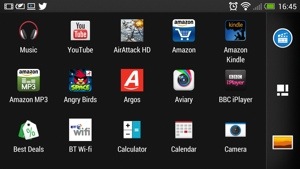
20130404-175742.jpg

Photos and video are all displayed in landscape. Movies did not get played on the HTC One at the same time as watching the TV screen. Gaming doesn’t work very well using the Media Link HD. However, the clarity of the displayed image is awesome.

If you have a wifi enabled/DNLA TV you don’t need this gadget, but I have found that cropped and panoramic photos wouldn’t display via DNLA but were fine with the HTC Media Link HD. I have raised this issue with HTC, so if I get any updates, I will let you know.

From now on each day I am just going to post about my HTC One experience and anything I discover as I undertake my One journey. Feel free to ask questions too.

I have been playing a few podcasts, and the One is fantastic for this as the built in speakers are clear and loud enough to enable me to still listen to the podcast while I move around from room to room. It seems a rather basic thing, decent speakers, but the difference is noticeable.

Any how enough for today, catch up with you all tomorrow.