Sony QX10 and QX100 attachable lenses for android and iOS

So there I was thinking about the Samsung Note 3, Nokia Lumia 1020 or Sony Xperia Z1 as my next phone and then Sony launches the QX10 and QX100 lenses.

image

Sony DSC-QX100 £399

Works with any android or iOS  smartphone. Simply mount the smart lens to your phone or hold in your hand or attach to a tripod.

One touch connection with NFC. High-performance 1.0-type Exmor™ CMOS sensor with 20.2 effective megapixels, -F1.8 Carl Zeiss Vario-Sonnar T* lens has a wide aperture to allow more light to enter the camera, for easy, creative effects.

Take complete control – use the functions on your smartphone’s touchscreen to compose and shoot, or use the control ring to manually fine-tune zoom and focus. Get close with 3.6x optical zoom – pull yourself closer to the scene and capture the long-distance shot you’re after. Optical SteadyShot reduces the effect of shaky hands for crisp, blur-free images.

Capture your own HD movies – thanks to the large CMOS sensor, the smart lens will shoot high-quality HD movies (30p) with low noise, even in the dark. Shoot fast, shoot clear – the high-speed BIONZ imaging processor powers rapid shooting for quick and clear results.

image

Sony DSC-QX10 £179

Same idea as its big brother but a G lens with 10x optical zoom. Optical SteadyShot reduces the effect of shaky hands for crisp, blur-free photos and videos. An 18MP Exmor R™ CMOS sensor ensures crisp, detailed results in every frame.

No noise, just smooth images – back-illumination technology inside the sensor collects light more efficiently to ensure minimal levels of noise. Capture your own HD movies – thanks to the CMOS sensor, the smart lens will shoot high-quality HD movies (30p) with low noise, even in the dark. Shoot fast, shoot clear – the high-speed BIONZ imaging processor powers rapid shooting for quick and clear results.

image

So with either one of these lenses I could attach these to my Nexus 4 and have a super HQ camera.

Also the lens has its own battery and memory card slot, so not drawing on my phones battery. The lenses can be used without the phone to.

So is this a great idea or a nutty one? Well it is in the top 3 at Amazon!

Why I am considering the Samsung Note 3

I finally sold by old Samsung Note N7000. This was the original Note and despite being a bit slow versus processors of today, it still rocked. This wasn’t my main device, just a second hand 2 year old phone.

The Note 3 seems to take the previous 2 versions and fine tune the hardware and software. In addition, the new S View cover is also available in a qi wireless charging option. That ticks a major box of mine.

It is also features the latest and greatest hardware specification and android 4.3 out of the box. The internal memory is adequate and expandable for media with a micro SD card. In terms of longevity, Samsung will keep this updated for a good few years. If the battery fades, I can just pop a new one in.

It is a little big, but in terms of including everything it really does tick the boxes. Even having USB 3 will mean really fast charging.

My only concern is the high price at launch. So I might just wait a few months for it to settle down.

Are you ready for the Note 3 and what accessories would you get with it ?

The only other phones I am considering is the Nokia Lumia 1020. And that’s due to the camera. And then Sony launched the Z1 and the QX10 and QX100 lenses and I had more ideas…..

iOS Traumatic Stress Disorder

Shortly Apple will release iOS 7 to the masses. Most people when they hit accept update to iOS 7 won’t realise how dramatically different the new iOS version is compared to the previous.

So it should come as no surprise that Apple is training its staff to deal with iOS Traumatic Stress Disorder. That is customers calling about their new look.

Just how the whole world will view the new look is unknown but I am sure Apple’s marketing team will create a campaign to make everybody desire the new look and functionality.

Wireless charging and why I won’t buy any device unless it has this feature

I had read an article by Steve Litchfield from All About Windows, and listened to him rave about how amazing wireless charging along with the benefits. Well, I did think this was a load of nonsense. I mean, how difficult can it be to plug a micro USB lead into your phone and tablet!

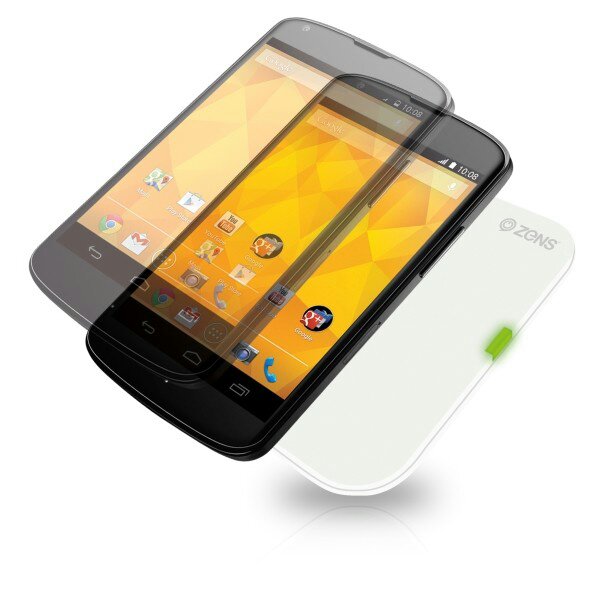
Well that was a week ago. My views today are this. Unless a phone has this capability or means I won’t consider buying it. So what has happened in a week. I received the Nexus 4 and new Nexus 7 and then discovered they both had the circuits built in to allow wireless charging. Curiosity got the better of me and I ordered a Zens charging pad. Well being able to just place the phone or tablet on this pad and it charges is a revelation. It is just so cool. In addition the pad turns charging off at 100% and recommences when battery drops to 95%.

So I decided to get a double charging pad for another room. I might get one more for downstairs too. But the double pad is not as slim and sleek as the single pad. So I returned the double pad and got another white Zens single charging pad. Happy days.

The other neat aspect of the Zens charging pad is that it is not placement sensitive.
image

image

My top photography apps on android

Those that follow my twitter account @gavinfabiani know that I like posting photos of my pets and Dartmoor. Consequently, I also have tried a number of photography apps. Below are my favourite-

1. The default camera app that came with your phone. Always start here and see what it can and can’t do.

2. The phone’s default editing options. Explore what your phone can and can’t do. Examine file sizes after editing too as some photo editors shrink the photo.

3. Camera Zoom FX – simple easy to use and tons of editing options. Works on tablets too. Complete control of photo capture. Voice activation.

4. Color Splash Effect – takes an image and makes it black and white. Then add back colour to the areas you want. Plus add text, effects, overlays, frames, and textures too.

5. Picsay Pro – similar to Camera Zoom FX but only for editing photos. Has some snazzy effects too.

6. ProCapture – camera + panorama – high quality panoramic photos up to 12 linked together, wide shot, loads of camera options. Good on tablets too. No post editing just great at taking photos.

7. Pro HDR Camera – full control over taking HDR photos. Plus after editing adjustments before saving.

8. Photoshop Touch – enables layers and other pro editing options. If you know what you are doing this is a very good app.

9. Lapse it – Time Lapse – Pro – create some stunning time lapse effects. A tripod might be handy.

10. Snapspeed – another post editing app. Drama is a great affect to use. Makes boring photos exciting.

A lot of the apps have some overlap, but each offer something special. With all the above and the default camera app you will be surprised by what you can achieve.