Samsung Note 3 KitKat update starts rolling out

The next software update for the Samsung Galaxy Note 3 has started via over the air.

The change log is –

-Select between the stock messaging app or Hangouts for SMS and MMS

-Select between TouchWiz or other launchers through settings

-Wireless printing

-Updated Google apps

-Updated Galaxy Gear Manager brings improved connectivity and better email options

-Music album art shows on the lock-screen while music is playing

-A camera shortcut is now displayed on the lock-screen

-New emojis support

I wouldn’t say the update is significant in features as most aspects are already included but this will make the phone very fast.

Camera shootout – Samsung Note 3 vs iPhone 5S

And the winner is neither.

I own both these phones and use them extensively to take photos.

Below is a brief overview of each and what you should expect.

Speed – From startup to capturing the moment goes to the iPhone 5S. And then the 5S burst mode of 10 photos per second at full resolution all the way up to 999 photos as a burst is out of this world. I’ve tried it and it works. It does take a while longer than normal to analyse 999 photos and give you the best but it’s still quick.  Meanwhile the Note 3 only takes 20 shots on burst but it’s very quick once it starts. From holding the shutter button down seems to have a delay of 1- 2 seconds before the burst mode starts.

Panoramic – this goes to the 5S as it auto adjusts exposure as you pan. But both are good at this mode. And both can take some fantastic shots. With the Note 3 be sure to hold phone vertically to get a real large photo.

Low light or indoors – this is a close draw. Both have strengths and weaknesses here. The Note 3 uses the flash more often whereas the 5S tries to avoid using the flash. On scenic non moving night shots the Note 3 using a tripod will outperform the 5S.

Good light – both take excellent photos. The 5S has an uncanny way of making sure the photos are very natural in their colour reproduction. But the Note 3 has higher mega pixel lens. And it shows. I actually prefer the Note 3 results slightly.

Macro – a close match. But the Note 3 wins. It’s one of its strengths.

Software – the 5S is limited and is really a “just press the shutter” whereas the Note 3 has comprehensive options. Depending on your needs depends on your winner.

Overall I prefer the Note 3 photos but I do miss that speed to first shot that the 5S achieves.

Samsung Note 3 – review – 3 months later – day 14

It’s been 2 weeks since I received the Samsung Note 3 again. With 7 firmware updates and countless app updates, the full software packages provided by Samsung, the Note 3 has been a different phone to the buggy disaster that was released at launch.

Some of the surprises and highlights has been the camera. The Note 3 camera has taken some awesome quality photos far above what I expected. At night time and with the use of my tripod I used an app called “A Better Camera” . In fact using this camera app with Samsung’s own default app provides a superb shooting experience. I found a tripod adapter for the Note 3 called iStabilizer from Amazon which allows for high quality night shots. Using voice to take photos removes the potential for camera shake. Photo editing is handled by several apps and the effects available are huge.

After 3 months the software is considerably bug free. There are a few bugs still remaining but nothing of any significance. So what I am getting is a smooth experience. In fact, the Note 3 has less bugs than the iPhone 5S which constantly reboots and has a battery not up to the task of a smartphone.

As a music player the Note 3 is fantastic. But it has USB Audio out so by connecting the Fiio E18 USB Portable DAC/Amp the improvement in audio enjoyment is off the charts.

And then there is the even more stark realisation. With the Note 3 not only have I left my iPhone in a bottom drawer, I am not using my iPad or computer. The Note 3 handles all the computing needs for me.

Until the next best thing arrives tomorrow, the Note 3 is my favourite phone.

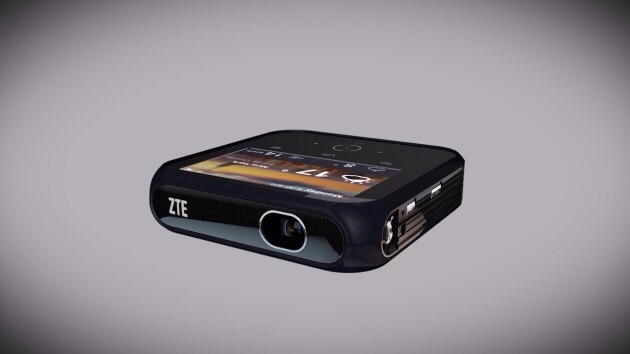
The ZTE Projector Hotspot – the device you have always needed according to ZTE

20140110-075615.jpg

LAS VEGAS Jan 6, 2014 – At CES 2014, ZTE, the fourth largest mobile phone manufacturer in the U.S., today introduced the “Projector Hotspot,” the world’s first all-in-one Wi-Fi hotspot and portable projector. Ideal for a variety of applications – from the boardroom to the classroom, or for at-home or outdoor entertainment, ZTE’s Projector Hotspot provides up to eight users with anytime, anywhere Wi-Fi access at 4G LTE speeds, and projects up to 120-inch images and video from a variety of convenient inputs. ZTE’s latest breakthrough is coming to the U.S. in 2014.

ZTE’s Projector Hotspot packs a ton of content sharing options into a compact 4.7 x 4.7 x 1.1-inch frame. It features an on-board 4-inch capacitive touchscreen through which users can access its Android operating system, making it easy to share content stored on the device, from the Internet, or through third-party applications. Users can also share content from their laptop through HDMI, or wirelessly mirror the screen of a smartphone or tablet via Wi-Fi Display. ZTE Projector Hotspot is small and light enough to take anywhere, it easily fits in a briefcase for the next big presentation or a backpack for the family camping trip.

Beyond sharing content, the Hotspot Projector also connects up to eight clients to a blazing 802.11 b/g/n network running at 4G LTE speeds. It features a 5000mAh battery and can also be used as portable charger for your smartphones.

ZTE Hotspot Projector specifications include:
Wi-Fi network management
Up to 8 clients
WPS
IPV6 supported
Display
4.0” Capacitive touch
800×480 WVGA
Bands LTE Supported
Size & Weight 120mm X 120mm X 28.5mm ,400g
Connectivity
Wi-Fi 802.11 b/g/n
HDMI
USB-A
Headset Jack
Bluetooth
Audio output
Battery 5000mAh internal
OS Android 4.2
Projector information
Projector Type: DLP
Brightness:100LM
Image Size: up to 120’’
Resolution: 1080P input supported
Contrast ratio: 1000:1

As good as this projector might seem, it really will need a darkish room to display the contents on the wall/screen properly as it’s not that bright.

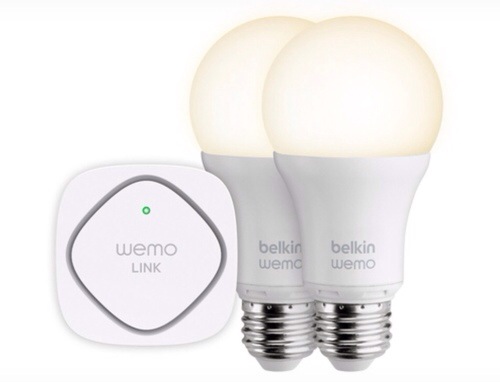
Belkin LED Lighting Starter Set – details

20140110-080652.jpg

At CES 2013, Belkin introduced its WeMo Light Switch, and this year it announced its new LED Lighting Starter Set. At $129, the set comes with two LED Smart Bulbs and the WeMo Link. The package lets you schedule and dim the lights from anywhere using the WeMo app, which uses a Wi-Fi signal to control appliances with your smartphone. The light bulbs are 60-watt equivalent with 800 Lumens and 3000 Kelvin, are fully dimmable, and can be set with a number of features like vacation mode, the latter of which automatically turns lights on and off when people are in the house. The WeMo also includes a “dim to sleep” function that gradually dims lights over time as you head to bed.

Looks very cool but sure is an expensive way to light your room.

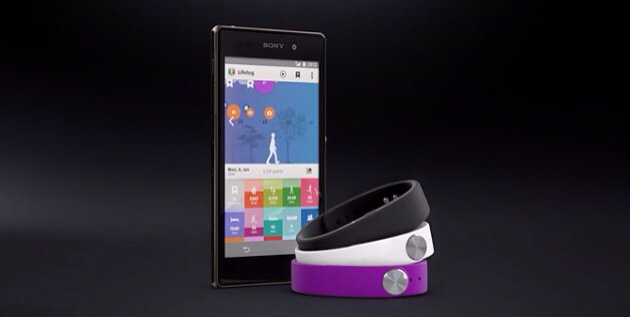
Sony Smartband – Sony’s new wearable tech

20140110-074949.jpg

At CES Sony announced the Sony SmartBand, which is a bracelet that keeps track of your activities throughout the day. It is apparently comfortable and wearable in the water. The battery lasts up to five days. You can toggle music using the button on the bracelet, and a companion application called LifeLog lets you look at all of the data being collected by the SmartBand.

The bracelet part is available in many different colours and designs.

Looks rather good.

Google Play services for android is being updated now – full changes

Google today started rolling out the latest version of its Google Play services for Android. Version 4.1 brings a number of incremental changes to the company’s service for integrating Google services into mobile apps. The rollout is currently in process and should arrive soon on your Android devices within the next few days.

The update brings support for turn-based multiplayer games to Play services. With this, developers can easily build asynchronous games with up to eight participants. Every time a player takes a turn, the data is uploaded to Google’s servers and shared with the other players. Google has integrated this service with its tools for matching players with others, too.

Also new in this update is improved support for Google+ sharing. Google says, this will make it “even easier for users to share with the right people from your app.” As part of this update, users will be able to get auto-complete support and suggested recipients for all Gmail contacts, device contacts and people on Google+.

Developers can now also use Play services to access Google Drive through a new API that’s now in preview. With this, they can read and write files in Drive. Users will be able to work on these files offline, and changes will be synced automatically.

For developers who use Google’s ad products, this new version introduces full support for DoubleClick for Publishers, DoubleClick Ad Exchange and Search Ads for Mobile Apps. What’s most interesting for advertisers, though, is that publishers can now also use a new location API to give Google access to a user’s location when requesting ads. Location-based ads are likely to perform better than generic ads, after all, though users have generally been a bit nervous about sharing this data with advertisers given the potential privacy ramifications.

One other feature most users will likely appreciate is improved battery life. While Google isn’t sharing any details about this, anybody who has Google Location Reporting turned on should see longer battery life after this update but no stats were revealed as to the difference expected.