What photo apps do you use on your Android and Windows Phone

Like the previous post for iOS, this one covers android and windows phone.

Windows Phone – as I only have had Nokia apps I’ve only ever used the included apps by Nokia, so these include Nokia Camera and Creative Studio.  1Shot Beta is the only third party camera app worth mentioning but do you use any others?

Android – this depends really on your phone and what software is included. But on my Note 3 I have the following apps installed.

1. Snapspeed – great editing app

2. Google+ Photos – plenty of filters and editing options

3. VSCO Cam – the best filters app. Worth buying the collections to save some money. Plus loads of the usual editing options

4. Picsay Pro – superb editing app plus has the ability to add balloons and other crazy items to photos eg hats

5. Photoshop Touch – advanced editing app

6. Lapse it Pro – creates amazing time lapse photos. You will need a tripod and a full charged battery!

7. Color Splash Pro – allows you to highlight the colour of one bit of the photo

8. Photo Grid – collage maker

So what else do you use?

Apple settles over in app purchases

Apple CEO Tim Cook informed Apple employees via email that the company has settled with the United States Federal Trade Commision over in-app-purchases. Here’s Cook’s email in full:

“Team,

I want to let you know that Apple has entered into a consent decree with the U.S. Federal Trade Commission. We have been negotiating with the FTC for several months over disclosures about the in-app purchase feature of the App Store, because younger customers have sometimes been able to make purchases without their parents’ consent. I know this announcement will come as a surprise to many of you since Apple has led the industry by making the App Store a safe place for customers of all ages.

From the very beginning, protecting children has been a top priority for the App Store team and everyone at Apple. The store is thoughtfully curated, and we hold app developers to Apple’s own high standards of security, privacy, usefulness and decency, among others. The parental controls in iOS are strong, intuitive and customizable, and we’ve continued to add ways for parents to protect their children. These controls go far beyond the features of other mobile device and OS makers, most of whom don’t even review the apps they sell to children.

When we introduced in-app purchases in 2009, we proactively offered parents a way to disable the function with a single switch. When in-app purchases were enabled and a password was entered to download an app, the App Store allowed purchases for 15 minutes without requiring a password. The 15-minute window had been there since the launch of the App Store in 2008 and was aimed at making the App Store easy to use, but some younger customers discovered that it also allowed them to make in-app purchases without a parent’s approval.

We heard from some customers with children that it was too easy to make in-app purchases, so we moved quickly to make improvements. We even created additional steps in the purchasing process, because these steps are so helpful to parents.

Last year, we set out to refund any in-app purchase which may have been made without a parent’s permission. We wanted to reach every customer who might have been affected, so we sent emails to 28 million App Store customers – anyone who had made an in-app purchase in a game designed for kids. When some emails bounced, we mailed the parents postcards. In all, we received 37,000 claims and we will be reimbursing each one as promised.

A federal judge agreed with our actions as a full settlement and we felt we had made things right for everyone. Then, the FTC got involved and we faced the prospect of a second lawsuit over the very same issue.

It doesn’t feel right for the FTC to sue over a case that had already been settled. To us, it smacked of double jeopardy. However, the consent decree the FTC proposed does not require us to do anything we weren’t already going to do, so we decided to accept it rather than take on a long and distracting legal fight.

The App Store is one of Apple’s most important innovations, and it’s wildly popular with our customers around the world because they know they can trust Apple. You and your coworkers have helped Apple earn that trust, which we value and respect above all else.

Apple is a company full of disruptive ideas and innovative people, who are also committed to upholding the highest moral, legal and ethical standards in everything we do. As I’ve said before, we believe technology can serve humankind’s deepest values and highest aspirations. As Apple continues to grow, there will inevitably be scrutiny and criticism along our journey. We don’t shy away from these kinds of questions, because we are confident in the integrity of our company and our coworkers.

Thank you for the hard work you do to delight our customers, and for showing them at every turn that Apple is worthy of their trust.

Tim”

Apple has one of the better protections for in app purchases but I just wish they got fined for ruining games that allow developer greed to take over and ruin many new games. I mean £50 to buy in game coins is out of order.

What photography apps do you use on your iPhone ?

Mobile photography is a whole section on its own.  Below are a list of my favourite iOS apps but what do you use?

1. Snapspeed – photo editing made easy with a great drama and HDR Scape modes. Available on iOS and android and an app owned by Google.

2. Slow Shutter Cam – does exactly what it says. Gets the best possible night shot but you will need to use a tripod

3. Photogene – advanced photo editing and sharing

4. Photoshop Touch – similar to the above but layers possible

5. Tadaa SLR – bizarrely does after blurring or bokeks really well.

I have about 15 photo apps on my iPhone but what do you use?

Twitter for android notifications now resolved – details

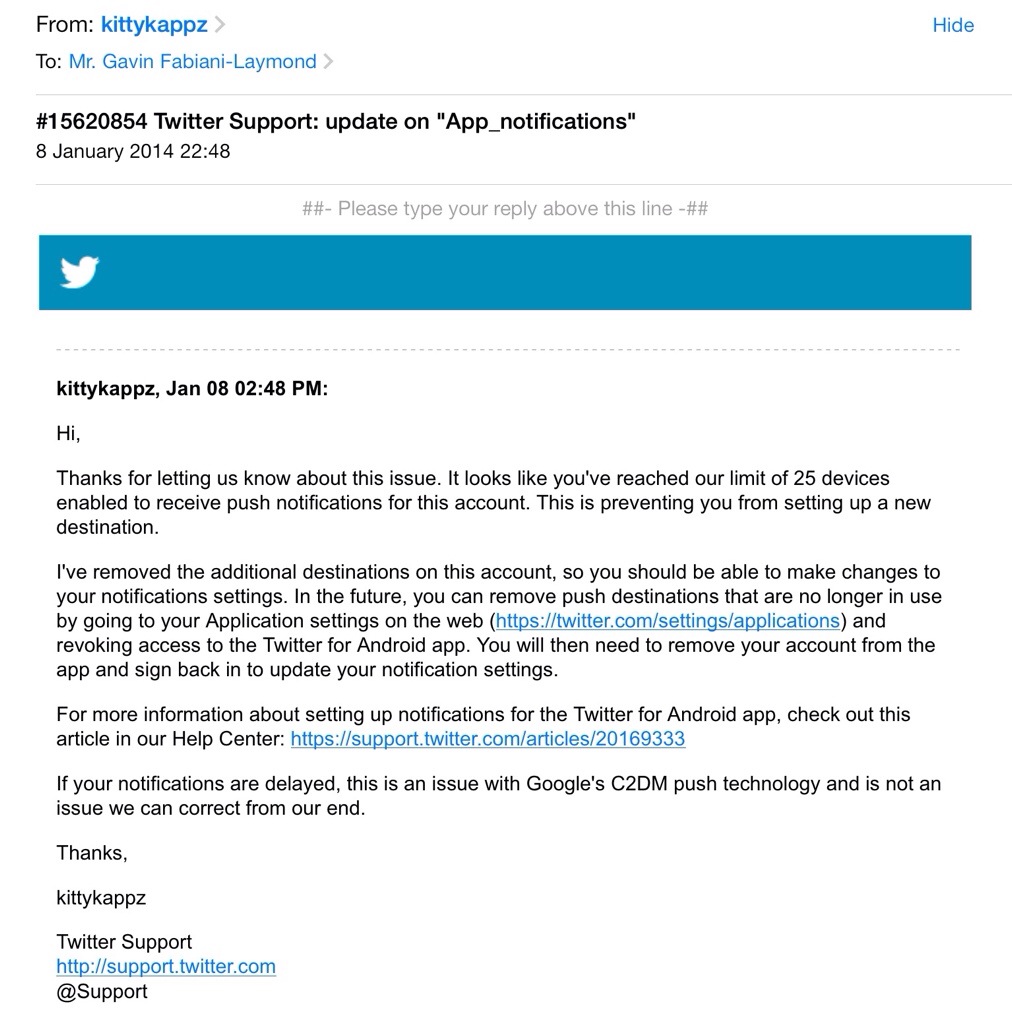
For over a week I had been frustrated with twitter on my Samsung Note 3 due to the lack of push notifications occurring. All the steps suggested by twitter support in the email below had already been tried by me several times. So if you get the message when trying to turn on push notifications “you cannot connect more than 25 devices to one account” by all means try the steps below. But if that doesn’t work, you will have to send an email to twitter support and wait about a week for it to be fixed.

20140110-072441.jpg

Another mobile threat – this time from Starbucks

Just how secure is your mobile data ?

The Starbucks mobile-payment app is reportedly saving user data, including email addresses, passwords and even your GPS location in plain text. Theoretically, anyone with access to your phone and a PC can download your private data.

Who needs hackers when sensitive information isn’t even encrypted in the first place!

Samsung Galaxy Gear – camera samples

Below are some further camera samples from the Galaxy Gear.  Don’t forget the watermark can be removed in the camera settings. As a comparison I have included a shot from the Note 3 of the same area.

image

image

Note 3 shot 

image

The Note 3 was able to reproduce the lighting conditions much better but I was quite happy with the Gear photos if sharing to just social networks like twitter.

Samsung Galaxy Gear – review impressions

image

The Galaxy Gear in mocha grey arrived a few days ago and I have been trying to get a sense of its usefulness.

It certainly splits opinions as to its looks. Some say it’s too big and bulky and looks butt ugly. Others are amazed by it. It’s fairly light despite its bulk. Other comments were over attention to detail. The screws on the Gear and not tightened into the same position. Other watches at this price point would not be like this!

Also there was an ongoing debate on twitter as to whether it’s really a watch as the time is not displayed permanently. When you lift your arm the accelerometer triggers the display to show you the time or chosen clock face.

Putting all that aside it comes in a typical Samsung box with the watch, charger, watch cradle with NFC, quick start guide and warranty leaflets.

I completely missed the fact that to NFC pair the Gear to the Note 3 that the watch cradle needed to be attached so I ended up manually downloading the Galaxy Gear Manager app and using bluetooth to pair the devices.

From the Gear Manager you can completely configure the watch complete with whatever face clocks required and the types of notifications you would like it to receive.
image

image

Some of the clock faces include shortcuts to apps and other functions. I like a plain face with the day of the month enabled in the clock options. They are a few more clock faces to download in the Samsung App store along with actual apps you can run on the Gear.

image

There are many settings that greet you when you open the Gear Manager.
image

And then there is a whole section just for notifications.
image

And then third party notifications. So for example I have twitter and Google Now selected.
image

Each of the included apps on the Gear has settings.

image

So it all seems very complicated at first. And it is. I didn’t grasp what was happening where and why but as day 1 progressed everything started to fit into place. Day 1 involved involved taking a number of photos with the Gear, asking S Voice to call a contact and then have a conversation using the Gear, all very James Bond 007 style. If the Gear and the Note 3 become separated the Note 3 locks. You can also double press the power key for S Voice which is marginally better than on the Note 3. For whatever Siri faults are on the iPhone, it is better than S Voice. However S Voice on the Gear is much better than on the Note 3 itself. I also had tons of notifications arriving. I had the Gear on vibrate but there are tones to select and different volumes. There is also a brightness and screen off delay settings. You can wake up the Gear display just by looking at the Gear. The accelerometer activates screen with the correct motion. I was dubious as to whether this function would work as well as described but it does. The other neat motion based function that works really well, is say I get a new tweet notification and pick my Note 3 up, the Gear will open the Note 3 twitter app at the notification. Rather neat.

I am still working out how notifications work between the Gear and the Note 3. For example, if I delete an email notification on the Gear it only removes the Note 3 notification and the email app shows a number badge of 1 email still. Opening the app shows the email as read. It is understanding the chemistry between notifications and the respective apps that will improve the operation. However, you still need to remove the notifications off the Gear and there’s no global delete yet.

So how easy is the interface? Actually very straight forward. With the clock showing, swipe down from edge to edge for camera, swipe up edge to edge for phone dialler. Two finger tap beings up Bluetooth and battery level status, volume and brightness adjustment. Swiping across to the left brings up the notifications, and contacts if you go the other way. Keep swiping to scroll through all the other apps. The menu does loop so you don’t have to go all the way backwards again. For every app that has a notification you can delete individual notifications or select all within that app. But you can’t at the moment do a global delete all app notifications as mentioned above. I have used S Voice to find a contact, dictate a text message and send it perfectly. To go backwards, just swipe down. Two finger holding on the display beings up recent apps and you can swipe away any you wish to close. The Gear will take a max of 50 photos after which you will need to delete them off the phone. After each photo , the Gear will transfer them to your phone. You can record 3 video clips in a row, after which the camera app closes to maintain optimal performance. The camera has a macro mode option. You can alter the order of apps and move apps in to the app folder or just have one app per whole screen. In the app folder 4 apps are shown per page.

Talking of apps some companies have released Galaxy Gear specific apps. I have installed the following.

Ebay for Galaxy Gear – works same as main app but only able to browse your activity.

Pocket – flick thru your articles. Hit play and the articles are read aloud through the Note 3. I really like this operation.

Zite – flick through headlines. Tap on article and it opens on phone. Not sure of usefulness of this but it’s different.

Camera 360 – adds some effects and frames for the Gear camera. A worthy extra.

Sample low light shot. I have created another post with some additional camera samples. You can remove the Galaxy Gear watermark as well.
image

So with all this activity what’s the battery like. Well from 8am to 7pm it knocked the battery to 50% meaning I would need to charge to overnight. With lighter usage maybe a second day is possible, but one full day is not unreasonable.

Is it worth £299. No. But who else sells a smart watch that can make calls, has a camera and speaker built into the strap? Will I keep it. Yes.
Sphero 2B robotic ball – details

20140110-081147.jpg

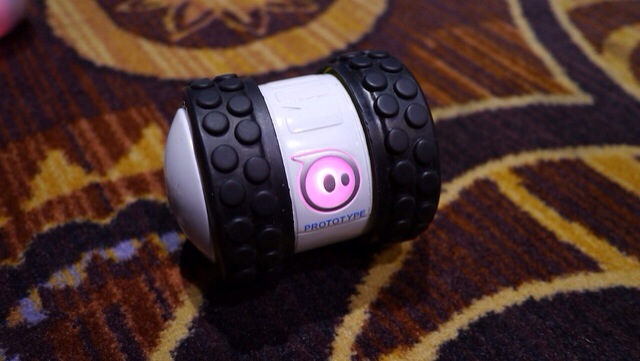
I recently reviewed the Sphere Ball. Refer to index in review tab above for details. Sphero 2 is currently the latest incarnation but at CES 2014, Sphero 2B is the new robot toy from Orbotix that can move as fast as 14 feet a second. That’s supposedly the equivalent of a 6 minute mile and twice as fast as the Sphero 2.0. The spinning tube has comically rugged tires that allows it to adorably jolt out at breakneck speeds and tackle any surface.

The Sphero 2B is controlled by your iOS or Android device, has a few accessories (like new wheels) and can be programmed so you can create your own robot army. It due on in September 2014.

I will be honest after a few weeks I lost interest in my Sphero Ball and so did my 3 dogs.