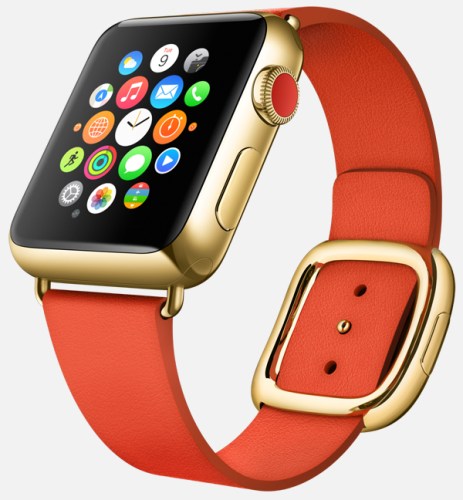
This is the Companion App that will control the Apple Watch – details

flow_startframe

9to5mac.com has managed to get exclusive details on the new Apple Companion app that will control the upcoming Apple Watch.

Clock Functions:

A new clock face feature called Monogram has been added as a complication (a background detail you can choose to enable or disable). Like a real monogram, this feature will allow users to include a virtual, embedded stamp of 1-4 letters – typically your initials – directly on the clock face. This is an interesting customization, giving you the chance to make your watch look more individually designed.
Users will also be able to enable a subtle red dot that appears atop the Apple Watch’s clock face whenever a new notification is received on your iPhone.
You can choose a stock to track via a watch face complication, seeing either its current price, point change, percentage change, or market cap. The same stock will appear in Glances, as well.

Messages:

Lacking a keyboard, the Apple Watch will allow users to respond to messages via voice. As Apple has previously detailed, users can respond via either transcribed dictation or actual audio messages. The app can switch between Dictation or Audio Replies as the default mechanism for replying to text messages. You can also choose to use either form of reply at the time of the individual message.
Users will be able enable or disable Read Receipts, just like on the Mac, iPad, iPhone, and iPod touch.
Users will also be able to set up and manage default text replies for incoming text messages.
Users will also be able to choose to not receive text message alerts or just to receive them from people in their contacts list. Like on the iPhone, you can also choose how many alerts you get per individual incoming message.
Maps:

Users will be able to enable or disable Taptic Engine tapping of the user’s wrist when it is time to turn for turn-by-turn directions.

Activity, Motion & Fitness:

The Companion app will let you activate granular fitness features such as stand reminders when you’ve been sitting, activity progress every 4/6/8 hours, completion of move/exercise/stand goals, achievements, and Monday summaries of movement.
You can separately activate or deactivate heart rate tracking to automatically calculate calories burned, as well as tracking of your body movements to determine step counts and fitness level.

If you want to read more and see all the screen shots from this app I really do suggest heading over to 9to5mac.com – http://9to5mac.com/2015/01/13/apple-watch-iphone-companion-app-revealed-with-new-watch-features-monograms/

Samsung Note 4 – its camera and my thoughts

Scroll back a few days to Sunday and Monday, and you will see some photos I had snapped with the Note 4 early Sunday morning.

In fact, since the 9th November 2014, I have now taken 46 photos with the Samsung Note 4 that I have shared to a dedicated album on my Flickr – https://www.flickr.com/photos/gavinfabl100/sets/72157648796796660/

If you consider the Note 4 the same as the Note Edge, there is another album just for the Note Edge. So its now over 2 months using the camera on this phone. My thoughts –

Every time I take a shot, I am often really pleased with the end result. Just dropping back to my previous phone which was the iPhone 6 Plus, I have found the 6 Plus camera is not at the same level as the Note 4. However, I would say that for most people it is definitely good enough and even though the Note 4 takes superior photos and video, the 6 Plus still is a remarkable shooter. Just shows how far smartphone camera technology has moved forward, and I believe in 2015 it will move forward again.

The Note 4 is 16mp affair and it does matter. Take a shot. Decide to crop in on a section and the end result is still a crisp, clear image with plenty of pixels. Macros are excellent for the same reason. I have taken low light shots and again not had particular issues. Panoramic photos are breathtaking and are able to span wider (more frames) than the iPhone. The Note 4 has many camera modes and manual settings should you wish to use them. On the dog action shots I discovered that the ones with George leaping over the water, the ISO was 40 and the shutter speed 1/400. That is remarkable to manage with the ISO so low. The optical image stabilisation is clearly helping here.

I mentioned I am always happy with the shots taken on the Note 4. With previous android phones, I would take several to make sure I got that one great shot. With the Note 4 that is not really necessary. It is reliable. The composition, depth and colours of each photo are also of a high standard. Still photography is easy but what about motion. On Sunday I decided to see how the Note 4 would fare trying to capture my 3 dogs pelting across Dartmoor. I used burst mode, sport and “shot and more”. For the shots posted on Sunday and Monday, only burst and sport mode were used. Shot and More mode was not appropriate as my dogs did not run in a predictable line between 2 points. Not surprising really! I took 350 photos in about an hour and decided after that point just to enjoy the walk and not take anymore. When I got home and inspected the photos I was ready to delete loads. Except, I couldn’t as there were only about 10 or so photos that were slightly blurred. It took me most of Sunday to slim down the number to around 40. And these photos were not in bright sunlight. Again remarkable.

So how about video. Well I do not shoot much video, but at work we held a go karting event. I offered to take photos and video and create a short film of the event. On my rig, I had the iPhone 6 Plus and the Note 4. The Note 4 was new so I was not as confident with it as the iPhone 6 Plus. The mezzanine floor I was filming from was moving slightly which at the time of recording I was not aware. Playing back footage from both phones the iPhone 6 Plus video made you feel sea sick as it moved around a lot. The Note 4 4K footage did not suffer from the movement. So from my time using the Note 4 in other scenarios, the video footage produced was better than that of anything I have seen before.

Sunlight. One last mention. So long as brightness is set to auto brightness, in powerful sun the Note 4 screen does some freaky stuff with contrast and brightness levels and makes it readable. I believe the brightness is cranked right up to 750 nits.

And there you have it. The Samsung Note 4 has a fabulous camera.

Gavin’s Gadgets – Adverts and more

Over on twitter there has been several posts by a few of you regarding the new advertising box that appears under a post. Advertising appears on most websites and is often the only method of covering costs. People rarely pay for news or reviews or most things. Even apps and games now feature advertising and often don’t even offer an upgrade to remove the ads.

So lets recap. It appears most of you see this single block of advertising as shown below.

2015-01-13 10.31.32

Last night it changed to this for me and it does constantly change. It is different again this morning on my mac.

2015-01-13 10.30.56

But I’ve seen the following. This is more in keeping as to what I expected and what WordPress promoted as high quality adverts.

2015-01-13 10.32.54

And as another example, I have seen this. Again, much better.

2015-01-13 10.33.22

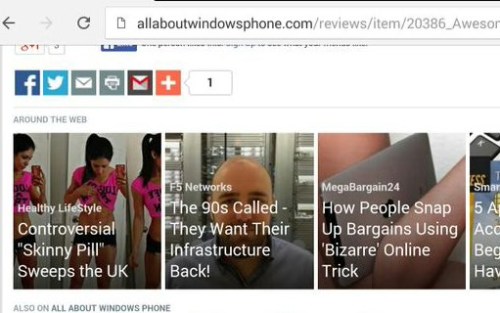
Just for comparison this is a recent advert on allaboutwindowsphone.com. As you can see they also feature some aspects of advertising that don’t fit as well. The difference being is there is more text and less free spaces making it less obvious. There is also more advertising on the site, so it probably hides it well

2015-01-13 10.34.01

So why the advertising? Well simply to earn money to cover the costs of running Gavin’s Gadgets and then hopefully at some point in the future years ahead to allow me to earn enough money to pay for basics like food, gas and electric. WordPress offer a basic free package which includes adverts inserted by WordPress. These adverts are awful. If you pay WordPress an annual fee of $30 they remove the adverts. I have paid this on top of any other costs for the last 2 years. During the last 2 years I have provided daily updates and reviewed over 30 phones and over 50 accessories.

To move the website forward, I purchased 2 domains and now run the website on gavinsgadgets.com. This costs money to run etc..and the single advert is meant to “hopefully” cover that cost. Not sure it will though.

Before adding any adverts I looked carefully at the options and I chose WordAds as they promoted it as a high quality offering. You can read all about it here http://wordads.co/benefits/ and you will see the type of adverts are somewhat different to those that have appeared in real life. I felt WordAds were a better choice than Google’s offering.

My own views on the adverts. Well actually it is just a single advert, so in terms of volume I really don’t understand the fuss. I really don’t. I could have had adverts running down the left and right side of the page as many other websites do. I could have had annoying pop up adverts (that drive even me crazy). In fact most websites have more adverts than here and by some volume. I referenced allaboutwindowsphone.com which I know several of you visit. This also has a block of 4 ads just like mine. What I do think and agree with is because there is so little advertising and previously there was none, this advert block of 4 stands out a bit.

And another reason why I don’t get the fuss if you go directly to gavinsgadgets.com and read the posts you only see the single box advert once. You can read the next 14 posts without seeing it again. So come on guys is it really that much of an issue!

So can I change the position of the advert. No. I have no say in this whatsoever or the content, which is meant to be high quality content too. I have even tried inserting more spaces after a post to create a bigger gap before the advert, but WordPress seems to remove them 😦 Can I stop the advertising. No, as I have to cover my costs. If I remove WordAds, WordPress will then fill the blog with their own advertising.

So what are the other options to covering my costs. In reality I cannot see any. I have setup an Amazon Affiliates link, just go to the About and Donations page to use the special link. If you buy your Amazon purchases this way, this will again help towards the running costs. But it won’t cover them.

WordPress have stated that the adverts will improve over time and that I have not given it anywhere near enough time to adapt.

So like I said, I need to cover the costs of running the site. I don’t think that is unfair or unreasonable. I did try and pick a high quality advertising option. So that is the situation. If you have any ideas on how to generate more revenue without the ads then get in touch. Or would like to help support Gavin’s Gadgets then head over to the About and Donations page. Or if you would like to become a sponsor get in touch too.

Apple releases iOS 8.2 beta 4 – Apple Watch referenced clearly – details

w640-3

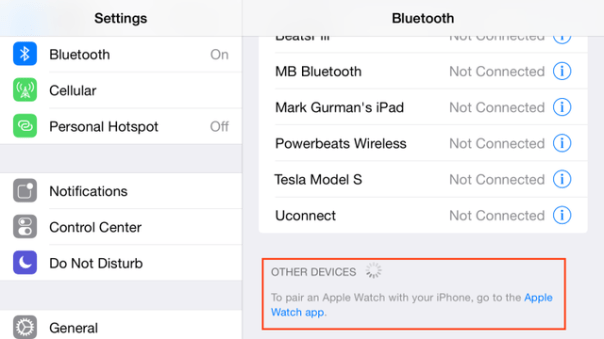
Apple has released iOS 8.2 beta 4 and this time it makes the clearest display that the Apple Watch is close to being released in a month or so. March is the probable time line for this smart watch.

So hands up if you are looking to acquire one of these?

Source – http://techcrunch.com/2015/01/12/the-apple-watch-shows-up-in-the-ios-8-2-beta-bluetooth-menu/?ncid=rss

LG G Flex 2 – now available to pre order – details

lg-g-flex-2-render-2

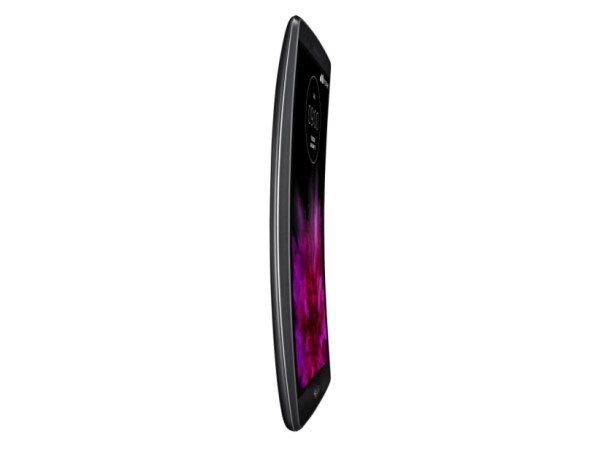
The LG G Flex 2 is now available to pre order at Amazon Germany http://www.amazon.de/LG-Flex-Full-HD-POLED-Display-2-GHz-Octa-Core-Prozessor-13-Megapixelkamera/dp/B00R4TCGLG/ref=sr_1_1?ie=UTF8&qid=1421074073&sr=8-1&keywords=G+Flex+2&tag=rnwap-20 for 599 euros.

So if you want early doors with this phone then thats the premium price you will need to pay. The G Flex 2 has a 5.5-inch curved P-OLED display with a resolution of 1080 x 1920 pixels, a Qualcomm Snapdragon 810 chipset, 2GB of RAM, a 13-megapixel rear-facing camera and a 2.1-megapixel front-facing shooter.

Yotaphone 2 – 2 screen phone but with a difference

image

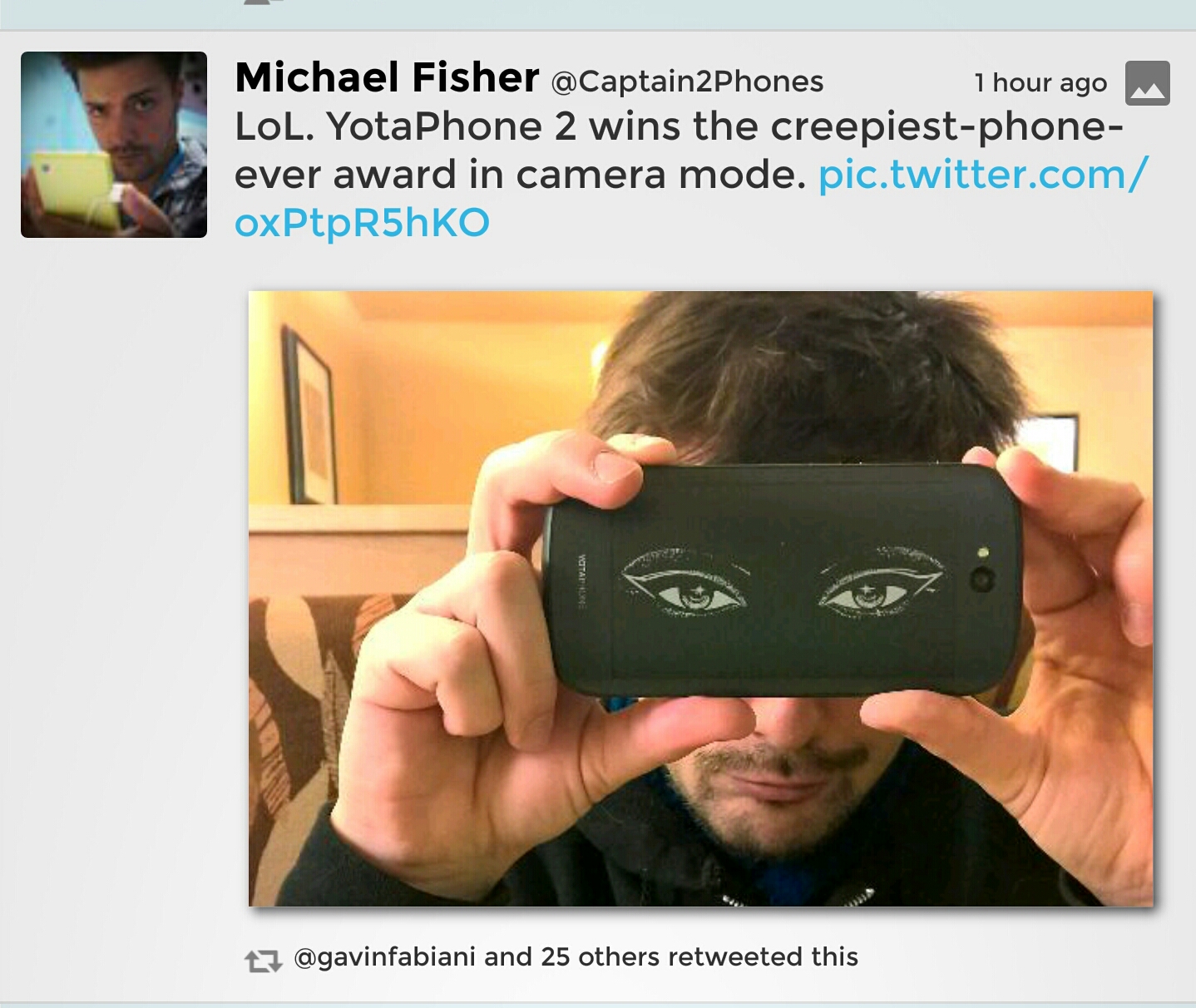
Michael Fischer of Pocketnow tweeted the above photo of the rear, yes rear e-ink display of the Yotaphone while you are about to take a photo. Creepy or what!

The Yotaphone 2 has a front 5 inch screen of 1920×1080, a 2.26 GHz Snapdragon 800 processor along with 2GB RAM. But then it has another screen on the back. The rear screen is EPD (electronic paper or e-ink) technology, the same used with the Kindle e-reader. Now as this is an e-ink screen, battery consumption viewing items on this screen is meant to be considerably less. Plus direct sunlight is no longer an issue with the e-ink display. It also has a number of other specifications including Qi Wireless charging.

But as shown in the above photo, Yotaphone also have thrown in a number of quirky mannerisms when you use this device. I do wonder if this is a “cool” idea or just “tacky”.

What do you think and would you want to own this phone?

Apple laptops vulnerable to a virus that is u removable and undetectable – details

Via The Telegraph –

” A security expert has found a way to install malicious code on a tiny chip built into Apple laptops which would resist any attempt at removal – even replacing the entire hard disk will not delete it.

The attack, which is being called Thunderstrike, is virtually undetectable and would require an attacker to get access to a machine for mere moments. And because it is new, no security software will even be looking out for it.

Trammell Hudson, who works for New York hedge fund Two Sigma Investments, said that the discovery came about when his employer asked him to look into the security around Apple laptops.”

“Since it is the first OS X firmware bootkit, there is nothing currently scanning for its presence. It controls the system from the very first instruction, which allows it to log keystrokes, including disk encryption keys, place backdoors into the OS X kernel and bypass firmware passwords,” Hudson said.
“It can’t be removed by software since it controls the signing keys and update routines. Reinstallation of OS X won’t remove it. Replacing the SSD won’t remove it since there is nothing stored on the drive.

This sounds like a terrible virus but I doubt anyone has been infected by it yet. Have you? 

Source Telegraph

Samsung Note 4 – camera action shots – part 3

Yesterday I created 2 posts with some examples of how the Note 4 handles fast moving objects. In my case it was dogs. I have included a few more and some stills. It was sunrise so tricky lighting with some when shooting in to the sun.

Part 1 – click here.

Part 2 – click here.

image

image

image

Camera exif for shot above. ISO 40. 1/461. F/2.2.

image

Camera exif for shot above. ISO 40. 1/348.

image

Camera exif for shot above ISO 40. 1/141.

PS. If you are likely to shop on Amazon please help with the running costs and use my affiliate link – details here. Thanks in advance ☺

Google Translate getting updated to take on Skype – details

“According to The New York Times, Google isn’t going to let Skype runaway with all the high-tech, language barrier-smashing fun. An upcoming update will allow the app to auto-recognize popular languages and translate them into text in real time.

In addition, Google Translate will also let you take snapshots of signs or menus or whatever, and also translate onscreen. This is probably the product of Google’s acquisition of the way cool Wordlens app. Our review of Skype Translator boiled down to a “close, but no cigar” analysis. But it’s a start, and with two huge companies entering in a positive game of one-upmanship, we’ll hopefully get closer to that Babel fish future rather than just one service trying to innovate in a vacuum.

Google Translate isn’t the only application whose updates are circling the rumor mill. Android Police reports that Google Now code is spilling a bunch of potential features, such as spoken notifications for when you’re driving. The code also reveals that Google is toying with the idea of allowing third-party apps to have their own cards in Google Now, so you could certain Facebook, Twitter, or Instagram (etc.) alerts right in your Google Now stream.”

Competition is always healthy and these new features sound great.

Sources – NewYorkTimes.com, AndroidPolice.com, Gizmodo.com

Samsung Note 4 – George demonstrates the long jump in 5 stages – crazy action camera shots

Part 2 of my earlier post. Part 3 will be tomorrow.

For part 1, click here.

Here’s George showing off the long jump in 5 stages. The photos were snapped using the Note 4 default camera app.

image

image

image

image

image

Pretty amazing shots from the Note 4 camera!

Update – exif data for all 5 shots. ISO 40, f/2.2 , 1/400

PS. If you are likely to shop on Amazon please help with the running costs and use my affiliate link – details here. Thanks in advance ☺

.