Below are all the sections I wrote covering the Samsung i600. This was at a time was qwerty keyboards were still popular. That was about to change in a few months time when Apple launched the iPhone
Samsung i600 – First Thoughts
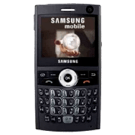
Review Date: 18th June 2007 Review by: Gavin Fabiani-Laymond
Price: £285 + VAT
Available from: http://www.clove.co.uk
Pros: Easy to use and setup, light and small
Cons: Lack of games in landscape mode
On Sunday, it was my birthday, which revealed a Samsung i600 all neatly wrapped up. This is the first Windows Mobile Smartphone that is “non touchscreen” phone I have had running windows. So far I am really enjoying this device.
I am not going to show you videos or pictures unboxing the phone, as there are plenty of these to watch elsewhere. Instead, here are my intial views:-
The first thing I did was take my sim card out of my Sony Ericsson K800i and put in in the i600. I then had a choice of the extended battery of normal battery. Dependent on which battery you choose, each has a separate back piece. Obviously, the normal battery is slightly heavier but not by much. I used the extended battery. I then connected the AC charger and commenced charging. In the box was a separate battery charging unit, so with the second charger (this was bought separately) I independently charged the normal battery. After a few hours, I powered on the i600.
I went to add the T-Mobile settings for MMS, SMS, Web and Voicemail. The i600 had already retrieved these from the network. That was brilliant and so much easier than my last unlocked Pocket PC Phones which needed loads of fields completed. I actually knew that I was going to be getting this as a present, so in preparation I bought a 2gb micro sd card, a screen protector, 2 leather cases from http://www.pdair.com and a advanced screen protector and silicone case from http://www.proporta.com. Sadly, the 2gb sd card didn’t work, but I was able to buy one later that day from a mobile phone shop with a £10 premium ☹ . On the subject of cases, I got an extended and non extended leather case from http://www.pdair.com . Both are brilliant, but do not include the cut-out for the 3g camera at the front. The Proporta Silicone case also didn’t have a cut-out for the front camera, but other than that was well made and even came with a belt clip and carry cord. The screen protectors were a different matter. I got one off ebay and one from Proporta. The ebay protector was awful and looked terrible on my i600. The Proporta Advanced Screen protector was lovely, and even had a slight curve to match the i600 screen.
After fiddling with the cases, I moved on and added my server details within the Activesync application on the i600. I use a service by http://www.mail2web.com called “live mail2web” which provides free of charge push server email and syncing of pim info. Because my i600 has HSPDA all my pim data and email was on my phone in record time. I then went to sync to my pc with Activesync. And here was my first problem. Activesync was naming my i600 “WM_Gavin_FL” and I wanted my i600 to be called simply “Gavin”. In PPC Phones you can easily change your user id. But in a smartphone you cannot. I downloaded Resco File Explorer for Smartphones and the Registry Editing module. I then went into the registry.
HKEY_LOCAL_MACHINE\Ident\
Within this key, you will see several strings and values. One string is titled “Name” and its value is the current name assigned to your Windows Mobile Phone. I simply changed this name to Gavin and rebooted my i600.
Now I was back in business. I next transferred my music and pictures to the memory card. I also tried several games, but found problems with the games not sizing correctly to the screen. On the application front, I have not had the same issues. Luckily for me, Egress and Bejeweled all work very well. Over the next week I will report back on which applications work well on the i600. I have tried the new Opera 8.65 beta. It is much more powerful than the standard browser, but it has crashed when downloading files.
The today screen. Samsung have provided some really effective and great looking home plugins. The card wheel is the coolest home screen, out of the ones available. I have found no issues with call quality or freezing of the phone with email etc. Samsung have added some really interesting touches to the phone. Additional software includes podcast and rss applications. Also, when I tried using Windows Media player, Samsung have added a skin which is a graphic equaliser. Very cool. The absence of word, excel and powerpoint viewers is disappointing, although I have found an alternative way of reading/editing these files, although not to the same level of sophistication.
The keyboard is a superb. I have mastered entering emails and text at high speed. In fact, I do not miss the touchscreen at all, except for games and the notes application. No more scribbles ☹ .
Battery life has been mentioned by many as the weakness of this phone. I so far have only used the extended battery, and manage to get through a day with email retrieval every 30 minutes, 1 hours web browsing, and several hours messing around. I imagine in full use the i600 will need charging daily.
Other little touches. Within the email application, one of the options is to automatically retrieve email daily. I like this option for email accounts which have low usage.
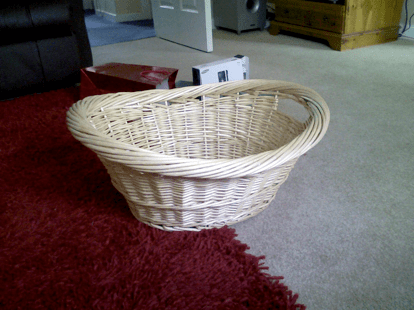
I have used the 1.3mp camera and it is not too bad. A picture taken with it is shown below.
So at the moment it is all smiles. Over the next few days I will be experimenting with software to create the perfect setup. Any questions or thoughts please ask.
And then 8 days later, I added the following review post.
Following on from my first impression review, I have used the Samsung i600 for 8 days. In that 4 days I have learnt an awful lot about the smartphone version or Windows Standard.
There are definitely some odd differences between a touchscreen and non-touchscreen. Overall I am convinced non-touchscreen is surprisingly versatile and is an easier phone to use.
I have made the following tweaks to ensure my i600 functions the way I like. Within the registry I changed:-
HKEY_LOCAL_MACHINE\Ident\
I altered the string value to Gavin. This registry hack is the only way to alter the smartphone’s name to a name you prefer.
HKEY_LOCAL_MACHINE\Software\Microsoft\Internet Explorer\AboutURLs\home
I altered the home string from the wapsamsungmobile to my preferred website. In fact, I created my own homepage bookmarks. If you go into Internet Explorer on your PC, under the menu, file, there is an option to “import and export” bookmarks. I exported the favourites. Before I did this I created a new folder with 5 of my favourite bookmarks. I named the file “Gavin’s Bookmarks”. You can edit the htm file using notepad if you wish. I then copied this across to the main memory of the i600, within “My Documents”. I changed the string value to “file://\My%Documents\Gavin’s%Bookmarks.htm”.
Next on my list involved adding the clock on the top bar. The time is only visible in the today screen in smartphones. I installed “Clockontop” which is a freeware application and available from http://www.smartphone-freeware.com. The other frustration I found was that Pocket Internet Explorer would not allow many files to be downloaded, included some zip files. However, another free application called PIEPlugin from http://mobile.surrealnetworks.com/SN%20PIE%20Download%20Plugin.htm solves this problem and allows for the following file types to be downloaded:- aac, doc, exe, nes, mp4, mpg, mov, ogg, pdf, pdb, pps, ppt, rar, xls, and zip.
I also found a free registry tweaks program called MobileConfig by http://www.infinityball.com/Article.aspx?ArticleID=129 but as of yet I have not needed to use this.
Apart from adjusting the settings of the i600, the above are the only special tweaks that I found were needed. The other useful item I did was read the manual. I wonder how many of you never bother to read the manual. The manual is informative and I learnt about some hidden features of the i600. For example:-
1. Push and hold scroll wheel reveals quicklauncher app. This is highly customisable and can have applications, file, favourites and docs
2. Quick press on power off button reveals useful options, like power off, connection manager, profiles, keylock
3. Button next to space bar on right. Push and hold for symbols.
4. Key Shortcuts – can be assigned to web pages, contacts, programs and email addresses
5. So many other shortcuts in all the programs eg camera application.
Onto the software side. I have added the following applications which work very well:-
Agenda One, SK Tools, Egress, Ereader Pro, Ewallet, Live Search, Metro, Coreplayer, Pocket Player 3.2, MobileConfig, Clockontop, Opera v8.65b (a bit buggy) , Resco File Explorer, Resco Radio and Tube 2 London.
On the gaming front, this has proved a little more difficult as there are not many games that work on this device. However the following play fine :-
Astraware Solitaire, Bejeweled, Glyph – all by http://www.astraware.com
Meteor – by http://www.mobile-stream.com
Virtual Pool Mobile – by http://www.celeris.com
ISS Blackjack, Blocks, Logic, Video Poker – http://www.implicitsoftware.com
SPB Brainevolution – http://www.spbsoftwarehouse.com
And that I am afraid is the total list. I have tried loads of games so if any developers believe there games work on the Samsung i600 please let me know.
The other strange thing which affects all smartphones is when you install software, it doesn’t list it alphabetically in the start menu. It is not an issue, as this can be altered using a registry tweak, but it is peculiar. Apart from that the Samsung i600 is a revelation. I must comment on a mistake in my first impression review, in that to view documents like word etc Piscel Viewer is used for this task. Piscel Viewer is also a reasonable picture viewer too. The Samsung i600 includes applications for Alarms, D-Day (important days), Notepad with syncing to Outlook, Voice Notes, World Clock, Pocket MSN, Piscel Viewer, Obex FTP, Smart Search, Task Manager, Smart Converter, Voice Assist, Stopwatch, Podcast, RSS Reader, and a few others and not forgetting the basic Microsoft applications. Remember Word Mobile etc isn’t installed.
I am amazed at the amount of included software and how well the i600 functions. Even the alarms work !!! In fact the alarm is so bloody loud there is no way you could ever stay asleep.
I will now experiment more with battery life to see how this works with push email active.
The other issue I have is the lack of editing options. I often need to copy and paste text from one program to another. Suggestions I have seen include, Xbar 3.2 and Vito Copy. Does anyone have any other thoughts.
More soon. Any questions or comments please ask.
And then on the 16th July 2007 I wrote my final part.
I have now had the Samsung i600 exactly one month. So how am I managing 1 month later?
It is a brilliant phone and I love it. I have only one gripe and that is not with the Samsung i600 but with Microsoft. There is no editing functionality built in. I am experimenting with several pieces of third party software, but nothing is perfect.
One item that I am having great fun with is the today screen. Samsung added some really superb today screen plugins as shown below in addition to the standard ones provided by Microsoft. First up is the Card Wheel which is terms of coolness is right up at the top. I have shown a few screens from this, Basically, as you scroll down the options flip round in a wheel motion:-
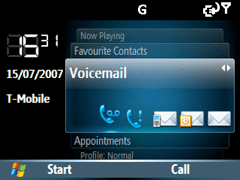
Whilst using WMP10, you can see what tracks you have listened to last, and go and play them from the front screen.

Another useful card is the profile tab, enabling quick switching of profiles.

However, other today options by Samsung include the clock, calendar, large text and a 6 option panel at the botton which scrolls through options similar to the card wheel. There is the pop up option, which has most items visible. I quite like this one.
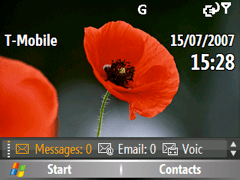

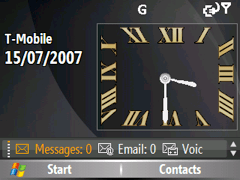
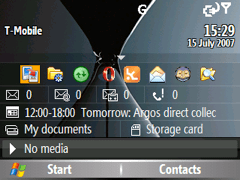
However, I use a free third party today plugin which shows everything I want to know including the home screen of Fizz Weather. This was available from a very talented individual Kooldezine. http://www.kooldezine.com/Q.htm .

By scrolling down one can change the profile and launch the applications as shown etc. Of course, a more traditional screen using just Fizz Weather and the standard Microsoft options looks like this –

Another very cool option is an animated home screen, whereby the earth rotates around. Pressing the centre action button activates the text slowly on the left corner.
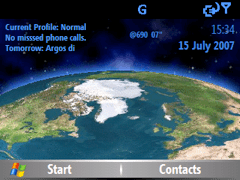
Again, this is freeware and available from http://black.jgui.net/ .
Now, Samsung have also added some neat little touches. This is the standard skin for the WMP10. Yes it is a fully functional graphic equaliser.

I have also discovered a load of free games that work reasonably well on the i600. SPVMan (a pacman clone), CincoSP (a hangman and mastermind cross) and S-Tris 2. Available via http://blackjacksmartzone.spreebb.com/index.php?showtopic=18 .
From the same website, but under the application freeware section, I found Keylock. http://blackjacksmartzone.spreebb.com/index.php?showtopic=17 A simple application that locks the phone keys after a preset time. The default is 30 secs.
Also don’t forget there was some useful software mentioned in my first two articles on the Samsung i600. Links at beginning of article.
I mentioned before, I am struggling with the lack of editing abilities. I am trying VitoCopy and Orneta Scissors. I will let you know my findings.
In the meantime, I am enjoying the high speed internet access, the thin profile and design and as Shaun would say, everything just works.
I am also managing fine with the standard battery, instead of using the extended version. I found that there are many Samsung Blackjack cases but few i600 cases. As a tip, I bought some leather Blackjack cases, went along to the shoe repairers and asked to have a large hole punched through the leather to reveal the front video camera.
Any questions, please ask. Gavin Fabiani-Laymond
So there you have it. Have we advanced that much in 8 years? 🙂