Category Archives: Tech News

Samsung Galaxy S4 Zoom – Review Part 1

Yesterday, I provided my early impressions of the S4 Zoom. Click here.

Today, I am going to start reviewing the device, and at the same time will answer the many questions I have already received about this device. As I mentioned yesterday, I got my Samsung Galaxy S4 from Clove Technology.

The official specifications of the S4 Zoom are –

-Xenon Flash, 16MP BSI CMOS Sensor, 24-240mm 10x optical zoom
-Optical Image stabilisation, F3.1-F6.3 Lens, 4fps Burst Shot, ISO 100-3200
-1080p video recording, Dedicated shutter key
-Zoom Ring for quick sharing of photos and access of the handset’s interface 1.9MP front facing camera
-Expert Mode for you to change shooting parameters,Smart Modes to help for your photos
-HDR Mode, Panorama,Best face to adjust smiles and eyes
-Multiple filters and modes to enhance your photos
-8GB Internal Storage (5GB user-accessible), possible to move apps to micro SD card
-MicroSD slot (expandable up to 64GB)
-Bluetooth, WiFi, 3G
-IR Blaster with Peel software
-3.5mm earphone Jack
-Accelerometer, Geomagnetic, Proximity, Gyro, RGB Light
-A-GPS and GLONASS for navigation
-Li-Ion 2330mA
-Up to 7 Hours Internet Usage Time (3G)
-Up to 9 Hours Internet Usage Time (Wi-Fi)
-Up to 10 Hours Video Playback Time
-Up to 46 Hours Audio Playback Time
-USB Chargeable
-Up to 13 Hours Talk Time (W-CDMA)
-Up to 570 Hours Standby Time (W-CDMA)
-1.5GB RAM
-125.5 x 63.5 x 15.4 mm
-208 g weight
-USB v2
-Super Amoled Display , 4.3 inches qHD resolution of 540 x 960
-GSM 3G, EDGE / GPRS (850 / 900 / 1800 / 1900MHz)
-HSPA+ 21Mbps / 5.76Mbps (850 / 900 / 1900 / 2100MHz)
-802.11a/b/g/n 2.4+5GHz, Wi-Fi Direct available
-PBAP, A2DP, AVRCP, HFP, HSP, OPP, SAP, HID, PAN, DI, MAP
-NFC available but not available Mobile Payment
-DLNA (Samsung Link), MHL 1.2 support
-KIES, KIES Air support
-Dual Core Processor
-1.5GHz CPU Speed
-Video Format: MPEG4, H.264, H.263, VC-1, WMV7 / 8, Sorenson Spark, VP8, MP43
-Full HD (1080p) Video Playback available
-Recording up to 30fps
-Audio Format : MP3, AMR-NB / WB, AAC, AAC+, eAAC+, Vorbis (OGG), FLAC, WMA

So being a Samsung device, everything including the kitchen sink in terms of specifications are included, but actually one key feature is missing. And that is the notification LED. That means no charging light too. I do miss this at the moment.

The apps Samsung include with the Zoom are WatchOn (the infra red blaster and TV Peel software), S Planner, Gallery, Samsung Apps, Samsung Hub, S Translator, Internet, TripAdvisor, Group Play, Video, Story Album, Music, Flipboard, Photo Suggest, Paper Artist, Video Editor, Calculator, Clock, Help, Downloads, My Files, Voice Recorder, Voice Search, Settings, Samsung Link, Dropbox, S Memo, Polaris Office 5 (the viewer is included but the full version is free when you log in to Samsung Apps). That is quite a decent bunch but not a massive bloatware either.

The settings of the S4 Zoom reveal quick toggles of which you can select from wifi, gps, sound, screen rotation, bluetooth, mobile data, blocking mode, power saving, screen mirroring, wifi hotspot, s beam, nfc, driving mode, smart stay, sync, and flight mode. As you can see, considerably less from the standard S4.

Further within the settings the key areas are security. Within here you can encrypt device and sd card, set up the remote controls, sim change alert and find my mobile and a few other options. On the accounts tab, you can control you various accounts from email , dropbox, Samsung and the backup options. You can choose to backup to Google, Samsung or dropbox. Under the My Device section in settings, there is lock screen, display, sound, home screen mode, open camera, call, block mode, driving mode, safety assistance, power saving mode, accessory, accessibility, language and input, motions and gestures, smart screen and voice control. The connection tabs handles wifi, bluetooth, data useage, more networks, NFC, S Beam, DLNA, Screen mirroring and Kies. The above list does not include all the setting options, as I have only included the relevant ones. 10% got left out. But even just listing the options is a task in itself.

Anyone using a Windows Phone, should now understand why WP8 is so far behind android. Anyway, back to the settings. Lockscreen – here you can select the type of screen lock preferred from swipe, face, pattern, pin or password. With swipe selected, you can have multiple widgets on the lockscreen, customise apps, app shortcuts, pick your unlock effect, and more.

Display – options for wallpaper including live wallpapers, notification panel options, screen mode options which include adapt, dynamic, standard, professional photo and movie. I use adapt so it changes according to your environment. Daydream options include colours, flipboard, photo frame and photo table. Fonts – options for font size from tiny, small, normal, large and huge. Font styles include default, choco cooky, cool jazz, rosemary and Samsung Sans plus the option of downloading tons more. Other options for touch key light duration from 1.5 seconds, 6 seconds, always off and always on. Options to display battery percentage, edit after screen capture, and auto adjust screen tone which saves battery.

Sound settings options have everything from volume controls for media, ringtone, notifications and system levels. Vibrations intensities can be set for incoming call, notifications and haptic feedback. You can select all your different tones and ringtones of which there are loads to choose from. You can also turn on or off keypad, touch, screen lock tones, haptic feedback on or off and also use the adapt sound option to find the best sound for you during calls and music. This is a very good option to setup. Make calls clearer. If you are a novice the home screen mode allows you to switch from the standard android setup to easy mode. There is also an option to open the camera everytime you press the power button. Call setting options have about another 20 options from call rejection options, call reject messages, alerts and more.

Blocking mode is excellent. You can use this to disable incoming calls, notifications, alarms and timers. You can have this setup as on or off or to work between certain times. I have this on permanently between 10pm and 6am with the exception for calls allowed from my favourite contacts.

Driving mode has options to read out aloud caller information, messages, alarms and schedules. And with Samsung S Voice you can reply too. S Voice is a whole subject on itself.

Safety Assistance – in an emergency by holding the volume up and down keys for 3 seconds will send messages at your selected interval to your selected emergency contacts with a message your setup and your exact location. Super clever stuff.

Power Saving mode – options for CPU reduction, screen lowering, and haptic feedback off or on.

Accessory – there is a special flip case coming out, and you have the option to unlock the screen with this case in accessory setting. Also the HDMI output audio can be changed from stereo to surround.

Motions and gestures – these include direct call (lift phone to call contact displayed on screen), smart alert , tilt zoom, pan an icon, pan images, turnover to mute calls or pause sounds. Smart screen – smart stay keeps screen on when you are looking at it, smart rotation keep screen rotated according to your face orientation. You can turn these on or off.

And finally Voice Control settings – incoming calls can be rejected or answered, Alarms can be snoozed or turned off, Camera can take photos by voice and operate a lot of the features, and control music playing too eg next, stop, pause, volume up , volume down. The Voice settings are in addition to S Voice app which does considerably more.

Anyway, that is a summary of what is included within the S4 Zoom. There are plenty more features within each of the apps, of which the camera is most fascinating. Just to give you an idea of the camera quality have a look at this photo I took on my Flickr account.

More tomorrow. But in the meantime, below are some screenshots of the various settings and items mentioned above.

2013-07-28 09.40.572013-07-28 09.41.102013-07-28 09.41.212013-07-28 09.41.362013-07-28 09.41.422013-07-28 09.41.552013-07-28 09.42.282013-07-28 09.42.352013-07-28 09.42.532013-07-28 09.43.022013-07-28 09.43.122013-07-28 09.43.272013-07-28 09.43.33

Macro Mode on the HTC One – tips

Thanks to my twitter friend @richardcyates , I have been able to achieve some incredible macro shots. The trick is to select macro mode, turn flash on and shoot around 10cm from subject. Then with the free photo editing app snapspeed, crop the flower area to create the finished articles below.

2013-07-26 10.12.28-1

2013-07-26 10.11.10-1

2013-07-24 19.34.47-1

All the above shots were taken first time every time. Such a good camera on the HTC One.

Samsung Galaxy S4 Zoom – first early impressions

image

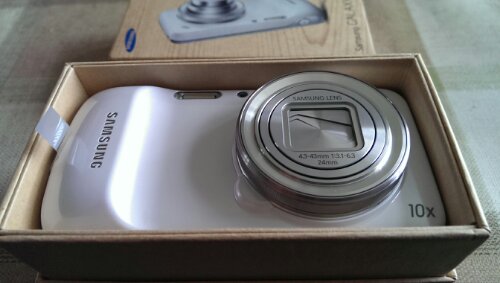
My Samsung Galaxy S4 Zoom arrived as promised from Clove Technology . Clove also had the S4 Zoom cheaper than Amazon, Phones4U and Carphone Warehouse. And with stock so limited, it was great they had some too.

I’ve never been so excited to open a phone box and be presented with a camera. But that is what you have. A phone and a camera. Samsung tout this as a S4. It isn’t in any form. It is like the S4 Mini with a camera bolted on. So below are my first impressions in no particular order.

So let’s get down to basics. It is bulky due to the camera lens but as it is not too wide, like a 5 inch phone, it feels ok to handle. But it is heavier than most phones. I’ve used it all day Saturday and the size never bothered me. The Zoom cannot be more different to my HTC One. From the menus, features and operation. After a day, I miss the ferocious speed at which the HTC One can launch the camera and take a photo. Also, the HTC One has a screen to die for compared to the Zoom. The HTC One has Zoe mode, video highlights, and fast sharing due to the small photo sizes. I am missing video highlights big time. But nothing else.

image

I’ve spent the day setting up the phone, installing my apps and one game. Word of warning, you will need a micro SD card to use this phone as it comes with a 8gb memory with 5gb free. However, out of the box you can move apps to the micro SD card. With 80 apps installed to the main memory I have 3gb free. Games are going to be the challenge, but I imagine I will be taking more photos than anything else.

Setting up the Zoom is so different than the HTC One. Samsung include so many apps, menus and more. Anyway, this is what I have found so far.

– there is no notification led. So you don’t even know when phone is charging either.
– the usual Samsung motion controls but slimmed down, so just the essentials. Smart stay is onboard which is great. Touchwiz works a treat.
– if the phone is off, the camera button won’t switch the camera on
– with the phone on, press and hold the camera button to launch it, is not as fast as using the screen camera icon
– photo quality is off the charts versus any other phone
– audio or music quality is very good too. No audio clipping either. The loudspeaker is very loud, and appears louder than the HTC One
– voice control on the camera was a little flaky until I did a soft reset. Probably needed as I had been opening and setting up all my apps and the settings. Voice can turn the flash on or off, set timer for 10 seconds, take a photo, record video, switch to auto mode or beauty mode, or open the gallery.
– the Zoom connects to my tripod
– comes with a xenon flash
– optical zoom x 10 works really well plus stabilisation built in
– I’m loving the device
– the screen is lower resolution but that doesn’t matter too much
– the weather widget redraws when returning to the home screen, but I do have S Voice on and activated by the home button which slows down the phone

So far the honeymoon period is off the charts. The photos are fantastic. The phone is a competent device too.

More next week…..,

image

Apple hits three-year low in smartphone marketshare, shipment figures reveal

Apple hits three-year low in smartphone marketshare, shipment figures reveal.

Fresh reports during Q2 2013 have shown smartphones have outsold their less-intelligent feature phones for the second quarter in a row. Strategy Analytics says shipments hit a record-breaking 237.9 million. According to IDC, Samsung managed to ship a total of 72.4 million smartphones during Q2 – a 43.9% boost year over year – with help of the Galaxy S 4 and price cuts to the GS3. To put that in perspective, that’s more than double the 31.2 million iPhones Apple managed to ship, and Strategy Analytics claims this marks a three-year low in Apple’s marketshare. While LG and ZTE each occupy third and fifth place, respectively, Lenovo pushed Huawei out of the number four slot by sending out 11.3 million handsets.

However, I do expect Apple to bounce back with it’s new products and iOS refresh.

Samsung Galaxy S4 Zoom – review and first impressions coming soon

image

I decided to take the plunge and move to the Samsung Galaxy S4 Zoom smartphone. Or is it camera?

Later tomorrow, or Sunday I hope to have some first impressions up, plus a daily review next week.

If you would like to know anything particular about this device please let me know and I will try and answer any questions.

I will be selling my HTC One silver, currently locked to 3, but debranded etc and running the latest stock UK 4.2.2 firmware. It will come with the box, headphones, some cases and screen protector fitted. It does have a few marks on rear. Photos etc will be uploaded to a new post later tonight. Price £355.

Stock availablity of the S4 Zoom is limited and the high street pricing very expensive. However, Clove Technology not only had stock, but were selling it lower too. Plus they are lovely people to support. Thanks Clove for your help today!

Anyway, time to zoom off to lunch.

What size should a tablet be?

So far I have used an iPad 2 at 9.7 inches, a iPad Mini at just under 8 inches and a Sony Xperia Tablet Z at just over 10 inches.

The buying decisions for each were simple at the time. The iPad 2 was at the time the only tablet worth buying. I replaced my iPad with the Mini as it was lighter and easier to carry around due to its size. Also the screen was clearer than my old iPad 2. I considered the new full size iPad but decided against it due to its weight and lack of features versus the Sony Xperia Tablet Z. The Z was lighter, thinner and had some great marketing specs including waterproof, dustproof, IR blaster, ultra thin and lightweight, better screen than the Mini, USB OTG, support for using Sony PS3 Dual Shock controller to play games and more.

However, after exploring these tablets, I am left with some thoughts over the ideal tablet size. If you browse the internet a lot, the Mini is just a fraction too small IMO. You really need and a slightly larger size. But the problem becomes that the larger the screen size the heavier the tablet. And the Mini is the perfect size for weight and portability. So actually what you really need is a retina iPad Mini or the new Nexus 7. Actually, I believe for my needs the Sony Z Ultra smartphone is my perfect tablet. Pocketable, waterproof, brilliant sharp screen and can also be used as a phone. Also android phone apps won’t look as bad on a 6.44 inch screen as some do on the Z Tablet’s 10.1 inch screen. Also note that at present the iPad has the best selection and designed apps.

So which way do you sway?

Sony confirms list of devices to be upgraded to android 4.3

Sony has been quick to announce its upgrade plans on its blog. It stated the following –

So, Sony’s Jelly Bean 4.2 upgrade for Xperia Z and Xperia ZL is well underway* – next up, Xperia ZR and Xperia Tablet Z will start receiving 4.2 from early August.

Yesterday you probably saw Google announce the next version of Jelly Bean (Android 4.3) – we’re already getting stuck in and can confirm we’ll make 4.3 available for: Xperia Z, Xperia ZL, Xperia ZR, Xperia Tablet Z, Xperia SP and Xperia Z Ultra…

We’re also looking at uplifting some of our other devices running 4.1 direct to 4.3 – we’ll share more info / deets / timings when we can, so be sure to follow @SonyMobileNews for all the latest.

So despite Sony’s previous track record with lack of updates, it seems they are trying to make amends now.

The new Nexus 7 is available for pre-order in the UK now

The new Nexus 7 is now available to pre order from either PC World or Currys .

Currys and PC World, both parts of the Dixons group, are listing the 16 and 32-gigabyte versions of the tablet for pre-order, priced at £199.99 and £239.99 respectively with an availability date of 13th September 2013. These are for the wifi only models. No information is available yet on the LTE version.

It is certainly going to be a good time to buy technology in the last quarter of 2013, but it is also worth waiting to see what is available from all companies first before parting with your cash.