Category Archives: Tech News

Samsung Galaxy S4 Zoom – Review Part 4

Welcome to part 4 of the Samsung S4 Zoom. Earlier parts and first impressions can be read here.

Today I am going to look at Easy Mode on the S4 Zoom.

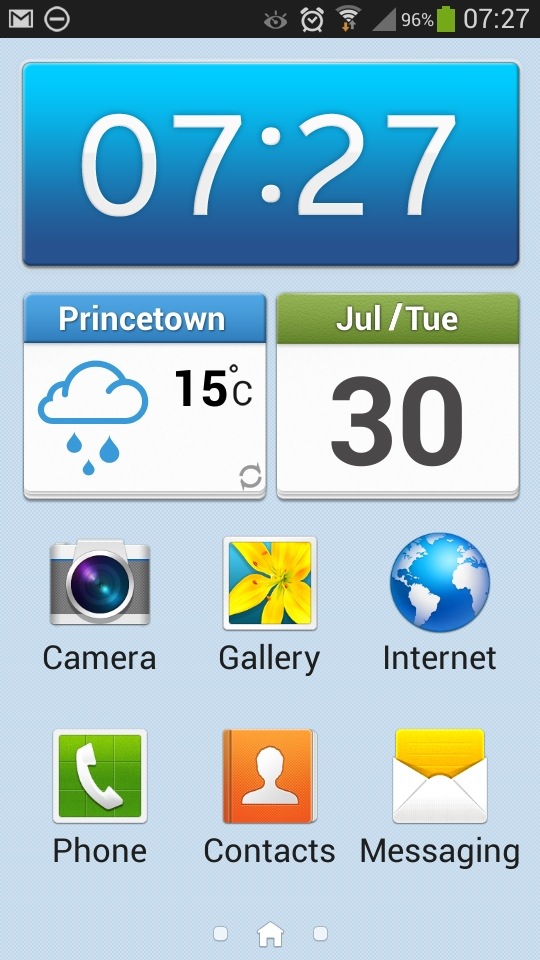
Easy Mode is a simpler launcher for people not that familiar with smartphones or just want a non complex operation.

20130730-081807.jpg
As you can see from the above screen shot you get nice large icons. That is carried across to the other 2 pre configured screens.

20130730-082254.jpg

20130730-082314.jpg
Where possible, tapping deeper into the apps and settings reveals just as simple and easy to read options.

20130730-082510.jpg
Ironically, I quite like the simplicity of easy mode. But it only allows 3 home screens and no widgets. What you see is what you get so clearly isn’t for everybody.

Samsung S4 Active – waterproof and dust proof – and the warranty says

The  Samsung Galaxy S4 Active is another one of Samsung’s S4 phones. This one features a more rugged finish with waterproof and dust proof certification. You can even take photos underwater. So what does the warranty say.

“This Limited Warranty does not cover: (a) defects or damage resulting from accident, misuse, abnormal use, abnormal conditions, improper storage, exposure to liquid, moisture, dampness, sand or dirt, neglect, or unusual physical, electrical or electromechanical stress […]

You read it correctly. Water and dust damage is excluded!  That’s not right surely!

Samsung Galaxy S4 Zoom – Review Part 3

I hope you have enjoyed the first 2 parts of the S4 Zoom review and early impressions. To recap on those parts click here.

Today, I am going to cover off some of the issues I have encountered. I probably won’t be able to stretch and test the camera due to the rainy UK weather until the weekend.

So in no particular order these are the issues or observations –

– battery life is fairly reasonable so far. I have used the S4 Zoom constantly and I can get through a day from 6am to 10pm. But no more. That is with using the camera, a few calls, twitter, blog, lots of stuff syncing and Internet. In fairness the battery is fairly hefty and I have 90 apps installed.

– the battery is removable but I cannot so far find anywhere even from Samsung that is selling the battery. In the long term, I would definitely want a spare battery kept with me especially if I was going to be snapping loads of photos.

– charging – thankfully regardless of whether via mains or USB the phone seems to charge fairly quickly.

– car GPS mount – my universal mount can’t handle the depth of the S4 Zoom and in my brief hunt for a new one cannot find anything. Any suggestions would be grateful.

– cases – you must be having a laugh, I have only found one case on eBay which is a silicone type affair for £3.90. It looks shocking, but it is better than nothing. Samsung are meant to have a bespoke case for this device, but nothing is available yet. In fact accessories for this device are going to be few and far between.

– story album – Samsung include an app called Story Album. You select some photos and make an album which you can then get printed and posted to yourself. Except, you select the photos and nothing further happens. Apparently, Samsung have suggested I need to hard reset my phone and some software I have installed might be clashing with it. Well no chance of that for a while until I have tested everything I need, and then I might try again. But I reckon its the app.

– auto focus on the camera – maybe me, but sometimes it seems to struggle to auto focus. I need more time to test camera but indoors this is what I have observed.

– camera – talking of the camera, I need to familiarise myself with the options, but strangely I did find the HTC One concept of taking photos much easier as with the HTC One you didn’t worry about which mode you just took the photo and edited it afterwards

– photos – no question about it, you get a decent quality photo. Optical zoom is brilliant being on your phone as often you do need to zoom in to a photo. I have captured views that no other phone could have managed due to optical zoom. Digital zoom is useless in comparison.

– speed – it takes about 1.5- 2.0 seconds to take the first photo from pressing the camera icon and then using shutter button. The HTC One could have taken 20 photos in the meantime, albeit much lower quality. As the S4 Zoom is more like the S4 Mini it’s processor is not as powerful. I don’t get any issues with its speed, and it is not slow, but then it is not fast like the HTC One. You do get the odd slow down, but it is odd ones and has no impact is usage. Makes you wonder if we really need Snapdragon 800 processors!

– voice control – you have the ability to control many apps by voice. Sometimes it works very well, and sometimes it is a bit hit and miss

– screen – it comes with a lower resolution screen than the standard S4 and you do notice the difference. Put the S4 Zoom side by side to the HTC One and it really shows how incredible the HTC One screen is. It’s a real wow moment. In addition, the S4 Zoom just isn’t a bright screen compared to the HTC One.

– shape, size and weight – it’s heavy. And you notice it in shirt front pockets but it fits with ease. Mainly as its not too wide or too tall. It’s fairly comfy in the hand due to its curves, but the Zoom lens does get in the way sometimes. I’m getting used to it though

– sound – loud and good audio quality, so makes for a good MP3 player, or for listening to podcasts over the loud speaker.

– no notification led – it got none, and no light for charging state either.

In reality you have a camera with a smartphone attached. It’s a good combo as you can do nearly anything and achieve high quality photos. It is still early days, and the main camera test is yet to be done.

If you have any questions, please ask. I should have all the answers.

Anyway, here is a photo taken last night. Zoomed in and cropped.
2013-07-30 21.48.35-1

HTC predicts first loss in its company history

HTC over last few years has seen its profits steadily decline. HTC has predicted it will post an operating loss next quarter, its first since going public in 2002.

The Taiwanese manufacturer expects its operating margin to fall between 0 and negative eight percent in Q3, down from Q2’s 1.5 percent. Gross margin is expected to be in the range of 18 to 21 percent, down from the previous quarter’s 23 percent. Revenues are expected to slip to between NT$50 billion and NT$60 billion (roughly $1.67 billion – $2.01 billion), down on last year and way down on the analyst consensus of around NT$75 billion ($2.51 billion).

Let’s hope the sales of the HTC One and it’s new devices can help turn its fortunes around.

LG unveils Quick Window case for the LG G2

LG unveils Quick Window case for the LG G2 which will come in seven colors.

image

The other day, LG announced their Quick Window case for their upcoming flagship the LG G2. Clearly a copy of Samsung’s Smart Cover, and it actually has different themes to what it shows eg. music widget theme, clock theme, etc. These covers will come in 7 different colours.

LG like Samsung have realised there is big money in cases,  but also it adds a little extra usefulness to the phone function.

Samsung Galaxy S4 Zoom – Review Part 2

Over the last few days I have written about my first early impressions and the part 1 of the S4 Zoom review. To recap, click here.

Today, I am going to look in more detail as to what you get in the box, and the physical aspects of the device.

But before I do that, I thought I would just update you on the memory front. The S4 Zoom comes with 8gb internal memory with the option to move apps to the micro SD card. However, whilst this moves the app itself, it doesn’t move the app data file. So Asphalt 7 which is 1.14gb doesn’t really benefit from this feature. However, I now have 90 apps installed in total, one third of which are games including Asphalt 7. I have 1.55gb left of free memory, so now don’t intend on installing any more apps. So unless you are a big heavy game player, the S4 Zoom memory works just fine. Now, here’s an identity crisis for you. The S4 Zoom is connected to the Moga Pro Game Controller. The Moga Pro Controller actually works really well with the S4 Zoom in both modes A & B and really well. The arm doesn’t secure the S4 Zoom firmly, but it is fine so long as you don’t move too much. Here’s a photo.

2013-07-29 10.03.58

The grip arm sits between the camera lens and S4 Zoom camera grip on the other side. Looks odd, but it works a treat.

So what came in the box.
2013-07-29 09.38.17
Well, apart from the phone itself, you got a Quick Start Guide, Quick Reference Guide, USB Micro Lead and UK Travel Plug, A microfibre cloth, regulatory information and wired headset. The wired headset can be used to make and receive calls and listen to music. There is no FM radio. The sound quality via the headphones is rather good with music considering they are included for free.

The Quick Start Guide is all about how to use the phone for the first time, from charging, inserting micro sim and battery. And not much more really. However, the Quick Reference Guide is very good.
2013-07-29 09.39.48
The guide is a double sided pull out booklet, describing over 40 photo modes, and some scenes and what settings you need. This is handy guide to have and even includes a section for you to make your own notes. I intend to photocopy this guide as well.
2013-07-29 09.40.30
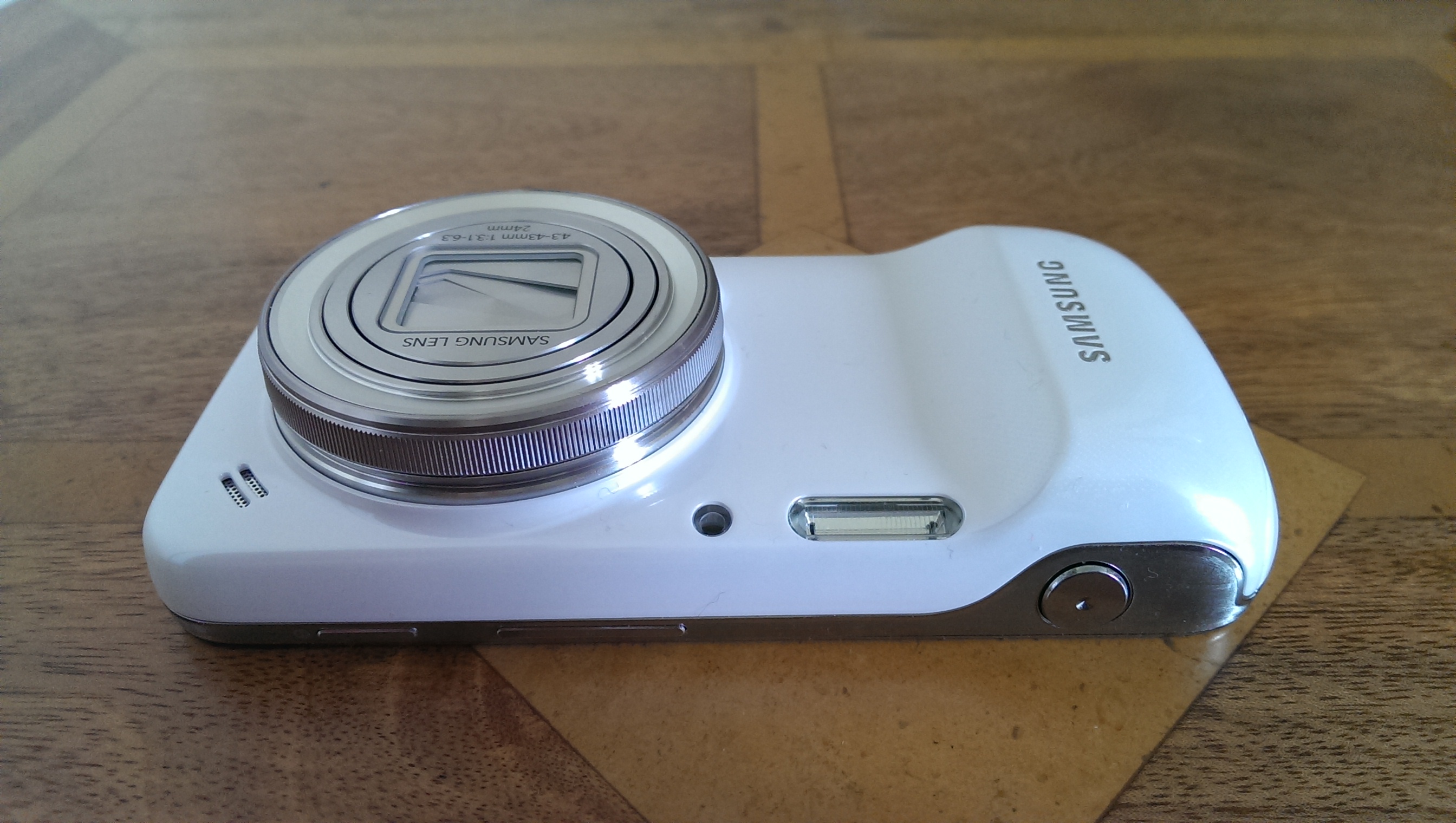
Looking more closely at the S4 Zoom, the front of the device has the lens, top right is the loudspeaker, between the loudspeaker and lens, the gps antenna is located, then the xenon flash and Auto Focus Sensor Assist light. The camera grip also hides the main phone antenna. on the top side, you have the power, volume and camera buttons.
2013-07-29 09.42.16
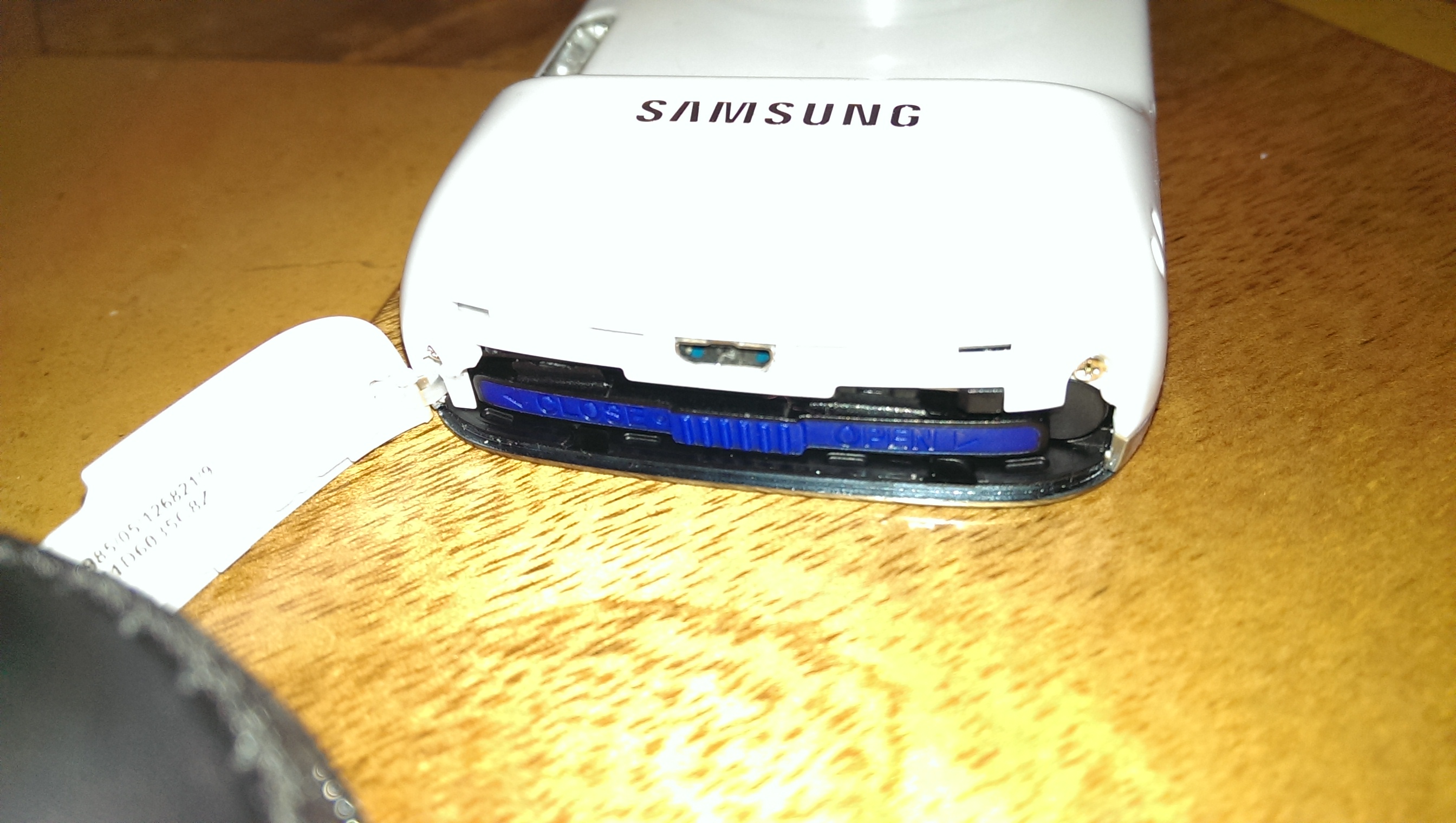
At the camera grip end, on the side, is located the battery and sim cover. The cover flip opens, enabling you to push the micro sim card in place. The battery has a slide to remove flap, once unlocked, the battery drops in to place.
2013-07-29 09.42.58
The bottom of the device reveals the cover for the micro SD card. 64gb micro sd cards are supported. You can also attach a tripod to the mount.
2013-07-29 09.43.34
And finally, on the back you have the S4 Zoom screen, which is made of Gorilla Glass 3. What I have noticed with the HTC One and S4 Zoom side by side, is just how amazing the HTC One screen is compared to the S4 Zoom. The S4 Zoom screen is nowhere as bright as the HTC One, nor as sharp due to nearly 50% less pixels. But so far, it is fine mainly due to the customisable fonts you can select in the settings on the S4.

The UK weather has been heavy rain over the weekend, and even yesterday, so photo samples have been limited. I will as soon as possible complete the camera review but below is another sample of a Nespresso pod, and then a crop from the photo.

2013-07-28 18.53.23
2013-07-28 18.51.35

Tomorrow, I will provide an update of how I am finding using the S4 Zoom, and in the meantime, if you fancy treating yourself to a Samsung S4 Zoom, Clove Technology will be more than happy to look after your needs.

iOS 7 Beta 4 update – the changes

Apple released the fourth beta of iOS 7, which has a number of improvements, changes, and bug fixes.

Lockscreen – Slide to Unlock has been updated with a changing highlight colour and an arrow that draw attention to the area on the lockscreen.

The arrow for the Notification Centre is now a line shape.

Mail – Swiping to delete inbox messages from the Mail app faster.

Notification Centre – The different sections of the Notification Centre can now be switched between by swiping left and right.

AirPlay –  new AirPlay icons.

Siri – Siri’s help menu now includes some questions and answers.

Camera – includes a relocated HDR button.

Reminders app – now offers Search functionality.

Safari and Mail icons appear to have tweaked gradient redesigns.

Folders – animation for folders located in the dock looks like it works properly.

Phone –  Call button takes up less of the phone’s screen and the Answer/Decline buttons have also been updated.

Messages app now uses the first name and last initial of a contact in a chat conversation rather than the full name.

Search – includes cancel option

Safari – Buttons for Bookmarks, Shared Links, and Reading List have been redone with icons rather than labels.

Fingerprint scanner – code in the beta suggests the home button might indeed have a finger print scanner.

If you notice any more drop a note in the comments.