Category Archives: Tech News

Latest iPhone 5S and 5C rumours

Just under 2 weeks on 10th September 2013, Apple will announce details on its new iPhones.

The iPhone 5C looks like to be a mid priced polycarbonate iPhone which will be available in a number of different colours. It is likely that the 5C will be the 5, but just in polycarbonate shell.

The iPhone 5S will be the upgrade to the 5. This will be available in 3 colours. White, Black and Champagne Gold. The storage will also be available in 128gb.

The new A7 processor inside the 5S is running at about 31% faster than the iPhone 5′s A6 chip. The iPhone 5′s A6 chip is dual-core, and the iPhone 5S will also remain dual-core. There is a possibility that it will handle 64bit. The fingerprint sensor built into the home button is a possibility, linked into some new payments system. The camera will have dual flash, upgraded optics but still only be 8mp.

20130825-193437.jpg

Photo via ASCII.JP

20130825-210525.jpg

20130825-210533.jpg

Photos via Sonny Dickson

Decisions, decisions, decisions – which phone and operating system to choose from ?

So here I am one week later and really enjoying using the Lumia 925. And part of me now is thinking how could I move to using Windows Phone permanently over android or iOS.

In my house I have every operating system in use, including iOS, android, windows phone, Firefox, BlackBerry and Symbian. Symbian, BlackBerry and Firefox don’t cut it. Firefox shows a lot of promise, and future updates will be interesting to watch.

If anybody tells me that android is better than iOS or the other way around or windows phone is not as good, they are not being truthful. It is clear to me in my opinion , that the 3 main systems are just different. Except, windows phone is clearly very different. IOS and android are becoming so similar in some ways , there is nothing new about them. But there is a but.

Windows Phone does have more apps and games, the ones that matter. It does have services and Nokia makes some great hardware. In fact some apps are really good. But there are some apps that haven’t been released on the platform at the same level as on android or iOS. Apple still has the best made apps, android is close but has better sharing options. iOS 7 may help bridge the services and sharing situation.

So, what phone should be the next one. If I choose the Nokia Lumia 1020 I will have the best camera on a smartphone, Nokia music and a phone running WP8 that has some deficiencies in the apps I use and need daily. As a games device it doesn’t work with my games controllers. For a lot of people the apps won’t be a problem. Plus it does bring many extras like downloadable maps.

If I choose the next wave of android phones, they should have improved cameras, with all the apps, services and sharing along with a variety of shapes and sizes. My game controllers should work too.

And then there is the next iPhone. Will the software provide enough new extras to compensate for the slight improvement on the iPhone 5. At present no other company can provide a phone at its size, that is as powerful. With the iPhone the apps really are wonderfully designed.

On the tablet front, if you want variety of apps and games, just buy an iPad. Android on a large tablet screen lacks apps.

So then I had a thought. Why don’t I get a large Phablet. 5.6 to 6.5 inch screen? And then an iPod Touch so I can play my 700 iOS games and use some of my exclusive apps. But really a Phablet or larger is too big to carry around comfortably. So I’m back to square one with my thought process.

What would you do?

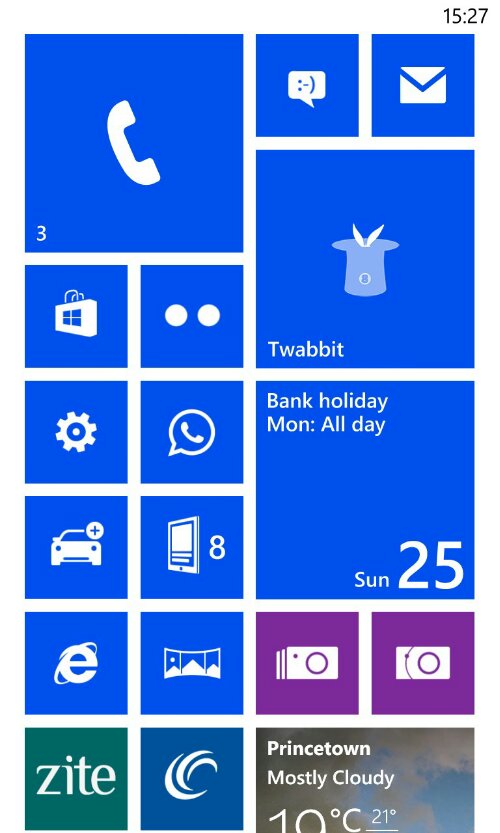
Live Tiles on a Windows Phone 8

image

I am currently using the Nokia Lumia 925,  and the only screen customisation is on the home screen. You can tweak the theme colour from white or black background.

image

After that you can decide what live tile to pin to the home screen and the size from a small square, large square or a rectangular shape that takes up the whole width.

image

In fact it is possible to spend a good few hours messing around with the look, colour and size options.

image

The beauty of the Windows Phone home screen is you only need a quick glance to see what’s happening or active or what notifications you have received via social networks,  apps or messages.  It is a very simple and clear way of viewing activities.  I started with the phone app, email,  sms,  tweets,  app.net,  WhatsApp,  calendar,  marketplace,  settings,  news feeds,  blog,  Nokia Here Navigation and Maps,  Internet Explorer,  Nokia PRO and Smart Cam apps,  weather,  photos, weather,  sport,  news,  podcasts and more.  Most of these tiles update constantly providing at a glance information.

It certainly makes the home screen more engaging,  than say static icons on the iPhone.

Another day with the Nokia Lumia 925

After another day has passed with the Lumia 925, this is what has occurred.

I have installed the following apps – 6sec, Adobe Reader, Amazon Kindle, Amazon Mobile, App Social, BBC iPlayer, Bing News, Bing Sport, Bing Finance, Bing Weather, DotDot, eBay, Flickr, gMaps, Google, HD Photo Viewer, ITN News, LinkedIn, Metrotube, Natwest, Nextgen Reader, Paypal, Photosynth, Podcast Lounge, Podcatcher, Pro Points Calculator, Shopsavvy, Sky News, SkyDrive, Skype, SophieLens for Nokia, thetrainline.com, Topgear News, TripAdvisor, Tunein Radio, TV Guide, TV Catchup, twabbit, Vyclone, Whatsapp , WordPress and Zite. With regards games, I have only installed a few so far – Jetpack Joyride, Mirrors Edge, AE Bubble, CosmosConquest, Temple Run and Word Twist.

As you can see many familiar apps are present. Also don’t forget Nokia include their Pro Cam and Smart Cam camera apps, Nokia Cinemagraph, Nokia Glam Me (I used this for my twitter avatar and lost 10 years and became slimmer), Microsoft Office and OneNote, Panorama, People app that merges if required social networks, Nokia Music (free or paid £3.99pm) streaming service and a great photo editing app Creative Studio.

Over the last few days I have taken many photos and used Creative Studio to edit these. Have a look at the various options available with the camera apps and editing. All photos are in an album on my Flickr. Click here.

The time is displayed permanently on the lock screen when screen off. I really like this. What I did find installing all the apps, is that I eventually got a message that I had reached the maximum 15 background running apps and to allow another app to run in the background I would have to stop another.

I have been using Nokia Maps turn by turn and it works well. Once during the course of a day, it stopped working. I have no idea why either. I also have a live tile for my commute. Tapping on this takes you into commute assistance gps mode. You get turn by turn but without the voice. The live tile updates itself near the commute time to give you a live eta.

I like the live tiles showing me at a glance what’s going on. But I wish there was a notification tile to capture everything from all apps.

I had an issue with a screenshot emailed to myself from my iPad. It displayed as an embedded photo, so I couldn’t detach it. If you email a photo, it is compressed. There is no option either to override this. Apparently, this is for speed and smoothness. However, the workaround is using HD Photo Viewer.

I have turned off SkyDive auto photo upload as in auto mode it reduces file size if on a mobile network. The workaround is to manually select which photos and these stay full size even when using your mobile Internet.

Using Windows Phone is a different experience. In many ways it is far more enjoyable than other operating systems. At times it is too simplistic.

What is your mobile phone history?

One of my favourite websites Lostinmobile ,  owned by Shaun McGill,  posted a list his 51 phones / pda’s he has owned. 

Below is my list,  so can you recall yours?

Acer – Liquid, M900
Motorola – Motofone F3,  StarTac
Nokia – 5110, 3210, 6210, 6230, 1100, E71,  Lumia 620, Lumia 925
HTC – S710,  Hero, HD2, One,  Touch,
Palm – Zire 71,  m505, m515,  Tungsten T3, Treo 650
O2 – Xda IIs,  XDA Exec,  Mini S
HP – 914c, iPaq 4700
Samsung – Omnia i900, i600, i780, Galaxy S3, Galaxy S4, Galaxy Note,  Galaxy Note 2,  i780,  S4 Zoom
Apple – iPhone 4,  4S, 5, iPad, iPad 2, iPad Mini
i-mate –  8502, 9502
Sony Ericsson – K700i,  M600i,
MWg – Zinc II
Huawei – Ascend P6
T-Mobile – Dash,  Pulse
ZTE –  Open
Ericsson – T28,  T10s
Fujitsu Siemens – n560,  Loox 720
Blackberry –  Curve 8900, Curve 8520
Sony –  Xperia Z Tablet

Google bans apps or games that have notification bar adverts, forced home shortcuts and more

Finally. Google has updated it’s Play Store developer policies and now forbids notification bar ads,  forced home shortcuts or bookmarks for advertising purposes.

Other aspects allow Google to block apps with misleading information,  fake reviews,  excessive  and useless tags,  deceptive developer behaviour or dodgy website names.

This is a huge change and badly needed.

The Samsung Galaxy Golden – another new phone from Samsung

20130821-085202.jpg

The Samsung Galaxy Golden sports a 3.7-inch Super AMOLED touchscreen, powered by a dual-core 1.7 GHz Qualcomm Snapdragon 400, Android 4.2 Jelly Bean and includes software such as the S Health fitness app and a business card scanning app. The phone comes in a champagne finish.

Currently available in Samsung’s home territory, but one does wonder is there any form factor left that Samsung doesn’t manufacture.