Category Archives: Tech News

iPhone 6 and iPhone 6 Plus – First Impressions

The iPhone 6 and 6 Plus have arrived. The Plus offers a 1080p 5.5 inch screen over the 6 which is a 750p 4.7 inch screen. The Plus has a bigger battery for longer battery life and also features optical image stabilisation over the smaller 6 which features digital stabilisation only.

iPhone 6 – this is the smaller of the two phones and if I am being honest is the best out of the two. It looks amazing. It feels amazing. It’s still is a one handed device. In fact the screen doesn’t look real at first. By that I mean it looked like a dummy phone but it wasn’t in a positive way. The screen even though it’s only 750p it looks bright and clear. In my opinion it is the best phone period. It makes the Samsung Galaxy Alpha look really cheap and nasty for example. It’s thickness or lack of and the overall design and construction was a surprise in that it was so good. Okay, enough of the praise. Let’s move on to the iPhone 6 Plus.

iPhone 6 Plus – OMG. It’s huge. Really huge and feels a little too big in the hand, so you will need two hands to use this safely. It’s 5.5 inch screen is just as a wow factor as its smaller cousin. Landscape mode converts the phone into a mini tablet. With this phone you would not need a tablet. However, I did notice that several apps had not been properly optimised yet for this bigger screen, and the scaling up looked wrong eg. menu bars looked too thick. The camera and battery is better than the 6 as previously mentioned. I took a few shots on each of the phones of the inside of the Apple Store and then opened them up and zoomed in to pixel peep. The Plus with its optical image stabilisation was a sharper image although the difference was marginal. Out of curiosity I took the same shot on my LG G3. In this particular scenario the G3 produced an even better shot, albeit only marginally better.

Colours – the iPhone 6 looked best in gold. But the iPhone 6 Plus looked best in space grey.

Final thoughts. Apple has built some superb new iPhones. iOS 8 and the apps especially for the iPhone 6 Plus need to catch up to be adjusted for the bigger screen. At this point the 6 Plus will be a cracking phone.

But for ease of use in one hand I would select the 6 over the 6 Plus.

And one final point. In the Apple Store a detailed explanation was provided of the iPhone 6 and iOS 8. I asked one question. Apart from the bigger size of the Plus, are they any other differences? Answer. None. Well we all know that’s not the case.

And my final final point. My LG G3 is shorter by a cm than the 6 Plus. There is no reaching or holding phone on the sides to turn volume up or down etc and the G3 has its buttons on the rear. So I’m clamping the G3 more firmly and in just one hand. The 6 Plus is not as easy to hold versus the G3.

iOS 8 Update Pre and Post – My Thoughts and Experiences

Apple’s iOS 8 update landed a few days ago. I was too busy when it went live to attempt to start the download, but based on the battering Apple’s servers would take, I thought it wise to wait.

I was pleased that I did wait, as it became evident that this update required a massive amount of free space to install. Between my wife and I, none of our Apple devices were able to update to iOS 8, even though it said there was an update available. In fact, all that happened was the devices took you to a usage screen. No instructions provided by Apple. Now, I’m tech minded but the majority of Apple’s users probably aren’t and would be left wondering what to do next! How difficult would it have been for a brief note/message on the next steps required to free up some space.

Even more concerning would be a phone with just 8 or 16gb storage. Based on the size of free space required, it would in essence be necessary to remove everything off your iPhone just to install iOS 8. Again no warnings or advice from Apple.

So before I could start downloading the update on all the devices, I had to fiddle around with removing enough apps or music or videos to install iOS 8.

So finally, the updates were starting to download. This took hours, but fortunately this was left running overnight. I say fortunately, but unfortunate for one device whose update timed out. The next stage after downloading was preparing the update which seemed to take forever. About 40 minutes. Then the installation, taking another 20 minutes. Next the music, videos and apps that had been removed had to be re-installed again.

This did not feel like a smooth operation and all it would have taken is a screen from Apple with some tips before trying to install this update.

However, Apple is the only company that can release an update to the World for all its devices on the same day at exactly the same time!!! And that is impressive.

So post update and running iOS 8. Here are my thoughts and then the thoughts of my wife.

Me – After installation, my iPad Air looked no different on the first glance. As I started to explore some of the new features and cosmetic tweaks, it became evident that the update as a whole was greater than the individual components. The attention to detail and the refined user experience was starting to really impress me. The camera and photos app. Totally enhanced providing more functionality and a better user experience, but done in a non overpowering way. Safari, when the pages started to load this was a super fast experience. I am experiencing web pages not loading. This is only cured by quitting the app and restarting. The new features are extensive, but I do believe it will be the developers and the forthcoming app updates that will end up creating a powerful and enjoyable user experience.

Wife – Gavin had helped me install iOS 8 on my iPhone 5S and iPad. First things, how do I remove the people’s faces from the recent screen. I really don’t want to see some of the faces there. Setting the alarm. The layouts changed and it threw me. I don’t like change. I’m not a tech person and therefore once I have worked out how to use something, change is not wanted for the sake of changes. The changes to all the other apps and menus is also a little confusing. I am sure after spending some more time with my iPhone it will become easier. I was really looking forward to the Health app, but Gavin informs me its functionality with Third Party apps has been removed temporarily due to a bug. Hmmm. There is a lot of changes and to be honest I don’t like them really at the moment. However, I did notice a Tips app from Apple. Thank goodness for this. I will have a read over time. Overall, I am feel frustrated over this update.

My final thoughts then got me wondering how iOS 8 and app updates/improvements would define the new iPhone 6 and iPhone 6 Plus. I believe these new iPhones after a 3 month period will really produce one of the best mobile phone user experiences. The new iPhones may not have the highest spec sheet, but I do believe the total sum of all the parts, software and hardware will be a difficult force to beat.

However, whilst today is the official launch of the new iPhone 6 and 6 Plus, it is also pre order day for the Samsung Note 4 in the UK. Now that is a coincidence!

So if you are now using the iPhone 6, please let me know and everyone else your initial thoughts: )

BlackBerry announces the new Porsche Design P’9983

bbp

The new Porsche Design P’9983. At its core, we’re looking at a device running BlackBerry 10.3 along with a few Porsche-produced bits like a custom wallpaper and watch face. Combine those looks with a “glass-like” physical QWERTY keyboard, a 3.1-inch touchscreen and 64GB of internal storage plus a price tag of around $2,000!!

Clearly there is still a market for such an expensive keyboard device!

Source -engadget.com

Amazon launches new luxury e-reader the Voyage

amazvoy

the Voyage looks like your standard e-reader. It’s small, rectangular and there’s a crisp, beautiful E Ink screen. The screen is flush with the bezel. The e-reader is made of magnesium with a chemically hardened front glass. Underneath the glass is a next-generation Paperwhite display that packs 300 pixels per inch in a 6-inch panel. The Voyage 7.6mm thick. Page turns can be triggered by a force press on the bezel which provide haptic feedback. X-ray features are improved. All this for $200.

So would you spend £200 on just an e-reader?

Source – amazon.com/engadget.com

iOS 8 full change log plus a few tips for updating

iOS 8 arrived yesterday and below is the full change log. You might find you need to clear some space with some models needing up to 7gb free space.If you update via iTunes the download seems to be smaller around 2gb.

According to Arstechnica iPad 2 and iPhone 4S don’t perform to well across the board after installing iOS 8, so it might be worth waiting for Apple to release its first bug fix.

In addition, the Health App/Kit got pulled at the last minute due to a serious bug found by Apple. Expect to see this reappear by the end of this month.

iOS 8

This update contains hundreds of new features, including the following:

• Messages improvements
◦ Tap to Talk to send your voice, a video or a photo with just a swipe
◦ Group messaging options to name a conversation, add a contact, remove a contact or leave a conversation
◦ New details view with Do Not Disturb, location sharing and attachments view
• Photos improvements
◦ Smart editing tools to adjust light and colour with a swipe
◦ Fine-tune controls to adjust exposure, brightness, contrast, highlights, shadows and more
◦ Search by date, location or album name, or use smart suggestions
◦ Smart albums for Slo-mo videos, Bursts, Panoramas and Time-lapse
◦ Third-party photo filters and editing tools supported directly in Photos
◦ Your photos and metadata from iPhoto will be migrated to Photos. Books, Journals and Slideshows will be converted to albums containing only photos. iPhoto for iOS is not supported on devices running iOS 8 or later. 
• Camera improvements
◦ Time-lapse mode
◦ Capture timer
◦ Adjust exposure with a simple nudge to lighten or darken a photo prior to capture
◦ Burst mode on front-facing camera on iPhone 5s
◦ Panorama for iPad Air and iPad mini with Retina display
• QuickType keyboard
◦ Predictive typing personalised to your writing style, and customised based on the recipient and the app
◦ Predictive typing is available in English (Australia, Canada, UK, US), French (Canada, France, Switzerland), German (Germany, Switzerland), Italian, Portuguese (Brazil), Spanish and Thai
◦ Third-party keyboard support
• Health 
◦ New Health app with easy-to-read dashboard of health and fitness data
◦ Ability to share health data with apps to provide a more comprehensive way to manage your health and fitness
◦ Add a Medical ID with information about allergies, medical conditions and more, with the option to make this accessible from the Lock screen
◦ Available on iPhone and iPod touch
• Family Sharing
◦ Share iTunes, iBooks and App Store purchases with up to six members of your family.
◦ Pay for family purchases with a single credit card and approve purchases by children with Ask to Buy
◦ Easily share family photos, a family calendar, locations and more
• iCloud Drive 
◦ Store all your documents in iCloud and access them from your iPhone, iPad, iPod touch, Mac or PC
◦ Share the same file across multiple compatible apps
◦ Edits you make on one device update on all your devices automatically
• Continuity features so your iPhone, iPad and Mac work together more seamlessly
◦ Handoff to continue what you’re doing as you move from one device to another
◦ Make and receive calls and send and receive SMS or MMS messages on your iPad or Mac
◦ Instant Hotspot to automatically use your mobile connection to get online with your other devices
◦ AirDrop compatibility with OS X Yosemite
◦ Available on iPhone 5 or later, iPad (4th generation), iPad Air, iPad mini and iPod touch (5th generation)
• Spotlight improvements 
◦ Displays suggestions from Wikipedia entries, places nearby, films (US only), popular web sites, App Store, iTunes Store and iBooks Store 
◦ Safari also supports Spotlight suggestions alongside Top Hit and search suggestions 
◦ Supported for local languages in US, UK, Austria, Australia, Belgium, Canada, France, Germany, Italy, Japan, Netherlands, Spain and Switzerland 
• Mail improvements
◦ Easily jump between drafts and your inbox with a simple swipe down on the draft
◦ Intelligent suggestions for Calendar events and Contacts
◦ VIP threads
• Siri improvements 
◦ Improvements to responsiveness, reliability and accuracy
◦ “Hey, Siri” option to initiate Siri using just your voice when your device is plugged in
◦ Streaming voice recognition
◦ Works with Shazam to answer “What song is playing?”
◦ Purchase content from iTunes Store
• Safari improvements
◦ DuckDuckGo search engine support
◦ Private browsing per tab
◦ Subscribe to RSS feeds in Shared Links 
◦ Use Camera to scan and enter credit card info
• Maps improvements
◦ Flyover city tours
◦ Maps place cards in Phone and Contacts
◦ Inline map view and travel time notifications for Calendar events
• App Store improvements
◦ New Explore tab for easier category browsing
◦ Top trending searches displayed in Search tab
◦ Scrolling search results
◦ App video previews
◦ Editors’ Choice badges
• Quick access to key contacts in multitasking view
• Interactive Notifications for Messages, Mail, Calendar, Reminders and enabled third-party apps
• New Tips app to help you do more with your iOS devices
• iBooks app built into iOS, now with auto night mode and new organisation for book series
• Podcasts app built into iOS
• Battery usage by app
• iCloud Keychain can use saved website passwords to easily sign in to associated apps
• FaceTime Audio call waiting
• Rich text editing in Notes
• Peer-to-peer AirPlay discovery and playback
• Enterprise features 
◦ Expanded data protection to Calendar, Contacts, Messages, Reminders and Notes in addition to Mail and third-party apps
◦ Per-message S/MIME email controls
◦ Improved UI to make it easier for users to understand the remote management of their device
◦ Automatic reply for Exchange
◦ Free/busy lookup for Calendar invitations
◦ MDM Managed books can be automatically pushed to users
• Accessibility features
◦ Redesigned Zoom with one-handed control and multiple zoom modes including picture-in-picture
◦ Built-in timer and Touch ID support for Guided Access
◦ Speak Screen to read out contents of the screen via gesture or Siri command
◦ VoiceOver improvements including Alex voice option and Braille input support
◦ Multi-device support for MFi hearing aids to seamlessly switch from one paired iOS device to another
• Features for China
◦ Vector-based maps
◦ Turn-by-turn navigation
◦ Lunar calendar support
◦ Improved predictive input
◦ Improved weather data
• Expanded language support
◦ Dictation support for 22 additional languages: Croatian, Catalan, Czech, Danish, Dutch, Finnish, Greek, Hungarian, Indonesian, Malay, Norwegian, Polish, Portuguese (Brazil), Portuguese (Portugal), Romanian, Russian, Slovakian, Swedish, Thai, Turkish, Ukrainian and Vietnamese
◦ New keyboards for English (India), Bengali, Filipino, Marathi, Slovenian and Urdu
◦ Hindi localisation 
◦ Definitions of a selected word for additional languages: Russian, Portuguese (Brazil), Thai and Turkish
◦ Spanish-English bilingual dictionary
◦ Spell check for Turkish
◦ Hebrew language support for Text to Speech and VoiceOver
• New developer capabilities, including
◦ Extensibility, giving apps new sharing options and the ability to create widgets, photo filters and editing tools in Photos, and third-party keyboards
◦ Metal, a new graphics technology for game providers to bring console-class 3D games to mobile devices
◦ SpriteKit and SceneKit for improved 2D and 3D games
◦ HealthKit, so health and fitness apps can share their data with each other
◦ HomeKit, a new way for you to control supported devices in your home using Siri
◦ Touch ID support so you can sign in to third-party apps with just your fingerprint
◦ CloudKit, offering a complete and scalable back-end solution, helping developers eliminate the need for writing server code and maintaining servers
• Bug fixes

Some features may not be available in all countries or all areas.

For information on the security content of this update, please visit this website:
http://support.apple.com/kb/HT1222

Amazon expands its Kindle Tablet range

Via Reuters –

NEW YORK (Reuters) – Amazon.com Inc ramped up its push into hardware on Wednesday with the debut of six new or upgraded devices, including a high-end $199 e-reader called the Kindle Voyage and its cheapest-ever touch-screen tablet.

The No. 1 U.S. online retailer also revamped its basic Kindle e-reader to include a touch screen. It will cost $79, about 15 percent more than the current basic model.

Other new devices unveiled on Wednesday are a $99 Kindle Fire HD tablet, which includes a smaller, six-inch screen as well as a tablet designed for kids that starts at $149. Amazon also upgraded its 7-inch and 8.9 inch Fire tablets.

Is PayPal worried about Apple Pay as American Banks fight over customers

Below is the single page advert PayPal placed in the New York Times.

IMG_2666.JPG

It makes reference to the nude iCloud photos and Apple’s lack of security. Perhaps PayPal needs to be reminded of the huge eBay hack that was kept quiet for ages. eBay and PayPal are owned by the same people.

Meanwhile American Banks are fighting already to gain Apple Pay customers.

“It’s a healthy competition,” JPMorgan Chase marketing chief Kristin Lemkau told the Financial Times. JPMorgan Chase launched Apple Pay-centered marketing campaigns on the same day as the service’s unveiling, and similar campaigns from Apple’s other partner banks quickly followed.”

So in my mind PayPal should be extremely worried!

Sources – FT, CultofMac, AppleInsider

iOS 8 cometh today as Apple shares decline despite record 4m iPhones sold

IMG_2665.PNG

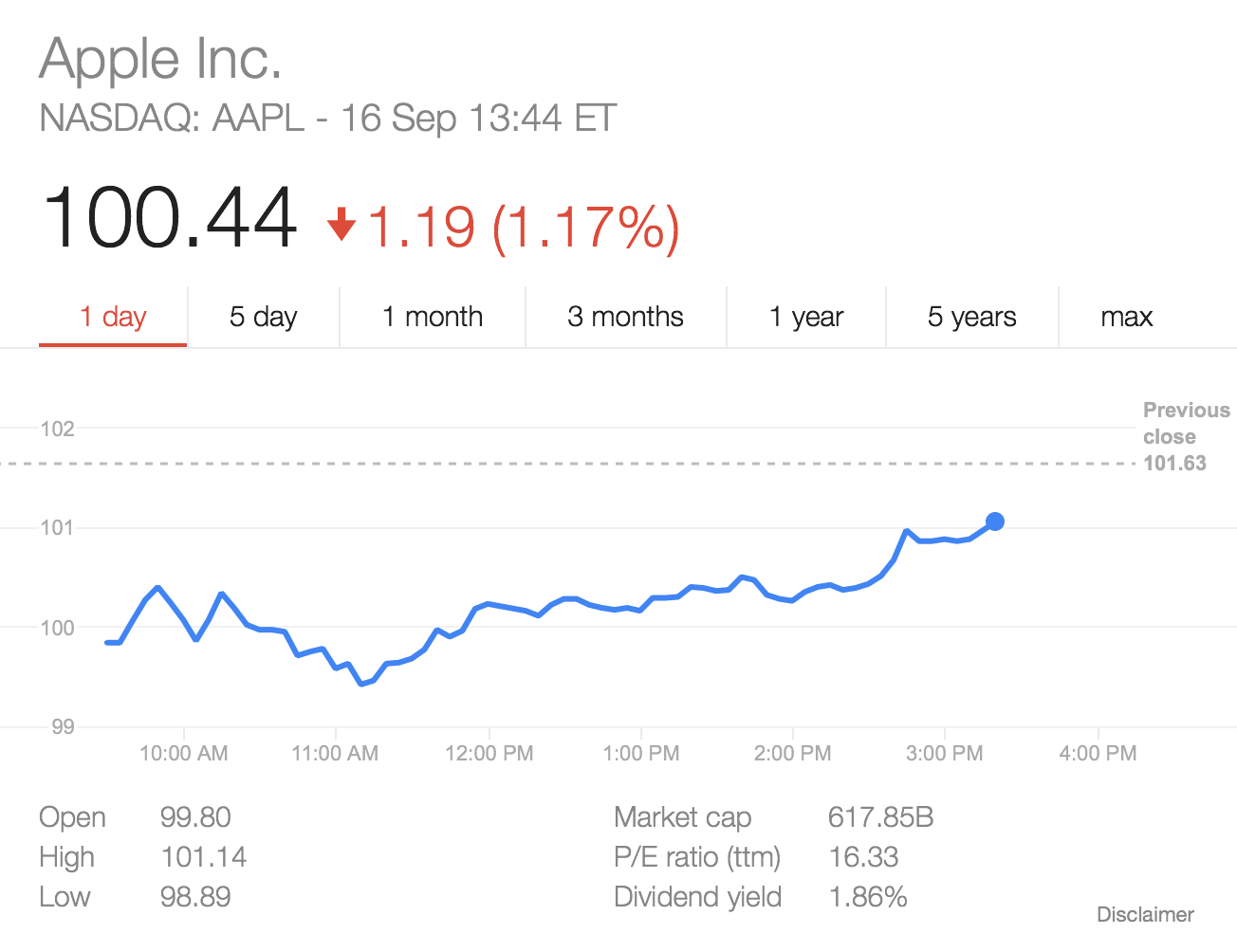
Apple’s shares have fallen today despite record breaking iPhone 6 sales. Why? China Mobile according to Bloomberg will not be offering the new iPhone until 2015. China Mobile is not happy with the huge subsidies from Apple and also Samsung.

iOS 8 arrives today for all existing iPads and iPhones with some exceptions for the older devices. So look forward to a new keyboard and the ability to install third party keyboards too, better sharing and widgets in the notification centre. And there is loads more of course 🙂