Category Archives: Tech News

Apple releases its Q1 results – full details

Via Apple.
” Apple Reports Record First Quarter Results

Highest-ever revenue & earnings drive 48% increase in EPS growth led by record revenue from iPhone, Mac & App Store

CUPERTINO, Calif.–(BUSINESS WIRE)–

Apple® today announced financial results for its fiscal 2015 first quarter ended December 27, 2014. The Company posted record quarterly revenue of $74.6 billion and record quarterly net profit of $18 billion, or $3.06 per diluted share. These results compare to revenue of $57.6 billion and net profit of $13.1 billion, or $2.07 per diluted share, in the year-ago quarter. Gross margin was 39.9 percent compared to 37.9 percent in the year-ago quarter. International sales accounted for 65 percent of the quarter’s revenue.

The results were fueled by all-time record revenue from iPhone® and Mac® sales as well as record performance of the App Store℠. iPhone unit sales of 74.5 million also set a new record.

“We’d like to thank our customers for an incredible quarter, which saw demand for Apple products soar to an all-time high,” said Tim Cook, Apple’s CEO. “Our revenue grew 30 percent over last year to $74.6 billion, and the execution by our teams to achieve these results was simply phenomenal.”

“Our exceptional results produced EPS growth of 48 percent over last year, and $33.7 billion in operating cash flow during the quarter, an all-time record,” said Luca Maestri, Apple’s CFO. “We spent over $8 billion on our capital return program, bringing total returns to investors to almost $103 billion, over $57 billion of which occurred in just the last 12 months.”

Apple is providing the following guidance for its fiscal 2015 second quarter:

• revenue between $52 billion and $55 billion

• gross margin between 38.5 percent and 39.5 percent

• operating expenses between $5.4 billion and $5.5 billion

• other income/(expense) of $350 million

• tax rate of 26.3 percent

Apple’s board of directors has declared a cash dividend of $.47 per share of the Company’s common stock. The dividend is payable on February 12, 2015, to shareholders of record as of the close of business on February 9, 2015.”

Mind blowing figures. No surprises. Just how does any company compete now.

Samsung Note 4 – How to capture moving people, dogs and kids

Tiggy tries the long jump, Windy Post, Dartmoor #samsungnote4

Following a discussion on Twitter at the weekend, I was asked how to I capture moving items like pets, kids, people and such like. There are endless pro photography options but I am going to focus on simplicity.

To illustrate what is possible, I took the above shot using the Samsung Note 4. This was snapped in difficult lighting using the burst mode, and then cropped in slightly to focus on the action. So what else did I do to capture this scene. Well below is my thought process.

Framing. Think about what the scene looks like through the viewfinder (screen). If you are going to want to shoot leaping dogs, try and get in to a position where you know your dog will run or fly passed. In other words set the phone up ready with the view minus the dog or child etc.. Now as you start to see you object move in to the target area, and about 1 sec before, press and hold the shutter button. 30 burst photos will be taken. While this happens do not move the phone. Breathe in, tucks arms in to chest as you take the photos. You can never have too many photos! Simple really, but lets step back. If you see you dog running try and let the Note 4 gain focus and then when scene is in target view, then press and hold on screen shutter button to activate burst mode.

What about indoors in low lighting. Normally the Note 4 tries to avoid using the flash, so use the night mode which needs a longer shutter time. This mode is no good for people and pets normally. However, you might be lucky in night mode. For this you must try and hold phone still to get the best shutter and ISO options using the OIS. IF necessary don’t be afraid of using flash. Sometimes there is no choice. IF you need extra light, use the torch mode on another phone to shine at subjects. Beneath a certain low light, the camera will not perform miracles. Other options at night is trying to shoot with HDR mode. Personally I don’t recommend that. You might find having to use an ISO of 800.

In better lighting, another mode worth trying is either Sport or Shot and More. Both these work really well too. As does 4K video recording, then during playback taking a screen grab which will be a 8mp image. Shot and More only works where the action is going to appear left to right or right to left in a predicable line. Once snapped, you can create some fancy modes. Below is one such effect. Because the horse was always going to jump over the fence, the line and my positioning was straight forward to manage using Shot and More.

The Jump in stages #rcs14 #horsephotography

Of course, you can always tweak the manual settings on the camera app, but usually by then the moment has been lost. Generally, it is understanding the lighting tolerances of the phone. Bright light, dusk, sunrise, sunset, indoor lighting, snow all impact the shots. It is worth practising without people first in your actual setups to see what works best for you so you don’t spend time trying to guess what mode to use and the miss the moment.

So what tips have you got?

HTC Desire Eye – review – part 2 – sound and more

Welcome back to my review of the HTC Desire Eye. Click here to read part 1 – https://gavinsgadgets.com/2015/01/26/htc-desire-eye-review/

In part 2, I am going to look at a few other aspects of the Desire Eye and then focus on the sound and music. Part 3 which will be live tomorrow will focus exclusively on the cameras and software that is included for them. On Thursday, I will pen my final thoughts on the HTC Desire Eye.

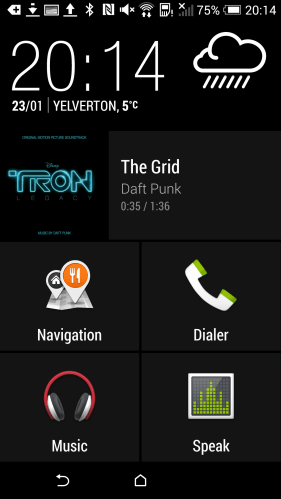
So lets jump back into the review again and look at a few other neat aspects. Car Mode. Simple concept but in this mode you get thumping big icons to press which makes it easier and safer to use, and you can customise the apps you want to see too.

Screenshot_2015-01-23-20-14-41

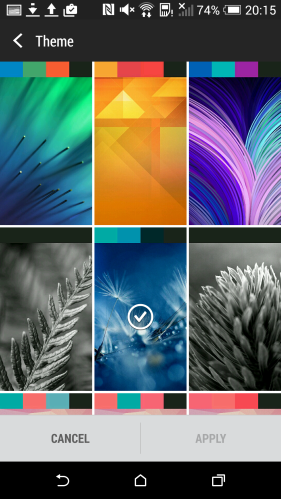
The other aspect of Sense UI is the theme options where you can personalise the look. HTC include a number of themes that tweak the look across the apps and home screen. Again, a simple touch but ideal.

Screenshot_2015-01-23-20-15-42

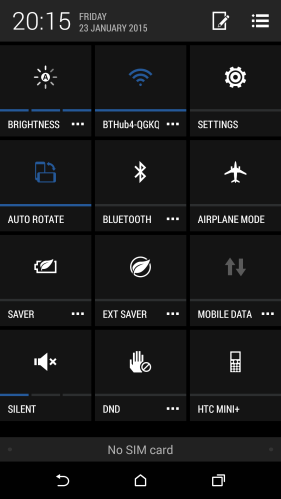
HTC include 2 power saving modes. The standard power saving mode reduces the CPU, display brightness, turns off vibrations and puts data connection to sleep when the display is off. All these options are toggles. There is also a generic sleep mode option to turn off data during long periods of inactivity. And finally there is the Extreme Power saving mode which can turn on automatically when the battery reaches 5,10 or 20%. In this mode many android functions are turned off including the ability to wipe or remote lock the phone.

So what can really add to the experience of a device. SPEAKERS. SOUND. The listening experience. And lets get straight to the point. Decent front facing stereo experiences makes everything from playing YouTube videos to listening to music and podcasts and absolute joy. And thats what the Desire Eye has behind tiny nearly hidden grills at each end on the front – stereo boomsound speakers. These front speakers are not as bassy as the HTC One M8, but nonetheless are still commendable and better than many other phones.

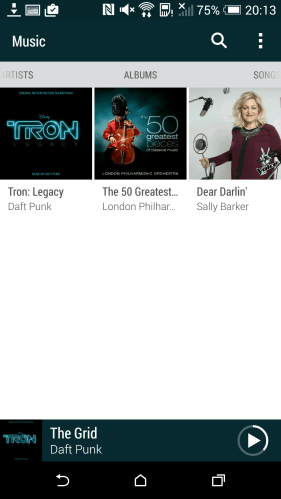
HTC include their own music app which can automatically update the album art, artist photos and lyrics. I copied across initially a few tracks and within a minute all the photos etc were fetched.

Screenshot_2015-01-23-20-13-58

So as I started talking about the sound, lets continue. If you plug your headphones in your get a good sound with the emphasis on bass. The headphone amp is able to power the headphones to a loud level, higher than many phones. Boomsound EQ is a setting that can be turned on or off. When switched on ,which is the default setting, the music is slightly bass heavy and not necessarily the finest word when it comes to pure audio analysis. With boomsound off, the music is rather flat. I imagine most people will leave it on, and for modern music boomsound is just fine. But what I discovered is by connecting my Plantronics BackBeat Pro bluetooth headset/headphones, the sound is booming amazing. Again no shortage of bass, but much better than the wired connection. That is because the Desire Eye has APT-X codec for bluetooth music. This is a phone for the trendy modern person, so I imagine most people will enjoy the extra bass. Some won’t. However, you can install a different music app to regain some control over that bass and that is what I did.

I installed USB Audio Player Pro. I then connected my USB DAC (Sabre Android DAC) and Cayin C5 headphone amplifier. I can confirm that the HTC Desire Eye in this setup supported USB Audio. The sound was naturally miles better and totally accurate from an audiophile point of view. The phone did put a warning triangle in the notification bar advising during this mode, the phone could not be charged. Minor inconvenience I would say for the improvement in sound.

Tomorrow its all about the camera, the editing software and video highlights. Plenty to talk about on this subject!

Are we a nation of online TV junkies?

“The DailyMail quoted – Record numbers watched television through iPlayer last year – driven by a surge in viewers using tablets and smartphones, figures show.

The BBC’s online service was used 2.6 billion times to watch shows in 2014, up from 2.1 billion the previous year.

The figures are sure to reignite the debate over whether the TV licence fee remains ‘fit for purpose’.”

So how much real time TV do you actually watch? For me it is really a small amount, maybe 2 hours a week maximum. Any other TV is via catchup services or using streaming services like Netflix. It would not surprise me that the day will come when all TV will be delivered via the internet.

So what about you? Is your viewing habits similar ?

Tweetbot for Mac removed from the App Store

Another sad day in twitter land for Third Party twitter apps.

9to5mac.com and other Apple websites are reporting that Tweetbot for Mac has been removed from the App Store. The issue seems to relate around tweetbot reaching its token limit.

Eventually the only Twitter app that will work will be the official one. Twitter wants control of its own platform.

I reckon by the end of 2015, Twitter’s official app will be the only option.

HTC Desire Eye – review – part 1

image

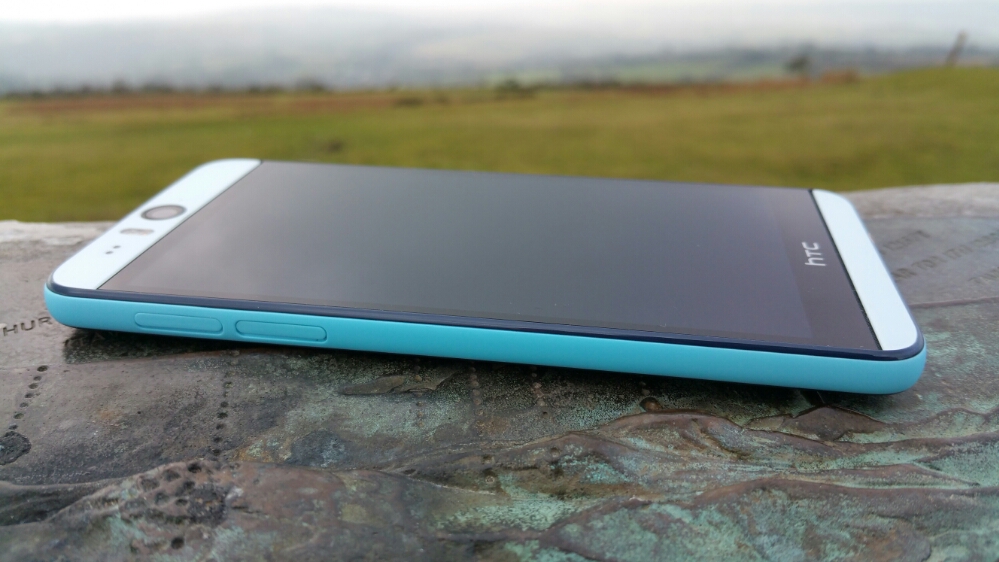
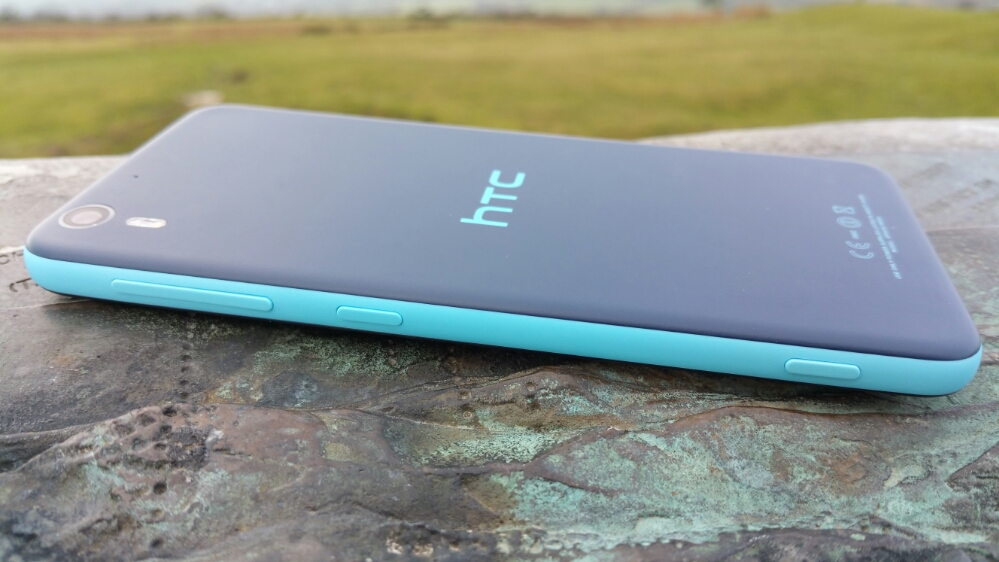
The HTC Desire Eye is typical HTC. Good hardware and software design with a proper purpose. Just look at these photos. I love its look and feel in the hand.

image

It is extremely comfortable to hold. Partly due to the gentle curves and partly because it is not too wide to hold comfortably in your hand.

image

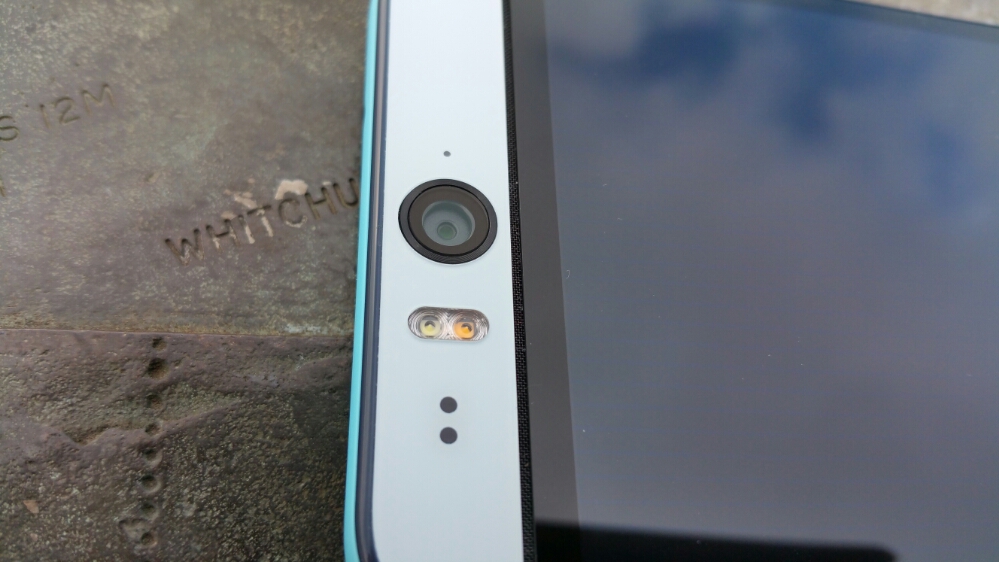
What is pretty neat about the Desire Eye is its front 13mp camera, fantastic for selfies and even more so with its two tone flash unit. But look even more closely and under the front lens and before the glass starts there is a grill hiding the left side speaker. And again at the bottom just after the glass panel ends before the bezel, there is another grill for the right side speaker. So you’ve guessed. The HTC Desire Eye has stereo front facing boomsound speakers! The rear camera is also a 13mp affair again with two tone flash. Before we continue lets take a look at the rest of the specs.

The specifications of the HTC Desire Eye –

– Rear Camera -13MP, BSI sensor, f/2.0, 28mm lens, wide angle, with HDR capability 1080p Full HD video recording, Dual LED Flash
– Front camera: 13MP, Auto-focus with zoom capability, BSI sensor, f/2.2, 22mm lens, wide angle, with HDR capability 1080p Full HD video recording, Dual LED Flash
– Dedicated Camera Button
– HTC Eye™ Experience: Face Tracking, Screen Share, Split Capture, Face Fusion, Live Makeup, Auto Selfie, Voice Selfie, Photo Booth, Crop Me In
– Android 4.4.4 (KitKat)
– 5.2″ 1080 x 1920 multi-touch (~424 ppi)
– 2.3GHz Snapdragon 801
– 4G LTE (Bands 3, 7, 8, 20)
– 16GB storage / micro SD up to 128GB
– WiFi / NFC / Miracast / BT 4.0 Apt-x / DLNA / HTC Connect
– 3.5 mm stereo audio jack
– HTC BoomSound™ Dual frontal stereo speakers with built-in amplifiers, 3 microphones,Sense Voice
– Capacity: 2400 mAh with Fast Charge , Embedded rechargeable Li-polymer battery
– Talk time Up to 20 hours for 3G Standby time: Up to 538 hours for 3G
– Sensors Accelerometer, Proximity sensor,Ambient light sensor ,Gyro sensor
– GPS / GLONASS
– 151.7 x 73.8 x 8.5 mm
– 154 grams

I mentioned that the HTC Desire Eye is typical HTC. That means the software “Sense” is beautifully implemented. Below are the main home screen and Blinkfeed. Blinkfeed is great for aggregating news and your social networks and local information on your phone.

Screenshot_2015-01-23-20-08-01

Screenshot_2015-01-23-20-08-18

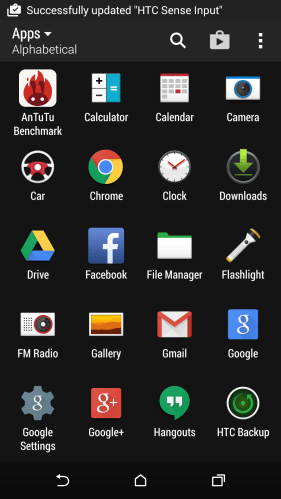
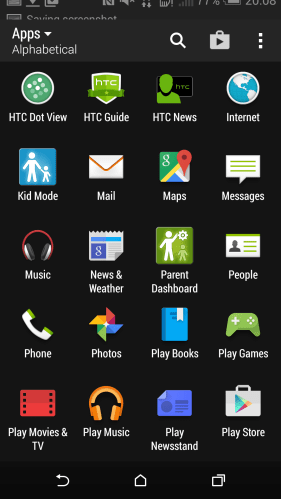
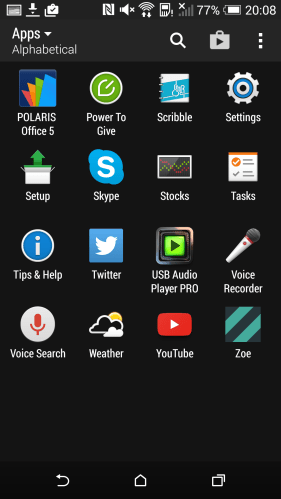
Next up are screen shots showing all the apps that are installed. I have added AnTuTu benchmarking and USB Audio Player Pro to assist with this review.

Screenshot_2015-01-23-20-08-46

Typical HTC in that the selection of added apps is kept to a minimum. In fact, HTC collate apps into folders as the default view in the app drawer. I just changed the view so you could see all the apps present.

Screenshot_2015-01-23-20-08-51

Some apps to mention that are good to be included. Polaris Office 5. This is good office viewer and creation app for word, excel and powerpoint docs. Twitter, Skype and FaceBook are included for all you social types 🙂 HTC extend the options of the backup with their own solution. There is a file manager, torch, FM Radio (many phones exclude this), Flashlight (torch), Kids Mode, Tips & Tricks and Setup app.

Screenshot_2015-01-23-20-08-57

It is worth mentioning the HTC provide solid setup solution for transferring data from previous phones including iPhones. Then the Tips and Tricks section is well worth a view to learn more about using the phone.

HTC have included a few more tricks with the Desire Eye – motions and gestures. If you swipe down on the screen this turns on voice dialling. Double tapping – pick the phone in portrait orientation turns on the phone, pick up the phone in portrait orientation again and swipe left wakes phone up and launches the widget panel and same thing but swiping right wakes phone up and launches Blinkfeed. All the options can be toggled on or off.

Talking of toggles, below is a screen shot of the pull down toggle menu.

Screenshot_2015-01-23-20-15-26

The last part of the hardware that I wanted to mention is the hardware camera shutter button. Not many android phones include this but it is found on the HTC Desire Eye. It is fairly firm to use so in practise I preferred using the on screen shutter icon.

Part 2 tomorrow.