Category Archives: Tech News

How to grab 8mp Photos from 4K Video on the Samsung Galaxy S6/S6 Edge

Unlike the Samsung Note 4 which had a menu for turning on screen capture whilst playing back videos to easily grab an image from your video, all these options are missing on the Samsung Galaxy S6 or S6 Edge.

But it still can be done. The reason for selecting photos from a 4K video is that each photo grabbed is a 8mp shot. This is often a good way to capture moving targets (kids, pets) and select the exact frame you want as a photo.

So start playing your 4K video. Select top right “more” and change playback speed to its lowest setting. Now play the 4K video until you get to the part you want to capture as a photo(s). Press pause. Tap screen to remove on screen controls. With your palm swipe across the screen to take a screen shot. This will save a 8mp shot of the frame as a PNG file.

If you have found a better way then please let everyone know below in the comments.

Owners of Nexus 6 and Samsung Galaxy S6/S6 Edge lose “OK Google” Voice Detection

I had been using “Ok Google” on my Samsung Galaxy S6 when I noticed it had stopped working. It only worked in the Google app itself. So I did a search on the internet and indeed it appears Google have removed the functionality at their end.

There are lengthy threads on XDA and Google Product Forums, links below. Have you been affected and perhaps you have found a solution?

Additional sources – Google – https://productforums.google.com/forum/m/#!msg/websearch/xGiV6D4PMS8/Askz3-LqvVgJ

XDA Developers – http://forum.xda-developers.com/galaxy-s6/help/ok-google-detection-t3085435

LG G4 – Pro Modes explained by Colby Brown – Official LG Video

Colby Brown is clearly in the paid services of LG. He has previously worked for HTC, Apple and others. However, this is a great video that clearly explains the benefits of the new LG G4 which has an official release date of 31st May 2015.

This is one phone I would love to pit head to head against the Samsung Galaxy S6. Would you like to see this battle as well?

Should you upgrade your Note 4 or iPhone 6 Plus for the Samsung Galaxy S6?

I have been asked my several people the above question? Should I upgrade my Note 4 or iPhone 6 Plus for a Samsung Galaxy S6/S6 Edge?

I have a Note 4, and I am changing it for a S6 Edge. I currently have the standard S6 but am moving to the gold S6 Edge. Why I am changing?

1. Design of the gold S6 Edge – personally I think it looks gorgeous
2. Speed of operation – its fast at everything
3. No more memory card/batteries to worry about
4. Audio quality – headphone output is both better than the Note 4 and louder
5. Camera – it just is superb
6. Size – easier to manage one handed

Now some balance. If you can manage with the Note 4 size, it still is a fabulous phone. Lovely large screen, stylus and still a good camera, just not as fast as the S6 or as good in low light. It is also cheaper and therefore represents better value for money.

What about if you own the iPhone 6 Plus. Firstly, it world’s apart as a device. If you use FaceTime or iMessage with family and friends, then maybe a change is not a good idea. Also, the 8mp camera on the iPhone is a good shooter and the 6 Plus is half way through it product cycle, so hopefully in 6 months time, it will receive the next world’s best camera on a smartphone. The 6 Plus has better battery life than the S6. So I would be cautious of any change.

If logic plays no part then its happy days 🙂

The

Android Wear responds to the Apple Watch – details

Apple is dispatching its new Apple Watch to some lucky folks this Friday along with some neat features. Google is not going to let Apple take all the thunder, although it is rumoured Apple sold over 3m watches in the first weekend alone.

In response, Android Wear is receiving a large update which includes –

– Wrist Flicking Gestures – Flick your wrist away from you to view the next card or notification; flick towards you to go back.

– Emoji Drawing – Want to reply quickly to a notification? If an emoji or two will suffice, you can now just draw it.

– A New Interface Flow – Up until now, launching third party apps built for Android Wear has been kind of a pain — you either had to do it by voice, or by swiping and tapping through a bunch of menus. Now they’re the focus. Swiping to the left from the idle/watch screen will bring up a list of your apps. Swiping left again will show you contacts. Swiping left a third time shows a list of actions like “Take a note” or “Set a timer”, primarily meant to remind you of things you can do with your voice through the “Ok, Google” command.

– Always On Apps – Apps can now elect to keep the screen alive as long as it’s open,

– Wi-Fi Support – Android Wear watches actually have Wi-Fi built-in but the chip has just been inactive. With the update, your phone can actually be miles away — as long as your phone has data and your watch is connected to Wi-Fi, and your notifications and replies will pass between them. This feature is already present in the Samsung Gear S running Tizen OS.

If Google can get an Android Wear watch to work with iOS then this could be a decent option for a cross platform smartwatch.

Source – http://www.techcrunch.com

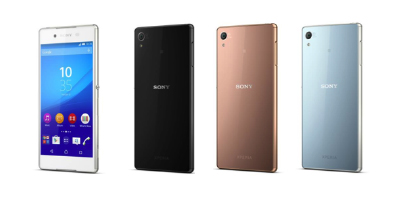
This is the Sony Xperia Z4 – Photos and ALL specifications revealed

z4

Sony has just announced the Xperia Z4 in Japan, and its near identical to the outgoing Z3. It does have a few improvements though.

The Xperia Z4 is 6.9-mm-thick (0.4mm thinner than the Z3) , weighs 144g (8g lighter than the Z3) clad in a metal and glass body, includes a 5.2-inch 1080p LCD screen, a 20.7-megapixel camera, a 2930mAh battery (17 hours talk time over 3g is claimed), a 2GHz 8-core 64-bit Snapdragon 810 processor, and 3GB of RAM, running Android 5.0 Lollipop and is water- and dust-resistant, IPX5/IP68 and IP6X with no flaps over the USB port too.

The front camera is 5.1mp with a 25mm wide angle affair. The photo editing allows for plentiful face and skin touch ups, and adding AR effects too. The rear camera is the same 20.3m G Sensor but with ISO settings up to 12,800. Shame there is still no optical image stabilisation but Sony did add a cooking mode! The Z4 offers LDAC high quality wireless playback.

The full specs are –

– Dimensions – 146mm Ă— about 72㎜ Ă— about 6.9㎜
– Weight – 144 g
– Battery capacity 2930mAh
– Display 5.2 inch Liquid crystal Birds Luminous display for mobile, 1920 x 1080
– OS Android ™ 5.0
– Built-in memory (ROM / RAM) 32GB / 3GB
– SD memory card slotmicroSD, microSDHC, microSDXC (maximum 128GB)
– Processor 2.0GHz / 1.5GHz
– External connection Bluetooth® Bluetooth® 4.1
– External device microUSB / MHL / headset connection terminal, DLNA
– Sony Mobile original software – Music applications, such as album application
– Main camera About 20.7 million pixel  back-illuminated stacked CMOS sensor Exmor RS for mobile
– Front camera About 5.1 million pixel  back-illuminated CMOS sensor Exmor R for mobile
– Camera shake correction – electronic (video / still image), Auto focus (video / still image),Self-timer,
– Main camera – 4K (2160p), full HD 60fps (1080p) / full HD 30 fps (1080p) / HD (720p) / VGA (480p) / MMS
– Front camera – full HD (1080p) / HD (720p) / VGA (480p) / MMS
– Photos – 20.7MP (4: 3) / 15.5MP (16: 9) / 8MP (4: 3) / 8MP (16: 9) / 3MP (4: 3) / 2MP (16: 9)
– Front camera – 5MP (4: 3) / 3.7MP (16: 9) / 2MP (4: 3) / 2M (16: 9)
– Flash main camera only Smile Shutter Waterproof / dustproof (IPX5 / 8, IP6X)
– NFC –
– Wi-Fi IEEE802.11a / b / g / n (2.4GHz / 5GHz) / ac compliant, MIMO support

Source – http://www.sonymobile.co.jp/company/press/entry/2015/0420_1_xperia_z4.html

So does the Sony Xperia Z4 interest you?

“Phones Show Chat” , “One More Thing” & “Gav & Dave’s Tech” Podcasts updates

As you all know, I co-host “Gav & Dave’s Tech Podcast”. From next month, and monthly thereafter, I will be a regular co-host on the “Phones Show Chat” podcast.

“Phones Show Chat” Episode 248 was recorded yesterday with host Steve Litchfield and myself, in which we discussed the Samsung Galaxy S6, HTC One M9 and 7 other phones. For more information on the Phones Show Chat podcast, click here – http://stevelitchfield.com/sshow/chat.html

My Co-Host Dave on “Gav & Dave’s Tech Podcast” has just started a new Apple only podcast with Jason Green, called “One More Thing”. Episode 1 went live yesterday, so go give it a listen. Click here – http://www.onemorething.audio/

Don’t forget that the next episode of “Gav & Dave’s Tech Podcast” will be out within the next 2 weeks. So that’s 3 podcasts to subscribe too!

Samsung Galaxy S6 – Camera thoughts and 35 more photos

I have now had the S6 about a week and the camera continues to impress me. It is fast. burst mode is equally as fast and it performs in all lighting just by pressing the button. I just can’t praise it enough. In my full review coming soon, I will cover off all the camera options. If there was one disappointment, that is over the fact there is no long shutter mode or any manual shutter control. This would improve low light shots and also allow for special light flow effects. Better low light shots can be obtained in Pro Mode, forcing the ISO to 800.

Anyway, below are some more photos from the S6. All unedited. Some have had a white frame added but that is it. The dogs photo bombed both photos. There were not part of the frame, but appeared suddenly when I hit the shutter. I expected these to be out of focus but they were just fine. The dogs were also moving really fast at the time too. To see the full Flickr S6 album click here (currently 35 shots)- https://www.flickr.com/photos/gavinfabl100/sets/72157651896189926/

Wild Dartmoor Trees

Enroute to Foggintor Quarry, George poses for the camera

Spectacular view inside Foggintor Quarry, Dartmoor #panoramic

Saltram House #Samsung #GalaxyS6

Fury is a happy dog with a big grin, near Foggintor Quarry, Dartmoor

Shopping on Amazon? Then use this special link and support Gavin’s Gadgets – It costs you nothing either! Please RT

Can you help Gavin’s Gadgets? Actually you can. If you decide to buy anything on Amazon, please use the affiliate link below. By using this link, you will help support Gavin’s Gadgets with all the running costs and more, and yet it won’t cost you anything. That’s right the price you pay at Amazon is the same whether you use the link below or not.

GavGadgets@Amazon