Category Archives: Apple

Nike+Move app for iOS goes live

20131105-052212.jpg

20131105-052222.jpg

20131105-052230.jpg

Nike have launched their special movement tracking app for free for the iPhone 5S only which uses the M7 motion coprocessor. And it looks like a really polished app too.

Details from Nike’s press release.

Nike+ Move is the simplest way to capture your every move, and motivate you to move more!

“Exclusively for use with iPhone 5S, Nike+ Move uses the M7 coprocessor to convert your movement into NikeFuel, the first-ever single, universal unit for measuring all kinds of activities. No matter your age, weight or gender, the same activity earns you the same amount of NikeFuel.

Nike+ Move offers insight into when you move, how you move and where you move – and lets you challenge your friends to see who moves more.

-Win the day by beating your NikeFuel average and watch your goal ring change from Red to Green.
-See when you are most active throughout the day and how you’re doing compared to yesterday.
-Move more often and win as many hours as you can throughout the day.
-See how you moved through the day with a breakdown of running, walking, and other movement.
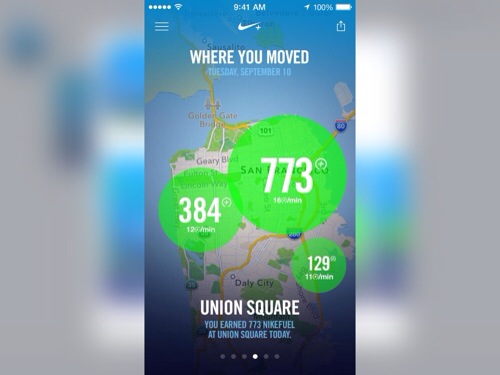
-See where you’re moving and where you move the most each day.
-Check out how you compare against your Game Center friends or other Nike+ Move users near you.”

Paid Video Chats from Google becomes a reality

Helpouts, Google’s combination of Google+ Hangouts, Google Wallet, and its identity tools is now live. A ‘Helpout’ is a Hangout-like video chat, but instead of speaking with a friend, you are connected to a purported expert in whatever it is that you need help with. The tagline that Google has come up with for Helpouts is “real help from real people in real time.”

So would you pay for one of these video chats?

Apple Plymouth – which product was selling the most

It was Sunday afternoon, and I happened to be in the Apple store in Plymouth.

On display were all the new iPhone 5S and 5C, the new iPad Air and all the other shiny Apple hardware and accessories. But to my surprise the iPhone 5S had hardly anybody browsing around them. In fact even the iPads weren’t gathering much attention. But the iPhone 5C tables were packed and this seemed the one item that was selling quicker than any of the others at that time of day.

The 5C was always meant to have a slow burn start, eventually surpassing the 5S in sales numbers. I’m unsure about the actual sales volumes in the long run, but it does show many people just like the different colours and aren’t too worried about the overall specs.

Further Thoughts on the Sony QX10 and QX100 Hub Lens Cameras

I have had the QX10 and QX100 now for several weeks and my views on them have slightly changed. They are both excellent however I now carry the QX10 with me more than the QX100.

I carry the QX10 permanently with me as it is considerably lighter and smaller to pocket. It also has 10x optical zoom so for most situations it is a better option to carry.

If I know I will be travelling to somewhere specifically where I intend to take photos or where there might be an opportunity for good shots then I will take the QX100. The QX100 takes incredible quality photos.

But if I had to choose just one, it would be the QX10. If I wanted QX100 quality I would use a DSLR camera instead.

However, my wife and I have been out several times with our iPhone 5S’s using the QX10 and QX100 and had a great time using them. More fun actually than most cameras.

How to crash your iPhone 5S and iPad Air

Both the iPad Air and iPhone 5S and Apple’s latest devices and both are so easy to crash. In fact, I have never seen Apple hardware suffer this much. Even iTunes on the mac running mavericks keeps quitting unexpectedly.

So how do you get the iPad Air and iPhone 5S to crash and cause a reboot all by itself. Start using either device. Open and close all the apps or games that you would normally use. Now double tap the home button to launch into the multitasking mode and jump to another app. Now do the same thing again. After repeating this a few times you will get your iPad Air or iPhone 5S to soft reset all by itself.

I haven’t lost any data when this happens and it only takes about 5-10 seconds to reboot back to life. It has happened once on my iPad Air yesterday and happens at least once a day on my iPhone 5S. I would hope a software update for iOS 7 will fix this annoying bug.

So have you been affected by this too?

iPad 2 64gb wifi/3G white for sale

I have an old iPad 2 64gb wifi and 3G model for sale for £260 plus postage. It is in very good condition. It has once small dent in the side but apart from that there are no other visible scratches.

My wife used this iPad 2 at home, and had a gelaskin on it , hence why there are no marks. It is sim free and unlocked. In fact, it has never has a SIM card in it. It runs the latest iOS 7 as well.

Included is the box, charger, USB 30 pin lead, a pink, but now dirty looking Smart Cover and a fairly new Logitech wireless keyboard cover. This keyboard acts as a screen cover and uses magnets like the official Smart Cover to attach to the iPad 2. For photos please go to ad on the PSC Forum http://www.pscforum.co.uk/forum/viewtopic.php?t=2342

If you are interested please get in touch using the donate menu contact option or via twitter at @gavinfabiani

iPad Air First Impressions

Yesterday morning was a quick rush down to Apple Plymouth, only to find that at the crazy early hour there were only 9 people in the queue. By 7.45am there was nearer to 35. But that was the same amount of Apple staff too. I had to go early as I was working. Anyway, I was in and out in 10-15mins. I bought the space grey iPad Air wifi only in 128gb. I got both the Smart Cover and smart case in black as I wasn’t sure which one I wanted. I will probably stick with the cover but it is too early to decide.

Unlike my last iPad which was the Mini I decided it was time to break the cord and not sync it to my MacBook. So now I am only using my MacBook to rip CDs and store photos and music. It’s getting close to me ditching the MacBook completely. After the Mini I got the new Nexus 7 which I ended up returning as it was faulty even after a few software updates.

But. I am pleased I did return it. The iPad Air is massively better than any tablet IMO. It’s better than the Mini. It’s better than my MacBook. Why? Well the onscreen keyboard on the Air is so damn fast to type on it is scary fast. I’ve typed this article using the Air and I am flying with keyboard entry faster than I would be on my MacBook mainly because the iPad auto correction is so fantastic.

So, first up the Air screen is fabulous. And the extra size for viewing and typing is perfect. Also the iPad had loads of beautifully designed apps for it, and that makes the user experience so much more enjoyable.

The reduction in bezels is noticeable, the depth not so much, but the weight is much better. It’s not as light as the Mini but it is lighter than the previous iPad by a fair amount and that makes this new Air more pleasurable to use for long periods.

I synced my entire music collection, 10 videos, my entire photo collection, and hundreds of apps. I have now have 9.4gb freememory left free. 128gb is extreme but I now feel I have a device with no compromises.

In fact I would describe the iPad Air as a tablet with no compromises. Stunning build quality. Stunning audio thru headphones. Good camera. And great software. I’m very happy with it.

Screen shot of my home screen below.

20131101-201738.jpg

iPhone 5S vs Nokia Lumia 1020 – Camera Shootout and the winner is not the 1020

This is not going to be popular but the new iPhone 5S was pitted against the venerable Nokia Lumia 1020 with its 41mp camera versus the 8mp iPhone 5S camera. The test was done by Laptopmag. To see all the photos and verdicts click here http://blog.laptopmag.com/iphone-5s-vs-lumia-1020-camera .

Now most would already give this contest to the Lumia 1020 but I am afraid it lost the shootout. Laptopmag used both phones in auto mode and HDR off. Wait, it had to do this as the 1020 doesn’t have HDR mode. It also used the Sony NEX-F3 mirror less camera as the control.The 5S even won the night time shot.

I must admit I was somewhat surprised by the results myself. And I also felt laptopmag were fairly balanced in their scoring as they did not mention that the Lumia 1020 needs 4 seconds between each shot using the ProCam app.

Now I will add that if you were to start using all the manual mode options with the Lumia 1020, better photos will be possible than the iPhone 5S in my opinion.