Category Archives: Apple

The successful iPhone 5C – no matter what you think it’s a money cow for Apple

And here’s why?

– the 5C is last year’s model sold in colourful polycarbonate.  It gives buyers something different to buy but also differentiates it between the 5S.

– despite sales not being as high as anticipated it still is selling more than the 4S in the same period of its life cycle.

– it costs less to make than the 5 in metal so lines Apple’s bottom line even more.

– but what the 5C has done is create fever pitch sales of the 5S creating even more cash for Apple.

Result.

Brando Shopping

Over the next week or so I will be reviewing some mobile accessories from Brando Shopping .

Brando Shopping supplies a whole range of accessories for your phone and tablets. I have bought my accessories from this online store for nearly 8 years now.

In the index page, I have now created a page called Shopping, to provide links to places where I buy my gadgets from. This will be expanded over the coming months.

Have fun.

Nintendo cuts profit forecasts drastically and changes business model – Mario on your phone ?

This is the press release from Reuters confirming the dreadful financial performance of Nintendo.

“TOKYO (Reuters) – Nintendo Co said it expects an operating loss of 35 billion yen ($336 million) for the year to end-March, reversing its previous forecast of a 100 billion yen profit, citing much weaker-than-expected sales of its Wii U and 3DS game machines.

Nintendo on Friday also warned of a net loss of 25 billion yen for the year ending on March 31, a substantial reversal from its prior projection of a 55 billion yen profit.

Nintendo President Satoshi Iwata will hold a news conference at 4:30 p.m. (0730 GMT) in Osaka regarding the estimated losses.

The company slashed its global Wii U sales forecast for 2013/14 to 2.8 million units from 9 million, and its 3DS sales forecast to 13.5 mln units from 18 mln units.”

And now finally Nintendo boss Saturo Iwata has admitted the company is considering “a new business structure,” which may involve branching out into the mobile arena. Hopefully it won’t be long before we see all the famous Nintendo game classics on the iPhone and Android phones.

What photography apps do you use on your iPhone ?

Mobile photography is a whole section on its own.  Below are a list of my favourite iOS apps but what do you use?

1. Snapspeed – photo editing made easy with a great drama and HDR Scape modes. Available on iOS and android and an app owned by Google.

2. Slow Shutter Cam – does exactly what it says. Gets the best possible night shot but you will need to use a tripod

3. Photogene – advanced photo editing and sharing

4. Photoshop Touch – similar to the above but layers possible

5. Tadaa SLR – bizarrely does after blurring or bokeks really well.

I have about 15 photo apps on my iPhone but what do you use?

Apple settles over in app purchases

Apple CEO Tim Cook informed Apple employees via email that the company has settled with the United States Federal Trade Commision over in-app-purchases. Here’s Cook’s email in full:

“Team,

I want to let you know that Apple has entered into a consent decree with the U.S. Federal Trade Commission. We have been negotiating with the FTC for several months over disclosures about the in-app purchase feature of the App Store, because younger customers have sometimes been able to make purchases without their parents’ consent. I know this announcement will come as a surprise to many of you since Apple has led the industry by making the App Store a safe place for customers of all ages.

From the very beginning, protecting children has been a top priority for the App Store team and everyone at Apple. The store is thoughtfully curated, and we hold app developers to Apple’s own high standards of security, privacy, usefulness and decency, among others. The parental controls in iOS are strong, intuitive and customizable, and we’ve continued to add ways for parents to protect their children. These controls go far beyond the features of other mobile device and OS makers, most of whom don’t even review the apps they sell to children.

When we introduced in-app purchases in 2009, we proactively offered parents a way to disable the function with a single switch. When in-app purchases were enabled and a password was entered to download an app, the App Store allowed purchases for 15 minutes without requiring a password. The 15-minute window had been there since the launch of the App Store in 2008 and was aimed at making the App Store easy to use, but some younger customers discovered that it also allowed them to make in-app purchases without a parent’s approval.

We heard from some customers with children that it was too easy to make in-app purchases, so we moved quickly to make improvements. We even created additional steps in the purchasing process, because these steps are so helpful to parents.

Last year, we set out to refund any in-app purchase which may have been made without a parent’s permission. We wanted to reach every customer who might have been affected, so we sent emails to 28 million App Store customers – anyone who had made an in-app purchase in a game designed for kids. When some emails bounced, we mailed the parents postcards. In all, we received 37,000 claims and we will be reimbursing each one as promised.

A federal judge agreed with our actions as a full settlement and we felt we had made things right for everyone. Then, the FTC got involved and we faced the prospect of a second lawsuit over the very same issue.

It doesn’t feel right for the FTC to sue over a case that had already been settled. To us, it smacked of double jeopardy. However, the consent decree the FTC proposed does not require us to do anything we weren’t already going to do, so we decided to accept it rather than take on a long and distracting legal fight.

The App Store is one of Apple’s most important innovations, and it’s wildly popular with our customers around the world because they know they can trust Apple. You and your coworkers have helped Apple earn that trust, which we value and respect above all else.

Apple is a company full of disruptive ideas and innovative people, who are also committed to upholding the highest moral, legal and ethical standards in everything we do. As I’ve said before, we believe technology can serve humankind’s deepest values and highest aspirations. As Apple continues to grow, there will inevitably be scrutiny and criticism along our journey. We don’t shy away from these kinds of questions, because we are confident in the integrity of our company and our coworkers.

Thank you for the hard work you do to delight our customers, and for showing them at every turn that Apple is worthy of their trust.

Tim”

Apple has one of the better protections for in app purchases but I just wish they got fined for ruining games that allow developer greed to take over and ruin many new games. I mean £50 to buy in game coins is out of order.
Another mobile threat – this time from Starbucks

Just how secure is your mobile data ?

The Starbucks mobile-payment app is reportedly saving user data, including email addresses, passwords and even your GPS location in plain text. Theoretically, anyone with access to your phone and a PC can download your private data.

Who needs hackers when sensitive information isn’t even encrypted in the first place!

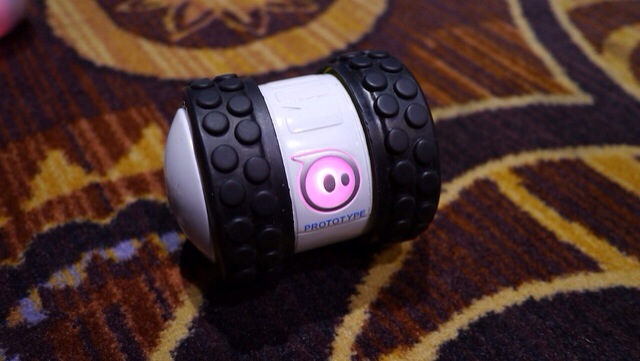
Sphero 2B robotic ball – details

20140110-081147.jpg

I recently reviewed the Sphere Ball. Refer to index in review tab above for details. Sphero 2 is currently the latest incarnation but at CES 2014, Sphero 2B is the new robot toy from Orbotix that can move as fast as 14 feet a second. That’s supposedly the equivalent of a 6 minute mile and twice as fast as the Sphero 2.0. The spinning tube has comically rugged tires that allows it to adorably jolt out at breakneck speeds and tackle any surface.

The Sphero 2B is controlled by your iOS or Android device, has a few accessories (like new wheels) and can be programmed so you can create your own robot army. It due on in September 2014.

I will be honest after a few weeks I lost interest in my Sphero Ball and so did my 3 dogs.

Camera shootout – Samsung Note 3 vs iPhone 5S

And the winner is neither.

I own both these phones and use them extensively to take photos.

Below is a brief overview of each and what you should expect.

Speed – From startup to capturing the moment goes to the iPhone 5S. And then the 5S burst mode of 10 photos per second at full resolution all the way up to 999 photos as a burst is out of this world. I’ve tried it and it works. It does take a while longer than normal to analyse 999 photos and give you the best but it’s still quick.  Meanwhile the Note 3 only takes 20 shots on burst but it’s very quick once it starts. From holding the shutter button down seems to have a delay of 1- 2 seconds before the burst mode starts.

Panoramic – this goes to the 5S as it auto adjusts exposure as you pan. But both are good at this mode. And both can take some fantastic shots. With the Note 3 be sure to hold phone vertically to get a real large photo.

Low light or indoors – this is a close draw. Both have strengths and weaknesses here. The Note 3 uses the flash more often whereas the 5S tries to avoid using the flash. On scenic non moving night shots the Note 3 using a tripod will outperform the 5S.

Good light – both take excellent photos. The 5S has an uncanny way of making sure the photos are very natural in their colour reproduction. But the Note 3 has higher mega pixel lens. And it shows. I actually prefer the Note 3 results slightly.

Macro – a close match. But the Note 3 wins. It’s one of its strengths.

Software – the 5S is limited and is really a “just press the shutter” whereas the Note 3 has comprehensive options. Depending on your needs depends on your winner.

Overall I prefer the Note 3 photos but I do miss that speed to first shot that the 5S achieves.

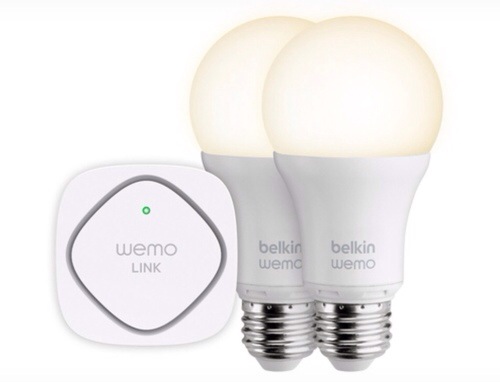
Belkin LED Lighting Starter Set – details

20140110-080652.jpg

At CES 2013, Belkin introduced its WeMo Light Switch, and this year it announced its new LED Lighting Starter Set. At $129, the set comes with two LED Smart Bulbs and the WeMo Link. The package lets you schedule and dim the lights from anywhere using the WeMo app, which uses a Wi-Fi signal to control appliances with your smartphone. The light bulbs are 60-watt equivalent with 800 Lumens and 3000 Kelvin, are fully dimmable, and can be set with a number of features like vacation mode, the latter of which automatically turns lights on and off when people are in the house. The WeMo also includes a “dim to sleep” function that gradually dims lights over time as you head to bed.

Looks very cool but sure is an expensive way to light your room.