Category Archives: Apple

Apple iPhone 6 Plus – more impressions part 4

So another day has passed and to be honest it has all been rather hassle free.

I have created an album now on my Flickr account for my favourite iPhone 6 Plus photos. Click here to view https://www.flickr.com/photos/gavinfabl100/sets/72157647679181549/

I have been using Apple Maps again and it has on the whole been stellar. The spoken turn by turn directions are so clear that you really don’t need to see the screen. However, it suddenly stopped speaking the directions, instead opting to make a weird doorbell like sound. Sounds like a bug.

Below are two photos I’ve had taken with many phones. I just can’t get over the clarity, true to life colours and detail achieved by the iPhone 6 Plus.

IMG_2811.JPG

IMG_2810.JPG

Daylight was disappearing at the time so rather good to be honest. I also took some random burst mode shots of cars travelling at speed. The results were excellent but boring to show. When I get some more exciting photos using burst mode I will upload these.

Overall the 6 Plus is my favourite smartphone of all time. I am very happy with the larger display and size and in no way would I want a smaller 4.7 inch iPhone 6. The extra benefits in battery and camera and screen are well worth it !

Tweetbot on iOS gets big update

One of the best Twitter apps received a huge with full support for the iPhone 6 and 6 Plus.

Today’s version 3.5 update also includes iOS 8-specific features like interactive notifications. Share Sheet integration now means you can send links to the app from anywhere in iOS 8.

Here’s the full change log:

– Optimized for iOS 8
– Optimized for the iPhone 6/6+
– Added Interactive Notifications
– 1Password Support
– Share Sheets Support
– Bug Fixes

Apple iPhone 6 Plus – more impressions part 3

Just a quick update on yesterday’s impressions and observations.

1) FaceTime video calls whilst moving in a car are not possible as the video image is blurred deliberately. This is a clever safety move.

2) Camera – I just took a few random snaps yesterday. Without a doubt the iPhone 6 Plus is such a competent shooter. I do need to test the burst mode out properly though.

3) I’ve sorted the iCloud photo syncing. Problem relates to the Mac not having iCloud Drive yet.

4) Overall the iPhone 6 Plus is proving to be reliable and fun to use.

5) Yesterday evening I charged the iPhone to 100% before I went to bed. I unplugged it and this morning the battery is still at 100%.

Pebble Smartwatches just got an significant update and price drop

Pebble has lowered its Smartwatches with the original down to $99 and the steel to $199.

In addition, following a software update, Pebble is capable of tracking activity and monitoring sleep in the background. Jawbone, Misfit, and Swim.com have all released apps that can tap into this functionality.

This is good news for Pebble fans and in my opinion a worthy update too.

Apple iPhone 6 Plus – More Experiences – Part 2

Ok, another day and another round of experiences. In no particular order.

1) Siri – what an improvement since my 5S days at the start of 2014. After 9 months without using Siri, you realise just how useful an assistant Siri becomes. In my car, I now have total handsfree and able to ask and get delivered requests that Google might struggle with. Yes Google is great for search related results. Google is also great with Google Now, although you do sacrifice all your privacy when using this service. I have asked Siri if I have any notifications. Siri responds reading a list of the notifications followed by the actual message within the notification, regardless to what type. So for example I had a severe weather warning of fog from the Met Office. Siri is like a personal assistant, and a decent one too.

2) I have set a countdown timer using Siri of course. Pressing the home button to turn on the screen reveals the time left of the timer under the clock. A simple idea but useful. If the iPhone is plugged in, just say, “Hey Siri, how much time is left on the countdown timer” and you get the answer.

3) Low light shots – I was impressed with the low light shots from the 6 Plus. These photos were not staged, setup with a tripod. These were simply a quick snap and drive off. I would have loved to spent a bit of time, using Camera+ and its manual controls to see what could be achieved.

4) Apple Maps was a total disaster. But last night it navigated me home, something it was unable to do 9 months ago. In fact, the experience is a lot better, with easier to follow turn by turn navigation than Google Maps. However, Google Maps is still far superior.

5) Standby battery – overnight dropped 1% in 6 hours. Not too bad considering I have 130 plus apps installed, all undertaking background services including many with location checking.

6) I pumped music from the 6 Plus into my cars aux port. I know I have mentioned it before, but its fantastic.

7) Photos – automatic syncing across all devices- not sure this works as advertised yet. Maybe iCloud Drive is confusing matters. I don’t like that the synced photo that appears magically on another device cannot be seen or edited by another app, unless you save a duplicated copy. Not sure this is a good implementation. Also there appears to be delays in photo syncing or sometimes not all photos get synced across. I have not got to grips with what is happening and why yet.

8) 240fps slow mo. This does not work via Airplay to an Apple TV. Share it on to an iCloud Photo album and it is playable!

9) Hardware silencer. Simple yet effective. Just slide the button on or off.

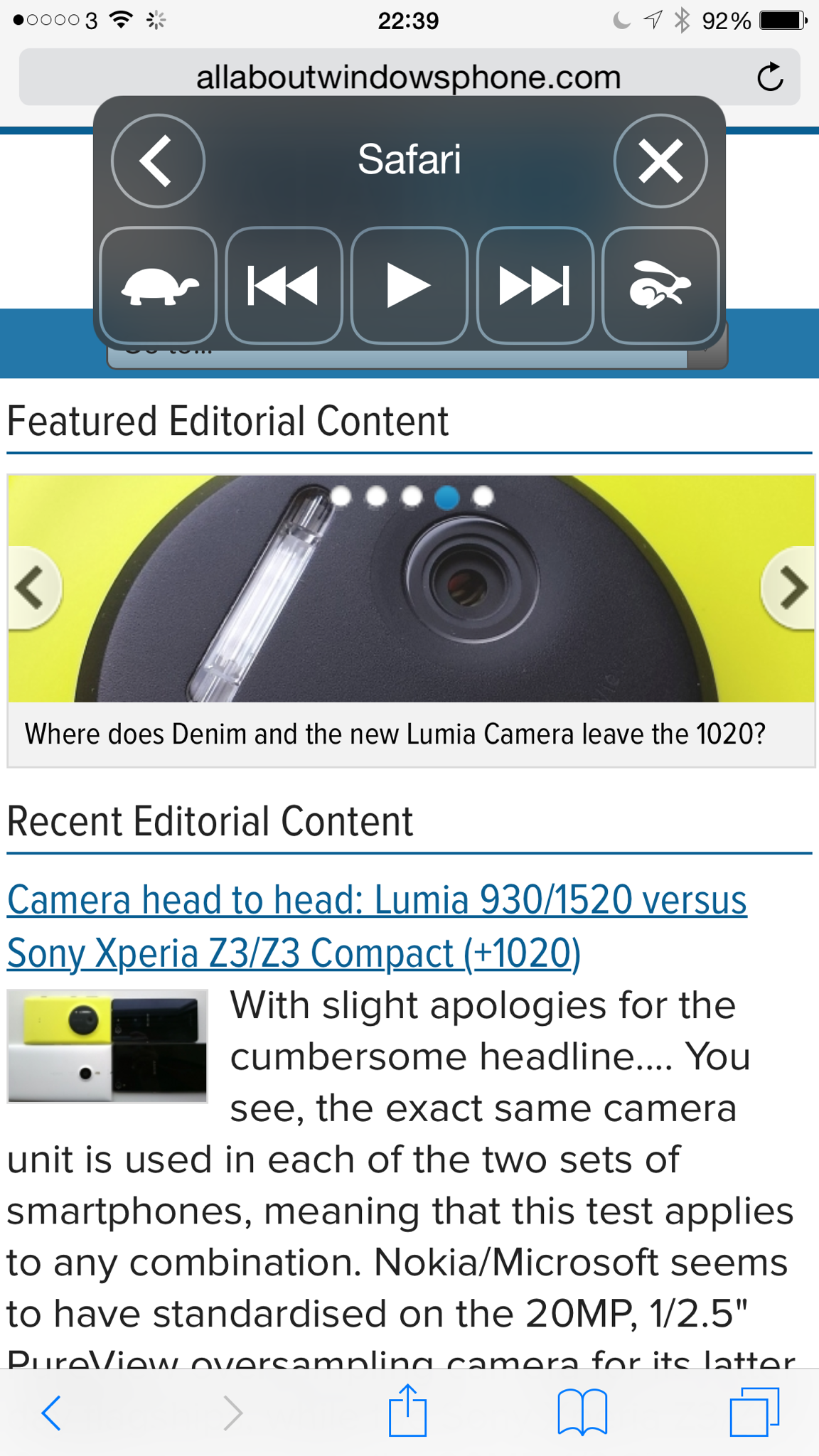
10) Accessibility- there are some great options in the settings under this category. One of my favourite is reading the screen aloud. After turning on just use two fingers and swipe down from the top of the screen to the bottom. This is what you get.

IMG_0168.PNG

iPhone 6 Plus – Further experiences

So as each day passes a few more experiences that make me happy or frustrated occur with the new iPhone 6 Plus.

So in no particular order here goes the good and bad experiences –

1) Headphones. I’ve said it before the audio quality output via the headphone socket is outstanding. Even bluetooth quality seems top notch.

2) Apple Photos app. Apart from it now having excellent editing options, I love the way I can now edit a photo in the Photos app, using features from another Photo editing app, without ever leaving the Apple Photos app. At the moment, I have 2 apps that work with this feature – Camera360 and Camera+. Talking about photo and video editing having the larger screen of the Plus makes a world of difference. Update. Camera 360 in app editing just stopped working. Deleting and reinstalling didn’t help.

3) iMovie – provided free of charge and a superb and easy video editing app to create a new home movie on the fly.

4) GarageBand – again a free app and a highly polished one too. I don’t need this app, but it is fun to use occasionally.

5) Games – I have a massive iOS games catalogue. Some of the games I’ve installed don’t work properly. Some examples – Alpha Wave graphics are weird at times, many of the Sega Sonic games when playing the actual game reduce to a much smaller size and look really odd. No zooming whatsoever. However, out of about 66 games I installed, I only had to remove 8. This is impressive as many of these haven’t been updated for ages. Some of the older games have black vertical strips on the left and right as they don’t stretch all the way to fill the Plus screen. I imagine the 6 (4.7 inch) will have no such issues. Metal. Apple have promoted games that work without going through any layers so work closer to the chip called Metal. I’ve played a few of these. Beach Buggy, Zen Garden and Asphalt 8. This new method of coding has a superb benefit to games and I can’t wait to see more games updated.

6) iCloud Drive – seems an oversight that the Mac has not been updated in time to take full advantage of this yet. I’m curious as to whether 5gb will be enough. Based on my calculations I will definitely need the 20gb per month allowance.

7) FaceTime, iMessage. They just work really well. My son is in hospital and just being able to do a no hassle video call along with sending media via iMessage has been something I don’t think would have happened if I had been on an android handset. But this experience then extends to other friends and family and my wife too. And one FaceTime call was when I was walking the dogs on Dartmoor and had a crystal clear video and audio. So cool.

8) Battery – the Plus has a vastly better battery life to my previous iPhone , the 5S. Bluetooth and wifi are left permanently on too with no obvious impact on battery life. But even with such a big improvement I wish Apple had pushed the boundaries even further.

9) Bluetooth range – I’ve been using my bluetooth headphones and have a perfect connection. Not one odd drop for a split second just a clear sound. And the range is nuts. I’ve walked into different rooms and the audio is still transmitting.

10) Handoff. This is a fabulous feature and again just works. This is one of my favourite features.

11) Reachability – not really found this helpful and haven’t got the the hang of it as to activate one handed feels like the iPhone 6 Plus weight is off balance and I feel like I might drop the iPhone.

12) Over zoomed apps. Apps like Hangouts and Whatsapp look dreadfully over zoomed. I can’t wait to see these updated properly.

13) Bugs – Pocketcast badge showed 3 podcasts when the folder it sat within was opened. When I closed the folder no badge number showed. I had to switch the phone off and on to resolve.

14) Touch ID – it’s the best implementation for a finger print sensor unlock. So smooth and seems very quick to unlock.

15) Health Kit – I’ve not had much time to explore this but I have set up my Medical ID which allows for certain information to be displayed on the lock screen. For example my ICE (in case of emergency) contact (wife) is displayed along with her number. The phone would allow a person to call my wife only without unlocking my iPhone. It could also display vital information eg blood type, organ donor yes or no, weight, height, list of medications, allergies or reactions, medical notes or conditions and date of birth. So if for example you were involved in a major accident a paramedic could obtain vital information to assist in treatment. The iPhone has a pedometer built in so my steps and altitude climbed are recorded without impacting battery life. I’ve also installed myfitnesspal which links into the Health kit. By granting the respective permissions, the Health app updated myfitnesspal with my weight and height. Working in the other direction as I record my food intake with myfitnesspal it’s updating the Health app. This is so neat and the potential is enormous.

16) AirPlay. This is not totally working. None of the slow motion videos will play via Apple TV that have been recorded on the Plus. Ones recorded on the 5S are fine.

My final thoughts are that the Plus could replace my iPad and be my standalone device. iOS 8 allows for a few more developer options that make this possible. But at the moment apps need updating and Apple need to pull their finger out and fix the bugs. Far too many really.

Anyway, that’s where I am at the moment. What about yourself?

Everyone loves using the iPhone even if they pretend not too

Don’t you love it when famous people are paid to promote another phone manufacturer like Samsung, LG or others and then you look at their tweets and the information reveals “Twitter for iPhone”.

So the latest culprit was LG who jumped on the nonsensical bendgate with a tweet that their LG G Flex was made to bend, but was tweeted on an iPhone.

Ironic!