Category Archives: Apple

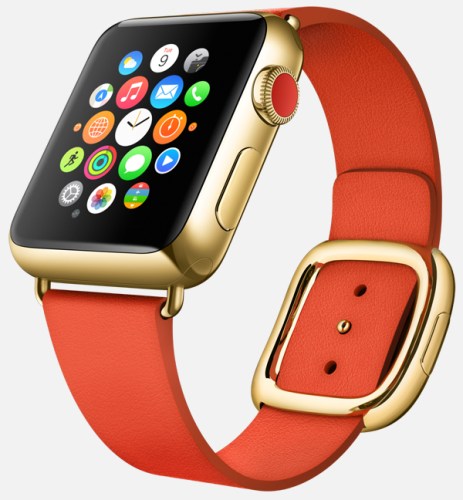
Apple aiming for 19 hours of Apple Watch battery life under normal conditions, 2.5 hours ‘heavy’ use

“Apple is aiming for 19 hours of Apple Watch battery life under normal conditions, 2.5 hours ‘heavy’ use

Apple is targeting 19 hours of battery life under mixed usage conditions for its upcoming Apple Watch wearable, consistent with Apple CEO Tim Cook’s estimate that users will want to charge the device daily. ”

Whether the above stats are true or not it does ask the question is any watch going to survive with the general population that needs charging daily and if filled with apps possibly even more than once a day. Perhaps it’s time to decide that less is more so that we can get longer battery life ?

What do you think?

Via Appleinsider.com

Dropbox ditching support for OS X 10.4 and 10.5 – details

From Dropbox –

“Hi,

We noticed that you’re running the Dropbox desktop application (client) on an older operating system (OS X Tiger 10.4 or OS X Leopard 10.5). We’re writing to let you know that as of May 18th, Dropbox will no longer support these older versions of OS X.

Don’t worry — your files and photos aren’t going anywhere! But you’ll need to update your computer to OS X Snow Leopard 10.6 or later to access them through the Dropbox desktop app. Apple’s instructions on how to update your operating system can be found here.

If you don’t want to update your operating system, your files will still be available through the Dropbox website. However, on May 18th you’ll be signed out of your Dropbox account on your computer and the Dropbox desktop application will no longer be accessible.

We apologize for the inconvenience. For more information, please check out our Help Centre.”

Personally don’t see a problem with this as these are really old operating systems now. Does this affect you.

Gav & Dave’s Tech Podcast is now live – Please RT and spread the word

As you know, I co-host a monthly podcast with David from UKMobileTech called Gav & Dave’s Tech Podcast. It is a light hearted tech podcast broadcast.

To subscribe click here for iTunes or copy and paste this link into your favourite podcast app.

Episode 30, Hot Gadgets is now live for your listening pleasure.

If you have enjoyed the podcast, please leave a 5 star review in iTunes. It helps others find our podcast. Go now and leave a review !

If you have any comments, questions or feedback, please drop a line at feedback@gdtpodcast.com or in the comments below.

And finally, our thanks to Audible as today’s podcast is supported by Audible- get a FREE audiobook download and 30 day free trial at http://www.audibletrial.com/GavDave . Over 150,000 titles to choose from for your iPhone, Android, Kindle or mp3 player. No obligation.

Apple Pay is storming the USA

“Apple Pay launch partner Bank of America on Thursday revealed that nearly 800,000 of its customers had signed up for Apple’s nascent mobile payments initiative, bringing 1.1 million cards to the service in the last three months. Bank of America has 60 million customers.”

This is just one financial institution sharing its success of Apple Pay. What is even more important is that these 1.1m Apple Pay users are more than likely ones that spend money too. Impressive stats.

Source – appleinsider.com

Google Maps got a decent update – details

If you haven’t installed or updated Google Maps, now is the time to do so.

It has just been updated with the following –

– Filter searches for restaurants by cuisine type — Google Maps users can finally drill down restaurant searches by cuisine

– View current weather information for cities around the world

– Drop a pin for your starting and destination points in directions and navigation

– Add transit directions to your calendar

– in the Android version of Google Maps, share directions with any contact.

Source – Google

Google Play Music – Limitations of Devices and Types of Devices – my dilemma

Just in case you are the person that likes to swap and change their devices often, and use Google’s Play Music service and app, then it is worth noting the following. This applies to any hardware platform.

Google offer a maximum number of devices that can be authorised in a 12 month period of 10. 5 of which are allocated to mobile phones and the other 5 for tablets, laptops, MacBooks and other things. In a 12 month period you can de-authorise a maximum of 4 devices only. Exceed these limits and you could find your new phone or tablet won’t be able to work with Play Music.

One last point, you can only have one device at a time active.

So it should come as no surprise that as a person who reviews products and changes phones often that I became a victim of these limits. Based on other people’s experiences asking Google to help resolve this was not going to be easy. In fact, Google had no obligation to resolve the situation whatsoever.

So I telephoned Google and was referred to one of their specialist music team members. It was a great phone call. We discussed our tablets (we both had Samsung Tab S’s) and had a jovial discussion about several smartphones and we joked about a few tablets (this part was really funny). I then explained my position and why it had arisen, gave him my website URL, explained I had reviewed 18 android phones in the last 18 months, and also had a habit of changing my phones a lot, and would probably continue to do so throughout 2015. Cut a long story short, he agreed that it should not be an issue to reset my devices and start from scratch. He then said if I needed to call back again for the same reason, they would be happy to help. 30 mins later my device list was reset to zero.

So moral of the story. the Google customer service experience was as good as any Apple support call.

Apple releases additional specs on the uses of the lightning port – details

Apple’s recently announced that third-party manufacturers will be able to license the female Lightning port and has now added what is allowed.

Apple is apparently hoping that a large range of different accessories will move from micro-USB to the Lightning port standard, and will allow manufacturers to have the port draw power from any MFi-certified power adapter, as well as providing passthrough charging and syncing for iOS devices connected to the other side of the accessory, such as iPhones used in battery cases. The passthrough feature could also allow a dock to simultaneously charge an iPhone while also providing audio output to Lightning headphones.

Only one Lightning port will be allowed per accessory, ruling out the development of Lightning splitters or hubs. Faster charging will be possible via Lightning, however, with MFi-certified USB power adapters providing power ranging from a minimum of 1.0A to the Apple-recommended 2.4A level suitable for charging an iPad at full speed.

This is good news for Apple users, although it is one step further to Apple taking tighter control of the accessory market.

Source – http://www.ilounge.com/index.php/news/comments/apple-releases-additional-specs-on-third-party-lightning-port-support

This is the Companion App that will control the Apple Watch – details

flow_startframe

9to5mac.com has managed to get exclusive details on the new Apple Companion app that will control the upcoming Apple Watch.

Clock Functions:

A new clock face feature called Monogram has been added as a complication (a background detail you can choose to enable or disable). Like a real monogram, this feature will allow users to include a virtual, embedded stamp of 1-4 letters – typically your initials – directly on the clock face. This is an interesting customization, giving you the chance to make your watch look more individually designed.
Users will also be able to enable a subtle red dot that appears atop the Apple Watch’s clock face whenever a new notification is received on your iPhone.
You can choose a stock to track via a watch face complication, seeing either its current price, point change, percentage change, or market cap. The same stock will appear in Glances, as well.

Messages:

Lacking a keyboard, the Apple Watch will allow users to respond to messages via voice. As Apple has previously detailed, users can respond via either transcribed dictation or actual audio messages. The app can switch between Dictation or Audio Replies as the default mechanism for replying to text messages. You can also choose to use either form of reply at the time of the individual message.
Users will be able enable or disable Read Receipts, just like on the Mac, iPad, iPhone, and iPod touch.
Users will also be able to set up and manage default text replies for incoming text messages.
Users will also be able to choose to not receive text message alerts or just to receive them from people in their contacts list. Like on the iPhone, you can also choose how many alerts you get per individual incoming message.
Maps:

Users will be able to enable or disable Taptic Engine tapping of the user’s wrist when it is time to turn for turn-by-turn directions.

Activity, Motion & Fitness:

The Companion app will let you activate granular fitness features such as stand reminders when you’ve been sitting, activity progress every 4/6/8 hours, completion of move/exercise/stand goals, achievements, and Monday summaries of movement.
You can separately activate or deactivate heart rate tracking to automatically calculate calories burned, as well as tracking of your body movements to determine step counts and fitness level.

If you want to read more and see all the screen shots from this app I really do suggest heading over to 9to5mac.com – http://9to5mac.com/2015/01/13/apple-watch-iphone-companion-app-revealed-with-new-watch-features-monograms/
Apple releases iOS 8.2 beta 4 – Apple Watch referenced clearly – details

w640-3

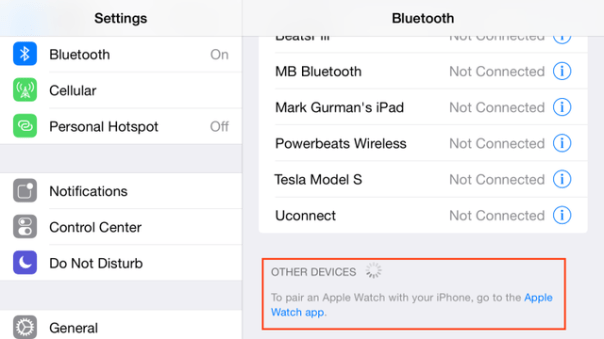
Apple has released iOS 8.2 beta 4 and this time it makes the clearest display that the Apple Watch is close to being released in a month or so. March is the probable time line for this smart watch.

So hands up if you are looking to acquire one of these?

Source – http://techcrunch.com/2015/01/12/the-apple-watch-shows-up-in-the-ios-8-2-beta-bluetooth-menu/?ncid=rss

Apple laptops vulnerable to a virus that is u removable and undetectable – details

Via The Telegraph –

” A security expert has found a way to install malicious code on a tiny chip built into Apple laptops which would resist any attempt at removal – even replacing the entire hard disk will not delete it.

The attack, which is being called Thunderstrike, is virtually undetectable and would require an attacker to get access to a machine for mere moments. And because it is new, no security software will even be looking out for it.

Trammell Hudson, who works for New York hedge fund Two Sigma Investments, said that the discovery came about when his employer asked him to look into the security around Apple laptops.”

“Since it is the first OS X firmware bootkit, there is nothing currently scanning for its presence. It controls the system from the very first instruction, which allows it to log keystrokes, including disk encryption keys, place backdoors into the OS X kernel and bypass firmware passwords,” Hudson said.
“It can’t be removed by software since it controls the signing keys and update routines. Reinstallation of OS X won’t remove it. Replacing the SSD won’t remove it since there is nothing stored on the drive.

This sounds like a terrible virus but I doubt anyone has been infected by it yet. Have you? 

Source Telegraph