LG tweeted the following tweet with the attached photo, following the furore with Samsung’s S4 sim free pricing.
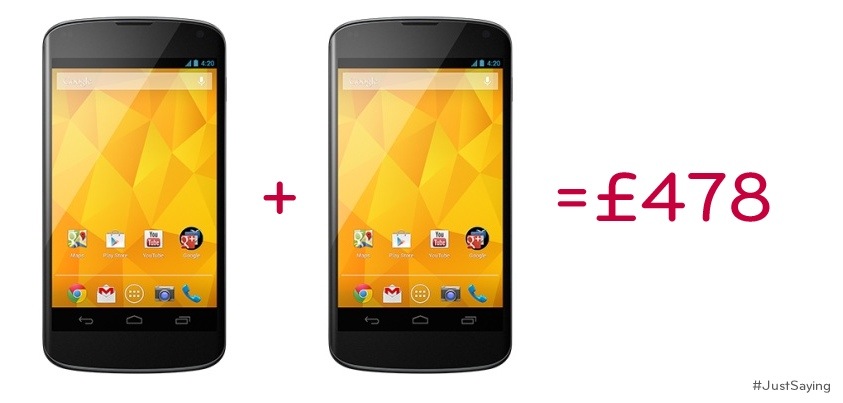
LG tweeted the following tweet with the attached photo, following the furore with Samsung’s S4 sim free pricing.
Three UK has started pushing the jelly bean update for the Samsung Galaxy S2.
This is good news for Three customers and shows how such an old phone can be kept current.
The Samsung Galaxy S4 will be available for pre-orders starting Thursday from the Carphonewarehouse. In order to entice buyers to reserve the flagship phone a good month in advance, the first 2,000 people who pre-order the handset will receive a free Samsung Galaxy 2 7.0 tablet. Also, those who reserve the phone from Carphonewarehouse will receive a free accessory pack which includes a Samsung Galaxy S4 screen protector, case and car charger, which the retailer says is valued at £64.97. The tablet is valued at £150.
Yesterday, I described the setting up procedure, so today I will describe what you get with the phone in terms of software and features. Also I will cover off some of this positives and negatives. Remember this phone only cost £130 vs an iPhone at £500.
For £130 you get a 3.8 inch wvga screen that looks gorgeous. A 5 MP camera with flash and lots of features and the options of downloading additional lenses (camera options) from Nokia’s Recommended Apps. It has changeable colour backs. The lockscreen has changeable options for notifications and changing backgrounds. My 620 had an app called Angry Birds Roost which provided fun pictures of angry birds space on the lock screen. In fact the lockscreen is very clear in providing the time and date.
Other software included or that is available free from Nokia is Alarms, Calculator, Camera, ebay, Hotmail, Mail app, Hello (unbelievably), Help and Tips, Nokia Maps and Turn by Turn Navigation, Internet Explorer, Messaging, Nokia Care, Nokia City Lens, Nokia Music, MS Office and One Note, People Hub, Photos, Settings, Skydrive, Skype (free video calls), Windows Store, Transfer my Data. Some apps I did not expect to see pre installed were ebay, groupon and Hello. If you have a mac, microsoft have an app that allows you to transfer music, videos photos and more out of itunes. It is a very good app actually. One last feature is voice commands and Bing Search.
I have added a few games, some additional photo editing apps, camera lens apps for to bolster the camera features like panorama, wordpress, the weather channel, youtube, zite, twitter, tv guide, tv catchup, tune in radio timer, remote control for sony, natwest, met office, linkedin, gMaps, flickr, dropbox viewer, amazon kindle and shopping. However, there are no google apps although gMaps is an excellent third party Google Maps plus Navigation substitute. You can probably find ways around the apps, but games are a different story.
So the birds eye view of all of the above is a smartphone that has a decent web browser, integration with microsoft skydrive cloud (7gb free storage too) and MS Office and One Note, decent camera, free music streaming via Nokia Music (very good), very powerful headphone output, maps, free navigation, live tiles on your home screen and an operating system that flows really well once you get used to it. The People Hub integrates all your social networking together and has a live tile which updates accordingly. In fact, installing apps with live tiles is great, since you can arrange your home screen to have the live tile (active resizeable icons) which give constant functionality. And free calls and video calls using Skype.
There is a lack of apps, but it is very weak in the gaming department selection, although there is angry birds, fruit ninja, shark dash, the dark knight rises, plants vs zombies and many more. So I am sure many could survive with ease. There is no notification centre as such, mainly because the home screen replaces it using the live tiles.
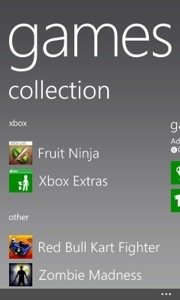
I love Windows Phone 8. Some of the apps like Amazon Mobile, Natwest, and eBay actually look better in my opinion than there equivalents on android and ios. Using the phone just flows and adapts the more you expand it. For example, install photo apps, and they appear in the main photos app. So if you open the photos app your first screen gives you options of camera roll, albums, date and people. If you scroll screens you will be shown a list of any photos apps you have installed. My list had cinemagraph, fhotoroom, flickr and lomogram. The other screen shows “whats new” from photos from your social accounts. And the last screen shows photos from any of your favourites. I found the integration into the Photos app of all the above was both logical and easy to use. Games work in a similar way. They appear in the Games hub app. This app integrates xbox, the store, xbox smart glass and even gives you the option on some apps to try them properly before buying them. Again I really like this. Plus my xbox gaming profile, is a moving person in the app. A funny fun touch.
So you flip up the lock screen and are faced with the live tiles home screen. In one glance you can see whats happening in your life. Its customisable too. From the home screen you flick left to get to the apps. This is one long list that scrolls. Now as you add more apps the list gets longer. After a point of adding apps, an alphabetical index is added to make seeing whats in what letter easier. It also allows for another trick. Tap any index letter and it brings up a page of 26 letters. So if you wanted Photos, just tap the P and you are taken to all the apps starting with P. I found this a rather quick way to whizz around. Also, bear in mind that games do not clog this list of apps. Also, the additional photo lenses installed will appear now in the camera options.
Other positives include the free streaming music, fantastic audio quality, integration out of the box with Microsoft Office and Skype. Plus twitter and linkedin and other social services contacts are integrated in to your people hub.
All in all, a very good phone. More tomorrow covering the finer points.




The Samsung Galaxy S4 is available in the UK on 26 April. It will be available on every major network and retaile.
O2, EE, Orange, T-Mobile, Three, Vodafone, Virgin Media and Tesco Mobile have all confirmed they will sell the S4. Carphone Warehouse and Phones 4U will have it too, as well as online retailers like Clove Technology.
But nobody has confirmed the all-important price. With less than a month to go before release, it looks like nobody is prepared to show their hand. This is going to be one very popular handset.
EE, Orange and T-Mobile will take your order for the S4 from 28 March, a month before delivery.
Retailers Carphone Warehouse and Phones 4U will both have special opening day events for the S4, which they’ll offer across a range of networks. Carphonewarehouse is also charging £29 to get a VIP queue jump pass. This is outrageous but some might pay it.
Then there are the online retailers like Clove Technology who will offer it sim free which is always a good option, since sim only deals do offer great value.
As soon as the pricing gets revealed I will update this post.
After experiencing a problem with my new, now returned, Samsung Galaxy Note 2 running android Jelly Bean, I did some further investigating.
At first look, most Samsung Galaxy phones offer expandable storage with a micro sd card. With older versions of software that was a blessing as apps could be easily moved from the internal memory to the micro sd card. This is not the case now.
So don’t be fooled into thinking if you run out of space with apps a micro sd card will help. It doesn’t. And remember a 16gb phone provides about 12gb actual memory.
Now Samsung at the launch of the Samsung Galaxy S3 and Note 2 said these phones would be available in 16gb, 32gb and 64gb. Just one question – where are the larger models?
Looking at the pre order pages for the new Samsung Galaxy S4 I can only see the 16gb. It is supposed to be available in 32gb and 64gb. If you use apps and games which can be 2gb in size each, I cannot recommend the 16gb version. You will run out of memory.
So what can you use the micro sd card for then. Well, the camera can save most shots except burst mode to the card, your own music transferred across can be saved there, and your documents.
And in case you are thinking about rooting which voids the warranty and using some well known apps like app2sd, they don’t work!
What I don’t understand is how can Samsung promote different memory sizes at launch but then not offer them?
If a new iPhone is launched, there is no issues getting whatever size you want.
Namco Bandai has released a completely freemium version of PAC-MAN, and it’s exclusively available on Google Play. PAC-MAN + Tournaments offers a full-featured free-to-play version of the original game, plus new tournaments feature, which lets you play online against others on new stages each week. The game also has new mazes available for purchase, along with online leaderboards and achievements.
Get your copy here.
At launch Samsung claimed the Note 2 would be available in 3 memory configurations. 16, 32 and 64gb. Except it was only seen in 16gb. For a brief moment the 32gb appeared and the 64gb in Korea again very briefly.
So some members of XDA Developers reached out to Samsung and got some sub par response. So then a few members complained to the UK Advertising Standards, informing them that Samsung promotes 3 sizes on their website etc…. The Advertising Standards wrote back saying the weren’t taking any action against Samsung, as Samsung had updated their website to show that the Note 2 was only sold in the 16gb configuration.
So what’s going on? Well Samsung might have been trying to mislead people and or push people maybe at Google’s request towards using the cloud , which in turn makes more money.
I am being cynical? I doubt it. Lets hope they don’t do the same with the new Samsung S4.
YouTube has reported that some billion people a month now use it services. That’s a big number.
18m people have jail broken their iPhone before Apple released iOS 6.1.3 which put an end to being able to jail break. 18m people is a lot but now the jail break team have confirmed they are not likely to create a fix until Apple releases a major new release.
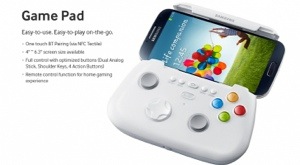
The Samsung Game Pad is available for £90. This add on maybe the reason I get the new S4.
Features Bluetooth connectivity and NFC pairing. The Game Pad connects to your S4 wirelessly using Bluetooth. This means that you can insert your smartphone quickly and get gaming without having to fiddle about with connections. Additionally, using NFC TecTiles you can pair your Galaxy S4 with the Game Pad automatically for greater convenience.
Suitable for screen sizes between 4″ – 6.3″. Designed for the Galaxy S4, the Samsung Game Pad includes an adjustable clamp design which securely holds your phone securely within the pad so you can game on the go. Because it is suitable for 4″ – 6.3″ the Game Pad can be used with even the largest smartphones. Optimised buttons and controls for superior gaming performance
The Game Pad includes all of the controls and buttons you would expect on a console-based games controller. These include select, start, back, home and menu buttons as well as four action buttons, shoulders keys, an omni-directional d-pad and dual analog sticks. This ensures that you can play your mobile games just as you play console games with all the interactivity and gaming performance a quality gaming pad provides.
Watch out for my review of this accessory.