Category Archives: Android

Motorola Moto X – UK release update

For those reading the tech news, you would have heard that Google’s hardware arm Motorola released the Moto X smartphone. It can be customised with 16 coloured backs, black or white front bezel, different coloured volume, power and camera insets, and a lot more options.

So what’s the latest on the UK launch. Sorry everyone, its not coming to the UK. But fret not.

A few weeks prior to the Moto X launch, Verizon announced their new Droid range updates. And if you looked carefully, these were actually based heavily on the new Moto X. In the new Droid line up was the 48 hour battery life model. Now I would rather that came to the UK, than some fancy coloured option.

What’s your views?

Sony versus HTC

Sony and HTC have both been in the news recently, with regards to their financial performance but with different results.

HTC warned that for the first time, it is likely to make a loss in the last quarter results. Sony on the other hand blasted past analysts expectations. And yet both companies have produced some of their best handsets this year, so why is HTC not performing like Sony.

If we remove competition threats from Apple and Samsung, other companies like Nokia and smaller companies ZTE or Huawei are eating away at HTC market share. But that’s not all. Apple, Samsung and Nokia have larger Eco systems. And so does Sony.

Sony sells other devices apart from phones and tablets. It also owns Sony Music and Sony Entertainment Network, so can offer a range of devices that are all designed to work together. Buy the Sony Z Tablet and you are shown the matching TV, headphones and more , all of which are designed supposedly to work effortlessly together. And this is why HTC is struggling. It only sells phones.

I sense a merger or purchase in the next 12 months. But who will succumb?

Samsung Galaxy S4 Zoom – camera highlights

The English weather had been terrible, so here is a collection of photos snapped by the S4 Zoom.
What I will say is that having a phone with optical zoom is a godsend. When you go to snap a photo, you think a bit of zoom would be good. None of these photos have been edited, just down sized slightly to save space on my blog. If you want to see the full resolution , just ask.

The Zoom does not take panoramic photos as mentioned a few days ago. They are horrific low quality and an embarrassment.

Anyway here’s the camera highlights so far.

20130731-183221.jpg

20130731-183251.jpg

20130731-183258.jpg

20130731-183242.jpg

20130731-183311.jpg

20130731-183305.jpg

20130731-183328.jpg

20130731-183319.jpg
image

image

Saturday Reading – a highlight of reviews on my blog

It is often difficult to find the reviews of devices and accessories I have written about, so below is a quick way to find all the articles for the key reviews. Or use the top right search box to search for anything on my blog.

HTC One

Samsung Galaxy S4 Zoom Review

Sony Xperia Z Tablet

Samsung Note 2 review

Nokia Lumia 620

Audio Technica ATH-AD900x Headphone review

Fiio E12 Headphone Amplifier

Olloclip 3 in 1 Lens review for iPhone 5

Trident iPhone 5 case review

Bluetooth iPad Mini case review

Glif+ for iPhone 5 review

USB Fridge Review

USB Rollup Drum Kit

Samsung Galaxy S4 Zoom – Review Part 6 and panoramic mode update

Over this weekend, I am going to try and start putting the S4 Zoom camera to task.

But before I list all the items, I thought I would mention the dreadfully low resolution panoramic mode photos. I have discovered that if you take them holding the phone vertical the 173kb file size is increase to about 750kb. Still totally unacceptable, but a start in the right direction. Both Samsung and Clove Technology are now investigating this matter urgently so hope to have an update by the end of next week. A quick thanks too for Clove being so helpful in trying to resolve this for me.

As a heads up, here is a list of the features/options I need to test –

– Zoom ring, Camera Voice Commands, 12 filters from Vignette to Fish Eye
– Optical Image Stabiliser
– Face detection, smile shot, blink detection,
– Focus lock, Auto mode, Expert mode – Program, Colour Wizard and Manual options
– Smart mode, smart mode suggest, beauty face, best photo, continuous shot, best face, kids shot,
– Landscape, dawn, snow, macro, food mode, party/indoor, action freeze, rich tone HDR, panorama, waterfall
– Animated photo, drama shot, eraser, sound and shot, silhouette, sunset, night, fireworks, light trace
– My modes
– Options in settings for EV (brightness), ISO, WB, Metering,
– Drive Mode – continuous normal, continuous high, Auto exposure bracketing
– Flash – Auto, OFf, Red Eye, Fill in, Slow Sync, Red Eye Fix
– Focus Area – Centre AF, Multi AF
– Photo size, quality, auto contrast options
– Adjust images for colour, saturation, sharpness or contrast
– Timer
– Video – movie size, motion speed, sound and windcut,
– Sharing options
– Camera volume, beeps, guidelines, descriptions on or off, auto screen off, review, date/time imprint,
– GPS tag, Voice options, Contextual filenames tags, AF lamp, start mode, storage options, reset

That certainly makes for some heavy testing. Wish me luck!

Samsung Galaxy S4 Zoom – Review Part 5

Welcome to part 5 of my review of the Samsung Galaxy S4 Zoom. To recap on the earlier parts click here.

Today, I am looking at S Voice on the S4 Zoom. The camera is being tested over the weekend in more detail, and therefore next week I will publish my findings in the camera aspect of this device.

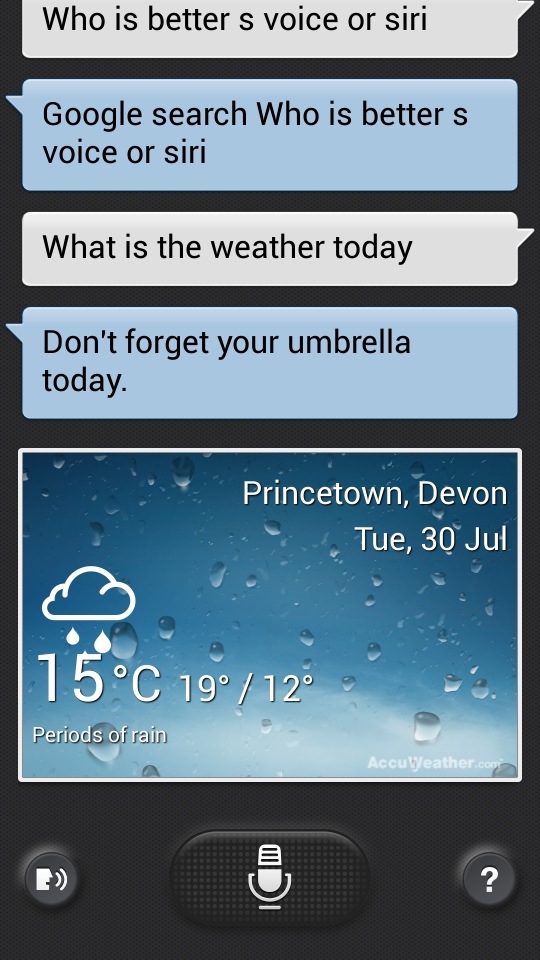
S Voice is Samsung’s answer to Siri. Except its not. Siri is like a personal assistant. You can move and change appointments with Siri in a much more natural way.

20130730-085806.jpg

20130730-085844.jpg
With S Voice you can request it to undertake basic instructions, from creating new appointments, tasks, memos, reminders, opening apps, navigate to a place or person, set timer, record voice, asking a web search, turn wifi or Bluetooth on or off, set alarms and read the news.

The voice recognition seems to work fairly well and rarely made an error. But it does need an Internet connection. Where Apple’s Siri scores higher is its ability to set a reminder for when you arrive home.

You activate S Voice by either double tapping the home button, pressing the S Voice icon, or by saying “Hi Galaxy” in Drive Mode.

In Drive Mode, S Voice reads out incoming messages and alerts. With messages you can reply using your voice hands free.

It is a handy feature when in the car, but otherwise its quicker to use other methods. Also having S Voice configured to start by double tapping the home button, does very marginally slow down the device.

20130730-090834.jpg

The Hot Watch – with private patented calling

The Hot Watch is a kickstarter campaign for a smart watch that does significantly more than any other previous watches.

20130731-175742.jpg

Meanwhile, the current crop of smart watches still requires your phone for basic functions like texting or making and receiving a call. Enter HOT Watch™ with Patent Pending Hands on Talk Technology that redefines what you can do with a watch, enabling you to send and receive messages while allowing you to make private calls without touching your phone.

HOT Watch™ comes bundled with Call Features (Private call, speakerphone, contact download and caller ID), Messaging Features (text, e-mail, Facebook, Twitter, Text Reply), Smart Phone Apps (weather, stocks, calendar, news, music control, phone finder), Watch Apps (Pedometer, note capture, fall detection, calculator), Time Features (alarm, timer, stopwatch, multi city time) and SDK for custom apps.

For all the above features to work, your smart phone just needs to be in close proximity of your HOT Watch™. The Typical Bluetooth connection range is 20-30 feet. You will still require your phone for more advanced functions like, GPS, internet browsing, camera or other smart features not listed above as supported by HOT Watch™.

HOT Watch™ is the first watch to support all the call features and limited Messaging features with any Bluetooth enabled phones. More advanced features are supported with iOS and Android devices.

Makes the Pebble seem so basic in comparison.

Samsung Galaxy S4 Zoom – review part 5a – disaster strikes

This is a second part of the review today, highlighting a rather disastrous discovery.

It was sunny late evening yesterday, so I decided to go take some photos. Panoramic are my favourite type of photo so I took several of these. I had a brief look on the phone, and the panoramic shots looked rather grainy.

Anyway, once back home, I connected via USB the S4 Zoom to my PC. It showed there was 800 photos to import. I had only taken 50 so something was wrong here. Basically all the thumbnails were being picked up, including dropbox. And then it took 20 mins to import the photos and the speed was painfully slow.

The panoramic photos had no resolution. They were 200kb in size. They should have been 30mb as a minimum. Another tech guru Steve Litchfield also tested his panoramic mode on his S4 Zoom and it had the same problem.

A phone call to Samsung, and a discussion with one of their camera experts, resetting and changing some other settings made no difference. Then I installed 5 top panoramic apps from Google Play and they also produced dreadful resolution.

Samsung recommended I returned the phone for a refund, as they could not guarantee whether it was software or hardware. Or whether it could be fixed by an update.

This is a camera first phone second device. It is possible that the S4 Zoom may just have a weakness for panoramic photos. It is disappointing though.

Samsung Galaxy S4 Zoom – silicone case

This is the first case I have been able to find for the Samsung Galaxy S4 Zoom, which also included a screen protector.

I bought it from eBay, click here for link to eBay.

2013-07-30 10.26.39
2013-07-30 10.26.55

The eBay seller also has the case available in black. No idea on long term quality, but for now I feel a bit more comfortable knowing my device is protected a little more against the elements. I must admit when I viewed the photos on eBay I was sceptical, but actually its rather good as it has special grippy parts.

The case does seem to fit fairly well, and for £3.90 I am rather pleased.

Samsung Galaxy S4 Zoom – Review Part 4

Welcome to part 4 of the Samsung S4 Zoom. Earlier parts and first impressions can be read here.

Today I am going to look at Easy Mode on the S4 Zoom.

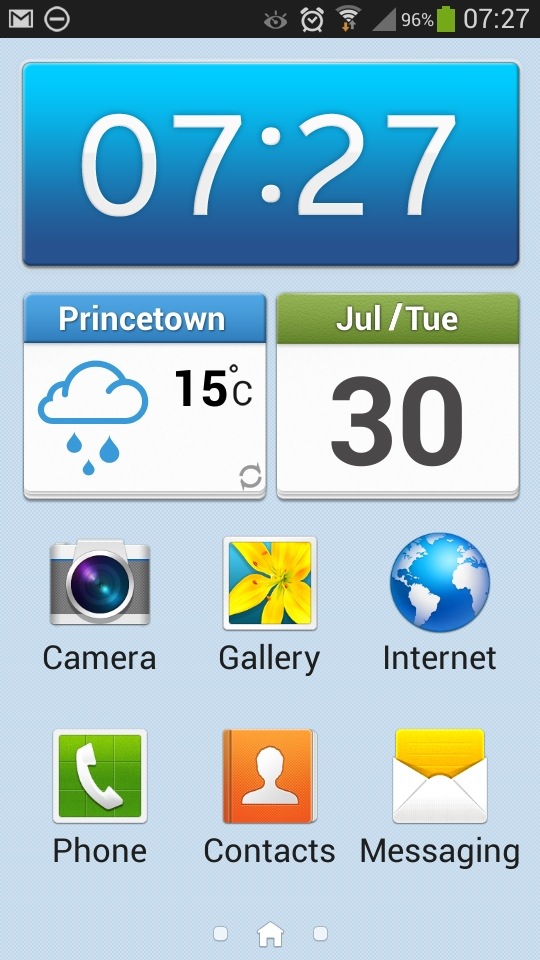
Easy Mode is a simpler launcher for people not that familiar with smartphones or just want a non complex operation.

20130730-081807.jpg
As you can see from the above screen shot you get nice large icons. That is carried across to the other 2 pre configured screens.

20130730-082254.jpg

20130730-082314.jpg
Where possible, tapping deeper into the apps and settings reveals just as simple and easy to read options.

20130730-082510.jpg
Ironically, I quite like the simplicity of easy mode. But it only allows 3 home screens and no widgets. What you see is what you get so clearly isn’t for everybody.