Online store Very.co.uk is selling the new Nexus 7 with a supposed 3 day shipping.

Seems to good to be true!
Online store Very.co.uk is selling the new Nexus 7 with a supposed 3 day shipping.
Seems to good to be true!
In the second part of the camera review, I am going to look at one of the multitude of preset modes available on the S4 Zoom. Today it is the turn of food mode. Food mode turns photos of food, into more vibrant, appealing and adds some zing. So first up is the plate of baked beans shot in auto mode.

And now photographed in food mode. Don’t those baked beans and toast look so wow now 🙂
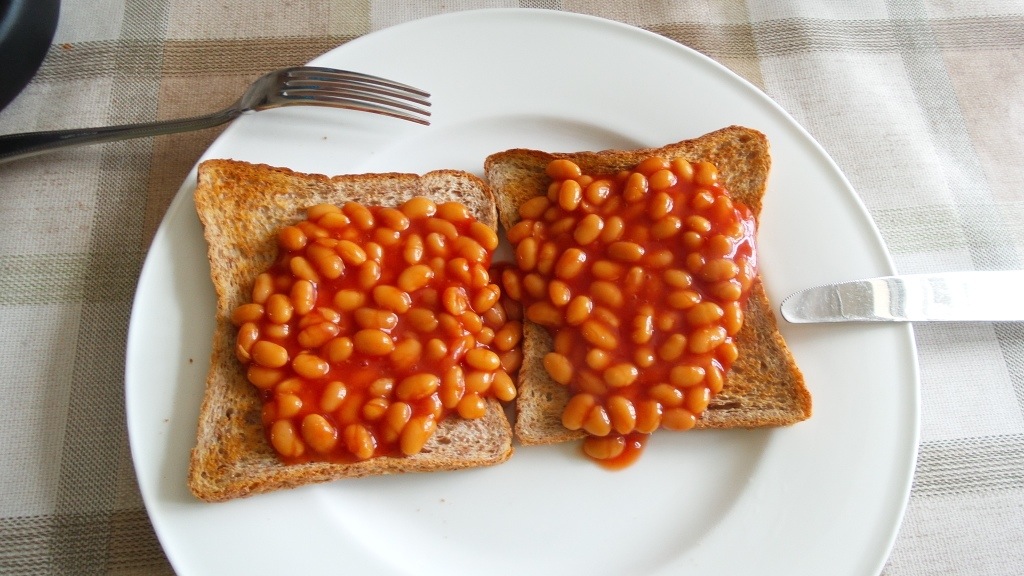
Whether or not you prefer the food mode is personal choice, but if you were uploading to twitter or Instagram it would certainly help make your food shot stand out more. Just remember baked beans aren’t that much of a wow food!

EPrice has posted a photo of the upcoming HTC One Max. And it makes the Max looks seriously huge. Having front boomsound speakers like the original HTC One adds additional length.
Looking at the photo, I wonder if this phablet from HTC is just too big.
What do you think?

Pantech has launched the Vega LTE-A. It’s their answer to the Samsung Galaxy Note 3. It’s a 5.5-inch FHD (1920 x 1080) IPS display and Snapdragon 800 SoC. It also has a fingerprint sensor beating the iPhone 5S to the limelight. This works using the incorporated small touch panel on the back side. You slide your finger along it to unlock your phone.
The 3,100mAh battery can be fully charged from 0 to 100% in 94 minutes. That is super fast.
The Pantech Vega LTE-A will be available in South Korea on SKTelecom by the middle of this month.
Key specifications are –
5.5 inch FHD (1920×1080) IPS LCD display
Snapdragon 800 MSM8974 2.3Ghz Quad-Core
2GB of RAM
Storage capacity of 16GB/32GB
13MP rear camera
LTE-Advanced (150Mbps) support
Rear and rear touch fingerprint sensor
3100mAh battery
Black or White
153.4×78.3×10.5mm 178.5g (Black) 181.7g (White)
Android 4.2.2 JellyBean
Evleaks has leaked the official renders of the new LG G2.


The device looks like there is hardly any bezel, which makes me wonder how difficult it will be to use without accidentally tapping the screen. The official reveal will be later today.
Samsung just released a press invite to its Samsung Unpacked event at IFA 2013 on September 4th, which judging by the invite, will be for the launch of the Samsung Galaxy Note 3.

However, that is not the only event Samsung is holding. It has also sent out invites for another event it is holding the next day, the 5th September. This will likely focus on Window 8 and laptops.
Over the next few weeks I am going to post daily shorts on camera sample modes.
First, is a test of the camera optics using dark and light shadows and seeing how it copes. HDR mode is not allowed for this test.
So here is the result.
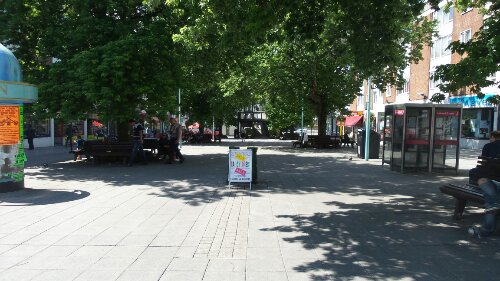
What do you think?
And this is using HDR mode.

Very marginal differences. Overall the camera did a good job.
What’s your opinion?
A while back I received a further response from the ASA adding they were really looking into the S4 and it’s memory claims. Refer to previous article, click here.
Well, I received another letter from them, now stating case was closed since Samsung now was making it clear about available free memory and that apps cannot be installed on the memory card. Consequently, no further action would be taken.
That’s great but it should never have occurred in the first place. And the UK still has not received the 32/64gb versions.
Anyway, copy letter from ASA below.

The Wall Street Journal is reporting that the FBI employs a number of high-tech hacker tactics in its efforts to round up information on suspects, including the ability to remotely activate microphones on Android devices and computers.
These methods are used in cases related to organized crime, counterterrorism or child pornography, according to the WSJ.
No surprises here. You need to fight technology with technology.
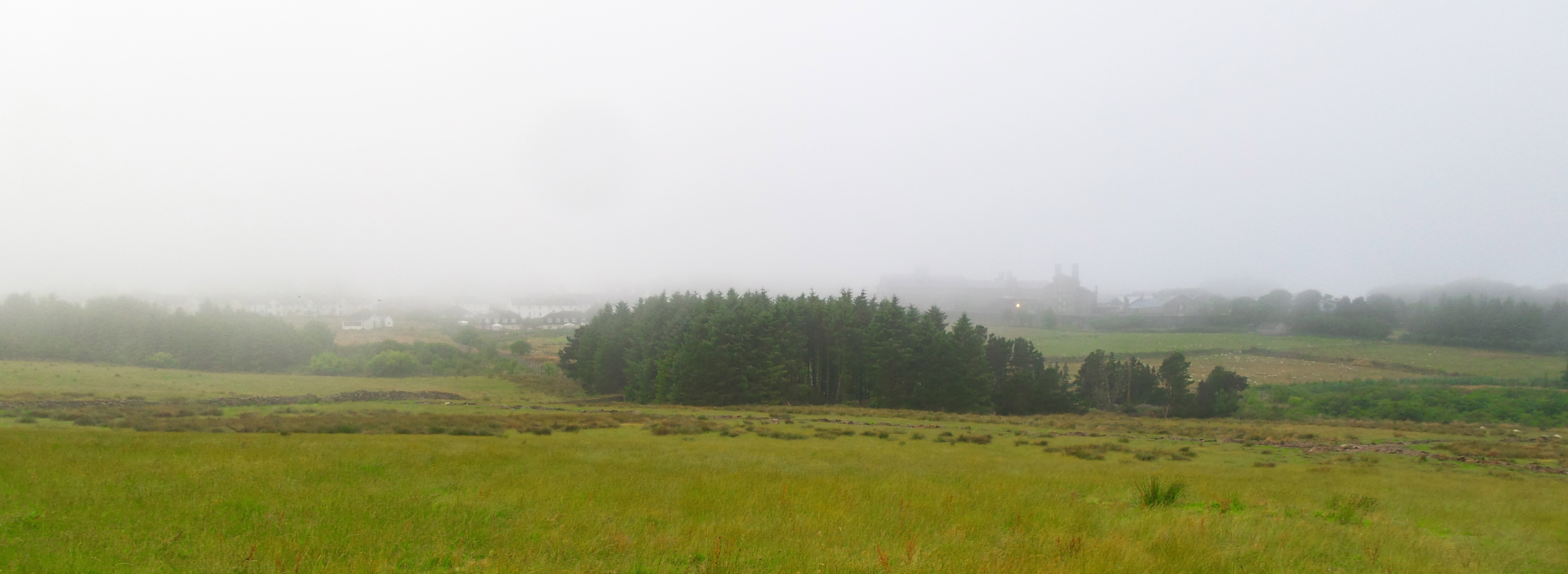
Shot taken at weekend with the S4 Zoom, no editing. View of the morning fog, Princetown, Dartmoor, Devon, Uk.
To recap on the earlier review sections click here.
Using a device as your main daily driver, with no other option to fall back on really does focus on the weakness and strengths of any device. I have discovered all sorts of nuances, strengths and weaknesses but overall this is a wonderful piece of kit, even with its limitations.
So, if you recall I mentioned the low resolution Panoramic mode photos. I discovered that if you take the panoramic photos holding the S4 Zoom vertically instead of horizontally, the quality jumps from 200kb to about 700kb. I am waiting for Clove Technology to get feedback from Samsung as to whether this is the maximum quality or a fault. But I imagine based on my testing it is not a fault but the maximum quality. Is this a deal breaker for most people, probably not. Other nuances as mentioned before include low internal memory of 8gb, even with apps to SD card supported out of the box, this does not move the app data so not ideal for gamers. Also, worth remembering that it has a smaller processor than the standard S4, low resolution screen and in speed tests is not lightning fast, but more runs along at an average pace. I think I have been spoilt by the speed of the HTC One. But here is the crazy thing, despite my previous cravings for a powerhouse device with the best screen, processor and tons of on board memory, a thin and fairly lightweight device, I am enamelled by the S4 Zoom. I just love it.
Other little things I have noticed is connecting the S4 Zoom to the Mac in camera mode brings up 700 plus photos, so totally useless. I am going to have to remove the micro SD card and import that way in future. Another oddity, I emailed some photos from my Mac to myself, opened up the photos on the S4 Zoom in the Gmail app, saved the photos, but when going to view them in the gallery app, they are not standard jpg or png and cannot be renamed etc. So I am now using the Samsung email app.
I have been using the S4 Zoom out and about this week. I was in a bank, and the cashier said “did you just reply to a text message on your camera”. I passed across the S4 Zoom for her to have a look and she was fascinated. As I was leaving, I heard the cashier tell the others how clever the camera was with a phone built in. Next, I was in a tech type store, and a young sales assistant asked is that the S4 Zoom. I said yes and let him have a look. His colleagues then gathered around and it caused quite a talking subject. Clearly the S4 Zoom piques interest.
So what has it been like to use? Well brilliant to be honest. The weight and overall size is not now a problem whatsoever. As it is based on the S4 Mini, it fits easily in the hand as it is not an oversized 5 inch plus disaster. The S4 Zoom is 2.8cm deep if you include the camera lens, but the depth is not an issue. The S4 Zoom handles all my internet, email, messaging, rss news feeds, forums and blog updates, social networking, replaces my TV and DVD remote using the built in infra red blaster, podcasts, and gaming. I added gaming. The builtin loudspeaker is excellent too, loud and clear.
I have been very selective as to the games installed, but they are mostly all games that work with my Mogo Pro Game Controller which connects via bluetooth. This works really well with the S4 Zoom. Games installed include SuperGNES emulator, R-Type, AlphaWave, Meganoid 2, Canabalt HD, Doodle Jump, Submarine Attack, Final Freeway 2R, Sonic, Pac Man, Asphalt 7 and many more.
I must admit, it does look strange using what looks like a camera to operate a TV, in fact making a phone call is even crazier looking, as it appears as if you are talking into a camera. Going back to the point that it is based on the S4 Mini, you get the Samsung experience and without too much of the useless memory hogging features found in the standard S4. The camera module has loads of different modes, to take the guess work out of what settings you need to change to take a particular shot. So if you went to a fireworks display, you would use the fireworks mode. I keep a cheap full size tripod in my car, and love being able to connect it to the S4 Zoom as simple as ABC, and without the need or fuss of finding an adapter first to connect to my phone, which would then connect to the tripod.
And then there is using the S4 Zoom as a camera. You have the great feeling, that whatever you throw at it, you will get a decent photo. With night shots or indoor, the xenon flash makes a remarkable difference. And then there is the lens which has 10 times optical zoom. Now I have a quality zoom option on my phone, I tend to use it a lot more often. I look at a shot and think, I will just zoom in a bit more to get a closer shot. I used it last week, when it was lashing down with rain, to take a photo of a crow from inside my car. I simply lowered the passenger window, and zoomed right in to the bird. I am still exploring all the different options, but so far have been impressed with all the results.
Case options for the S4 Zoom are limited, but last week I posted details of a silicone case I received that came with a screen protector. The silicone case added extra grippy parts too. I also bought from a SuperGrip Universal Case Compatible Car Mount which works a treat with the S4 Zoom. The Zoom makes a great GPS too.
Finally, the S4 Zoom has a removable battery and micro SD card. So if you knew you were going to be taking thousands of photos, you could carry additional micro SD card and a spare battery (not available yet). Another benefit of the removable spare battery is when the old ones starts wearing out, you can simply change it for another.
If photography is your thing, or you always want to take a decent photo, the S4 Zoom could be right up your street.
Available from Clove Technology
To recap on the earlier review sections click here.

