Category Archives: Android

Gav & Dave’s Tech Podcast is live – Please RT

As you know, I co-host a weekly podcast with David from UKMobileTech called Gav & Dave’s Tech Podcast. It is a light hearted tech podcast broadcast bi-weekly. To subscribe click here for iTunes or copy and paste this link into your favourite podcast app.

Episode 8 is now live.

If you get a moment and have enjoyed the podcast, please leave some feedback in iTunes. Thanks.

Gav & Dave’s Tech Podcast is live – Please RT

As you know, I co-host a weekly podcast with David from UKMobileTech called Gav & Dave’s Tech Podcast. It is a light hearted tech podcast broadcast bi-weekly. To subscribe click here for iTunes or copy and paste this link into your favourite podcast app.

Episode 8 is now live.

If you get a moment and have enjoyed the podcast, please leave some feedback in iTunes. Thanks.

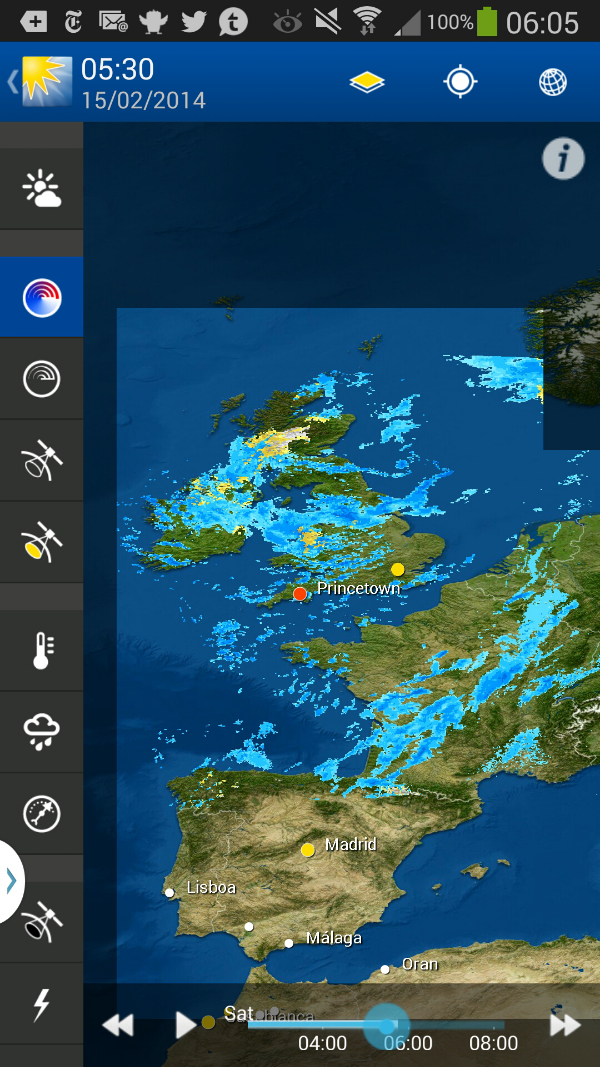
WeatherPro – One of the best weather apps

WeatherPro is available from Google Play and Apple’s App Store.

image

It is my favorite weather app by far. 

WeatherPro for Android features high-quality seven-day forecasts and weather reports for over two million locations worldwide. Highlights include global satellite plus radar for the USA, Australia, UK and much of Europe. Images can be animated with interactive elements bringing the weather to life! With our fantastic Live Wallpaper and new and improved widgets, you can instantly see the weather at your selected location before you even open the app.

SEVEN DAY FORECASTS INCLUDING:
• 3-hourly intervals
• Dynamic short-term forecast for instant overview
• Weather reports for over 2 million locations worldwide
• Temperature (Celsius/Fahrenheit) and the all important “feels like”
• Worldwide weather alerts
• Wind direction and speed (in your chosen format)
• Air pressure, precipitation amount and relative humidity
• Sunrise and sunset times
• View forecast as a graph for an alternative, easy to read outlook
• And more…comprehensive forecast features from Europe’s leading independent weather company

GLOBAL SATELLITE AND ANIMATED RADAR:
• Radar images for the USA, Australia and much of Europe
• Automatically shows your current location

WEATHER MAPS:
• Stunning, high resolution weather maps
• Interactive weather icons and city temperatures
• Connect to MeteoEarth – switch to a 3D map view in MeteoGroup’s brand new app MeteoEarth at the touch of a button.

PLUS:
• NEW! Create and share your own personalised weather photos!
• NEW! Connect to your personal weather stations, in partnership with Netatmo!
• If your device has an integrated weather sensor then WeatherPro will automatically display the data (such as pressure, humidity and temperature) on the forecast screen giving you hyperlocal weather wherever you are.
• NEW! Our widgets (with weather and clock) are now customizable! Following user feedback, you can now choose your own colour, size, transparency, location, gradient and use the live wallpaper as background. We’ve also introduced a new widget for your lock screen which shows the latest weather conditions.
• Live Wallpaper with current weather images
• Favourites settings
• 800,000 Points of Interest
• Always show the weather for your current location with the “My location” favourite setting
• App2SD compatibility
• Interactive city search (GPS)
• Map of water temperatures in Europe
• Air pressure maps
• Weather Reports and News
• Available in 14 European languages
• No adverts

The optional in-app upgrade to the PREMIUM version includes:
• Hourly forecasts – for when timing is crucial!
• 14 day forecasts – for planning ahead
• Stunning, high resolution maps with multiple layers of advanced weather information including precipitation type radar in Europe (showing the difference between rain, freezing rain, snow and so on), radar forecasts, worldwide visible and infrared satellite images, air pressure, heat maps, lightning strikes and cloud cover forecasts.
image

image

Below is a screen shot connected to my Netatmo Urban Weather Station.
image

WeatherPro is truly a top notch weather app.

Sony Xperia Z1 Compact review

The Xperia Z1 just got smaller.

Sony has set a high standard with their Xperia Z range of phones. First the original waterproof Z, then the 20 MP camera in the updated Z1 and now the Z1 Compact.

As the name implies, the Compact is smaller in size than the Z1, but that is really where the differences end. The Compact has a smaller battery and a smaller lower resolution display but the same feature set.

The battery has dropped from 3,000 to 2,300 mAh and the screen is now 4.3” with a 1080 x 720 resolution, in comparison to the 5” 1920 x 1080 display of the Z1. Of course the physical size and weight has been affected too but more on that later.

More over at Clove Technology Blog.

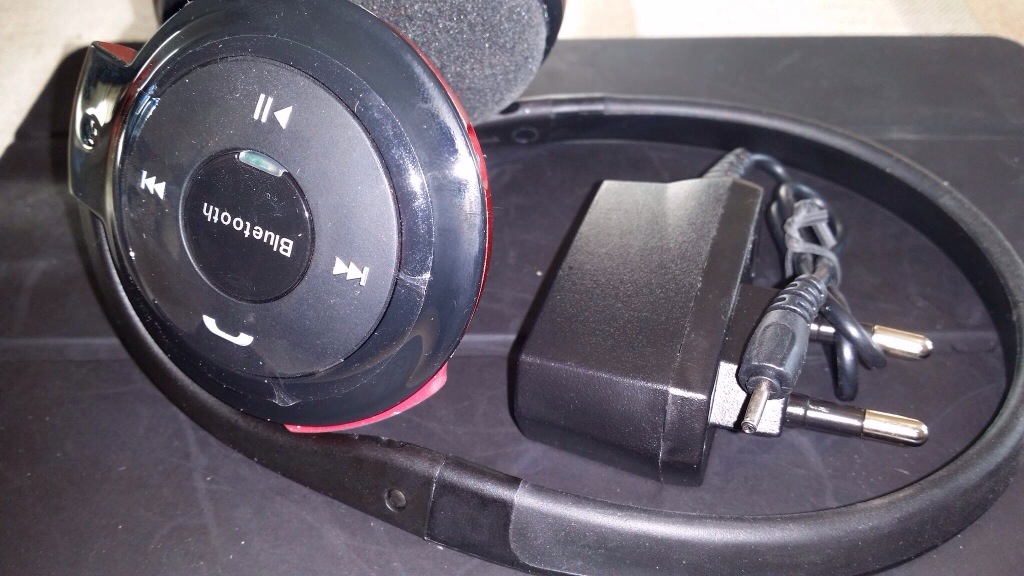
Cellz Bluetooth Stereo Headset BH-503 review

20140207-114424.jpg

The Cellz Bluetooth Stereo Headset BH-503 is currently £33.97 with free shipping to the UK.

The specifications are –

– neckband for multiple uses
– Bluetooth v2 with EDR hands free. Headset A2DP and AVRCP
– Frequency response 22 – 18,000 Hz
– Total Harmonic Distortion less than 0.5%
– Music and talk time up to 13 hours
– Fast charging – get up to 75mins music with 20 minutes charging
– for mobile phones and computers

These Bluetooth do exactly what the say on the tin. I’m so pleased with these I bought another pair for my wife. The only thing you will need is an adapter as it comes with a shaving plug. Luckily my bathroom has an electric socket for shavers.

Music quality is just above average. It’s not at Sennheiser levels but it’s fine. I did you a slight EQ in a Google Play Music but getting a loud enough volume was not an issue whatsoever. They don’t have thumping bass, just a little to not overpower the music. Occasionally the music did seem to slow ever so slightly for a split second. Not sure what or why this is.

Call quality was ok, nothing to set the world alight but fine. The neckband held firmly around my head. It’s non adjustable but it fitted my large head and did not feel like it was going to fall off.

Controls – music controls for track rewind and forward, play pause and answering calls. Volume up and down.

A reasonable set of Bluetooth headphones just let down by the non standard charging plug for which you will need an adapter.

Rating 8.8/10.

On Valentines show somebody you love them using a Note 3

It’s that day of the year when marketing departments have a field day with flowers, meals and gifts all of which cost a bomb.

I wondered what to do for my wife this year, and about 2 weeks ago was exploring the Samsung Story Album app. The concept is simple. Using your photos you can create a story book. There are many themes to choose from when designing your book and even more to download from Samsung Apps store.

So I started collating and editing the cutest photos of our 2 cats and 3 dogs and created a little book. Then I discovered as part of the app, there was the ability to pay and get your book printed. So I spent some more time editing to ensure I had the layout as I wanted and connected to the service called Blurb.

After you pay for the size of book and whether you want hardback or softback, it then uploads the entire book in the background. It can take up or 3 weeks for delivery, but in my case it was about 2 weeks.

What was slick was having the entire option built in to the Samsung Story Album app. For your information it is possible to use Blurb services independently too on a computer or via an iOS app.

LG G Pro 2 official unveiled – details

image

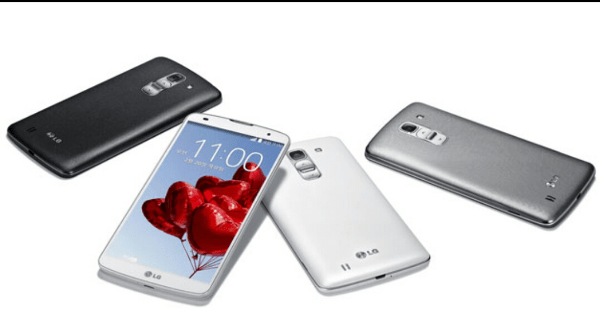
In a bid to beat the announcements at MWC, LG has announced the LG G Pro 2. And this phone is designed to take on the HTC One and Note 3.

It features a massive 5.9 inch screen versus the predecessor of 5.5 inches. It is pumped for sound with a 1 watt speaker system, and powered by a Snapdragon 800. The camera has been improved to allow for 4K video recording with up to 120 frames per second. The 13-megapixel camera comes with advanced Optical Image Stabilizer Plus technology and 2.1-megapixel front camera.

The G Pro 2 will feature a 5.9-inch Full HD (1920 x 1080) IPS display, 2.26GHz quad-core Qualcomm Snapdragon 800 processor, Adreno 330 graphics, 3GB of RAM, 16/32GB of storage, microSD support, Wi-Fi 802.11 a/b/g/n/ac, NFC, 3200mAh removable battery and Android 4.4 KitKat under the hood.

So what do you think of these specs? Well carry on reading below for LG’s full press release detailing even more features.

LG’S NEWEST G SERIES DEVICE LG G PRO 2 LAUNCHES IN KOREAN MARKET

Successor to “Best Smartphone of MWC 2013” to Make Global Debut at MWC 2014

SEOUL, Feb. 13, 2014 — Today LG Electronics (LG) introduced the LG G Pro 2, its follow-up to the award-winning G Pro, to the Korean public. Much like last year’s G Pro, which was recognized as the Best Smartphone of MWC 2013, the G Pro 2 comes equipped with a state-of-the-art display and new UX features to take user convenience to the next level.

With a stunning 5.9-inch Full HD IPS display and extra slim bezel of 3.3mm, the G Pro 2 offers an industry-leading screen-to-frame ratio of 77.2 percent. A thicker, high-power 1W Hi-Fi sound that’s 30 percent louder than in the G Pro delivers clearer sound with more powerful bass. And to simplify the powering on and unlocking process, LG engineers developed a completely unique feature called Knock Code™ which makes unlocking and using the G Pro 2 easier and more convenient than ever before.

“Knock Code is an example of LG bringing simpler, more convenient solutions to consumers’ mobile lives,” said Dr. Jong-seok Park, president and CEO of LG Electronics Mobile Communications Company. “Whereas in the early years of smartphones it was a contest to see how many features could be stuffed into the phones, our researchers took a long, hard look at how consumers were really using their devices in their daily lives and included just the most useful UX features. We think customers will agree.”

An evolution of the popular KnockON feature that was first unveiled last year in the LG G2, Knock Code allows owners to power on and unlock their G Pro 2 smartphones in one easy step by tapping their screens using one of 86,367 “knock” combinations. Thanks to LG’s intelligent algorithm and advanced hardware, the knock pattern can be entered on any area of the screen — whether the display is turned on or off — using anywhere from two to eight taps.

The G Pro 2 is the first LG smartphone to benefit from an enhanced 13MP camera with OIS+ (Optical Image Stabilizer Plus) and advanced functions ideal for creating sharing content. LG’s proprietary OIS+ technology adds software anti-shake functionality to the acclaimed hardware-based feature already built into the slim camera module for the best photos and videos possible when in motion or in low light situations. What’s more, the sensors and lens of the rear and front camera on the G Pro 2 have increased in both size and sensitivity, for images that rival many standalone point-and-shoot cameras. Some of the other advanced image capturing features built into the G Pro 2 are:

● 120FPS HD Video Recording and Slow-Motion Editing: Records in 120fps HD and allows editing of video in three different speeds — one-half slow motion, one-fourth slow motion and original
● 4K ULTRA HD Recording: Records video footage in ultra-high definition mode for playback on 4K TV sets
● Magic Focus: After the shot is taken, the user has the option to select the preferred depth of focus before saving. Users could also press the ‘All in Focus’ icon to set focus on all spots of the picture.
● Natural Flash: Offers a much more balanced color temperature and exposure compared to the normal flash, which results in a most natural image just as it is in real life.
● Flash for Selfie: Reduces the size of the preview screen and adds a bright white background for more “soft” lighting in self-portrait mode
● Burst Shot: Takes up to 20 continuous shots and automatically edits them to create a video of the captured images
● Gallery Collage: Allows users to select photos from their gallery to create a collage for easy uploading to favorite social network sites

In addition to the latest components, the G Pro 2 also boasts a collection of upgraded features that complements today’s mobile lifestyle where much of the information we need is in the palm of our hands or in our back pockets. Some of these new UX features include:

● Content Lock: Provides users more security with the ability to lock files, photos, videos and memos with a unique password
● Mini View: Enables users to comfortably use the G Pro 2 with one hand by shrinking the display to a size ranging from 3.4 inches to 4.7 inches, depending on the user’s preference
● Dual Browser: Divides the expansive screen into two separate browser windows for more convenient surfing

Availability of G Pro 2 in markets outside of Korea has not yet been determined but attendees to the 2014 Mobile World Congress can experience the G Pro 2 and its features first-hand at LG’s Booth in Hall 3 of Fira Gran Via.

Key Specifications:
– Chipset: Qualcomm® Snapdragon™ 800 (2.26 GHz Quad-Core)
– GPU: Qualcomm Technologies’ Adreno™ 330
– Display: 5.9-inch Full HD IPS (1920 x 1080), Slim Bezel
– Memory: 3GB DDR3 RAM / 16GB/32GB eMMC ROM / microSD slot
– Camera: Rear 13.0MP OIS+ / Front 2.1MP
– Battery: 3,200mAh (removable)
– Operating System: Android 4.4 KitKat
– Size: 157.9 x 81.9 x 8.3mm
– Weight: 172g
– Network: LTE / HSPA+
– Connectivity: Bluetooth Smart Ready (BT 4.0) / USB / WiFi (802.11 a/b/g/n/ac) / NFC / SlimPort
– Colors: Titan, White, Silver
– Other: Knock Code™, 1W Hi-Fi Sound, Content Lock
Add Holidays to your Google Calendar

Google’s Calendar app has been improved.

Google has added the option to include official holidays from 30 new countries to their Calendar app, ranging from Australia to Brazil, and of course the UK and USA.

Log on to your computer, go to Google Calendar, settings, Calendars, and subscribe to holidays and select which country.

Now go to your tablet or phone and make sure you tick to turn on syncing for subscribed holiday calendar.