All posts by Gavin Fabiani-Laymond

Unknown's avatar

About Gavin Fabiani-Laymond

President, CEO & Editor of https://gavinsgadgets.com Reviews & News of Technology

Apple versus the FBI – 1st March Court Date – Others Join the Battle – Updated

Apple vs FBI – The iPhone unlocking case is gathering pace with a hearing date set for 1st March 2016.

Now for the first time, other tech giants have stepped into the ring to officially say the will be supporting Apple and submitting legal briefs/documents to the courts in support of Apple.

The current companies who will legally be supporting Apple are –

– Microsoft
– Facebook
– Google
– Twitter

And I am sure more will follow. This is such an emotive case and yet at the same time a legal precedent too.

Updated – BlackBerry and Verizon have joined to support Apple.

Apple iPhone 6S and Siri – My Favourite and Most Useful Commands for Siri

Today, I thought I would share one of my favourite voice commands that I use all the time with Siri. If you have the iPhone 6S or 6S Plus you can have “Hey Siri” set to be always on (listening) for your voice. This is my preferred choice.

Your hands are wet as you’ve just had a shower. So say “Hey Siri”, then ask Siri, what time is it. Siri will respond dutifully with the time.

Next you’re cooking and need to set a timer. Just say “Hey Siri”, “Set timer 10 mins” or once “Timer 10 mins”.

But my all time favourite which I use a lot when in the car driving is “Hey Siri” , “Notifications” . I use to have to say “Any notifications”, but now Siri understands me to say just “Notifications”. After this command, Siri will read off all the notifications from all your different apps that you have showing in the notification centre, plus the short line of text revealed by each notification.

So these are my top 3, what are yours?

Xiaomi launches its new flagship phone – the Xiaomi Mi 5 – Full Details and Pricing

mi5

Xiaomi held its press conference yesterday at MWC 2016 and officially launched its new flagship phone the Xiaomi Mi 5.

1 mi5

The Key Specifications

– Android 6.0 Marshmallow, MIUI 7
– 5.15-Inch Full HD IPS display (600 nits, 1920 x 1080 resolution, 428 ppi)
– Snapdragon 820 clocked @1.8GHz or 2.15GHz depending on model, Adreno 530 GPU
– 3GB/4GB LPDDR4 RAM (depending on model)
– 32GB/64GB/128GB Internal storage (UFS 2.0)
– MicroSD card support
– 16MP Rear camera with 4-axis OIS, f/2.0 aperture, dual-LED flash, Sony IMX298 sensor
– 4MP Front camera with 80-degree wide angle lens
– Fingerprint scanner/Home button
– Dual nano-SIM, 4G/LTE
– Dual WiFi 802.11 a/b/g/n/ac with MU-MIMO technology and WiFi Display
– Bluetooth 4.2/ NFC/Infrared
– GPS/AGPS/GLONASS
– USB Type-C
– Quick Charging 3.0
– Battery: 3,000mAh
– Dimensions: 144.5 x 69.2 x 7.25mm
– Weight: 129
– Available in black/ white/ gold

Having previously owned and reviewed the Xiaomi Mi4i and Mi Note Pro, Click HERE , to read the review, I was very curious to see what the Mi 5 would look like and what specs would be included. For starters the Mi 5 is a modified look of the Mi Note Pro which was gorgeous in its own right. Xiaomi have tweaked the Mi 5 to look even curvier.

So what you have now is a few options with the new flagship which are mainly dictated by storage required. If you opt for the Mi 5 Pro, you get a Snapdragon 820, 4gb ram, 128gb storage (UFS 2), 16gb Rear Camera for 4 stage OIS, fingerprint sensor, NFC, Quick Charge 3 and a 3,000mAh battery, all weighing 129g. And if you select the ceramic top end finish, you still won’t pay more than $400. Sounds too good to be true.

Well, in my past experience with the Mi4i and Mi Note Pro, both of these phones were well built from a hardware point of view and the software and software support was excellent too. However, the screen is 1080p and not QHD. Despite the camera specs, the camera results will be good but not as good as the Samsung Galaxy S7 or LG G5 or LG G4. That aside, it seems like a stellar phone and when available to purchase I will try and import one to review accordingly. It is companies like Xiaomi that eventually will threaten the big boys Apple and Samsung. Xiaomi also have a huge product eco system too from power supplies, headphones, air humidifiers, routers and so much more.

Source – Xiaomi

HTC starts releasing information on the HTC One M10

HTC choose this year not to announce its new flagship at MWC and instead will hold a separate event next month.

However, not to be left out of the game, HTC started to tease details of its new flagship, the HTC One M10.

So it looks like the M10 has chamfered edges and comes in a metallic body. I must admit, after the lacklustre One M9, I really hope the One M10 brings HTC back into the game.

Is Google correct to strike off 9to5Google, 5 years later for Trademark Violation?

Tech website 9to5Google.com had its ads stopped yesterday and without advanced warning by Google which run through both Google’s Doubleclick/Ad Exchange network and Adsense. Apparently 9to5Google earn income well into 6 figures per month. 9to5Google were told that Google’s Public Policy Team has decided that, after 5 years of publishing under the 9to5Google name, they had been violating their trademark. 9to5Google had also attended loads of Google events too.

Below is an exert from their Google Ad Manager –

I want to start by apologizing for the abrupt and confusing way that this issue was brought to your attention. This has been really frustrating – for both of us – as these issues are normally communicated internally in advance so that I am able to give you warning and clarify the issue. As you know, that did not happen in this case, and I apologize for that.

My Team Lead (—-, CC’d here) and I had a lengthy conversation about why this happened immediately and without an internal warning. Evidently, because this is a legal trademark violation, the policy team is required to act immediately. We still expected there to be a notification from our Policy Team, and we’re sorry on behalf of their team that it was not communicated more clearly.

With that said, we were not able to argue an appeal for this violation since it’s an explicit policy in the AdSense Ts&Cs. This was my first time encountering this violation, so I had assumed I could make a case for appeal, but it’s actually coming from the Legal Trademark team, above the Policy Team, and there isn’t any grey area for us to make an appeal.

We understand that you have been operating the site for many years and have even attended several Google hosted events without anyone bringing up an issue; however, our Legal Team must take action when they discover a trademark violation whether they discover it early on or much later.

We recognize that the situation is both shocking and frustrating and we’ve advocated on your behalf as much as we can. Since they will not grant us an appeal, we want to provide you with information for how you may legally use our trademark and if the conditions are reasonable, for you to submit a request.

In the meantime, your advertising strategy for 9to5google should be to continue to use DFP for ad serving, but to use other third party networks as your demand sources in order for you to monetize the site. My team and I are still here to advise you with monetizing your other sites and to support you as best as we can.

Please let us know if you have any other concerns.

So is this Google being over zealous or what? It seems odd Google has taken aim on this 5 years down the line, but I suppose that is the issue when you use “Google” in part of your website name when you are not “Google”.

So what are your thoughts on this scenario?

Source – 9to5Google

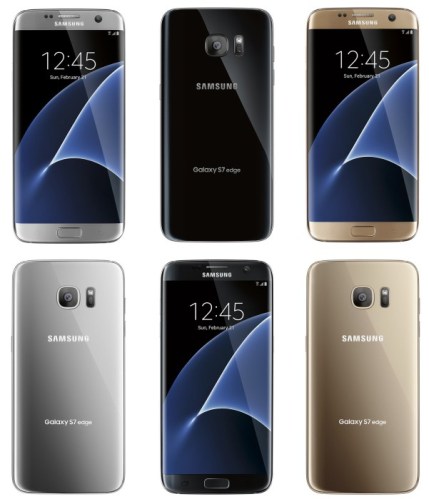
Samsung Galaxy S7 and S7 Edge – My First Hands On Impressions plus Camera

s7 edge colours

Welcome to my first impression of the Samsung Galaxy S7 and Galaxy S7 Edge. In this first impression I will discuss my initial findings on the camera and how the camera compared versus my Apple iPhone 6S Plus.

Unfortunately, it was not possible to extract the photos for this post but I will have another article up focusing specifically on the S7 Edge camera with loads of camera samples.

But first let’s talk about the Samsung Galaxy S7 and S7 Edge hardware. Historically, I have always preferred the Edge version of the earlier Samsung models. Not so with the S7 range. I was examining a black S7 and a gold S7 Edge. In black, the S7 looked stunning and so much better than the older S6 too. 

The S7 is curvier, fits better in the hand, and in black was super cool. Now bear in mind I don’t like black phones. I prefer white, silver or gold. So for me to say black looks stunning, it really does! The Edge was finished in the gold option and it just didn’t look right or good either. It is a slightly different shade of gold to the S6 range. It also is not as comfortable to hold as the standard S7 nor does it look as good. Now my verdict could be tarred by the gold finish, and maybe in black the S7 Edge will look a lot better. I compared the S7 to a S6 and whilst there is similarities, the S7 does look different and classier.

Touchwiz. It’s present but not overpowering and I like the lighter skin provided by Samsung. It really is a lot lighter. Many apps are not installed versus previous Samsung phones. For example, the only music app is Google Play by default. There is even an option to remove the app drawer in the settings to make the S7 look just like an iPhone. I tried to slow down the phone and I couldn’t. No lag was present. It obvious that the android app drawer is going to finally become obsolete across all android phones and this is fine by me. 

Camera. The 12mp rear camera shoots at 4:3, or 9.1mp at 16:9 aspect ratio. Lower resolutions are available. The takeaway aspect of the camera that I witnessed was its focusing speed. Blisteringly fast. Even in diminishing light. I snapped people walking and it kept them on the whole in focus and produced a good shot with little blur. I noticed that reduced light shots were brighter and clearer than those from my iPhone 6S Plus. However the iPhone shots could be edited in photos and made brighter although the quality was not as good. 

The level of detail in lower light on the S7 was overall better than my iPhone. This advantage should pay off with kids or pets moving around, enabling a shot to be snapped in focus and look light enough to use as well i.e. not too dark. The f/1.7 versus the iPhone f/2.2 does make a difference in lower lighting. As soon as the lighting improved to more daylight type conditions, I found it was harder to spot the differences.

For those curious the Pro mode allows a max of 10 second shutter speed. 

I loved the double pressing of the home button to launch the camera and take a shot. Super fast. 

BUT.

I did manage to trip the S7 camera up several times when it came to macro. Several times it just could not focus and the macro shots did not look as pin sharp as I would have expected. I need to retest the macro shots again. However, when it did focus, it was fast again as with all the photos.

Final thoughts. I was left in no doubt the S7 camera is really fast to focus and that it will also produce great quality photos in most lighting conditions. The black finish in my preferred choice and currently I wouldn’t buy the Edge, I would buy the standard S7. I might change my mind when I receive the S7 Edge in Black, so watch this space. I can’t recommend the gold finish. Samsung have done a good job and produced great looking flagship.

But how will it compete against the likes of the LG G5? How far can I push the boundaries of the S7 Camera? Stay tuned as all the comparisons and tests and photographic results are coming soon.

Oppo redefines Quick Charging and OIS – details 

  
Oppo just announced a few worlds first. 

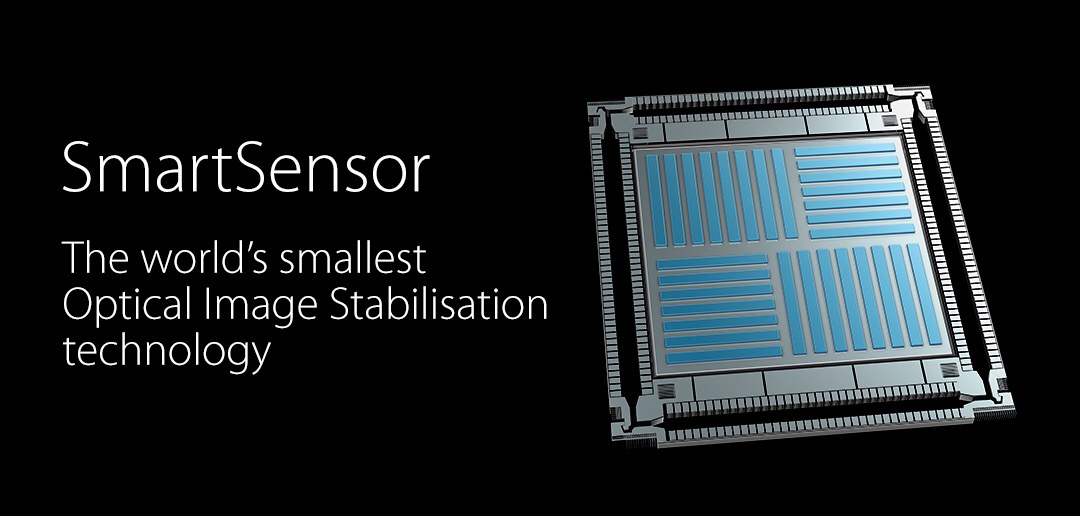
First OPPO has made a huge breakthrough in smartphone photography. They have developed the first-ever sensor-based image stabilizer for smartphones. It’s also the smallest image stabilizer, for any type of device, in the world. It stabilises quicker and over a great movement and uses 50 times less power to operate. This also reduces heat. 

  
Next Oppo announced a new safer fast charging system that charges a phone fully in 15 mins. This is done at a safer 5 volts too. This is for a battery 2,500mAh battery. 

All in all a good day for innovation for Oppo. 
Source – Oppo

Apple iOS 9.3 – All the new features and benefits

Next month Apple will release iOS 9.3 which apart from the mandatory bug fixes will incorporate a host of new features, all of which are worthy additions.

These new features will bring benefits to all your iPhone, iPads and iPod Touches. Many apps will have minor improvements but the main ones are as listed below along with their benefits –

Night Shift – Night Shift uses your iOS device’s clock and geolocation to determine when it’s sunset in your location. Then it automatically shifts the colors in your display to the warmer end of the spectrum, making it easier on your eyes. In the morning, it returns the display to its regular settings. This places less strain on your eyes and helps you sleep better at night.

Notes app – Notes is one of those apps you use all the time for all kinds of things. Now you can secure the notes that contain your most personal data — such as financial details, medical info, or website logins — with a password or fingerprint. You can also sort notes by date created, date modified, or alphabetically.

News app – The articles in For You are now better tailored to your particular interests. And to help you discover new Favorites, For You suggests trending topics and Editors’ Picks. When a story contains video, you can play it right from your feed. On your iPhone, you can view everything in landscape. And when you check for updates, the latest stories appear much faster — so you can catch up on the day’s events quickly and easily. I really like using the News app and the more you use it the better it becomes!

Health app – It’s simpler than ever to find third-party apps to track your health and wellness. Categories such as Weight, Workouts, and Sleep have a new slider menu that reveals great apps you can easily add to your Health dashboard.2 The Health app also now displays your move, exercise, and stand data, as well as your goals, from Apple Watch. So you can see all your health metrics in one place and easily share your data with third‑party apps.

CarPlay – CarPlay adds more features from Apple Music. And the Nearby feature in Maps lets you find gas, parking, restaurants, coffee, and more with a tap. So you’ll know the best places to stop, whether you’re on your daily commute or an epic road trip. Just need my car computer to be updated to work with CarPlay!

Education – iOS 9.3 releases loads of new tools for education, enabling sharing iPads with various students with ease, a new Classroom app for the teacher, School Manager app for the administrators, and Managed Apple ID’s – new kind of ID for education, Managed Apple IDs are created and assigned by the school.

What you will also find is all of Apple’s own apps now have 3D Touch menu options enabled on the app itself e.g. weather, settings. So as you can see there is lots of new features to enjoy very soon.

Source – Apple

Vivo Xplay 5 – 6gb ram Snapdragon 820 – Benchmarks and Photos

Yesterday I wrote about the new Vivo Xplay 5 that’s about to be revealed in full. 

This is no budget phone. It is a top flight flagship phone from Vivo based in China. It’s the first phone to have 6gb ram along with the new Snapdragon 820 processor. 

It’s now been benchmarked and it reveals some awesome figures. 

  
In addition photos of the new phone have been revealed and I have to admit it looks gorgeous. 


So what do you think?

Sources – talkandroid.com / Gizmochina.com 

Apple Watch – Using your Apple Watch to monitor your sleep data


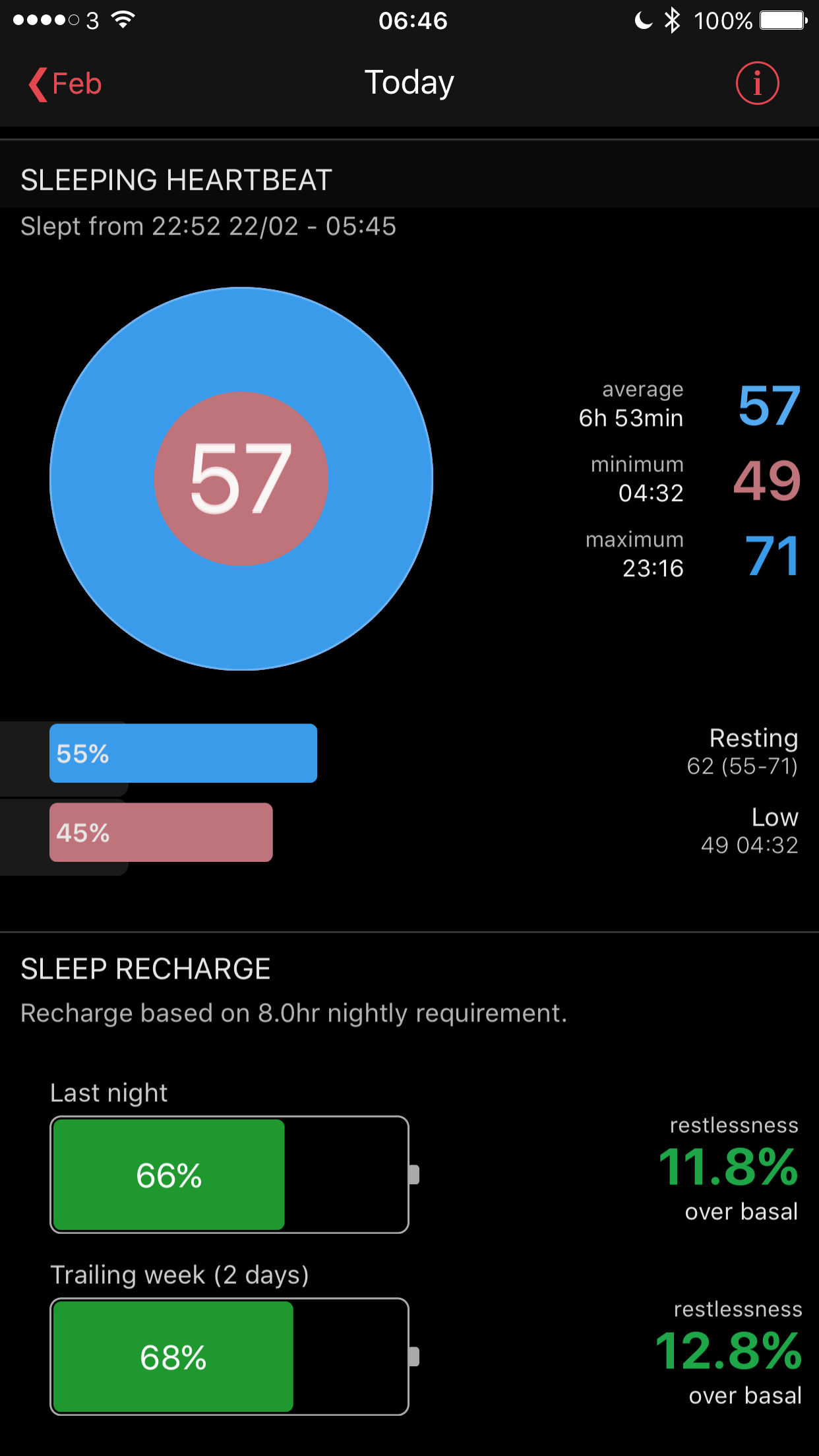
Heartwatch 2 for iOS has many functions for monitoring your heart rate using your Apple Watch. But it also can record and analyse your sleep data. 
Now one concern may be battery drain if using this function. Actually there is nothing to get concerned about. For a start my Apple Watch manages 2-3 days on a single charge with ease. At night, I turn off wake screen with motion. Then activate sleep mode on the Heartwatch 2 app. Turning off wake screen is done using the settings app on your Apple Watch. Then open Heartwatch 2 app on your Apple Watch. Force Touch down on the screen to reveal sleep mode and press start. 

Now once the screen goes off it won’t come on again while you sleep and disturb you or a partner unless you press the Digital Crown. Nor does battery life reduce that much either. 

And when you wake up the data get synced across to the Heartwatch 2 app on your iPhone and you get to see how you sleep presented beautifully too.