Tag Archives: NotePro 12.2

Living the Samsung Nightmare – Note 4, Gear S and NotePro 12.2

Some balance to all the glow from the last few days and for some you may not like reading my comments below. But unlike some reviews, I am not in the pockets of the manufacturers so will say it how it is.

Before I get to the Note 4, I used the NotePro 12.2 with Chrome and the Internet Browser both open in multitasking mode side by side, so I could compare images of 2 different vehicles. The iPad really needs some form of multi window.

The Gear S has been faultless. Battery at the end of the night before bedtime was at 65%. I have also discovered that call forwarding charges vary from network to network. Three UK don’t charge. They simply take the cost from your allowance. EE charge through the roof unless a business customer. I believe the charge is around 60p per minute. I will double check this cost again from EE as it seems totally out of sync with Three UK.

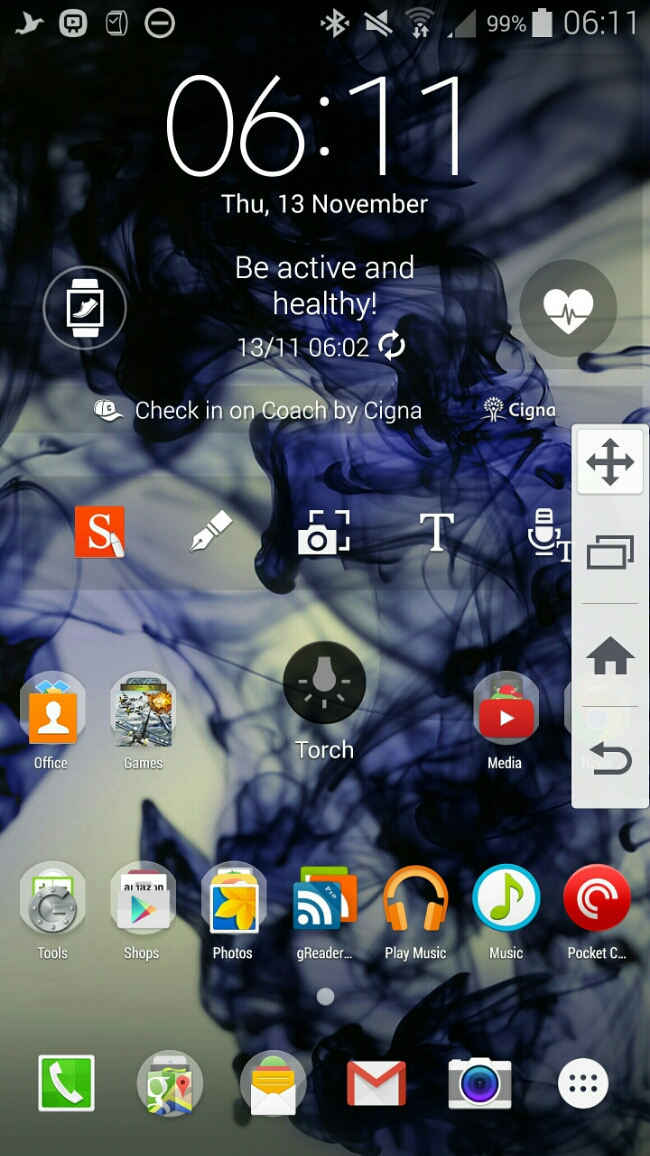
And now to the nightmare scenery with the Note 4. To recap it has sensors galore – heart rate, oxygen levels, UV. A very good camera. S-Pen. Multitasking. QHD screen. And so much more. In fact it’s removed the toolbox gimmick found on the S5 and replaced it with Side Key Panel. See screen shot. Basically you get the bottom capacitive and home key on the left or right edge. It hides when not in use. Flick to bring out. You can move it to your preferred position.
image

But stripping it back to basics it still is a phone that can send SMS messages. And this is where it fails miserably. It has really poor signal strength. I live in a rural location. Reception downstairs has always been flaky on Three UK but it for the iPhone 6 Plus it was still able to make/receive phone calls/SMS. The BlackBerry Passport had no issues with grasping on the reception. And now to the Note 4. Downstairs the Note 4 “cannot” make or receive any phone calls or SMS. It cannot pull a signal. I have noticed in many different areas outside of my house, weaker cell coverage too. Problem is if I cannot get the basics from the Note 4, I will have to return it along with the Gear S, as the Gear S only works with a Samsung phone.

Some background. I have been with Three UK for quite some time. I have tried O2, Vodafone and T-Mobile and all were rubbish. However, reader “Jah” suggested I look into EE and I got hold of a EE pay as you go sim to test. Low and behold the Note 4 did have signal downstairs, albeit at the lowest signal thresholds. EE could be a solution, so long as call forwarding is not charged at 60p per minute when calls get forwarded from the Note 4 to the Gear S.

Just to make sure my signal issues weren’t unique to myself, I started a thread on XDA Developers and it appears many people are also experiencing poor signal strength. Maybe we shouldn’t have asked Samsung to build a metal phone!

Update – I went online and chatted to EE who stated call forwarding is not charged. Uses your allowance.

Living the Samsung Dream – Note 4, Gear S and Samsung NotePro 12.2 tablet

Today I’m not going to talk about each device separately but how the work in unison with each other.

First up its Monday night and I’m typing my thoughts for this post using the NotePro tablet and it really is a joy with its large on screen keyboard and display. I won’t get much time with it otherwise so there isn’t much to say except it was on standby for 15 hours and lost 18% battery.

So today at lunchtime I was able to sort out moving my sim from my iPhone 6 Plus to the Note 4 and getting a nano SIM for the Gear S. Fortunately, there was a Samsung expert in the Three store helping flog Samsung phones for the Three store staff. He also new exactly how to setup the Note 4 with the Gear S. So my main sim went into the Note 4 and a Three pay as you go 321 or 123 sim went into the Gear S.

But before I get to the master setup, I wore the Gear S last night and turned on the sleep mode. During sleep mode, the watch also activates do not disturb mode . This means no bright screens awakening your partner. The sleep data is synced across to the Note 4. It showed my total sleep was 6 hours and 10 minutes and that I was motionless for 94% of the time, that is for 5 hours and 47 mins. I intend to wear this every night now so I can build up average sleep data patterns. Now, the Gear S was at 50% at the end of Sunday evening, so while I went to the bathroom I quickly charged the watch up to 75%. While I am typing this I have put it back on  charge. It’s 8pm and the battery including tracking me while I slept and all the way to 8pm had only dropped to 51%. Not bad. During the day notifications have been pumping out of the Gear S and I can honestly say reading them on a 2 inch screen is great on the eyes. Also, if you select clear all notifications it also clears them on the Note 4. S Voice works really well on the Gear S. S Voice was able to recognise correctly all the commands and people’s names that I asked it to dial. I had my mum call me and took the call on my Gear S using its loudspeaker. It’s not very loud but I suppose that is a good point in some ways in that the whole world won’t get to hear your conversation.  But in a noisy room it may be difficult to use in this way. Bluetooth headphones might come in useful. I asked my mum if she could hear me on her end. She had no trouble hearing me.

I then asked my mum to call me again. This time I started the call on the watch and pressed the on screen button to transfer call back to the Note 4. That worked just fine. Just clarifying how the relationship between the Note 4 works with the Gear S. Standard use is via a bluetooth connection. In this mode notifications are received over bluetooth from the Note 4 to the Gear S. Phone calls and text messages placed from the watch use the Note 4 to activate the call. Now, with a nano SIM in the Gear S and allow remote access ticked in the Gear Manager app, the following is possible. You decide to leave the Note 4 at home. As you exit your home, the bluetooth connection is broken between the Note 4 and Gear S. The Gear S switches over to being it’s own phone. It also pings a command back to the Note 4 which activate call forwarding to the Gear S. Notifications from the Note 4 are also sent to the Gear S. For this to occur you have to be signed in to your Samsung account.

So how was the Note 4 now that it has my main sim in use. The screen has been the standout feature all day. And yesterday the S Health app has been good too. Fingerprint scanner works really well, but Apple’s Touch ID is still the best. I have now managed one handed unlocking on the Note 4. When locked with fingerprint security I cannot use S Voice or Ok Google unless I have unlocked the phone. As an example with the iPhone 6 Plus plugged into a charger I can say “hey siri ” and then “any notifications “. Siri will then read all my notifications. Can’t do that on the Note 4. Also, Touch wiz only allows 21 icons on a screen. The iPhone 6 Plus can show many more. It seems to maximise the screen I am going to have to use Nova or Apex launcher but at the cost of losing some of the Samsung widgets. I seem to be suffering from wifi dropping out from time to time. Might be because there is a storm outside or its not working correctly. Cell signal seems fairly strong on par with the iPhone 6 Plus.

So that’s all to report today. More tomorrow.

PS. Don’t forget to read my other post today about how to get the Mont Blanc digital content for free.