Category Archives: Uncategorized

HTC One – Review Part 8

Today will be the final part. I have covered off as much of the HTC One as possible. I am still learning little gems about this phone but without a doubt it is a marvel.

As I have mentioned before HTC having included a decent array of software but not bloatware. I useful app included is Flashlight. Open the app and you are faced with a picture of a torch. Tap 3 times to scroll through the torch light strengths.

20130402-152245.jpg

Next up in the calculator. It is a very basic calculator with a few more options in landscape mode. See screen shots below.

20130402-152343.jpg

20130402-152350.jpg

Next up is the voice recorder. The One records crisp quality audio and with the recording app you can share, set as ringtone and change the quality. Simple but effective app.

20130402-152714.jpg

20130402-152722.jpg

Lastly there is the car mode app. This brings up large buttons and some voice control options. The voice options include call, play, radio on, listen to station , check for new messages, find and help.

20130402-153008.jpg

20130402-153015.jpg

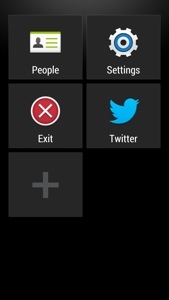
You can also add your own apps to the interface.

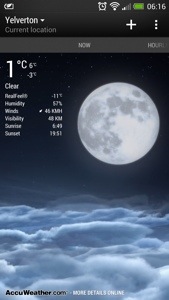
Some neat touches. If you tap the weather icon on the Sense clock it brings up an animated today forecast. You can swipe left to reveal hourly and daily forecast too. Once again HTC have thought of everything.

You’re half asleep an the alarm goes off. You swipe one of the alarm icons, but you can’t recall if you snoozed the alarm of stopped it. Have no fear, since if you did snooze it a notification will appear in the notification centre. Tapping the notification stops the snooze.

Ok, so finally I have covered off over 8 days, plus first impressions and camera effects and samples everything about the HTC One.

If you are interested in the design process of the HTC One, check out this from HTC

As I summarised yesterday, this is a superb phone. Software and hardware gel together. The HTC One is unlike any android phone I have ever had. It feels like a totally refreshing user experience. All the software links into each other, syncs with something, interacts with Blinkfeed, and it is the first phone whereby I have only installed 45 apps/games. That’s because it includes so much out of the box. It doesn’t have bloatware just fully functional and useful features and benefits. Everything has a benefit to you the user. The camera is excellent with its various modes, super easy editing, Zoe mode and loads more. The sound and audio are first class. The setup procedure and manual is the best I have ever seen. And the phone is the best looking device available. HTC really have thought about every menu, user interaction and kept it easy to use but still a powerful capable device. Plus the battery will last a day even if you use it a lot. It is also the first android phone that won’t have a new launcher added. All in all, it just works out of the box, like an iPhone but better.
20130403-062658.jpg

PS. There will be more 🙂

The Retail buying experience is sickening – except in Apple stores

First up, the only place where it is enjoyable to buy anything is in an Apple store, regardless if it is a new release or not. If they have the stock, they will sell the phone sim free or with a contract with zero fuss. They will then help set it up.

So, what is it like on the rest of the high street. Well two words. It sucks. A new phone is available, lets use the HTC One as an example. It is offered on Phones4U, Three UK, Vodafone, EE, O2 and Carphonewarehouse as available on contract or sim free or pay as you go, dependant on the company.

So how does a typical shopping experience go outside of Apple. Well, you ask if they have a HTC One. You will next be asked if you are buying on contract or not. If you say not because you have a contract or sim only deal, and therefore you want to buy it either pay as you go, or sim free, miraculously there is no stock.

Or, when you ask if they have stock, they spend the next 30 minutes convincing you to take a contract out, when you have clearly told them you will not. At which point, exhausted and frustrated, they turn around and tell you they won’t sell one to you. What!

Their respective websites offer the phone off contract or pay as you go. What’s going on. Well if the retail stores want people to shop online and then look saddened when they have to close due to lack of trade, they are going about it the right way. As I mentioned above this would NEVER happen in an Apple store. And why should the retail experience differ from the website. It’s the same company.

If Samsung, HTC and others want their devices to receive the same happy buying experience as their competitor Apple, they need to put pressure on the respective companies to stop these tactics.

In the end, after visiting several mobile phone shops I did pick up a HTC on pay as you go via a Three store. I have a Three sim only deal, so used that sim instead. I am a long standing customer of Three but the measures I had to go through to buy one on pay as you go we’re dreadful.

As stated above, the sales assistant kept wanting to sell a contract. I said I had spoken to customer services who said I could buy it pay as you go that morning and to visit the store. That was a lie but I wanted to see what difference it made. The assistant spoke to his manager and then came back to try and still sell me a 2 year contract that I didn’t want. Is this how Three treat existing customers!

Anyway, the assistant and store manager appeared, and the manager said the retail stores at present have no way to process the phone on pay as you go. And then the Area Manager appeared, wondering what was going on. I explained again I had spoken to customer services, travelled a long way (20 miles) and the Area Manager said to the manager to process the order, and he would sign whatever was needed. The manager had a face like a slapped arse.

Question is should anybody have to go through the above lengths just to buy a phone. In my view this should never happen. It time for change.

Google Reader is closing due to lack of use – really?

So Google Reader is being closed down due to lack of use. That’s odd.

Feedly, the RSS feed-reading client has launched new versions of its Feedly Mobile client for iPhone, iPad, iPod touch, and Android phones and tablets. This update, built in response to user feedback, is focused on improving search, productivity, discovery, and sharing. But the feature which is likely to appeal to ex-Google Reader users the most is the new “title only” mode, designed to make headline scanning more efficient.

Why have Feedly launched the apps. Well since Google made the announcement to close its Reader service, Feedly has now got 3 million new users.

BMW and Mini cars add iOS integration for Audible, Glympse and Tunein

BMW has just confirmed iOS apps from Audible, Glympse, Rhapsody and TuneIn will all be able to plug in to the vehicles and work using the cars centre interface for the respective audiobook, location sharing, subscription music and live streaming radio services.

Looks like smartphone integration is soaring ahead, with Ford, GM and Ferrari all getting in on the act too.

Google Maps updated again – includes live departure times and service alerts

Google Maps has been updated to include live departure times and service alerts. However it will only benefit those in Salt Lake City, New York City and Washington DC. The update covers mass transit and gives access to live departure times and live service alerts. The catch here, these two additions will not be available for all users. Basically, the departure times are for those in Salt Lake City and New York City and the service alerts will be for those in Washington DC.

A great addition if you travel and live in those areas. Lets hope Google Maps stays free.

HTC One – Review Part 2

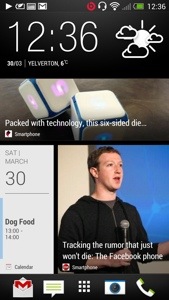
Following yesterday’s first impressions of the HTC One, I have spent more time with it, reading the manual, and tweaking the home screens. The next part is also live click here for part 3 Blinkfeed is not my default home screen. It is the HTC clock/weather widget. Blinkfeed is to the left, and other widgets on the right. See below. I just can’t decide between whether to keep Blinkfeed as my default home screen. I’m not turning it off as I really like it. It brings up so much useful info and its possible to reply straight from it too. Screen shots below of my 3 screens. You can add more home screens if you want but 3 is ample for me.

20130330-130727.jpg

20130330-130754.jpg

20130330-130811.jpg

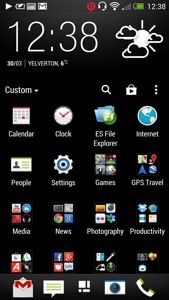
I have also included a screen shot of the application folder. If you slide down it reveals the settings, play store icon, search and custom. Custom allows you to set up folder as you like. Other options include alphabetical and most recent.

I learnt today that you can have different types of lock screens, productivity, wallpaper, photo album, music, and no lock screen. I currently use productivity which will display all my notifications at a quick glance. I quite like the idea of no lock screen. Obvious solution for quick access if you want it. Other things I have done is turn trace on in the keyboard settings so I can slide across keyboard to enter text. I was trying to work out how to change the lock screen shortcuts and now have realised they are the same shortcuts as your home screen launch tray.

I have been using the phone for 8 hours with headphones in for a few hours and battery is down to 60%. I was also out earlier so took a photo or two. Need more practise with all the camera settings, filters, Zoe but it all seems pretty good. They only downside of the camera is distance landscape. The 4mp lens cannot give enough detail so zooming in is not as clear. However, what the camera does is a great shot first time nearly every time. Landscape shot below.

20130330-132641.jpg

The photo is not full resolution above. But talking of resolution you can take loads of photos and not run out of space. Also uploading to Dropbox over 3G is not an issue as file sizes are anything from 700kb to 2mb.

Here’s a photo taken in pitch darkness. This is the power of the HTC One. See bottom shot.
I mentioned above I have been listening to my music. The quality of the One is very good. I’m really enjoying it. Also, as you play a track, Gracenote is accessed and if available the song lyrics are shown and highlighted as song, with some fancy colourful effects moving to the music beats.

So far so good..

20130331-075158.jpg

Camera effects post is here

Part 3 is now live. Click here,

Apple iCloud still not good enough for developers

You watch the TV ads and you see an app, song, or photo being bought or snapped. Next you see the app, song or photo appear on another Apple device, as it by magic. That does happen and in my experience happens very well.

However, many third-party developers are hopping mad at what they describe as Apple’s failure to make iCloud seamlessly integrate and sync up with third-party application data. Developers are saying that Apple has failed to improve the way it syncs databases (‘Core Data’) with iCloud. The problem is compounded as customers are requesting iCloud integration.

Lets hope iOS 7 addresses these concerns of the developing community.

Google Translate updated – now offers offline translation

now offers offline translation.

The new version supports Android 2.3 Gingerbread and above, and languages can be downloaded from the new “Offline languages” menu. A word of warning — downloading an entire language to your phone takes just as much space as you’d imagine. With only English and French installed, this would take up over 260mb of internal storage.

There are also some limitations to offline mode being that it’s currently text-only, so voice translation and image translation don’t work offline. However, I great update nonetheless.