Category Archives: Tech News

Microsoft Lumia 950 XL – Camera Shots and Further Thoughts from the Weekend

Microsoft Lumia 950 XL - The end of an era

Over the weekend I decided to use take the Microsoft Lumia 950 XL on a hike with my 3 labradors across Dartmoor.

I would learn how to use the camera as I walked through the rugged terrain of Dartmoor. If I am being honest, the camera app is really easy to use and most of these shots below were taken in auto. I did notice how readable the screen was in the bright sunlight. Actually, the lighting was particularly hazy so I was unsure how the shots would turn out. I also had my Samsung Galaxy S7 with me and after comparing shots from both phones, it was the Lumia 950 XL that took the better quality photos. Part of the magic is the Lumia’s Rich Capture Mode that performs some nifty post processing on each photo shot. This does mean the odd saving message, especially when using burst mode.

Anyway, below are some of the shots snapped from the weekend.

High speed cornering by George #lumia950xl

I really like this one of George. He was runninig really quickly and sort of cornering at the same time.

George says "hello" #lumia950xl

The overall balance and colours of this photo are absolutely spot on.

George & Fury blasting off #lumia950xl

Another high speed shot and beautifully balanced with accurate colours.

Merrivale Stones, Dartmoor #lumia950xl

Merrivale stones captured in all its glory. Perfect true to life shot again.

Sunshine & Shade #clouds #Dartmoor #lumia950xl

The shade and sun along with the clouds are captured brilliantly.

Scenes around St Michael & All Angels Historic Church #lumia950xl

And finally a shot of my local church.

The Microsoft Lumia 950 XL impressed me with the image quality over the weekend. Also, I have been viewing photos that other people have snapped using RAW which looked mighty amazing. So now, I will attempt to see if I can get close to some of their masterpieces and hope to bring you some of my handy work in a future post.

If you have any questions on the Microsoft Lumia 950 XL please let me know.

Piper NV Smart Security Alarm with HD Video Camera review

Piper NV Security camera

Welcome to my review of the Piper NV Smart Security Alarm with HD Camera. The Piper NV system costs £229.

Piper NV Security camera

I have now had the Piper NV for over one month before writing this review to try and see how it performs over this period.

Key Specifications

The Piper NV is a device that lets you manage and connect with your home. For starters the camera is a 180 degree HD affair. You can set the device up to capture video and send it to your phone when doors are opened and more. Notifications are customisable. You can add home automation accessories to Piper to control lights and appliances remotely, with no monthly fees or contracts. The HD camera is excellent quality and I could see everything with ease.

Setting up the Piper was as easy as downloading the app, create an account, run the setup and connecting via wiFi. There are customisable security modes: home, away and vacation. The Piper NV includes motion, sound detection, a high quality microphone and a super loud 105db siren.

With the camera you have options to pan, tilt, zoom and split screen while watching live or recorded video with pan, tilt and zoom capabilities. You can even split your screen into four independent viewing zones. On top of all that there is two-way audio.

What makes Piper NV more useful is support for Z-Wave home automation accessories. I linked up some Z-wave window and door sensors into the app and system. You can connect up to 5 Pipers.

So apart from Z-wave support the Piper NV system also support IFTTT integration. Using IFTTT I was able to get the Piper to automatically arm or disarm according to three factors:

1. Geolocation – e.g. if I was on my way home, then Piper could disarm

2. Time – e.g. at a certain time it could disarm or arm.

3. Connection to Wi-Fi – e.g. if I left home with my smartphone the Piper would arm itself

But auto arm and disarm isn’t the only IFTTT recipe. The options are only as limited as your skill with IFTTT.

During the month, the app got updated. This provide the app with a fresh new theme and provided a more streamlined experience due to –

· More intuitive layout with three tabs – Dashboard, Events and Rules

· Security modes have been simplified to ‘Armed Away’, ‘Armed Stay’ and ‘Disarmed’

· Piper View – view a live feed of all Pipers that you have linked

· Panic Slider – trigger the blaring siren directly from the dashboard

· Wireless accessory drawer – quickly see the status of every wireless accessory you have connected

· Faster app start-up

· Enhanced setup experience

If the power goes, the device does have battery back up. Also Piper offers cloud storage for up to 100 snippets of recorded events at no additional charge. That’s really cool.

One aspect which would impact the service would be if Piper NV servers were out of action. This would be the same for most other systems too.

Because I live on Dartmoor which is rural and has low internet speeds, I did notice a time delay of 10 seconds from sending an audio message to the message being pumped out of the Piper NV. A faster internet connection will improve this situation.

Final Thoughts

Overall this is a versatile security system and without any monthly charges. Recommended.

More information and the latest deals on Amazon UK – Click HERE.

Xiaomi Mi Max – Review – A Giant of a Phone

20160525_145852

Welcome to my review of the Xiaomi Mi Max.

Key Features

Yesterday my Xiaomi Mi Max arrived. It is a monster.

– Dimensions – 173.1 x 88.3 x 7.5 mm
– Weight – 203g
– SIM Dual SIM (Nano-SIM, dual stand-by / or combo with micro SD)
– Screen 6.44 inch , 342 ppi , 1080p IPS
– Gorilla Glass 4
– 3/4gb ram 32/64/128gb storage
– IR Blaster
– Gorilla Glass 4
– 16 MP, phase detection autofocus, dual-LED (dual tone) flash, 5mp front
– FM Radio
– 4,850 mAh battery

Phone Basics

I have the 3gb 32 storage, Snapdragon 650 Mi Max. There are larger storage options along with 4gb ram and also a Snapdragon 652. In day to day use the Mi Max has been fluid with no hickups. Screen viewing angles are excellent and sunlight visibilty reasonable too. I have no bluetooth, wifi or other issues either.

The Mi Max comes a Chinese rom. Hopefully, it won’t be long for a Global rom. With the Chinese firmware, despite selecting English in the language menu, Chinese text does appear in certain apps and menus. This hasn’t stop me setting up the FM Radio channels, the Mi Remote (infra red blaster) for my TV and a lot more. The loudspeaker is mono, goes fairly loud and sounds quite good. Headphone audio is excellent. My Sennheiser HD598se were powered with relative ease.

To make this work with Google services, you will need to install Google Play Services APK. This is available from the Xiaomi forums within the Mi5 section. After installing this, you will need to go to the Download app and change WiFi limit size to unlimited, go to the security app and allow all permissions for all the Google apps and services, and allow all the Google apps and services to auto start. Then reboot. Obviously, once a global rom arrives, Google Play services will come preinstalled and minus a lot of the Chinese bloat.

MIUI v7.3 is installed and this will be upgraded to the new MIUI v8.

Battery life is wonderful. Full brightness. Everything on. And still loads of juice left at the end of the day. Every phone should have a 4,850mAh battery! Viewing media on the 6.44 inch screen is fantastic too.

Camera

Both the front and rear cameras take good photos. The front has several selfie options and I was pleased with the results. The rear camera took great photos in good light. The quality dropped in lower light. In its manual mode it only has a maximum shutter of 0.25 seconds. The camera has lots of different shooting modes shown in my video review further down. It is worth noting that optical image stabilisation is not present.

Camera Samples

Views around Princetown, Dartmoor #Xiaomi #MiMax

Lovely colours with this shot above.

Views around Princetown, Dartmoor #Xiaomi #MiMax

My local church above with HDR off.

Views around Princetown, Dartmoor #Xiaomi #MiMax

Now with HDR on.

Views around Princetown, Dartmoor #Xiaomi #MiMax

The camera is able to focus on specific areas with relative ease.

Video Review


Conclusion

At around £250 this is an amazing piece of hardware and once the global rom arrives will be even better. It also is a giant of a phone yet still manageable.

Reviews coming up next week

Just a quick update on some of next weeks reviews. These will include –

– HTC 10 smartphone
– Piper NV Security System
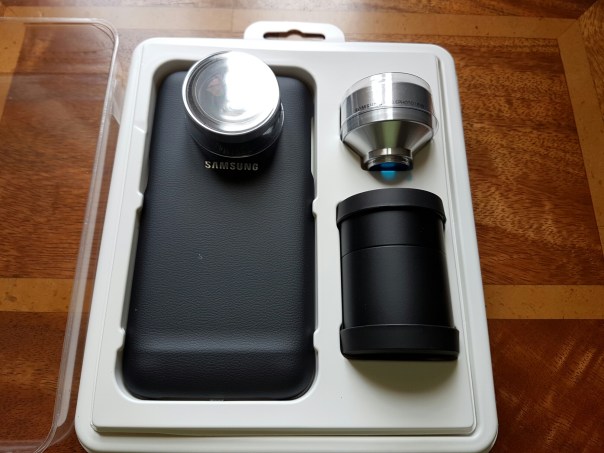
– Samsung Lens Cover for S7 and S7 Edge
– Mini reviews covering aspects of the Microsoft Lumia 950 XL
– Video Review of the Xiaomi Mi Max

So if you’re shopping on Amazon you can help Gavin’s Gadgets towards the running costs at no extra difference in price simply by click the respective links below.

Amazon UK Link

Amazon US Link

Xiaomi Mi Max – First Impressions and Camera Samples

20160525_145852

It has been 24 hours since the Xiaomi Mi Max arrived. It is an absolute beast. Currently, I am running the Chinese rom as the official global rom is not available. This meant side loading Google Play Services which was a fairly simple affair once I used the correct apk installer. I have now installed around 100 apps/games from the Google Play Store.

One of the drawbacks of using the Chinese rom is despite selecting English in the language settings, Chinese text does appear in certain apps and menus. This hasn’t stop me setting up the FM Radio channels, the Mi Remote (infra red blaster) for my TV and a lot more. The loudspeaker is mono, goes fairly loud and sounds quite good. Headphone audio is excellent. My Sennheiser HD598se were powered with relative ease.

Battery life is wonderful. Full brightness. Everything on. And still loads of juice left at the end of the day. Every phone should have a 4,850mAh battery! Viewing media on the 6.44 inch screen is fantastic too.

So what about the camera? Well below are some samples I snapped yesterday. Click on each photo if you want to pixel peep at the original.

Views around Princetown, Dartmoor #Xiaomi #MiMax

Whilst perfect conditions for taking photos. I felt the shots were good. Just look how vivid the colours are on the telephone box, yet the sky is the correct shade of blue.

Views around Princetown, Dartmoor #Xiaomi #MiMax

Shot of my village centre.

Views around Princetown, Dartmoor #Xiaomi #MiMax

Now this is my local church. HDR was off.

Views around Princetown, Dartmoor #Xiaomi #MiMax

But with HDR on, the shot is vastly improved.

Views around Princetown, Dartmoor #Xiaomi #MiMax

The Mi Max has tap to focus. So I tried focusing on the graveyard in the distance and it worked.

Views around Princetown, Dartmoor #Xiaomi #MiMax

So now I focused on one of the bars. And it worked again. So far I have been impressed by the camera.

More soon on the Xiaomi Mi Max.

Microsoft Lumia 950 XL – First Impressions

Microsoft Lumia 950 XL - The end of an era

Despite the sad news coming out of the smartphone division of Microsoft, I now have a Microsoft Lumia 950 XL to evaluate along with the dock to connect to a screen via HDMI for the next few weeks, thanks to Steve Litchfield.

So, I powered up the Lumia 950 XL, entered my Windows credentials and shortly was asked if I wanted to restore from an earlier Windows Phone backup from an old device I had used previously.

This time, I choose new setup. I left the phone for a few hours to update and download a few apps.

The 950 XL I am testing has a gold edge and red leather back cover which really feels great in the hand and looks somewhat premium too.

Microsoft Lumia 950 XL - The end of an era

Live Tiles. Oh how I missed them. I don’t know what it is, but I really do like the live tiles interface. I also have had a little play with the camera and in my brief testing it does seem rather good. More over the weekend on the camera and other aspects next week.

The Next Tech Addicts Podcast is Live – with Gareth, Jay, Sam and I

wp-1460657590183.jpg

Tech Addicts Podcast is back again with new episode starring Gareth Myles, Jay Garrett, Sam Pullen and I. Tech Addicts is released every 2 weeks.

To listen to the latest episode subscribe by searching “Tech Addicts” within your favourite podcast app, iTunes or use the URL “mobiletechaddicts.libsyn.com/rss” to add directly.

Alternatively, just click listen via the embedded player below.

Have fun listening!

Samsung Lens Cover Camera Samples and vs LG G5 Wide Lens

wp-1464165578144.jpg

Yesterday I received the official Samsung Protective Lens Cover for my S7. Samsung also sell this for the S7 Edge.

Below are some camera samples and comparisons with the LG G5. To view full size click on each photo.

Samsung S7 – No lenses used. Snapped at 4:3. Cropped to 16:9.

Along the Two Moors Way, Warren House Inn #SamsungS7 #LensCover

LG G5 – 16mp

Along Two Moors Way #LGG5

Samsung S7 -Wide Lens attached

Along the Two Moors Way, Warren House Inn #SamsungS7 #LensCover

LG G5 – 8mp Wide Angle Lens

Along Two Moors Way #LGG5

Samsung S7 – Wide

Along the Two Moors Way, Warren House Inn #SamsungS7 #LensCover

LG G5 – Wide lens

Along Two Moors Way #LGG5

Samsung S7 – Telephoto Lens

Along the Two Moors Way, Warren House Inn #SamsungS7 #LensCover

Along the Two Moors Way, Warren House Inn #SamsungS7 #LensCover

Along the Two Moors Way, Warren House Inn #SamsungS7 #LensCover

I have since discovered that apparently the wide angle lens can also be used for macro shots. This I need to test still. The Telephoto lens can suffer light flare easily, but this can be removed by blocking the light hitting the lens awkwardly.

All the S7 shots were originally 4:3. I just cropped then to 16:9. I really liked the dog burst shots taken with the telephoto lens. The wide shots were as expected. Quality seemed similar to the LG G5, although in places the edge does go to the S7 with the lenses attached. However, if you have the LG G5, you don’t need to attach anything.

The actual case for the S7 is a very strong and sturdy affair and even has a raised grip section on the right back end. Neat touch.

So what do you think? If you head over to my flickr I have created a dedicated album. The dog shots were all taken with the telephoto lens. CLICK HERE.

A Sad Day for Windows Smartphones – 1,850 jobs cut at Microsoft – Viewpoint

Via the Telegraph

Microsoft will cut as many as 1,850 jobs and take a new impairment charge as Chief Executive Officer Satya Nadella pares back the company’s ambitions in smartphones.

The company will take a $950 million (£650 million) impairment and restructuring charge, including $200 million for severance payments, Microsoft said. About 1,350 jobs will be cut in Finland, the base of the handset business it acquired from Nokia in 2014.

Nadella has already written off most of the $9.5 billion Nokia deal led by his predecessor Steve Ballmer, shifting its Windows phone strategy toward business customers as it struggles to compete with Apple and the Android operating system.

Microsoft already indicated a few days ago that the Lumia 950 will be the last Lumia. And now it is decimating its smartphone division. Is this game over for Microsoft and its Windows Phone Mobile hardware? Maybe. Or it just needs time to get the Universal apps sorted and come back fighting with new mobile hardware that truly innovates and doesn’t need a new app store, as it has Universal apps.

Whatever happens in the future, it doesn’t help all the employees who are about to lose their jobs.

And today I will be receiving a Microsoft Lumia 950 for review. Thanks to Steve Litchfield for the loan.