Category Archives: Tech News

HTC One – Daily Blog

In my review I mentioned the HTC Music player and how once playing a song it can display all sorts of fancy visualisations and obtain the lyrics for the song playing, but I never attached a screen shot. Well this is the song playing with lyrics.

20130406-101105.jpg

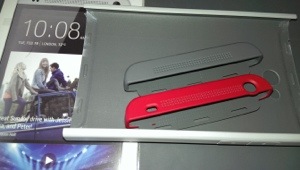
I have been looking at cases and screen protectors. At present the options are limited but I did get the HTC Double Dip hard case and HTC Official screen protector. Whilst the HTC case is fine, I have grown to dislike it. It takes away the beauty of the phone. And the HTC screen protector is crap. It doesn’t fit properly. On both edges the protector is not without air underneath. It just won’t stick down properly. Poor fit. Otherwise its ok. So I’m in two minds now whether to forget using a case and screen protector. I have got a slim silicone case on route so I will decide then.

20130406-104411.jpg

The other thing I noticed after fitting the screen protector is that it affects the capacitive buttons. Sometimes the don’t work first time and it is the screen protector that causes this. So I removed it.

Turn iBooks into audio books using Siri

First go to Settings > General, then scroll down to Accessibility. Tap Speak Selection, slow down the speaking rate a bit to make Siri’s reading somewhat more natural sounding, and then turn on Highlight Words so that you can see where Siri is reading in the iBook.

Now head over to the iBooks app and open the book you want to hear. Tap the aA icon at the top right of the iBook display, and tap on Themes. Of the three choices, select Scroll. Next, tap a word in the book to select it, then — while holding your finger down on the drag handle — scroll down through the text as far as you want.

Once you’ve selected the text, a menu appears. Tap Speak, and Siri complies by reading your book. Should you need to pause the reading, just select another piece of text and tap on Pause from the menu that appears.

HTC One – Daily Blog

Welcome back. As before click here for my reviews and more on HTC One .

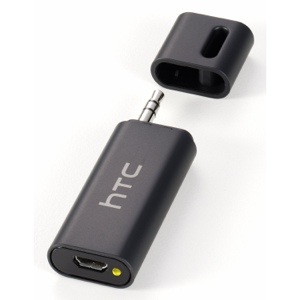
I had ordered via Amazon the HTC A100 Car Bridge adapter.

20130406-093209.jpg

This is a great little piece of tech. Basically if you don’t have a Bluetooth enabled car stereo but you do have an audio input jack, plug this in, then stream your music via Bluetooth from your HTC One to this device and it then plays through your car stereo. Also worth mentioning is the A100 has the apt-x codec for high quality Bluetooth stereo sound, which is handy as the HTC One has this as well. Makes a huge difference to the sound quality. As a point of reference the iPhone 5 doesn’t possess this codec.

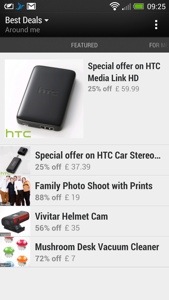
I was quite pleased to buy it from Amazon, as it was £5 cheaper than anywhere else at £45. To my annoyance, I had the Best Deals app (installed as standard on the HTC One) pop up on Blinkfeed with daily deals, and the HTC A100 was £37.99. £7 cheaper than Amazon. So I cancelled my Amazon order and ordered it through the Best Deals app.

20130406-094113.jpg

When I get this, I will let you know how it works.

I used Google Navigation on the One today, and apart from the clarity of the screen, the front speakers are so clear it makes it seem the person is there talking to you.

Seriously you cannot underestimate what a difference the front speakers make to the HTC One experience.

Nokia Lumia 928 breaks cover

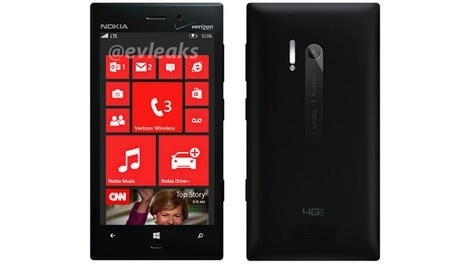
This didn’t take long to break cover, the Nokia Lumia 928 is a slightly upgraded version of the 920. It features a slimmer and slightly lighter body than the 920.

What is of importance is the phone will feature a xenon flash, which obviously will make a big difference to low light photos.

However, if you are thinking about getting a windows phone, it is worth checking out the Lumia 620. This can be bought for a fraction of the price, and is a great phone for the price.

20130407-184811.jpg

Protect your Apple ID

Apple now offers two stage security verification. So :-

Go to the My Apple ID page
Select “Manage your Apple ID” and sign in
Select “Password and Security”
Under Two-Step Verification, select Get Started and follow the on-screen instructions

You will need to change your password and not use one you have used in the last year.

It a simple process and takes about 3 days to verify. So in future when you do stuff involving your Apple ID you will be sent a code to your phone which you then use to confirm it is you and not some stranger hacking your details.

HTC One – Daily Blog

Since I now have reviewed the HTC One in every way possible, I’m just going to do a short post now, noting on new findings and experiences.

First up, here’s the links to all the previous HTC One reviews and more.

I discovered a setting in the default web browser. Go to the web browser settings, accessibility and tick “dim screen while web pages loading”. A nifty battery saving tip.

I have changed the auto brightness off. It’s too bright. I have a manual setting which works just fine.

The HTC One also has USB on the go. So far I have tried connecting a USB memory stick and a small USB hub all of which worked fine. Unlike my Samsung Note 2 you do have to go into settings, storage and tap unmount USB before detaching from the phone.

I also tried connected a Fiio E17 headphone/dac via USB. This worked really well, and I am pleased that the HTC One has USB audio out as a standard feature. As a comparison you can get USB audio out from the iPad Mini, iPhone 5 and older Apple devices, but as Apple control the authentication aspect, any USB DAC subsequently costs a premium due to the royalties Apple charges and their bespoke connectors. At least with the HTC One it is using a worldwide standard micro USB connection.

Connecting the Fiio E17 via USB to the HTC One, and using the DAC on the Fiio you begin to realise just how capable the One is in the audio department. Truly astonishing. And for the full affect you can use the Fiio E17 as a USB DAC only and feed the signal to the Fiio E12 Mont Blanc Portable Headphone amplifier, as shown below.

20130405-224648.jpg

20130405-224722.jpg

Just to clarify for those not as technically minded, plugging the USB on the go cable (thats the small black cable coming out of the One) into the HTC One, then enables you to connect the digital analogue converter, and then that sends the analogue sound to the portable power amp. Your headphones plug into the portable power amp. Using this method bypasses the built headphone amp, DAC & Beats on the HTC One, but does provide a much cleaner and even better audio. No sound comes out of the speakers or headphone jack with this connection setup either.

And the USB on the go cable also allows you to connect USB mouse, keyboard and more. I’ve only tested the USB audio and memory sticks but I’m fairly sure the others will work too.

Nespresso App for android and iOS

Nespresso is a wonderful coffee machine. They have also made ordering more coffee capsules as easy as possible. You can download their free app for android, iPhone and iPad browse at your hearts content, and order your coffee capsules.

Where the app becomes somewhat slick, is that it allows you to browse your previous orders, and then click add previous order to cart, hit pay, and voila. So if you order the same capsules all the time from start to finish takes less than 22 seconds.

But it gets even better.

I ordered using the app at 2.15pm on Bank Holiday Monday. The coffee got delivered at 6.45pm the next day.

If only everything was that quick and easy.