Category Archives: Tech News

Pebble Watch – review – a novel piece of technology

Over a week ago I received the Pebble Watch in black. It is currently only available from Pebble directly, so if you live in the UK, custom charges will get added to the overall cost.

First some key facts about the Pebble Watch.

– Battery life is quoted at 7 days plus. I got 6 days on my first run. I suppose it depends how often you use it, but it certainly doesn’t need constant charging. A USB cable magnetically clips on to the side of the watch and then charges off a USB port.

20130610-105701.jpg
– Watch faces are changeable and the display remains on all the time. In direct sunlight you will still be able to read the screen with ease. There are hundreds of different watch faces.
– The Pebble watch is waterproof to 5 ATM. So you can go swimming, wash dishes etc. The screen is also covered with a scratch resistant coating. The watch strap is a standard 22mm size, so is easy replaceable or changeable to something of your own choice.
– It has a backlight for night viewing. This can be activated by movement.

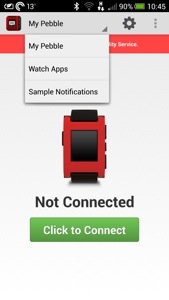
Setting up is a simple affair. Download the app from either the Google Play Store or Apple AppStore. Yes, it works both on android and Apple iPhones. I used the Pebble with my HTC One but it will work with the iPhone 3GS, 4, 4S, 5 or any iPod Touch with iOS 5 or iOS 6. (iOS 5 and iPhone 3GS have restricted feature sets). Android devices running OS 2.3 and up. Works great with Android 4.0 (Ice Cream Sandwich)!The Pebble app interface looks as follows :
20130610-110215.jpg
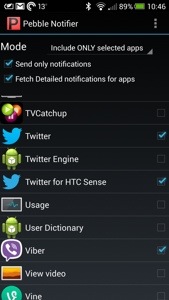
You simply turn on Bluetooth, and activate accessibility settings, pair and voila. Next you can select what type of notifications you would like to receive. With android, there is a third party app Pebble Notifier that allows you to add any app. See screenshot.
20130610-110355.jpg
Some of the basic notifications available are –
– Incoming Caller ID
– Email (Gmail or any IMAP email account)
– SMS on both Android and iPhones
– iMessage (iOS only)
– Calendar Alerts
– Facebook Messages
– Twitter
– Weather Alerts
– Silent vibrating alarm and timer

Some of the more interesting uses is letting the Pebble watch access the phone’s GPS. This allows the watch to show your running speed, track, or show information while golfing.

So what’s the impact on your phones battery life. I would say about 5%.

So what’s it like to use? Well it’s been rather good in some ways and not so in others. The negative is the look of the watch. It is not sleek and elegant, but maybe some will like a more bulky fit. Here it is on my wrist.

20130610-111325.jpg
The positive aspects are being able to browse at notifications on your watch and then decide which ones are worth responding too. You cannot respond from the watch, just view. In the car, or out and about being able to control my music was excellent. Pause, play, next or last track. I was surprised how useful I found this. Also in the hot sunny days, it has been a breeze reading the notifications as the Pebble screen loves sunlight. Other wow moments were playing an action game full screen, when suddenly you hear a text bleep. Instead of quitting the game, I just glanced at the watch and could then decide if that person was important enough to respond.

I have found it simple to use and I overall a fascinating experience. However, it is not something I would normally have bought, it was more curiosity that made me purchase it.

Wireless Charging comes to the Samsung S4

image

Samsung’s wireless charging kit for the S4 is one option that is now available in the US. It uses the Qi wireless charging standard, so if you already have a Qi charger, all you’ll need to do is grab the backplate for $39.99. Otherwise, you can also snag the charging pad for $49.99.

$90 for wireless charging is expensive, especially as some phones have it built in as standard and a spare plug to charge the phone is only a few dollars.

Update – its now in the UK via MobileFun for £40.

BMW will incorporate Siri and S Voice into its 2014 cars

Siri will be a standard option in 2014 BMWs thanks to an update to BMW iDrive, the car maker’s integrated mobile interface.

The update will enable BMWs to interact with not only Apple’s Siri in Eyes Free mode, but also Samsung’s S-Voice Drive mode. Users will be able to press a button on the steering wheel and, once the digital assistant has activated, dictate messages, send calls, and use other voice command options. BMW’s system is also compatible with apps like Pandora, Stitcher, Rhapsody, and Glymps.

But it’s useless as it can’t iron my shirts or make my tea.

Is Windows Phone 8 about to get a notification centre?

When I used my Nokia Lumia 620, the one omission was notifications. Once they had appeared they disappeared unless you had a live tile with an update showing. Based on the leaked screenshot by a reddit user it looks like that will be addressed on a software update.

With the improvements in the quality of apps this piece of the jigsaw will make the platform a decent option. I really enjoy using Windows Phone with Nokia hardware.

image

The hidden features of iOS 7

iOS 7 beta is just out but here are some of the more interesting features not covered –

– the Clock app is a live tile that features the actual time

– Spotlight has moved. Pull down from within app grid to reveal Spotlight. Pull down from top to reveal Notification Center.

– per app settings for cellular use

– twitter and Facebook posting via notification centre has gone for now

– Ability to block users in Phone, FaceTime and Message apps

– Improved mail search

– New smart mailboxes

– Notification sync

– FaceTime audio

– Per app VPN

– Activation lock

– View PDF annotations

– Inclinometer

– Long MMS support

– Maps bookmark syncing

– Chinese-English bilingual dictionary

– Handwriting recognition for multiple Chinese characters

– Do Not Track option in Safari

– App Store volume purchasing

– Enterprise single sign-on

– Italian, Dutch and Korean dictionaries

– Tencent Weibo

– Wi-Fi Hotspot 2.0

– Night mode for Maps

– Managed app configuration

– Smart downloading of TV episodes

– Turn-by-turn walking directions in Apple Maps

– Newsstand can be placed inside a folder

– Live home screen icons

I will update as I find more.

Here’s how to get iOS 7 beta 1 without a developer account

Want to test the beta of iOS 7 and don’t have a developer account. Well this method currently works. Be warned installing a beta can destroy your iPhone and make it become unreliable. Install at your own risk.

What you’ll need to do is install a fresh copy of iOS 6 on your device, then to acquire the iOS 7 beta 1 IPSW file, simply hold down Shift on PC or Option on Mac while clicking the Update button in iTunes. Then, select the iOS 7 beta file and you should be able to update your device to the latest software version. iOS 7 is compatible with iPhone 4, iPad 2, iPad mini and iPod touch 5th gen or later.

The new mac operating system – OS X 10.9 Mavericks – what’s new

So apart from iOS 7 Apple introduced Mavericks. I better cohesion between the iDevices and Macs. So what’s new?

-OS X names will now be California-themed
-New Finder Tabs
-Tags for files – keep track of files by adding a tag in OS X
-Multiple Displays – much more powerful. Menus and dock appears on both displays.
-OpenGL 4 support
-Time Coalescing – helps improve your CPU efficiency by up to 72%
-1.5x faster at waking a system from standby
-Accelerated Scrolling optimized for Retina displays
-AppNap – lets you pause apps to prevent battery drain
– Developer beta preview available now
– Released September / October

– Safari – New Sidebar with reading list, bookmarks and shared links, Big performance improvements, 1.44x faster in SunSpider JavaScript benchmark than Chrome and Firefox, Improved CPU energy uses, iCloud Keychain which links in with your iPhone or iPad. This remembers your website logins, credit card numbers and more. It can suggest to auto-fill your forms for you with private info too.

– Notifications – Reply to iMessages, Email, FaceTime calls right from desktop, Get push notifications from iOS apps on your Mac (that’s your iPad, iPod or iPhone ), Tells you what you missed on your lock-screen, Apps update in the background.

– Maps for OS X – Street Maps, 3D Flyover, Info cards, Turn-by-turn directions, Send directions to your iPhone which appear on the lockscreen ready to use.

-iBooks for Mac – Access to 1.8 million books in iBookstore, Read books from your desktop or iOS,
Interactive books just like in iOS.

– iWork for iCloud – Create iWork docs from a web browser, Works on OS X or Windows, New iWork releases coming to Mac and iOS later this year.

With all the new features the integration between all Apple hardware becomes closer and closer. The user experience of the Apple Eco system is set to raise to new epic levels.

The new MacBook Air and Mac Pro

At Apple’s Keynote speech they launched 2 new devices. The MacBook Air and Pro.

The MacBook Air

20130610-211652.jpg
– All-day battery life thanks to Haswell processor
– 2X GPU execution units with 40% faster graphics
– 11-inch MBA will have 9 hours of battery life
– 13-inch MBA now has 12 hours of battery life
– 45% faster SSD storage
– Faster WiFi 802.11ac card
– 11-inch starts at $999 with 128GB storage
– Ships now

Mac Pro

20130610-211943.jpg
– New unified thermal-core body
– Intel Xeon with up to 12-core
– Fastest ECC memory
– PCIe Storage that’s 10x faster than any previous Mac Pro drive
– Thunderbolt 2 support. 20GBps throughput
– Dual workstation GPUs
– 4k display support
– 1/8th the size of old Mac Pro
– Made in the USA and coming soon

Two great new products to add to Apple’s range of hardware.

Apple Keynote stats

The key facts from Apple’s Keynote –

– 600 million iOS devices sold to date
-24th WWDC with attendees from 66 countries
– 6 million registered developers
– WWDC sold out in 71 seconds
– 1 million daily vistors at the 407 Apple Stores in 14 countries
– 50 billion apps download from the App Store
– 300 million iTunes in the Cloud users
– 900,000 apps in the store
– 375,000 iPad apps
– 575 million App Store accounts (more accounts with credit cards than any store)
– $10 billion has been paid to developers ($5 billion just last year)
– 72 million Macs installed
– 28 million copies sold of OS X Mountain Lion
– 35% of Mac users are now using OS X 10.8

Some serious numbers!

iOS 7 – all the new stuff – and there is loads

Apple demonstrated iOS 7 at WWDC yesterday, and it certainly looked fresh. Massive attention to detail and over 1,500 new API’s for developers including support for game controllers. So what was new –

-Completely redesigned interface
-New Lockscreen
-New translucency and Parallax allows you to see layers of info
-Weather app has interactive displays
-Calendar has new minimalist UI
-Multiple page support in Folders
-Notification Center now available on Lock Screen
-FaceTime audio calls
-Notification syncing
-Phone and Message blocking
-Activation lock disables phone if stolen
-iPhone beta available now to developers
-Coming September / October

-Control Center – Swipe up from bottom of device to access toggles quickly, turn on Airplane Mode, adjust brightness, AirDrop and more.

-Multitasking – New interface shows app cards, Multi-tasking for all apps with great battery life,Puts apps into scheduled background cycles, Adapts to network conditions.

-Safari – New full-screen look, Pull down from top brings up smart search field, iCloud Keychain support

-Camera – Redesigned UI, New filters, Accessible from Control Center

– New Photos App – Collect photos into ‘Moments’ based on location, date, or people, Look across photo collection by pinch-to-zooming through Photostream, Share photos via AirDrop, Twitter, Facebook, iMessage, See comments from people you’ve shared the picture with directly in image

– AirDrop – Share images with friends, System-wide support with apps with share-sheets, Works on iPhone 5, iPad 4, 5th Gen iPod Touch

– Siri – New interface with wave animation, All new female and male voices, Can now control more of your device such as adjusting brigthness, Wikipedia and Bing search results integrated directly into Siri

– iOS in the Car – Get iOS on your car’s dashboard screen, Get directions, play music, have iMessages dictated to you and more, eyes free,Supported by more than 12 car manufacturers in 2014

– App Store – Search for apps by age range, Find apps based on current location, Apps are updated automatically

– iTunes Radio- Built directly into iOS Music app, Featured Stations stream music based on its theme., Share stations with friends, or create your own based on favourite artists, Preview and purchase songs directly in the app, Support on Mac, PC, iPad, iPhone, iPod Touch, and Apple TV
Free for all users, Completely ad-free for iTunes Match subscribers, Launches in the U.S. at first with other countries following later on

This is just the summary of the new features. The keynote speech highlighted many others, and the design elements were fantastic. And with 1,500 new API’s more is clearly available but not known yet.

So what did you think?

Below are some samples of the new look and screens.

20130610-204636.jpg

20130610-204643.jpg

20130610-204648.jpg

20130610-204654.jpg