Category Archives: Reviews

Samsung Note 3 – 3 months later review – day 6

Before you think to yourself, “I don’t remember reading day 4 and 5” you would be correct as I skipped 2 days.

I thought I would leave a few more days to see how things have progressed. Sadly, I’ve giving up on the Note 3 and I am back with the iPhone 5S. No that’s not true and I know some of still believe I will fall back to the iPhone 5S.

Using the Note 3 now is becoming a pleasure and not a frustration. I am still waiting for Google to update their Play Music app so I can stream my tunes and for for the official twitter app to allow me to receive notifications. Update. I fixed this. See separate post. Apparently twitter need to clear my cache but there support service is dreadfully slow.

Samsung’s WatchOn app remote control now operates my TV and DVD player properly and has a shortcut widget on the lock and home screen which is very handy.

And to reset or switch off and back on I have to untick allow scanning in the advanced wifi settings to avoid a reboot loop. Apart from that it’s faultless.

In the meantime, I am using Robird for twitter, a pleasurable experience, and for low light shots A Better Camera App that allows the Note 3 to take great low light photos providing their is no movement and you are using a tripod or similar. In fact, this app using the Hi-Res Night mode can produce some crazy good quality shots.

I have started to tweak everything a little bit more and I am finding everything just works a treat now. It was a painful beginning but it is starting to provide dividends.

Even the free music offer which at first didn’t work, just did yesterday when I tried again. Human error probably but it wasn’t as obvious as I would have thought. I also found a free game Monster University for Note 3 users available on the Samsung Games stores. I also have a different view of the Samsung Hub. Whilst it is not perfect, it does cover all aspects of media and is definitely Samsung’s next strike to remove itself from Google’s services in the future.

With the Note 3, Samsung included a wealth of extra software and third party software services which makes this whole proposition really hard to refuse.

I have activated Find My Phone and Sim Activation Lock. Scrapbook which I thought was a gimmick is actually wonderful to use. It provides a fluid way to clip and record properly items of interest.

Screen and battery life and amazing. I have nearly every option turned on from air gestures, to motion and smart options. The small on screen floating apps are useful although not many of them. Handy for the calculator and whatsapp. Using Flipboard, My Magazine, Business Week and other news type apps is a joy due to the large screen. I never really bothered with Flipboard on the iPhone but it is lovely to view on the Note 3.

I have now added gestures with Nova Launcher so double type, and one or two finger swiping up and down launches specific apps, saving time.

There is no away I can see myself drifting back to an iPhone despite all its positives. The Note 3 is leagues ahead in many ways and the honeymoon period is just improving.

Fix – If you have Google Play Music and a Note 3 with silent tracks occurring

At the weekend I connected a usb dac and amp to the Note 3. When I made the connection it triggered the emergency assistance function on the Note 3.

This function sends a MMS message to whoever you setup in the settings. The message includes your GPS location and a Google Map link. In addition the front and rear cameras take a simultaneous photo and off everything goes. Well, you can imagine my surprise when one of my emergency contacts calls me and tells me I need a shave and could they have one of the chocolate biscuits on the table.

I realised that every time I connected the usb dac the same thing happened.  So I turned off that option and no more emergency messages.

That got me thinking about my current issue with Google Play Music, whereby it kept going silent after one or two songs but was still playing , and only fixed by pausing then pressing play. I wondered if the emergency assistance feature was clashing and low and behold it was. With emergency assistance off, Google Play Music works just fine.

20140104-142915.jpg

Nokia Lumia 1520 – upcoming review

I will be receiving the Nokia Lumia 1520 any day now and intend to take it through it paces.

I must admit I am excited about this piece of hardware. It’s a 6 inch IPS screened Phablet running the latest Windows Phone and Nokia Black software, micro sd card expansion, LTE enabled, Bluetooth v4 with A2DP, 20mp Carl Zeiss camera optics including optical image stabilisation, FM radio, Quad Core Snapdragon 800 processor, Adreno 330 GPU, wireless charging integration, and much much more.

If you have any questions regarding this phone please let me know.

If you are looking to buy one of these sim free, head over to Clove Technology today.

Update. It’s arrived.
image

Samsung Note 3 – 3 months later review – day 3

They say anything can happen in 24 hours. Well, my Samsung Note 3 has gone from a thing of frustration to a golden entity.

From a software point of view the Note 3 needs a few tweaks to prevent the constant reboots when powering on the phone. Also Google need to update their Google Play Music app so it works with the phone. I am sure both these will happen at some point in the future.

However, a trip over to XDA Developers (link provided in comments on part 2 published yesterday) revealed this was a common problem and solved by unticking the box in wifi advanced settings “allow scanning” as shown below.

20140102-164333.jpg

With this box unticked it is safe to reset or switch off and on phone. After phone is back on you can retick the box. I have installed Nova Launcher and now have 2 home screens as below and app drawer all organised.

20140102-164744.jpg

20140102-164759.jpg

20140102-164809.jpg

Despite missing out on free albums and other apps, I have found that I am still eligible for a free years subscription to the weekly magazine “Business Week”, free app MarketWatch and 3 articles free for the New York Times. There was also a magazine and photo printing app to peruse.

My other observations are that the loudspeaker doesn’t go loud enough as I would have liked, but it is crystal clear, the output volume via headphones could be louder but at least you won’t go deaf in a day, the headphone quality using the supplied in ear headphones is rubbish but using a number of decent in ear and over ear headphones provided high quality audio playback. Battery. Finally a phone that can last a day. It has at least 60% more juice than the iPhone 5S. The screen is gorgeous. Whether it’s watching a movie, looking at photos or indeed anything it’s really amazing. Gaming takes on a new level which such a vast screen. Clip the Note 3 into my Moga Pro game controller and it’s game on. The camera is much better than I thought. Low light photos aren’t brilliant but passable at best. The iPhone 5S and Lumia 1020 trounce it but as soon as the light increases the Note 3 is providing some stunning shots.

I finally have found an acceptable way to sync between my mac and the Note 3. iTunes music and movies (non drm) are handled wonderfully by an app called iSyncr. I realised I had photo uploads going to Google, Dropbox, Skydrive and Flickr yesterday. And still I got through a whole day in one battery charge. I have selected Dropbox for the time being as it integrates better into the mac folder structure. However, I have 80gb storage on my Google account so need to investigate options for using this more, as I enjoy the auto awesome features. Then there is the infra red remote control, ideal for controlling the TV.

How would I compare the Note 3 to the iPhone 5S? You can’t. They are totally different devices. The iPhone is a one handed masterpiece. All your apps and information as the flick of a thumb or finger. I think the notification centre in iOS is better as there are normally choices of how the notification is delivered, badges and more. The Note 3 uses the status bar instead for handling notifications. The one huge score for iOS is using twitter. I haven’t come across any twitter app on android that provides proper streaming and instant notifications as they appear. On iOS the official twitter app is better than any other twitter app on android, even the official android twitter app. The iPhone is technology made easy. iTunes syncing and backup is legendary. But then the Note 3 steps in.

The Note 3 provides over and above the iPhone, a 5.7 inch screen that enhances media engagement, 4K video recording, camera settings and options to fuel a nuclear reactor, in fact that applies to the whole device. Everything is adjustable. Options include intelligent S-View Premium cases, wireless charging, blocking mode, enough motion controls to make you sea sick, smart stay x 100, a decent hands free mode great when driving , S-Pen, air gestures galore, USB 3, USB OTG, and the list just keeps going on and on. The more you learn about the Note 3, the more you realise if you only could have one device, this could be it.

So at the end of day 3, I’m absolutely loving the Note 3. The iPhone 5S still has not been powered back on. My wife reckons I will be back with the iPhone in about a month. I don’t think so whatsoever!

But then again………

Samsung Note 3 – 3 months later day 2 – review

So after a frustrating first day, I’m giving the Note 3 another chance. I’ve reinstalled all my apps nearly, but will have to go through the painful process of setting each and every app up.

Samsung seem to have included a crazy amount of bloat ware apps. Totally unnecessary. By trying to flog their apps and services they part ruin the device. Within the Samsung Apps/Hub was a Winter Wonderland offer app with a free gift every day. I installed it to find the offers were no longer running. There was also 5 free albums on offer. I got the redemption code from the Samsung Music app only to find the same thing. Then Samsung Music Premium shows as stopping at end of Jan 2014. Then some of the apps for the Samsung Galaxy Note 3 within Samsung’s App Store were just bloat ware again. Totally unacceptable.

So, I was setting up the Note 3 again from scratch installing all my apps without a sim installed as I had moved it back to another phone temporarily late last night. So after everything was installed from an app point of view, I powered off and put my sim back in the Note 3. Therein after it just kept rebooting with no end in sight. Don’t you love this phone! This was cured by removing the battery and powering up without the memory card installed and just the SIM card. Then I added the memory card whilst phone was powered on. Finally. And the memory card has to be removed every time you turn the phone on.

Right let’s put some balance back in the Note 3. Despite everything so far I really like this phone. Side by side with my iPhone 5S it looks like a bad boy and the 5S a kiddies toy, despite my 5S being the shiny gold version. So as you guys may realise I have a number of accessories that work with phones from my Sony QX10/100 lenses, Moga Pro Game Controller, WeMo internet plug and my new Sphero Robotic Ball. And with every single one of these the Note 3 flies above anything other phone using these hardware accessories. Let’s take each accessory in turn.

WeMo – nothing special here just a much larger screen to operate all my WeMo’s from Belkin

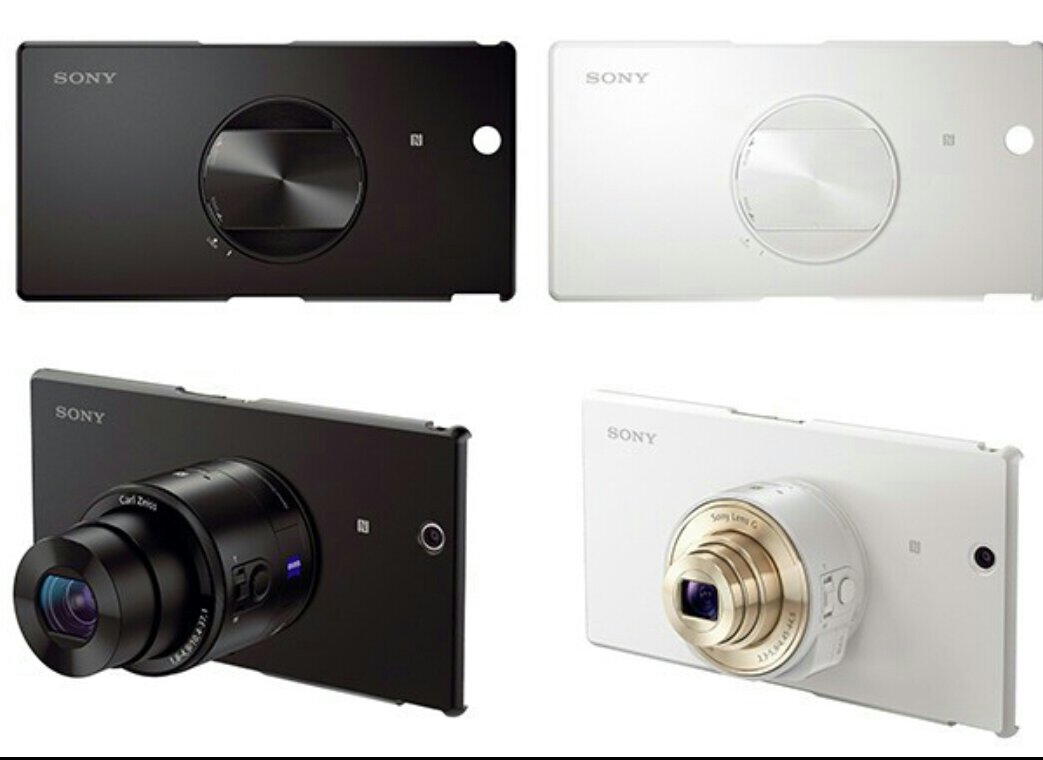
Sony QX10/100 lenses – using the Note 3 NFC these work from start far quicker than the iPhone. The clamp doesn’t really fit, so a tripod or flat surface is needed to use these. But the processor power of the Note 3 provides a seamless integration.

Moga Pro Controller – OMG – this controller was awesome when I got it, but compared to the iPhone version which I have, android Moga compatible games are on a different level. Air Attack HD and Need For Speed Most Wanted are now Moga A compatible. Asphalt 7 and 8 too. Playing on the gorgeous screen is breathtaking. The Note 3 fits fine in the Moga clamp. There is no way in a million years I can go back to the iPhone 5S after playing games with the Moga and the better screen. On Android there are over 200 games that work on this game controller versus 60 on iOS.

Sphero Robotic Ball – works perfectly as expected. But having a bigger screen to operate the on screen controls just provides a much better experience.

It’s all about the screen so far. The Note 3 first impressions is flawed but you must give it a chance. It doesn’t have the slickness of software and hardware integration of iOS 7, nothing does. BUT it does have its own magic.

In the next part I will cover more and more of the phone.

Samsung Note 3 – 3 months later impressions

I thought it would be a good idea to get the Samsung Note 3 again. It arrived yesterday at 11am, took over 2 hours to complete 7 software updates one after the other. If that wasn’t bad enough every app installed seemed to have an update even after 7 software updates. Then every Samsung app or service had same issue.

I have tried two hard resets wiping the phone clean and starting again. 2 restores after a hard reset. And despite the Samsung and Google backups in place, the restore process is crap compared to that provide by Apple for iPhones and iPads. None of the layouts are remembered in the restore and no app data either. Useless.

As I write this at 6pm I still don’t have a fully working phone. The positive. It’s a great piece of tech. Lovely sound quality via headphones, camera better than expected actually took best photo to date of my dog George. See below. This compares even to the amazing Nokia Lumia 1020 and iPhone 5S. It has the kitchen sink of specifications and I love every aspect of it.

But it cannot play music streamed via Google, using Google Play Music. It plays one track, maybe a second, but on third no sound comes out of the headphones even though the track is playing. If you pause song and press play again you hear sound immediately.

So, I have to ask why were there 7 software updates? Why not consolidate them into one, and update the default applications at the same time?

Not sure whether I have a faulty phone re the music issues, as I have read about other people having same issues. It’s a real pity as the technology inside the device is magical.

As an update it appears Google Play Music app got updated and became incompatible with many Note 3’s, see screen shot below of review of app..

20131231-234559.jpg

20131231-234611.jpg