Category Archives: Android

HTC One CyanogenMod 10.1 nightlies now available

If you like the HTC One and the Cyanogenmod now you can try out the beta build for the phone.

With both a post on its official Google+ page and new thread in the HTC One forums at XDA, CyanogenMod has announced that CM10.1 nightlies are beginning to roll out for all models of the HTC One. Whether you have a GSM model or one running on Sprint, you can expect the first builds to show up on the get.cm too.

For more information click here.

Samsung Galaxy S4 – bye bye

My love affair with the Samsung Galaxy S4 is over. It is due to be returned, so is all boxed up.

There are many positives about this phone, and I think if Samsung had spent a little bit more time prior to release resolving some of the bugs, this would be a force to be reckoned with. Personally I believe Samsung wanted to get this phone out as early as possible prior to any new iOS official announcements and new devices. Apart from the fact I believe this should have been a 32gb device for a flagship phone, it does many other good features.

It is excellent to hold, the range of included software is impressive although some bugs existed, the motion and air controls whilst erratic whether they worked or not, still showed clever thinking by Samsung. Problems with the screen and audio clipping were frustrating.

In 3-6 months I hope that all the above problems have been fixed, because at that point the S4 will be a worthy flagship. I also hope Samsung has provided a way to buy the larger memory models at a reasonable cost.

The problem Samsung will face that in 3-6 months there will be new products from the likes of Apple, HTC, and others.

What ruined it for me was the overall experience. At times I was smiling, but then I got frustrated by the bugs and issues which killed the good feelings.

New Reviews coming soon – details

Just as heads up to expect 2 new gadget reviews in a few weeks time.

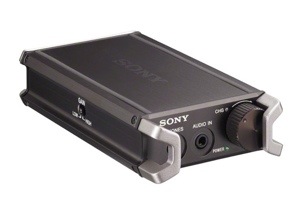
First up is the Sony PHA-1 headphone/DAC amplifier. This is a gorgeous piece of kit, flexible as it can be used both with Apple and Android devices. More info is here.

20130509-074405.jpg

The next review will be the renowned JVC HA-FXZ200 in ear headphones. Details can be found here.

20130509-074553.jpg

These features a revolutionary sub woofer, carbon fibre and brass. They also are meant to sound incredible

Apex Launcher Pro hits version 2 – loads of new features

My favourite launcher just received a really big update, with lots of new features. I have this installed on my HTC One. There is a free version to give you as taster, but you really need the paid version to get the full monty. Get the paid version here.

Apex Launcher includes –

Features:
• Customizable homescreen grid size and up to 9 homescreens
• Scrollable dock with up to 7 icons per page and up to 5 pages
• Infinite & elastic scrolling (homescreen, drawer and dock)
• Fancy transition effects (tablet, cube, etc.)
• Hide elements as you want (persistent search bar, status bar, or even the dock)
• Customizable icons and labels for shortcuts and folders
• Choose different folder preview styles and background
• Multiple drawer styles (transparent/opaque, horizontal/vertical, paginated/continuous)
• Drawer apps sorting (title, install date, mostly used)
• Hide apps from the drawer
• Lock your desktop to prevent accidental changes
• Enjoy homescreen gestures (pinch, swipe up/down, double tap)
• Advanced theme engine (icon packs, skins, etc.)
• Backup/restore settings and data
• Optimized for both phones and tablets
• Lots of other customization options!

Apex Launcher Pro (Paid Version) Features:
• Powerful drawer customizations (unlimited drawer tabs, folders in drawer)
• Unread count notifications (provided by the free Apex Notifier extension)
• Dock swipe actions (swipe up and down actions)
• More gesture options (two-finger gestures)
• Additional transition effects (accordion, cross, etc.)
• Flexible theme options (ADW, LauncherPro, Go Launcher themes)
• Enhanced folder support (batch add, merge folders)
• Advanced widget options (widgets in dock, overlapping widgets)
• More features on the way!

Tips:
• Pinch the screen to access screen previews (like Exposé or HTC Sense).
• Long press an icon to drag and drop it over another one to create a folder.
• Long press icons/folders on the desktop and choose edit from the popup menu to customize icons and labels.
• Drag, hover, and drop app icons over the delete button at the top of the screen to quickly uninstall apps.
• Long press an app in the hide apps list to quickly launch that app.
• Switch to single screen wallpaper mode to fix wallpaper zooming issues.
• Enable the Root Helper in advanced settings (root required, Android 4.0 only) to add widgets from the drawer.

20130509-073920.jpg

20130509-163735.jpg

Cyanogenmod has a stable release candidate for android 4.2.2 – details

Cyanogenmod finally has a release candidate 10.1 for android 4.2.2. The list of devices it supports is huge as shown below.

So even is the manufacturer has given up supporting your device, there is still options available. This is one good reason to have an android phone.

Devices supported are –

a700 (Acer Iconia Tab A700)
captivatemtd (Samsung Captivate)
crespo (Nexus S)
crespo4g (Nexus S 4G)
d2att (Samsung Galaxy S III – AT&T)
d2cri (Samsung Galaxy S III – Cricket)
d2mtr (Samsung Galaxy S III – MetroPCS)
d2spr (Samsung Galaxy S III – Sprint)
d2tmo (Samsung Galaxy S III – T-Mobile)
d2vzw (Samsung Galaxy S III – Verizon)
e975 (LG Optimus G – Intl.)
endeavoru (HTC One X – Tegra 3)
epicmtd (Samsung Epic 4G)
galaxysmtd (Samsung Galaxy S)
grouper (Nexus 7 – WiFi)
hercules (Samsung Galaxy S II – T-Mobile)
i9100g (Samsung Galaxy S II – Intl.)
maguro (Galaxy Nexus)
mako (Nexus 4)
manta (Nexus 10)
odroidu2
otter (Amazon Kindle Fire)
otter2 (Amazon Kindle Fire HD)
p3100 (Samsung Galaxy Tab 2 7.0 – GSM)
p3110 (Samsung Galaxy Tab 2 7.0 – WiFi)
p5100 (Samsung Galaxy Tab 2 10.1 – GSM)
p5110 (Samsung Galaxy Tab 2 10.1 – WiFi)
p760 (LG Optimus L9)
p880 (LG Optimus 4X HD)
p930 (LG Nitro HD / Optimus LTE)
quincyatt (Samsung Galaxy Note – AT&T)
quincytmo (Samsung Galaxy Note – T-Mobile)
skyrocket (Samsung Galaxy S II Skyrocket)
steelhead (Nexus Q)
su640 (LG Optimus LTE – SK Telecom)
tf700t (Asus Transformer Pad Infinity)
tilapia (Nexus 7 – GSM)
toro (Galaxy Nexus – Verizon)
toroplus (Galaxy Nexus – Sprint)
vs920 (LG Spectrum)

HTC One – 6 weeks review update

Would you believe it, I’ve kept the HTC One for 6 weeks. That’s a record ownership time for myself. But there are good reasons why I still adore the HTC One. If you want to read my previous articles, look above, and click the HTC One Review tab.

Now unlike many other sites I actually bought this phone myself, so it’s not on loan for reviewing with an expectation of a semi decent review. Also, if you look around there is no advertising so my comments are my own opinion and are not being swayed by anybody.

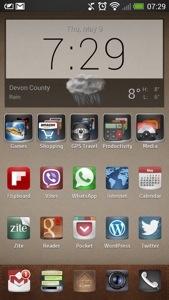
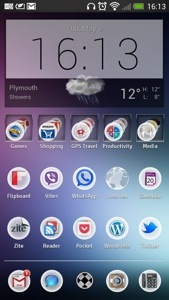
So what’s happened in the last 6 weeks. Well I have got to use the phone more and more and appreciate its key selling points. First up the front facing speakers. They are positioned correctly on the front and with the Beats Audio produce a decent loud and clear sound. Podcasts, films and music are a joy to pump out the One’s speakers. The TV IR blaster is useful. I like the little touch of just raising the phone and the TV blaster app automatically turns back on. Blinkfeed. As much as I really enjoyed this, it no longer features on my home screen, as I have installed a new launcher, Apex Launcher Pro. So below is my new look home screen.

20130508-195544.jpg

I still love the build and design quality of this phone. It’s simplicity makes you feel proud to be holding it. It does make other phones look a little inferior.

Simplicity is a good word to describe the HTC One. It makes life simple. It is easy to use, and HTC have taken a lot of care to make the software partner with the hardware. There are no lags or stutters using this phone. It has no bloatware, just useful apps that you would actually use. The attention to detail is astonishing at times. I mentioned the speakers, but the phone’s audio quality is excellent no matter if you use the speakers, your headphones or a USB DAC/Amp. In fact the built in headphone amplifier can power your headphones to a very decent volume.

The camera. I don’t think I could have another device if it didn’t have Zoe’s and video highlights. They are really useful and make a great way to share events. Even my frustration over landscapes has dwindled as the HTC One has a rather wide field of view, meaning it photographs more. This has proven handy.

A little camera tip. If you tap to focus, waiting a second or two produces sharper photos before pressing the shutter button. Strange but true.

HTC have already released a software update and are on schedule for Jelly Bean 4.2.2 next month. But in all honesty, the HTC One is so great straight out of the box, it sets the standard that other companies should aspire too.

I have 2 dogs and cats. The HTC One is the first phone that has photographed my pets in action without blur. That alone is worth it’s weight in gold.

Seriously, the HTC One is a superb phone that looks amazing and performs like a true champ.
Sharp releasing new Aquos Phone with 2 days battery life

The Sharp AQUOS Phone XX  SoftBank 206SH can hold up for two full days on it’s 3,080mAh battery. Other than the  size of the battery,  power consumption improvements come from the continuous grain (CG) silicon display as opposed to amorphous silicon found on traditional LCD TFT panels. This not only allows for a thinner display and better graphics, but also reduced power consumption.

It also includes a 1.7GHz Snapdragon S4 Pro CPU, a 13.1MP camera with f/1.9 optics, 1-Seg digital TV, IR blaster, LTE, and Android 4.2. It’s also waterproof.

That is one bad boy of a phone.

image

Samsung Galaxy S4 audio problem

The Samsung S4 had many strong points going for it. It also has several weaknesses. So far during my testing I have experienced slow downs when opening apps, motion controls not always working especially in bright sunlight. But even more basic it’s a problem with using headphones.

There is an active thread over at XDA Developers detailing issues people are having whereby the S4 cannot provide enough current/power, which in turn causes the headphones to crack and pop.

Not a good state of affairs.