Category Archives: Android

Belkin LED Lighting Starter Set – details

20140110-080652.jpg

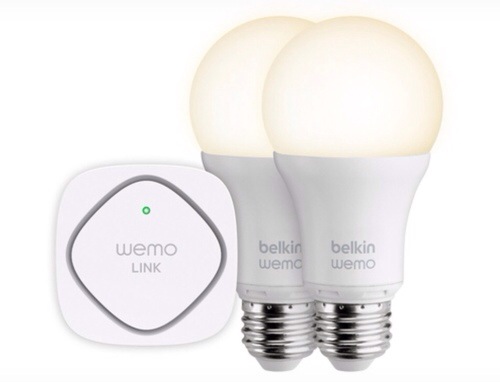
At CES 2013, Belkin introduced its WeMo Light Switch, and this year it announced its new LED Lighting Starter Set. At $129, the set comes with two LED Smart Bulbs and the WeMo Link. The package lets you schedule and dim the lights from anywhere using the WeMo app, which uses a Wi-Fi signal to control appliances with your smartphone. The light bulbs are 60-watt equivalent with 800 Lumens and 3000 Kelvin, are fully dimmable, and can be set with a number of features like vacation mode, the latter of which automatically turns lights on and off when people are in the house. The WeMo also includes a “dim to sleep” function that gradually dims lights over time as you head to bed.

Looks very cool but sure is an expensive way to light your room.

Google acquires Nest – details

Google is acquiring Nest, the smart-home appliance maker that is behind the Nest Thermostat and the Nest Protect smoke detector, for a reported $3.2 billion in cash.

iPod co-creator Tony Fadell is the co-founder of the company alongside another former Apple employee, Matt Rogers. Nest tweeted that it will operate independent of Google.

A huge coup for Google 

Sony Smartband – Sony’s new wearable tech

20140110-074949.jpg

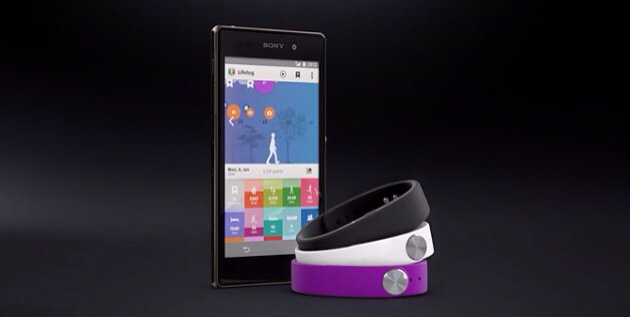
At CES Sony announced the Sony SmartBand, which is a bracelet that keeps track of your activities throughout the day. It is apparently comfortable and wearable in the water. The battery lasts up to five days. You can toggle music using the button on the bracelet, and a companion application called LifeLog lets you look at all of the data being collected by the SmartBand.

The bracelet part is available in many different colours and designs.

Looks rather good.

Google Play services for android is being updated now – full changes

Google today started rolling out the latest version of its Google Play services for Android. Version 4.1 brings a number of incremental changes to the company’s service for integrating Google services into mobile apps. The rollout is currently in process and should arrive soon on your Android devices within the next few days.

The update brings support for turn-based multiplayer games to Play services. With this, developers can easily build asynchronous games with up to eight participants. Every time a player takes a turn, the data is uploaded to Google’s servers and shared with the other players. Google has integrated this service with its tools for matching players with others, too.

Also new in this update is improved support for Google+ sharing. Google says, this will make it “even easier for users to share with the right people from your app.” As part of this update, users will be able to get auto-complete support and suggested recipients for all Gmail contacts, device contacts and people on Google+.

Developers can now also use Play services to access Google Drive through a new API that’s now in preview. With this, they can read and write files in Drive. Users will be able to work on these files offline, and changes will be synced automatically.

For developers who use Google’s ad products, this new version introduces full support for DoubleClick for Publishers, DoubleClick Ad Exchange and Search Ads for Mobile Apps. What’s most interesting for advertisers, though, is that publishers can now also use a new location API to give Google access to a user’s location when requesting ads. Location-based ads are likely to perform better than generic ads, after all, though users have generally been a bit nervous about sharing this data with advertisers given the potential privacy ramifications.

One other feature most users will likely appreciate is improved battery life. While Google isn’t sharing any details about this, anybody who has Google Location Reporting turned on should see longer battery life after this update but no stats were revealed as to the difference expected.
Google has just allowed Gmail to send email to Google+ contacts without …

Google has just implemented a change to Google+ and Gmail that will enable you to email other Google+ users without having to know their email address. If you want to send an email to somone on Google+, but do not know their email address, simply type their name in the ‘To’ field in Gmail, and they’ll appear as one of your Google+ Connections. Google insists that Google+ contacts can’t see your email address until you send them an email.

This sounds very suspicious and the next step to Google+ replacing every Google product.

Update – if you log on to Gmail on your PC , go to settings you can turn this feature off.

Samsung Note 3 – 3 months later – one handed use

One feature I like with the Note 3 is one handed use. Ideal when out and about and works really well.

First the keyboard can be shrunk for left or right handed use.
image

Then the phone dialer can be made smaller..
image

And if you really want extreme one handed use you can shrink the whole page. You can move the screen around and it comes complete with all the menu options.

image

Rather neat touches. The keyboard is especially handy when out and about in one handed mode.

Details of the upcoming Samsung Galaxy S5 and Note 4

CES has just ended and next month is Mobile World Congress. Lots of new mobile tech will get announced there but Samsung will hold its own press event for the new Samsung Galaxy S5 after this show has finished.

During CES 2014, Samsung spoke to Bloomberg and confirmed that Samsung’s plans for the Galaxy S5 to return to the basics and provide a big update from last year’s S4.

This will include everything from the feel and comfort in the hand to a fresh new software launcher details of which were posted here a few days ago. The S5 will also have the option of a new more advanced and slimmer Galaxy Gear smartwatch.

Moving on to the Galaxy Note 4, Samsung plans to make a phone that targets professionals that are willing to pay more for it, (no surprises here) and that is not just a bigger phone but with extra benefits. This could include a different fabric of construction too and a 3 sided display option.

Samsung Galaxy Note Official S-View Premium Cover – impressions

I received the official Samsung S-View Premium case at the weekend. This is the case that allows you to see and control a limited amount of actions on the Note 3 via the square clear window in the flip cover. It is very expensive at £34 approximately.

The case provides options on the colour of the window background. You have the option to see the time and missed notifications, walking steps, weather and sliding across the camera, music and action notes, without actually opening the flip cover. And that is it.

What you lose is the quick glance screen and the Watch On remote widget on the lock screen, which I have found more useful. Also the rear of this case replaces the current back cover. A good idea except its thicker than what it replaces. You can use the stylus on the cover window which is something. The camera function is weird. It takes a picture just fine but it is only a small square, similar size to the case window and not a full width shot. Another odd decision by Samsung IMO.

Some people will like this case, but for me it didn’t add any real advantages with the quick access information and in fact took away some functionality for me.