Watch as one lucky guy unboxes is OnePlus One. Quite a lucky guy being one of the 100 winners selected. And don’t forget he smashed up his fairly decent phone to get the new OnePlus One. His face at the end says it all!
And reading the OnePlus forums, it seems the lucky 100 winners received their new phones in a plastic bag, void of the sim ejector tool and accessories. Apparently, these will be sent once produced. Not a good start, although the official retail packaging is ultra slick.
Update – the video has been made private. Thanks for Damian for letting me know. In a nutshell the guy filmed his live Unboxing to find an empty box and no phone. Just a card with a message from OnePlus.
Now in a public statement, Samsung Electronics CEO Kwon Oh-hyun said “several workers at our production facilities suffered from leukemia and other incurable diseases, which also lead to some deaths.” Kwon said Samsung would make “appropriate compensation to those who were affected and their families,” after activist groups claimed hazardous working environments caused some employees to contract lethal diseases. “We should have settled the issue earlier, and we are deeply heartbroken that we failed to do so and express our deep apology.”
Just a little too late for those who have lost their lives or are terminally ill.
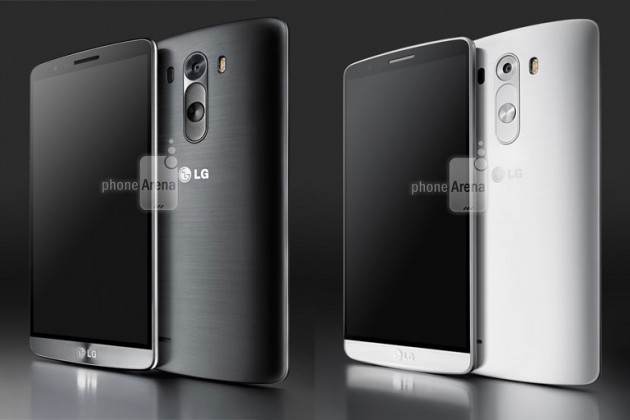
PhoneArena scooped some great renders of the upcoming LG G3.
The more photos I see of this phone the better it looks. It also is meant to have a replaceable battery, micro sd card slot and be water and dust resistant. Also the built in loudspeaker is meant to rock loud.
Is this the phone for 2014? 27th May will be the day LG officially reveals all, so not long now.
The Gear 2 Neo arrived yesterday in the post, so last night it got fully charged and then synced to my S5. The process was rather simple. Download the Gear Manager from Samsung Apps. Install. Turn on Bluetooth. Open app. Press front home button to turn on the watch. Pairing process completes. And voila.
Next you are faced with 2 firmware updates for the Gear 2 Neo, which happen one after another. The Neo is the camera less version and full plastic but costs £80 less,than the full metal bezel and camera included version.
I had the original Galaxy Gear, and in my brief time I had the Gear 2 Neo it is a vast improvement from both the software and hardware. On the software side the watch runs Tizen. The hardware now has changeable straps, which Samsung has made easy with a pull spring mechanism inside the included strap.
Going back to the software, the Gear 2 Neo runs really smoothly. It has a built it music player to play back via Bluetooth headphones music direct from the watch, and many other refinements. Notifications are much better handled. S Voice on the watch is leaps ahead than on the phone. Extras from the heart rate monitor and TV remote blaster all make this a great watch….. Or do they?
First, the apps in Samsung’s app store were rather meagre vs the Galaxy Gear which whilst poor still , did have more options. Android Wear which is Google’s smart watch platform is about to go live and will offer far better app support. Developers are more likely to support this too.
Next and most fundamental, the strap did not fit me. I am a big guy and I imagine for most people it will fit just about. But to me that was an oversight.
However, it definitely was an improvement over the original Galaxy Gear so if you are a true all out Samsung fan person, then go for it.
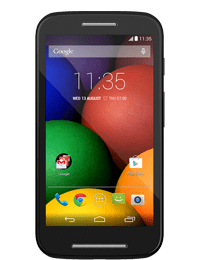
Motorola just took the wraps off the Moto E. Its focus is the price point. It is already on sale in the UK on Pay as You Go for £79.99 via a number of places. For the geeks among us, the Moto E won’t even be on our radar. But for many this is an absolute cracker of a phone.
It is optimised to open web pages faster than the Samsung Galaxy S4. It has a micro sd card slot for media. It does not have the best of anything but it is a masterful low cost budget phone. Motorola will also offer a range of coloured back shells to help personalise the phone too. Also of note is the large battery that will give it 24 hours usage. Plus it is splashproof.
All in all an impressive budget phone which will do well in emerging markets and cash strapped people.
If you are interested, the full specs are –
Operating system – Android™ 4.4, KitKat® with guaranteed update to next version of Android.
Processor – Qualcomm® Snapdragon™ 200 with 1.2GHz dual-core A7 CPU Adreno 302 400MHz single-core GPU
Capacity -4GB user storage, MicroSD slot supports up to 32GB expandable memory 1GB RAM
Google Maps apps have received a huge update in the UK by adding in directions for travel using public transportation. The app update is available now for iOS and Android, as well as on the web on the desktop, will cover almost 17,000 routes of bus, train, tram, and ferry navigation. No love for Windows Phone though.
The update will work on travel across England, Wales, and Scotland, with Northern Ireland still in the works. The update includes travel information from Traveline and National Express.
Users can now plan their routes to determine what the fastest or shortest routes will be, how many stops or interchanges they want to make, and what time the next departures leave.
With so much functionality I just cannot see the need now for third party navigation options. Can you ?
So what has the first month been like? Is the S5 a laggy nightmare? Do you need an alternative launcher to make it nippy to use?
Firstly, I decided to use Touchwiz instead of Apex or Nova Launcher. I tried both but I missed some of the extra neat touches that Touchwiz provide from “My Magazine” , “Ok Google” voice activation from home screen without touching widget and other touchwiz widgets eg S Planner Month view which is on my last home screen.
I also like the weather widget which now has transparency control. Also the variable coloured folders.
So what about lag. My initial posts mentioned lag. I now have none. No lag ever. In fact I have a fast supercharged S5, and I could make it faster. No lag when launching the camera either. How? First turn off S Voice launching as a double tap on the home button. Google Voice is active without touch so there really is no need for S Voice. Next. Lock screen. By default Samsung have many options active on the lock screen. Turn off the weather and pedometer. The difference is remarkable. Now if you want your S5 even faster you can activate developer mode, and turn off animations or reduce them. I haven’t as the speed is fast enough. Amazing what a firmware update can do to improve matters. Let’s hope it stays this good over time.
Battery. Check location services are using power saving mode and GEO news is not active. These 2 options hurt the battery. Otherwise, I don’t use any power saving options until I get to 3% or less. I easily get a full day or day and a half from the S5.
Bloatware or value added. I would say most of the S5 is value added. The S Health app is excellent. Samsung have also provided some additional software trials as long as a year in places. But you can manage just with S Health. If you don’t want to use any of the health options, just use the hide apps options. The point is the phone is designed for different people with different interests. You just select the suite of options you require. That’s value added.
Early adopters usually have software issues. The S5 is the first phone where I wasn’t waiting for an update to majorly fix or improve something. Everything is really well thought out. Simple things like plugging in your headphones and having a choice of 5 apps you might want to use with your headphones. The toolbox option is useful. But more importantly, everything just works which is a first for a phone just released.
Hardware. It’s plastic. Get over it. The HTC One M8 and Sony Xperia Z2 look better but I would want a case with them to stop them getting damaged or scratched. The S5 looks alright. I asked my wife for her opinion and she actually thought it look quite good especially the back. I am not using a case or screen protector. It’s lightweight and lighter than the competition. But more importantly if feels the best in the hand and the easiest to grip. In other words it’s a real world phone and great to use. It also has water and dust resistance built in like the Z2. And then there is the S5 screen. It’s brilliant and the best I’ve used ever. Whether in sun or at night the display adapts perfectly to the conditions.
Other extras. So apart from a full range of software services covering media, photos, business and tools, there is the hardware extras – finger print sensor, heart rate monitor and a 16mp camera. The Ultra Power Saving mode is a gem. One day I forget to charge the S5 overnight. I headed off at the start of the day with 40% battery. At 8.30pm I went out for the evening still forgetting to charge the S5. At 3% battery I activated it. And I still had 3% the next morning.
So is the S5 a good phone. Yes it is providing you spend the time learning it’s nuances and setting it up to your preferences. Now if you prefer hardware design then head over to the HTC or Sony options. There is plenty of choice. And if you don’t need all the fancy software and hardware just buy a Motorola G or X, or even a Nexus 5.
However, ask me how I “feel” about the S5 and my answer will be “disconnected” when using it.
So if you scroll back to the 3 posts from the weekend you will have got some idea of the camera. Whilst it’s not the best out there, it is still surprisingly punching above its price tag. I took many shots of my dogs and cats and the majority were in focus despite being indoors or in overcast conditions. The scenic and macro shots also were not too bad. Sometimes, the colours were off key, but if you were really fussy just use a photo editor.
I was looking at my home screen and this critter creature appeared and started moving around the screen. I did not know what to think. This is what it looks like .
Very small, but don’t forget it’s running across and all over the screen. This is part of the “spotlight” app. It’s the craziest thing I’ve seen ever on any phone. I will discuss this more on Sunday episode of “Gav & Dave’s Podcast”.
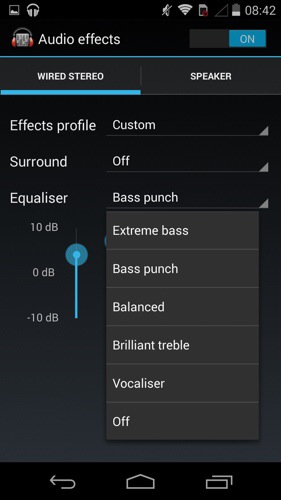
So what about the audio. Loudspeaker. It’s good. But not HTC One M8 Boomsound. You have some EQ options which don’t do too much other than reduce the treble.
Listening via headphones is a different experience all together. In fact, I’m typing this whilst using the Moto X to listen to my music via headphones. The Moto X can power most headphones with a lot of guts and clarity. A decent sound in my book. Again there are a number of EQ options and they do make a difference. But even with the EQ off I loved the sound via my neutral fussy Sony MDR-1R headphones. My Sennheisers loved the Moto X too as did any other can. So it’s a thumbs up in this department from me.
Battery life. Excellent. In 4 days I’ve only charged it twice. In fact at the moment I’m using it in to the third day and the battery is at 34%.
I was asked on Saturday would I choose this over the Moto G. I would. But is it worth the extra cash over the Moto G cost. That depends on what is more important to you. Do you want a better camera and audio experience a nicer feel in the hand?
Anyway, if you have any more questions, please let me know, and I will cover these off in the next episode of “Gav & Dave’s Tech Podcast ” along with my final conclusion.
Once again a big thanks to Clove Technology who are a super cool company to buy your smartphones and accessories from.












 Gavin's Gadgets & Photography