Watch up everyone, FaceBook has announced it is going to include in your videos, adverts by the end of April 2013. I’m sure this will be as popular as Instagram selling your photos.
All posts by Gavin Fabiani-Laymond

iOS 6.0.2 update miracle for iPhone 5 & iPad Mini
I have installed the latest iOS update on my iPhone 5. It’s early days but this seems to have been more than just the wifi bug fix. The No Service bug has been fixed too. I kept a signal even after 10 mins. In fact the signal strength has held miles better even in rural spots.
I did have a genius appointment tomorrow but it looks very likely this will be cancelled.
The bonus too is the bug fixes allow for crazy battery life. So far so good. I’m keeping fingers crossed.
Update – the iPad Mini seems to be holding wifi signal and not disconnecting when screen is off.
Instagram – The Evil Filter
So FaceBook acquires instagram for a billion dollars, and pretty much instantly users are notified of impending privacy changes. In a nutshell from 26th January 2013, you don’t own the right to privacy of any of your photos. FaceBook can sell them, use them, advertisers can use them and you get no payment and no privacy. Its called the Evil Filter.
Maybe there should be a low cost annual premium option?
This will not be the first service to change, but it is the speed at which it has happened. Suddenly, you are faced with removing all your photos, downloading them safely and then deleting your account. Or let your soul be sold without your knowledge.
Hello Flickr.
Apple vs Samsung – Legal Views
So another day and another session in court for Apple and Samsung. What was interesting this time was the fact that the judge denied Samsung a mistrial and Apple a ban on Samsung products.
This seems like the Judge having had enough of the constant legal wrangling between these two companies. But the piece I find interesting is the judge denied a sales ban on Samsung phones due to the fact Apple hadn’t and won’t get impacted by Samsung phones. If that is the case what merit does the billion dollar settlement figure against Samsung hold true? In the UK, the courts threw out most of Apple’s claims. They weren’t interested. HTC settled with Apple. It would be interesting to understand the monetary values apportioned to that agreement and then compare it to the billion dollars Samsung is meant to pay to Apple. I doubt for one minute there is any similarities.
There is no question Samsung copied Apple to try and compete, but they had no choice. That is what consumers wanted. But their copying didn’t impact Apple sales. The US patent system sure doesn’t make sense. A smaller settlement should be paid but not a billion dollars. But then are the features found on iPhones unique and patentable? The same question could be asked for Samsung. And should essential mobile technologies that we as consumers need, be allowed to be patented. And if they are, a separate ruling body should set out the agreed amount other companies that use this technology should pay. Simple solution.
What both these companies now need to do is innovate and not litigate.
Apple Reportedly in Talks with Foursquare
The Wall Street Journal is reporting that Apple is in talks with Foursquare for a data sharing deal to bolster its Maps application. If this does happen I wonder if this is what Apple needs. A social Map app. Do you think so?
Copilot & Letterpress gets updated
Copilot Live had a big update. It’s gone universal. Yelp is now available and traffic incident details on your route, rotation lock and a new privacy menu. The universal part is interesting timing. Google Maps influence perhaps?
My fav word game Letterpress just got updated too. On iOS 6 you can share replays. You can tweet or email or just hoard links to your games. The dictionary is improved as is iPad rotation.
10m Downloads in 48 hours
Google Maps for iOS racked up 10m downloads in 48 hours. That clearly sends a big message. Google Maps was needed and missed.
YouTube Capture – a new app from Google
YouTube Capture is a new app from Google. This new app allows you to easily film and share video. Touch up videos with colour correction, stabilisation, trimming and music tracks. Upload to YouTube , Google +, FaceBook and twitter at the same time. At the moment only available for the iPhone and iPod Touch.
The Android Controlled Toilet
Satis Toilets are releasing new toilets that are controlled by an android app. Users will be able to flush the toilet , lift the lid and more. All from your smartphone.
Only one issue I can see. How clean will your hands be when operating the app? And do you need to wash your smartphone after handling with your hands?
Would you use one?
The Virtual Keyboard – A Blast from the Past – The Year 2004
Below is a review I wrote in November 2004. This gadget caused a storm wherever I used it. It was a cool piece of kit, and was available 8 years ago!
The Virtual Keyboard
Now before anyone asks, is this fantasy or fiction I will state this is fiction and following my use of the keyboard it is no gimmick.
In fact before I continue, I have been left stunned at how well its works. Not to mention the “wow” factor. All my colleagues, friends in the pub, new friends I have made showing the Virtual Keyboard cannot believe what they are seeing. However, they are equally amused by the fact it actually works.
So what do you get in the box.

The Virtual Keyboard, comes with a lovely small case for it, some instructions, the installation CD, and a whole host of adapters which connect to Palm, Pocket PC, Smartphones and even a PC (serial).
The Virtual Keyboard uses the latest infrared and laser technology to project a full size qwerty keyboard onto any flat surface.
The current version is compatible with:
O2 XDA I and II – O/S Pocket PC2002/3
Orange SPV e200 – O/S Smartphone 2003
Palm Tungsten T3 – O/S Palm OS 5.x
Palm M505 – O/S Palm OS 4.x
HP2210 – O/S Pocket PC2003
HP5550 – O/S Pocket PC2003
Laptops/Desktops – O/S WinXP, 2000, NT & 98
The actual device is quite compact. In fact it was a lot smaller than I had anticipated.
Loading the installation CD revealed all the different operating systems. I chose Palm OS5 and installed the driver.
Plug the charging into the wall and give the unit a 2 hours charge. This should last for 2 hours continuous typing. So in reality you should get a whole days worth of typing if you do a bit here and there.
Next it is important to configure the driver to your own typing style and the various options as shown below.
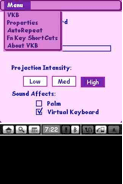


Also when connected the driver provides a useful meter for the battery level.
In addition there are a range of keyboard shortcuts which make life a little easier. So what does it look like in use.

The size of projection is reasonable and easy to use.

It is worth noting that the Virtual Keyboard cannot be used in direct sunlight and must be used on a flat surface. Also, the keyboard driver settings appear to be lost following a soft reset.
Definitely recommended and a very cool piece of kit.
So would you have been tempted?

