All posts by Gavin Fabiani-Laymond

Unknown's avatar

About Gavin Fabiani-Laymond

President, CEO & Editor of https://gavinsgadgets.com Reviews & News of Technology

HTC One – Daily Blog – Car Mode review

The HTC One comes with an app called car mode. This is more than an app, it is a simple launcher to use whilst driving. Everything is big, big words and icons. Bluetooth is switched on automatically, in fact even music can if you desire. Screen brightness is at max too. You also get a number of voice options, but the choice is nowhere near as extensive as Siri or S Voice, but what you get does work really well. I have set up my car mode home screens as follows.

20130409-104744.jpg

20130409-104751.jpg

20130409-104759.jpg

If you need access to another app you will have to either exit car mode or add it to the launcher. Navigation is one of the options. Tap on this icon and you are presented with a number of options. All work well using either Google Navigation or Maps. The only option that is rather odd is the Previous option.

20130409-105228.jpg

20130409-105237.jpg

20130409-105246.jpg

This seems to find random places, or towns. I found it was really only useful for finding towns or cities, but in all honesty it was best to avoid altogether and go straight to Google Navigation for searching. The other navigation option icons use google maps and work correctly. So if you want a restaurant, it pulls up all restaurants nearby in google maps. From maps you can navigate accordingly.

The music player options are also enlarged. See screen shots below.

20130409-105703.jpg

20130409-105711.jpg

20130409-105721.jpg

The enlarged icons and text make it easy to select the music you would like. And when you have selected an album etc the music player controls are super sized on the screen. Next up is the People icon. This reveals three larger icons , favourites , frequent, and all people as shown below.

20130409-110004.jpg

Remember that whilst in car mode tapping the home button brings you back to the first car mode home screen. To exit car mode from here, you have to either press the back key twice, or use the exit icon. Car mode has a number of settings and options, selected from within the app from auto launch with car dock, auto play music, auto connect to Bluetooth devices, options for voice call accessories and Audio out, beats on/off, read out notification , notification preview on or off.

20130409-110333.jpg

20130409-110345.jpg

So if you have read out and preview notifications turned on if a text message arrives, it will display new message from your contact, and ask it you want it read out or call contact. If you say read out, the text message is displayed on the screen large and clear and the phone reads the message out. You can now call or dismiss but not use voice to type reply. The other voice options using the voice icons are call contact, play music, radio on or off or listen to. And that’s it. It is certainly no Siri match or even S Voice, but it does work very well.

20130409-110809.jpg

A little point to remember that with car mode activated, GPS running, Bluetooth on and more, the phone charges extremely slowly.

Tomorrow I will describe how it works with the HTC Car stereo clip A100.

Blackberry Z10 US sales off to a poor start

Whilst other countries have adopted the new Blackberry 10 with open arms, the US is not showing the same love. Maybe its due to the lack of heavy marketing or simply now the HTC One is available and soon the S4, people just won’t buy it.

Lets hope sales do pick up but so far the feedback is rather grim.

Waterstones founder to launch Spotify for books

Tim Waterstones is looking to launch a subscription style service to books.

The project, Read Petite, will specialise in short stories and serialisations, following in the tradition of 19th Century novelists like Dickens, creator of Oliver Twist, and Anthony Trollope, who used to publish their novels chapter by chapter in newspapers and magazines.

Short stories have traditionally been very difficult to sell in paper form, but Mr Waterstone said they would be suited to commuters and other time-pressed bibliophiles.

Read Petite will launch towards the end of the year, and is likely to charge between £5 and £12 a month.

I’m not so sure this will work. But let’s see. What’s your views on this?

Yahoo Mail adds Dropbox integration

Yahoo! Mail is now tightly integrated with Dropbox, allowing you to share files straight from your folders online or save attachments to them. The tie-in comes courtesy of Dropbox Chooser, which also means an end to size limits for email attachments. Anything over 25MB is shared through a Dropbox link, rather than directly attached to your message. If you’re a Yahoo! user you should see the new options in your inbox today.

Google facing enforcement action in 6 European states

Google is facing enforcement action, possibly fines in six European Union member states after it failed to make changes to its privacy policy following requests by European data protection regulators. The six countries that have today launched data protection investigations into Google’s unified privacy policy are France, Germany, Italy, the Netherlands, Spain, and the U.K.

The UK’s Information Commissioner’s Office confirmed it has launched an investigation into whether the policy infringes national law:

The ICO has launched an investigation into whether Google’s revised March 2012 privacy policy is compliant with the Data Protection Act. The action follows an initial investigation by the French data protection authority CNIL, on behalf of the Article 29 group of which the ICO is a member. Several data protection authorities across Europe are now considering whether the policy is compliant with their own national legislation. As this is an ongoing investigation it would not be appropriate to comment further.

HTC One – Daily Blog

Today I have been streaming a movie to the HTC Media Hub. I was then able to carry on and use the HTC One as normal but in landscape mode.

In fact as I am typing this I have my TV screen displaying the post as well.

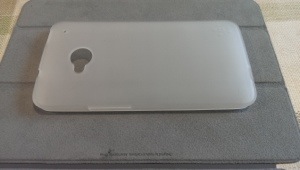
I got a clear silicone Belkin case today. It’s ok but doesn’t set my world alight. The One just looks so damn good naked.

I tried connecting a wifi wireless mouse via a USB otg cable but it doesn’t work. Shame.

After many days using the phone I wish it had a quick profile change in the power button and an automated do not disturb option.

Photo of Belkin case below. My main gripe is that it’s not contoured around the phone properly. So I’ve been looking at other options and have a short list of 31 cases.

20130413-171401.jpg

HTC One – Daily Blog

Yesterday I was lucky enough to win a free film code of HTC on twitter, so I’ve got a film downloaded for today. Actually, I decided to try another 2. I am going to see if it works with the HTC Media Hub as well and let me stream the film on my TV. I believe it should.

The HTC Watch app is a fairly reasonable way to get movies instead of Google Play and if it let you play the movies on a TV screen via the media hub then that is better than Google Play tat doesn’t allow this.

I’ve really settled in to the swing of things with the HTC , just wish a few of my apps got updated for the HTC screen resolution. These are Zite, Nationwide and Need for Speed Most Wanted.

Also of a surprise is the fact that I have over a 100 apps installed, tons of photos, several personal video clips and 3 feature films. And I still have over 13gb free.

Anyway, not much today as I am watching the F1 qualifying on my HTC One via the BBC iPlayer app. It’s so loud with the HTC One speakers. A dream to listen and hear!