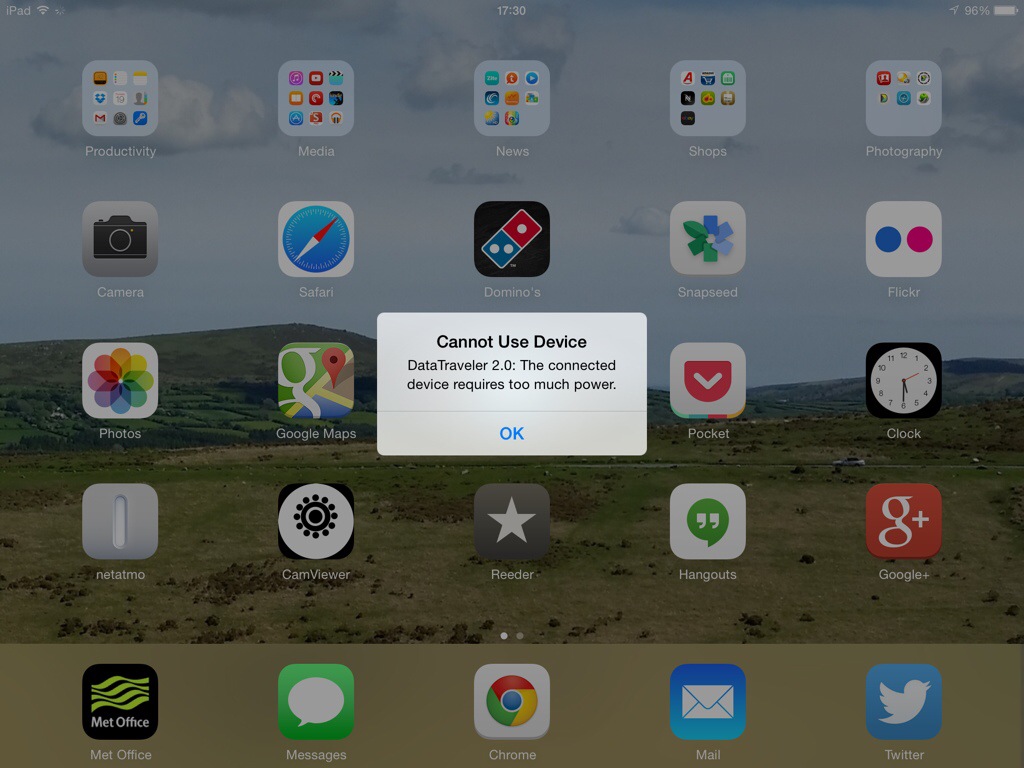
Before I let some steam off, I will just say that I am not an iOS hater, or an Apple hater. I have just reached the point where Apple’s lack of interoperability takes the biscuit. This applies to iPhones , iPads and macs. These are gorgeously designed devices but there comes a point when enough is enough. Take a look at the above screen shot from my iPad. Now clearly I am trying to power some monster power rig from my iPad! Now look at the photo below.
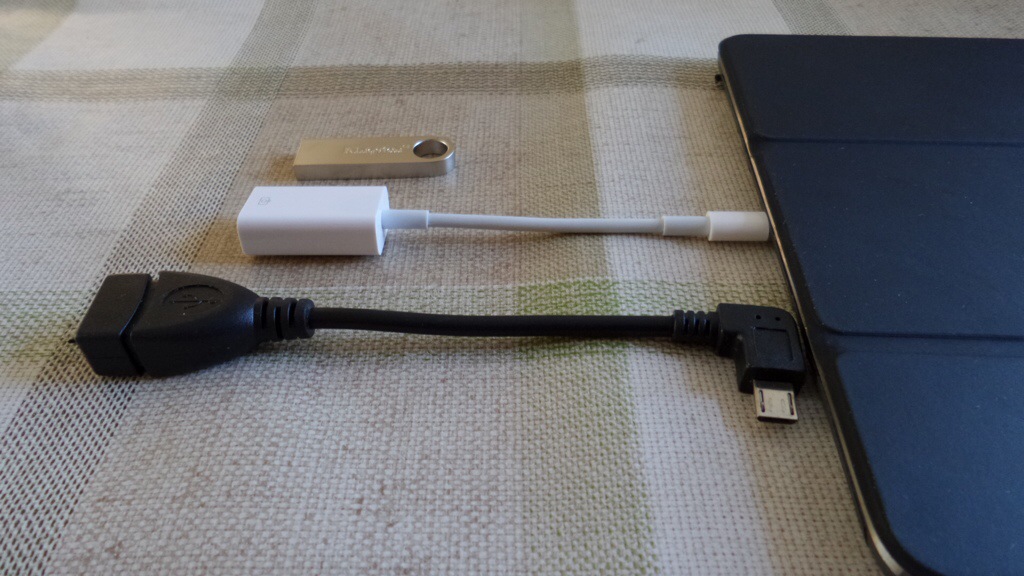
I have an android phone, a Samsung Galaxy K Zoom. Now if I had any other device apart from an Apple device I could send the photos by Bluetooth or wifi direct. But oh no, Apple has to have a closed system. No problem I thought. Buy the USB to lightning port camera adapter for the iPad, shown above in white. Buy a USB storage stick. So using the micro OTG adapter I plugged the memory stick into my K Zoom and copied the photos across. Then, I placed the memory stick into the lightning adapter and plugged it into my iPad. And xxxx xxxx xxxxx piece of crapware produces the message as shown in the first photo. Not enough power. Well my phone that costs over 50% less had no issue. Now before anyone says, use the cloud. There is no way I’m waiting for 500 photos to get uploaded to a cloud service , for me to have to them re download them on to another device. It takes minutes using a USB stick.
Well it would do if you didn’t have an iPad. So despite the wonders of the iPad it simply doesn’t cut the mustard for me. Adios my friend.
Update – thanks to @ratkat who left a reply in the comments below and recommended PhotoSync , I now have perfect photo and video transfers between android, mac and iPad. You do need to buy the device on both your android and iOS but at £1.99 on iOS and free on android (£0.99 to remove banner ad) , it’s cheaper than a coffee and a memory card stick by far. And based on my early testing a marvellous solution. You can quick select a batch of photos as well, use personal hotspot and so much more.
 Gavin's Gadgets & Photography
Interesting…..
I have just this second dug out my ‘Lightning Adapter Camera Connection Kit’, put a USB Stick into it and received a similar message on screen ~ “This cable or device is not certified etc.”
The same if I put an SD Card into the CCK. wtf… I never had this before!
It used to work perfectly under iOS 6.
Time for me to pop over to the forums to find out what is going on here.
LikeLike
Mike, that message is different to not enough power etc… Is your adapter the official Apple one? If not might explain message. Later versions of iOS clamp down on unofficial hardware accessories.
I have managed to figure out how transfer from my Samsung K Zoom via wifi. I use wifi explorer pro on my android phone. Open up safari on iPad. Type URL . And download one photo at a time. It’s quick though. Then once photo is on showing on web page , press and hold to “save” to camera roll. Not ideal for 700 photos but for a few dozen just about acceptable. And a workaround.
LikeLike
Well Gavin, here’s the rub…. I ‘THOUGHT’ I had purchased the official CCK but it appears not.
Yes, it is a non-brand lookalike and yes Apple did indeed block these devices under iOS7.
Today was the first time I tested the CCK (after reading your post) as I don’t use it anymore.
Like you I have a wifi digital camera and transfer data over using a similar method.
So, my issue is very different and I apologies for the confusion.
You clearly have a dedicated Apple product that is no longer working.
P.S. I take it you have tried the reboot method (Power & Home buttons for 10 seconds?).
LikeLike
I have tried the reboot method. I have used an android app wifi explorer pro. You open a web page on your iPad or iPhone. Tap the photo and it downloads on safari. Once the photo is showing on screen, do the usual tap and hold to save to camera roll. Using wifi it’s quick, but would be tedious for more than 20 shots as it’s a one by one only solution. Better than nothing I suppose.
What’s also a bit frustrating, the old 30 pin Apple camera connection kit had no issues using a memory stick.
LikeLike
A poor workaround, and very frustrating. Good luck with that.
LikeLike
Thanks ☺
LikeLike
Yeah I forgot to mention I too have the Wifi Explorer Pro App which is ideal for the phone. But as you say it is slow, which is why I allow everything to go up to the annoyingly now expensive Dropbox and pull them back to the iPad as and when I need them.
So now I use both Wifi Explorer Pro, Apps that control wifi cameras and Dropbox.
Non ideal for speed so my routine has changed.
Non of which helps your situation where I hope you find a solution.
LikeLike
Apple will.get more closed as they make wearables.
LikeLike
I think that is quite likely.
LikeLike
Guys just buy PhotoSync by Touchbyte for both Android and iOS. Turn on Bluetooth and sync as many or as few pics in one go, as you want. Simple.
Can’t remember last time I had to use an adaptor/card/wire for photo transfer.
LikeLike
Top tip Nick. Thanks.
LikeLike
Another great app that works cross platform is Photo Transfer App. They have versions for iOS, Android, Mac, Windows (and Windows 8). Android version here: http://www.phototransferapp.com/android/
LikeLike