So currently I have the Samsung Galaxy S5 which I like a lot. However over the weekend, whilst browsing I noticed the LG G Flex had been reduced considerably at Asda Direct to £379, so I decided it was worth seeing what all the fuss was about and whether it was a novelty or useful piece of tech.
So, after ordering it arrived the next day in the post. The box is curved inwards at the topside which is a neat touch highlighting the fact that you are about to hold your first curved phone, that is able to bend and has a self healing back. And before anyone asks, it does go flat. Freaky or what.

The next oddity is the physical buttons. They are on the back. Sounds weird and for the first hour they are oddly placed, but I grew to find them really handy and easy to use. It meant that despite the large screen size I didn’t have to fumble to a button on the top.
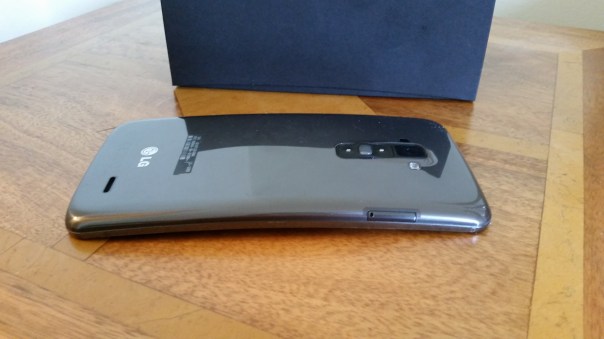
These buttons on the back have the volume up and down keys, power and notification light built into the power key. Screen shots are really simple too as you hold down the power and volume down key together. If you are taking a selfie using the rear camera, the notification light changes colour when your face is lined up properly.
The G Flex does not have android kitkat yet, although it is due to roll up in about 3-4 weeks time. The differences are minor but it will still be worth updating.
The screen is only 720p for a 225ppi resolution. If you have the Samsung S5 next to you, then the difference is obvious. But like anything you soon get used to the screen. LG have a custom skin and launcher which can be themed to your hearts content by accessing a number of free themes in the LG Smart World. You can also get themes to change the look of the LG Keyboard. At the bottom you have soft menu keys. Again, you can change the positioning and have either 3 or 4 on screen menu keys. Then there are the quick apps, small apps that you can have floating on the screen. You can also have up to 3 apps just swiped off to the side using 3 fingers, ready to bring back as and when needed.
The LG G Flex also has double tap to unlock and lock. Kit kat update adds code unlock.
The LG built in keyboard was very good, with optional swipe too and a permanent row for the numbers. Symbol shortcuts were also possible on a number of the keys.
That curve. My wife said it looks like you have had an accident and bent your phone. And if you did not know any better then you would think that. But it weirdly does makes media more engaging. Even games felt great on that large screen.
The 32gb G Flex has 24gb user storage available. Despite such a large amount taken for all the LG skinning, the Flex is super nippy. I could not slow it down so far, despite installing loads of apps and games. The G Flex has a snapdragon 800 processor and 2gb ram, and a standby battery that seems to last me nearly 2 days. Crazy good.
The infra red blaster in on the back next to the camera module. So just hold your phone upright and use the remote software on screen to control your TV etc… And the Quickremote app works very well and it feels far more logical and easier to lift phone upright slightly to operate your devices.
So far so good and all I can think is at £379 this is a great value 6 inch smartphone, that happens to have a flexible screen and body and a self healing back. Also, with this phone there is no reason to opt for a tablet as well. But when it cost £800 it was not worth that amount of money.
 Gavin's Gadgets & Photography
1 thought on “LG G Flex – First Impressions”